
1. Продукт закінчивсяview
The Edifier CC300 is a professional Bluetooth 6.0 communicator headset designed for reliable and high-quality audio communication in various professional environments. It features AI-enhanced dual-microphone noise filtering, a 30mm dynamic driver for clear sound, and multiple connectivity options for versatile use.
2. Вміст упаковки
- Edifier CC300 Headset
- Ключ USB-C
- Зарядний кабель USB-A – USB-C
- Посібник користувача
3. Особливості продукту
The Edifier CC300 headset is engineered for comfort and performance, featuring a lightweight design and a flexible microphone arm.

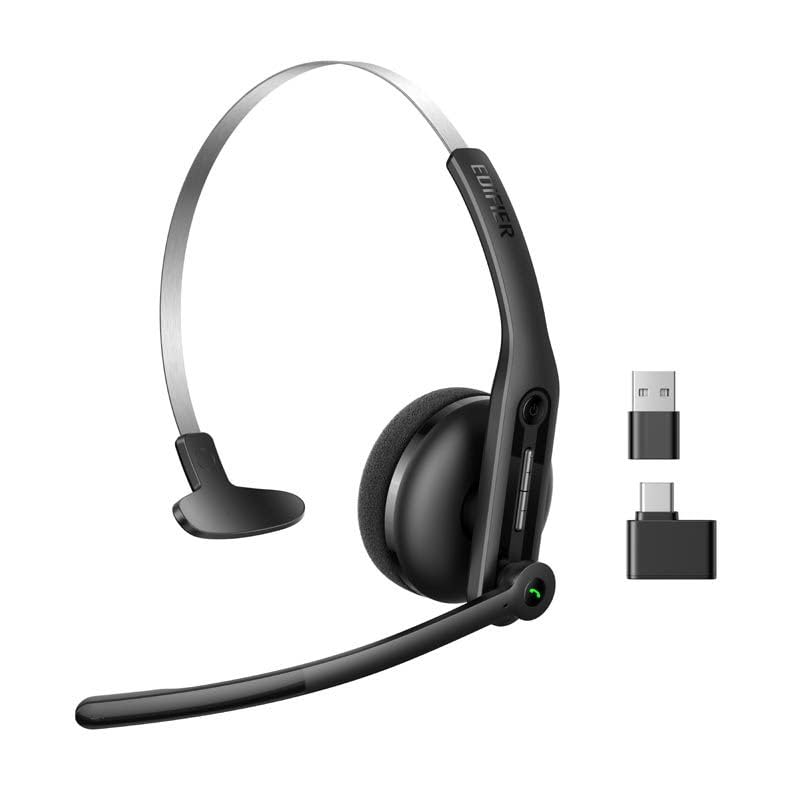
малюнок 3.1: Edifier CC300 Headset with included USB-C dongle and charging cable.

малюнок 3.2: сторона view of the Edifier CC300 Headset with the microphone arm extended.

малюнок 3.3: The microphone arm can rotate 240 degrees for flexible positioning on either the left or right side.
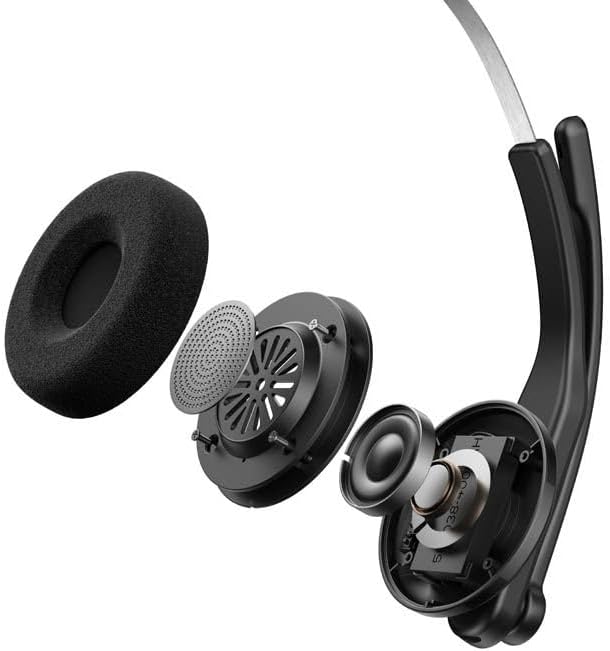
малюнок 3.4: Вибухнув view showing the internal components of the earcup, including the 30mm dynamic driver.
4. Налаштування
4.1 Початкове заряджання
Before first use, fully charge the headset using the provided USB-A to USB-C cable. Connect the USB-C end to the headset and the USB-A end to a power source (e.g., computer USB port or wall adapter). The charging indicator light will show the charging status.
4.2 Увімкнення/вимкнення
- Щоб увімкнути: Натисніть і утримуйте кнопку живлення, доки не засвітиться індикатор.
- Щоб вимкнути: Натисніть і утримуйте кнопку живлення, доки індикатор не згасне.
4.3 Носіння гарнітури
Adjust the headband for a comfortable fit. The microphone arm can be rotated 240 degrees to be positioned on either the left or right side of your face. Position the microphone approximately 2-3 cm from your mouth for optimal voice pickup.
5. Інструкція з експлуатації
The Edifier CC300 features intuitive controls for managing calls and audio playback.

малюнок 5.1: Diagram illustrating the control buttons and their functions on the Edifier CC300 Headset.
5.1 Функції кнопок
| Дія | функція |
|---|---|
| Press and hold (Power Button) | Увімкнення/вимкнення живлення |
| Press 1x (Mute Button) | Activate/Deactivate Mute (during calls) |
| Press 1x (Volume Up) | Збільшити гучність |
| Press and hold (Volume Up) | Наступний трек |
| Press and hold (Volume Down) | Зменшити гучність |
| Press 1x (Volume Down) | Попередній трек |
| Press 1x (Call Button) | Play/Pause Audio; Answer/End Call |
| Press and hold (Call Button) | Відхилити виклик |
| Press 2x (Call Button) | Повторний набір останнього номера |
6. Параметри підключення
The Edifier CC300 offers three versatile connection methods:
малюнок 6.1: Visual representation of the three connectivity options: Bluetooth, USB-C dongle, and wired USB-A.
6.1 Підключення Bluetooth
- Переконайтеся, що гарнітура увімкнена та перебуває в режимі сполучення (індикатор блимає).
- On your device (smartphone, laptop), enable Bluetooth and search for "EDIFIER CC300".
- Select the headset to pair. Once connected, the indicator light will turn solid blue.
6.2 USB-C Dongle Connection
- Plug the provided USB-C dongle into an available USB-C port on your computer.
- Power on the headset. It will automatically connect to the dongle for a stable, low-latency connection.
6.3 Wired USB-A Connection
- Connect the headset to your computer using the provided USB-A to USB-C cable.
- The headset will function as a wired audio device, providing zero interference.
7. Акумулятор та заряджання
The CC300 headset is designed for extended use with a long-lasting battery.
- Термін служби батареї: Up to 72 hours for audio playback, or 36 hours for talk time.
- Час зарядки: Приблизно 1.5 години для повної зарядки.
- Індикатор зарядки: Refer to the LED indicator on the headset for charging status.
To charge, connect the headset to a power source using the USB-A to USB-C cable.
8. Технічне обслуговування
- Прибирання: Use a soft, dry cloth to clean the headset. Do not use liquid cleaners or aerosols.
- Зберігання: Зберігайте гарнітуру в прохолодному, сухому місці, подалі від прямих сонячних променів та екстремальних температур.
- Уникайте вологи: Keep the headset away from water and high humidity to prevent damage.
- Обережно поводьтеся: Уникайте падіння або сильних ударів гарнітури.
9. Вирішення проблем
9.1 Немає звуку або погана якість звуку
- Ensure the headset is powered on and properly connected (Bluetooth, dongle, or wired).
- Перевірте рівні гучності як на гарнітурі, так і на підключеному пристрої.
- If using Bluetooth, ensure the headset is within range of your device.
- Try restarting both the headset and your connected device.
9.2 Мікрофон не працює
- Ensure the microphone is not muted (check the mute button).
- Verify that the headset is selected as the input device in your computer's or device's sound settings.
- Ensure the microphone arm is positioned correctly near your mouth.
9.3 Headset Not Pairing via Bluetooth
- Ensure the headset is in pairing mode (indicator light flashing).
- Вимкніть Bluetooth на інших пристроях поблизу, щоб уникнути перешкод.
- Забудьте про пристрій зі списку Bluetooth вашого пристрою та спробуйте знову підключитися.
10. Технічні характеристики
| Особливість | Деталь |
|---|---|
| Бренд | Едифікатор |
| Назва моделі | CC300 |
| Колір | чорний |
| Технологія підключення | Wireless (Bluetooth), Wired (USB-A), USB-C Dongle |
| Версія Bluetooth | 6.0 |
| Протоколи Bluetooth | A2DP, AVRCP, HFP |
| Аудіокодек | SBC |
| Тип драйвера | Динамічний драйвер 30 мм |
| АЧХ | 20Hz - 20KHz |
| Рівень звукового тиску | 94 ± 3 дБ(А) |
| Ємність акумулятора | 400 мАг |
| Час відтворення музики | прибл. 72 години |
| Час розмови | прибл. 36 години |
| Час зарядки | прибл. 1.5 години |
| Вхідна потужність | 5 В/500 мАг |
| вага | 70 грамів |
| Особливості | AI-enhanced Dual-Mic Noise Cancellation |
| Сумісні пристрої | Mobile Phones, Desktops, Laptops |
11. Гарантія та підтримка
11.1 Інформація про гарантію
The Edifier CC300 Headset comes with a Гарантія 1 рік from the date of purchase, covering manufacturing defects. Please retain your proof of purchase for warranty claims. The warranty does not cover damage caused by misuse, accidents, unauthorized modifications, or normal wear and tear.
11.2 Підтримка клієнтів
For technical assistance, troubleshooting, or warranty inquiries, please contact Edifier customer support through their official website or the contact information provided with your product packaging. You may also visit the Магазин Edifier на Amazon для отримання додаткової інформації.