
1. Вступ
This manual provides essential information for the safe and efficient operation of your PowMr 4000W Hybrid Solar Inverter. This device is designed to convert 24VDC battery power into 110/120VAC pure sine wave electricity, integrating a 140A MPPT charge controller for optimal solar energy utilization. It supports various battery types and off-grid system configurations. Please read this manual thoroughly before installation and use, and retain it for future reference.
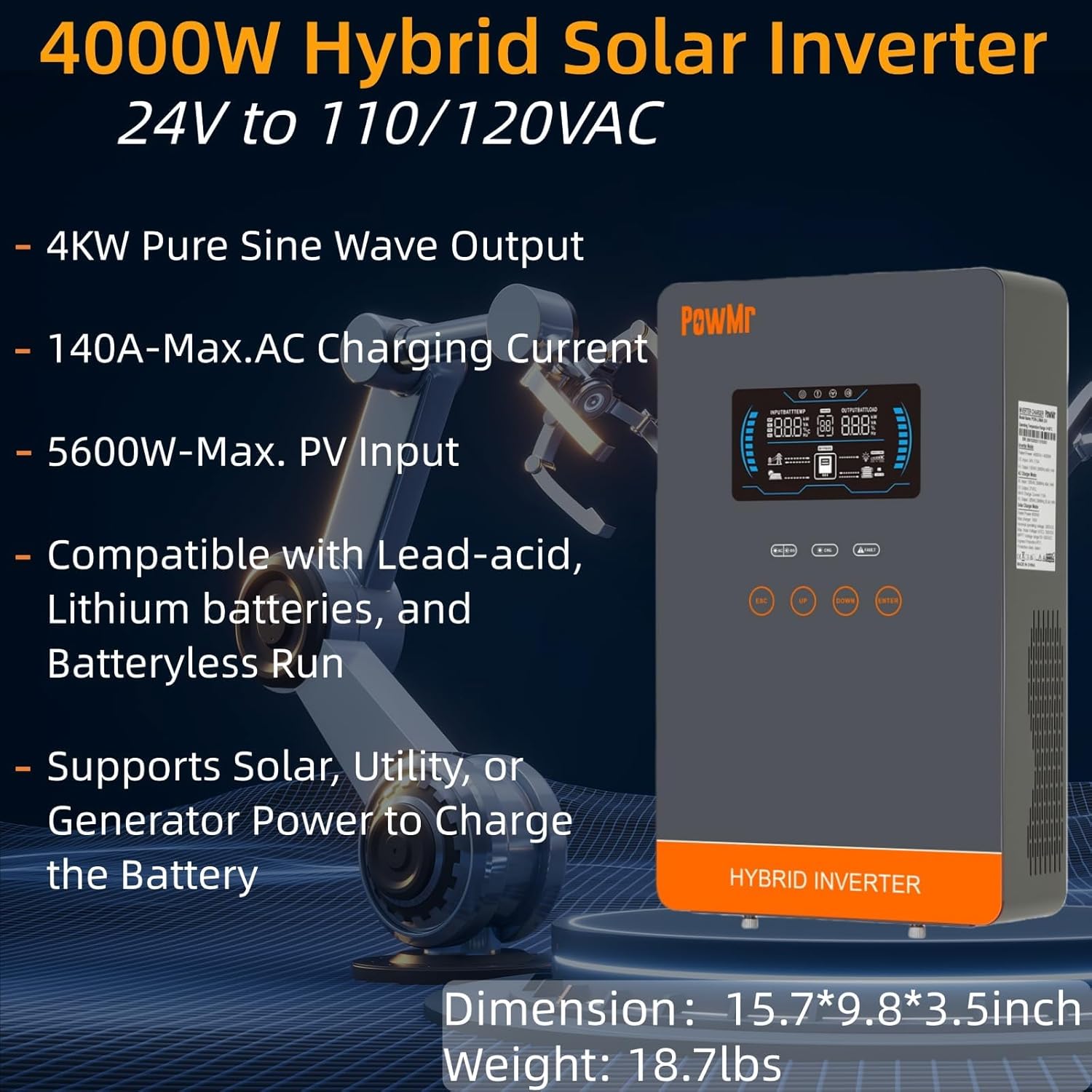
Image: The PowMr 4000W Hybrid Solar Inverter, highlighting its 4KW pure sine wave output, 140A max AC charging current, 5600W max PV input, compatibility with various batteries, and support for solar, utility, or generator power to charge the battery. Dimensions are 15.7"L x 9.8"W x 3.5"H and weight is 18.7lbs.
2. Техніка безпеки
Завжди дотримуйтесь наступних запобіжних заходів, щоб зменшити ризик ураження електричним струмом, пожежі або травмування:
- Монтаж повинен виконуватися кваліфікованим персоналом.
- Переконайтеся, що вся проводка має правильний розмір та належну ізоляцію.
- Не розбирайте інвертор. Усередині немає деталей, які може обслуговувати користувач.
- Тримайте інвертор подалі від легкозаймистих матеріалів, вологи та прямих сонячних променів.
- Забезпечте належну вентиляцію навколо інвертора, щоб запобігти перегріву.
- Завжди відключайте всі джерела живлення (фотоелектричні панелі, акумулятор, вхід змінного струму) перед виконанням будь-якого технічного обслуговування або підключення.
- Використовуйте відповідні засоби індивідуального захисту (ЗІЗ) під час встановлення та технічного обслуговування.
3. Продукт закінчивсяview
3.1. особливості
- Вихід чистої синусоїди: Provides stable and clean power suitable for sensitive electronics.
- Інтегрований MPPT-контролер заряду: 140A MPPT for efficient solar charging.
- Широка сумісність з акумуляторами: Supports AGM, Gel, Lead-acid, Lithium-ion, and LiFePO4 batteries.
- Режим без батареї: Can power loads directly from PV/AC grid without a connected battery.
- Кілька режимів зарядки: Solar Only, Mains Only, Mains & Solar Hybrid.
- Кілька режимів виходу навантаження: Utility Priority, Solar Priority, Solar and SBU Priority.
- Розширений захист: Коротке замикання, понад обtagе, за випtage, overload, reverse polarity, over-temperature, and backfill protection.
- Зручний інтерфейс: 6.25-inch LCD screen with touch controls for real-time data display.
- Комунікаційні порти: RS485 and RS232 for monitoring and control.
3.2. Ідентифікація компонента

Image: A detailed diagram of the PowMr Hybrid Solar Inverter, showing its front panel and connection ports. Key components labeled include: 1. LCD display, 2. Status indicator, 3. Charging indicator, 4. Fault indicator, 5. Function touch buttons, 6. On/off switch, 7. AC input, 8. AC output, 9. PV input, 10. Battery input, 11. RS485/RS232 communication port.
3.3. Особливості захисту

Image: An illustration detailing the comprehensive protection features of the inverter, including Short Circuit Protection, Over-Load Protection, Over Current Protection, Backfill Protection, Over VoltagЗахист від е-електронної енергії, захист від перегріву, захист від низького тискуtagЗахист від електронного струму та захист від перезаряджання.
4. Вміст упаковки
Після розпакування, будь ласка, переконайтеся, що всі предмети є в наявності та не пошкоджені:
- PowMr 4000W Hybrid Solar Inverter
- Інструкція з експлуатації (цей документ)
- Communication Cables (if applicable, check packaging)
- Mounting Hardware (if applicable, check packaging)
5. Встановлення та налаштування
5.1. Монтаж інвертора
Select a suitable location for mounting the inverter. It should be:
- У приміщенні, захищеному від прямих сонячних променів, дощу та пилу.
- Добре вентильований для забезпечення розсіювання тепла.
- Close to the battery bank to minimize cable length and voltage крапля.
- На твердій, негорючій поверхні.
5.2. Схема підключення
Follow the wiring diagram carefully. Incorrect wiring can cause damage to the inverter, batteries, or connected loads, and may pose a safety hazard.

Image: A comprehensive wiring diagram illustrating connections for PV input, Mains/Generator input, AC output, and Battery input. It specifies voltage ranges, current ratings, and recommended wire gauges for each connection point.
5.3. Підключення батареї
The inverter is compatible with various 24V battery types. Ensure your battery bank matches the inverter's voltage вимоги.

Image: An illustration showing the inverter's compatibility with various battery types including AGM, GEL, FLD (Flooded), LI (Lithium-ion), SLD (Sealed Lead-Acid), and USER-defined settings. It also indicates a maximum battery charging current of 140A (utility charging + solar charging).
- Connect the battery cables to the inverter's battery terminals, ensuring correct polarity (positive to positive, negative to negative).
- Надійно затягніть всі з'єднання.
5.4. Підключення фотоелектричного масиву
- Connect the solar panel array to the PV input terminals, observing correct polarity.
- Ensure the PV array's open circuit voltage and power are within the inverter's specifications.
5.5. Підключення входу/виходу змінного струму
- Підключіть мережу змінного струму або генератор до вхідних клем змінного струму.
- Підключіть навантаження змінного струму до вихідних клем змінного струму.
- Ensure all AC connections are properly grounded.
6. Інструкція з експлуатації
6.1. Увімкнення/вимкнення живлення
- Щоб увімкнути: Ensure all connections are secure. First, connect the battery, then the PV array, and finally the AC input. Press the On/Off switch.
- Щоб вимкнути: Disconnect the AC input, then the PV array, and finally the battery. Press the On/Off switch.
6.2. РК-дисплей та елементи керування
The LCD screen displays real-time system data. Use the touch buttons to navigate menus and adjust settings.
6.3. Setting Charging and Output Modes
Інвертор пропонує гнучкі режими заряджання та виходу енергії для задоволення різних потреб в управлінні енергією.

Image: An illustration detailing the three charging modes (1. Only Solar, 2. Only Utility, 3. Solar+Utility) and three output modes (1. Utility First, 2. Solar First (default), 3. SBU priority). Steps to set programs are also provided: 1. Long press and hold ENTER button for 3s, 2. Press UP and DOWN to select setting programs, 3. Press ENTER to confirm or ESC to exit.
6.3.1. Режими зарядки
- Лише сонячна батарея: Заряджає акумулятори виключно від сонячних панелей.
- Mains Only: Charges batteries exclusively from the AC utility grid or generator.
- Гібридна система від мережі та сонячної енергії: Prioritizes solar charging, supplementing with AC utility/generator if solar power is insufficient.
6.3.2. Режими виходу навантаження
- Пріоритет комунальних послуг: Loads are primarily powered by the AC utility grid. Inverter switches to battery/solar if utility fails.
- Сонячний пріоритет: Loads are primarily powered by solar and battery. Inverter switches to utility if solar/battery power is insufficient.
- Пріоритет SBU (сонячна енергія-акумулятор-комунальні послуги): Loads are primarily powered by solar, then battery, and finally by utility as a last resort.
7. Технічне обслуговування
Регулярне технічне обслуговування забезпечує оптимальну продуктивність та довговічність вашого інвертора.
- Прибирання: Periodically clean the inverter's exterior with a dry cloth. Do not use liquid cleaners.
- Вентиляція: Ensure cooling fan vents are clear of dust and obstructions. The triple cooling fan design helps dissipate heat efficiently.
- Підключення: Щорічно перевіряйте всі електричні з'єднання на герметичність та наявність ознак корозії.
- Середовище: Maintain a clean, dry, and well-ventilated environment around the inverter. The dust-proof design helps prevent dust ingress.
8. Вирішення проблем
If you encounter issues, refer to the following common problems and solutions. For persistent issues, contact customer support.
| проблема | Можлива причина | Рішення |
|---|---|---|
| Інвертор не включається | Немає підключення до акумулятора; низький рівень заряду акумулятораtage; On/Off switch off | Check battery connections; Charge battery; Turn on switch |
| Немає виходу змінного струму | Overload; Short circuit; Inverter fault | Reduce load; Check for short circuits; Restart inverter |
| Зарядка фотоелектричних панелей не працює | Фотоелектрична батарея відключена; Недостатньо сонячного світла; Об'єм фотоелектричних панелейtagзанадто низький/високий | Check PV connections; Ensure adequate sunlight; Verify PV array specifications |
| Попередження про перевантаження | Підключені навантаження перевищують потужність інвертора | Disconnect some loads; Ensure total load is within 4000W |
| Попередження про високу температуру | Poor ventilation; Ambient temperature too high | Clear vents; Improve airflow; Relocate inverter if necessary |
9. Технічні характеристики
Technical specifications for the PowMr 4000W Hybrid Solar Inverter:
| Параметр | Значення |
|---|---|
| Номер моделі | POW-LVM4K-24V-FBA2 |
| Номінальна вихідна потужність | 4000 Вт |
| Вхідний об'ємtage (DC) | 24 В постійного струму |
| Вихідний випtage (AC) | 110/120 В змінного струму |
| Форма вихідного сигналу | Чиста синусова хвиля |
| Макс. PV Open Circuit Voltage | 350 В постійного струму |
| PV Array MPPT Voltage Дальність | 55-350В постійного струму |
| Макс. Вхідна потужність PV | 5600 Вт |
| Rated Grid Input Voltage | 110/120 В змінного струму |
| Max. Hybrid Charging Current (AC+PV) | 140А |
| спілкування | RS485, RS232 |
| Тип дисплея | ЖК |
| Розміри (Д x Ш x В) | 15.7 см (Д) x 9.8 см (Ш) x 3.5 см (В) |
| вага | 18.7 lbs (approximate, derived from image) |
10. Гарантія та підтримка
10.1. Інформація про гарантію
The PowMr 4000W Hybrid Solar Inverter comes with an Гарантія 18 місяців з дати покупки. Ця гарантія поширюється на дефекти матеріалів та виготовлення за умов нормального використання. Вона не поширюється на пошкодження, спричинені неправильним встановленням, неправильним використанням, аваріями, несанкціонованими модифікаціями або стихійними лихами.
10.2. Підтримка клієнтів
For technical assistance, warranty claims, or any questions regarding your PowMr inverter, please contact PowMr customer support through the retailer's platform or the official PowMr website. Please have your model number (POW-LVM4K-24V-FBA2) and purchase date available when contacting support.