
1. Вступ
Thank you for choosing the Cillso GTR3 Fitness Smart Watch. This manual provides essential information for the proper setup, operation, and maintenance of your device. Please read it thoroughly to ensure optimal performance and a complete understanding of all features.
2. Вміст упаковки
Перевірте наявність усіх предметів у вашій упаковці:
- 1 x Cillso GTR3 Smart Watch
- 1 х магнітний зарядний кабель
- 1 x Детальний посібник користувача (цей документ)
3. Посібник із налаштування
3.1 Заряджання смарт-годинника
Before first use, fully charge your Cillso GTR3 Smart Watch. Connect the magnetic charging cable to the charging points on the back of the watch and plug the USB end into a standard USB power adapter (not included).

Image: The Cillso GTR3 Smart Watch connected to its magnetic charging cable, indicating a 350 mAh battery and 3ATM waterproof rating.
A full charge typically takes approximately 2 hours. The watch has a standby time of up to 45 days and can last up to 10 days with heavy usage.
3.2 Завантаження програми та сполучення
To unlock the full functionality of your smart watch, download the "Runmefit" application on your smartphone.
- Завантажте додаток: шукати "Runmefit" in your smartphone's app store (compatible with iOS 12.0+ and Android 7.0+).
- Увімкнути Bluetooth: Увімкніть Bluetooth на своєму смартфоні.
- Open Runmefit App: Launch the app and follow the on-screen instructions to search for your device. Select "GTR3" from the list of available devices.
- Підтвердити сполучення: Підтвердіть запит на сполучення як на телефоні, так і на смарт-годиннику.

Image: Visual guide demonstrating the steps to download the "Runmefit" app, enable Bluetooth, and connect the GTR3 smart watch.
3.3 Увімкнення функції Bluetooth-дзвінків
For Bluetooth calling functionality, an additional connection is required:
- Ensure the watch is successfully bound to the "Runmefit" app.
- Go to your smartphone's Bluetooth settings.
- Find and select "GTR3" (or a similar identifier) in the list of available devices and click to bind. This creates a separate audio connection.
- Once connected, you can use the watch to answer and make calls.
4. Інструкція з експлуатації
4.1 Основна навігація
The Cillso GTR3 features a 1.46-inch AMOLED Ultra-HD full touchscreen display. Swipe across the screen to navigate through menus and functions. Use the physical buttons for quick access or to return to the home screen.

Image: The 1.46-inch AMOLED display of the GTR3 Smart Watch showcasinрізні налаштовувані циферблати годинника.
4.2 Моніторинг здоров'я
Годинник постійно відстежує різні показники здоров'я:
- ЧСС: Відстежує ваш пульс цілодобово. View real-time data and historical trends in the Runmefit app.
- Кисень крові (SpO2): Monitors blood oxygen levels to help ensure vital signs stay within a healthy range.
- Моніторинг сну: Automatically tracks sleep patterns, including deep sleep, light sleep, and awake times, providing insights into sleep quality.
- Моніторинг стресу: Analyzes stress levels throughout the day.
- Нагадування про фізіологічний цикл: Provides reminders for women's health tracking when configured in the app.

Зображення: Оверview of the GTR3's 24/7 health tracking capabilities, including heart rate, SpO2, body energy, and sleep monitoring.

Зображення: Детальне view of the heart rate monitoring feature on the GTR3 Smart Watch and its companion app.

Image: The GTR3 Smart Watch showing continuous blood oxygen monitoring, with data also visible in the app.

Image: The GTR3 Smart Watch's sleep monitoring interface, showing duration of deep sleep, light sleep, and awake periods.
4.3 спортивних режимів
The GTR3 supports over 110 sports modes, including walking, running, cycling, soccer, and hiking. Select your desired activity to track specific metrics such as steps, distance, calories burned, and exercise duration.

Image: The GTR3 Smart Watch highlighting its 110+ sports modes and detailed tracking of steps, calories, heart rate, blood oxygen, and stress.
4.4 Виклики та сповіщення через Bluetooth
Once the Bluetooth call function is enabled (see Section 3.3), you can answer, reject, or make calls directly from your watch. The watch also displays notifications from your smartphone, including messages and app alerts.
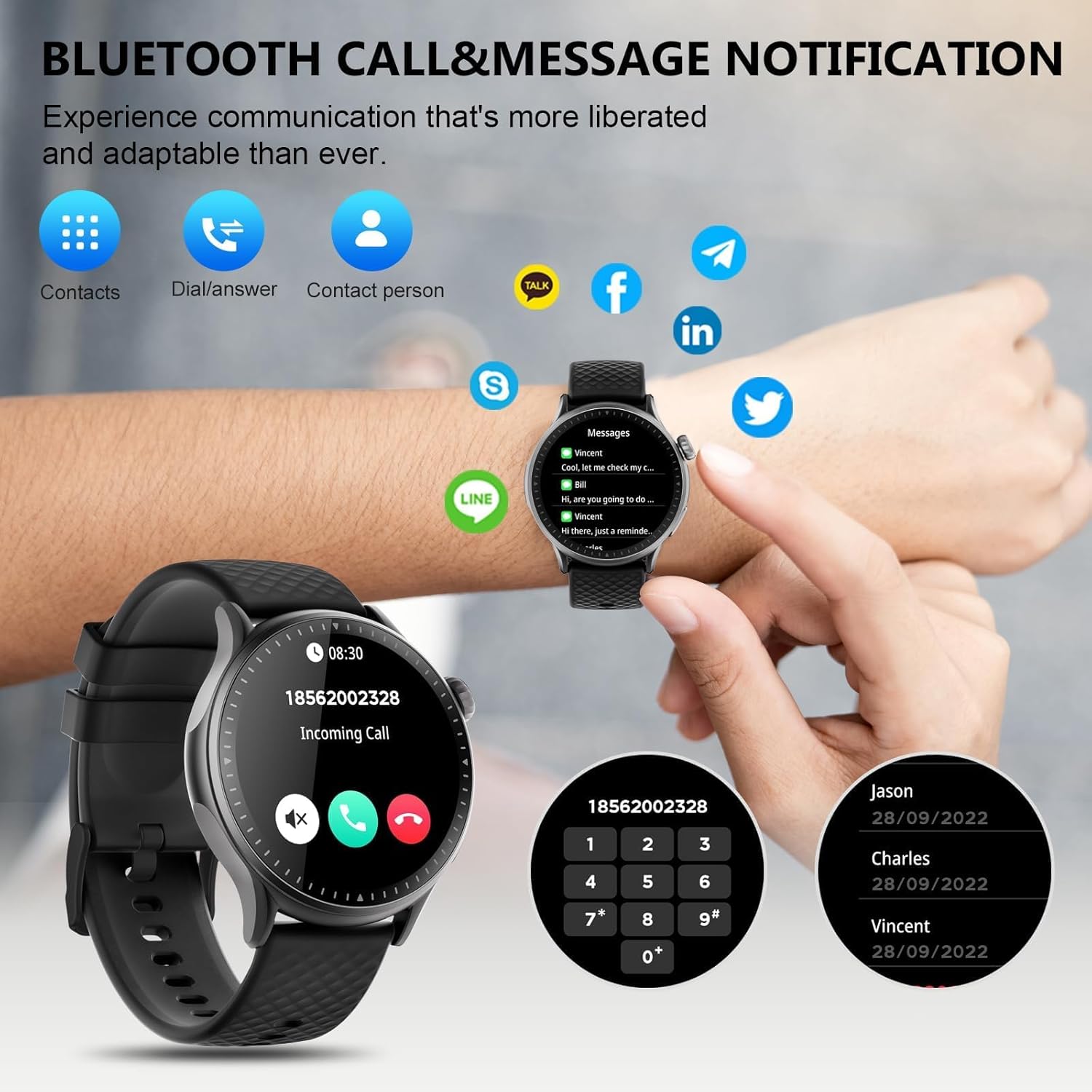
Image: The GTR3 Smart Watch displaying an incoming call and various message notification icons from social media and communication apps.
4.5 Голосовий помічник зі штучним інтелектом
The built-in AI assistant allows for hands-free control. Use voice commands to check the weather, control music playback on your phone, set alarms, and more.

Image: The GTR3 Smart Watch's AI Voice Assistant interface, illustrating how to use voice commands for tasks like checking weather or setting alarms.
4.6 Додаткові функції
The Cillso GTR3 offers a range of other useful features:
- Прогноз погоди
- Знайдіть телефон
- Секундомір і таймер
- Калькулятор
- Будильник
- Керування віддаленою камерою
- Music Control (for your phone's music player)
- Дихальні вправи

Image: The GTR3 Smart Watch's app menu, showcasing icons for various functions including Find Phone, Weather, Calculator, Remote Camera Shutter, Breathing Exercises, Women's Health, and Alarm Clock.
4.7 Налаштування циферблатів годинника
Personalize your watch with a variety of watch faces. The "Runmefit" app offers over 200 watch faces to choose from. You can also upload your favorite photos to create custom watch faces.
5. Технічне обслуговування
5.1 Гідроізоляція
The Cillso GTR3 has a 3ATM waterproof rating, meaning it is resistant to splashes, rain, and sweat. It is suitable for daily use and can withstand brief immersion in water. However, it is ні recommended for hot showers, saunas, diving, or high-speed water sports, as steam or high water pressure can compromise the seals.
5.2 Очищення та догляд
Щоб зберегти зовнішній вигляд та функціональність годинника:
- Регулярно протирайте екран і ремінець м’якою ганчіркоюamp тканина.
- Уникайте використання агресивних хімікатів, абразивних засобів для чищення або розчинників.
- Перед заряджанням переконайтеся, що зарядні контакти чисті та сухі.
- Уникайте тривалого перебування годинника під екстремальними температурами або прямими сонячними променями.
5.3 Термін служби батареї
To maximize battery life, avoid fully discharging the watch frequently. Charge it when the battery level is low, and disconnect it once fully charged.
6. Вирішення проблем
If you encounter issues with your Cillso GTR3 Smart Watch, refer to the following common problems and solutions:
| проблема | Можливе рішення |
|---|---|
| Годинник не підключається до телефону через Bluetooth. | Ensure Bluetooth is enabled on your phone. Restart both the watch and phone. Make sure the "Runmefit" app is open and running in the background. Check if the watch is already paired with another device. |
| Функція дзвінків через Bluetooth не працює. | Verify that the watch is connected via Bluetooth in обидва the "Runmefit" app and your phone's native Bluetooth settings (as a separate audio device). |
| Notifications or calls only vibrate, no sound. | Check the sound settings on your watch and in the "Runmefit" app. Ensure the watch's speaker volume is not muted or set too low. Note that the speaker volume may be limited in noisy environments. |
| Inaccurate step count or health data. | Ensure the watch is worn snugly on your wrist. Calibrate the watch in the "Runmefit" app if available. Keep the app connected to sync data regularly. |
| Weather information not updating. | Ensure your phone's location services are enabled and the "Runmefit" app has permission to access your location. The app must be connected and running in the background to sync weather data. |
| Watch disconnects frequently. | Maintain close proximity between your watch and smartphone. Avoid obstacles that may interfere with the Bluetooth signal. Ensure the "Runmefit" app is not being closed by your phone's power-saving features. |
| Cannot customize watch faces. | Ensure the watch is connected to the "Runmefit" app. Follow the app's instructions for selecting or uploading watch faces. Some watches may have limitations on the number of custom faces stored simultaneously. |
7. Технічні характеристики
| Особливість | Деталь |
|---|---|
| Назва моделі | GTR3 |
| Бренд | Cillso |
| Тип дисплея | AMOLED |
| Розмір екрана | 1.46 дюймів |
| роздільна здатність | 1.46" AMOLED Ultra-HD |
| Операційна система | iOS 12.0+ і Android 7.0+ |
| Ємність пам'яті | 128 Мб |
| Технологія підключення | Bluetooth |
| Стандарт бездротового зв'язку | Bluetooth |
| Ємність акумулятора | 350 mAh (approximate, based on image) |
| Середній термін служби батареї | Up to 10 days (heavy usage), 45 days (standby) |
| Рівень водонепроникності | 3ATM (30 Meters) |
| Вимірювані показники | Heart Rate, Sleep Duration, Blood Oxygen Monitor |
| Особливості | 24/7 Activity Tracker, Heart Rate Monitor, Sleep Monitor, AI Voice Control, Message Notifications, Answer/Make Call, AMOLED Touchscreen, Cycle Tracking, Alarm Clock, Blood Oxygen Monitor, 110+ Sport Modes, Music Control, Distance Record/Pedometer/Calories, Distance Tracker |
| Тип матеріалу стрічки | Silicone, Rubber, or Fluoroelastomer |
| GPS | GPS через смартфон |
| Цільова аудиторія | Унісекс для дорослих |
8. Інформація про гарантію
The Cillso GTR3 Smart Watch comes with a 1-річна стандартна гарантія з дати покупки. Ця гарантія поширюється на виробничі дефекти та несправності за умов нормального використання. Вона не поширюється на пошкодження, спричинені неправильним використанням, нещасними випадками, несанкціонованими модифікаціями або недотриманням інструкцій, викладених у цьому посібнику.
Зберігайте підтвердження покупки для гарантійних претензій.
9. Підтримка клієнтів
For further assistance, technical support, or warranty inquiries, please refer to the contact information provided with your purchase or visit the official Cillso website. Ensure you have your product model (GTR3) and proof of purchase ready when contacting support.