
1. Вступ
Welcome to the user manual for your ATTACK SHARK R68 HE Carbon Fiber 8000Hz Rapid Trigger Keyboard. This manual provides detailed instructions for setting up, operating, customizing, and maintaining your keyboard to ensure optimal performance and a superior gaming experience.

Image: The ATTACK SHARK R68 HE Wired Forged Carbon Fiber Keyboard, showcasing its design and vibrant RGB lighting.
2. Ключові характеристики
The ATTACK SHARK R68 HE keyboard is engineered for high-performance gaming and typing, incorporating advanced technologies:
- Преміальна конструкція: Features a compact 60% layout with CNC-machined aluminum alloy side trims and advanced carbon fiber composite materials for durability and aesthetics.
- Магнітні перемикачі: Equipped with Hall effect magnetic switches for ultra-sensitive operation and a silky smooth feel.
- Rapid Trigger (RT) Functionality: Adjustable 0.005mm RT accuracy with a global actuation range of 0.005mm to 3.4mm, allowing for precise and instant key responses.
- Високий коефіцієнт опитування: An 8000Hz polling rate delivers 8x faster response times than traditional gaming keyboards, with ultra-low 0.08ms latency.
- Розширені ключові функції: Supports Dynamic Keystroke (DKS), Mod Tap (MT), Toggle Key (TGL), and Snap Tap (SOCD) for enhanced gaming precision.
- Настроюване освітлення RGB: Dual-sided dynamic RGB light strips and individual key RGB lighting with 16.8 million colors, featuring 20+ preset light effects.
- QMK Web-На основі драйвера: Offers comprehensive customization for key remapping, macros, lighting effects, and magnetic switch settings.
- C01 Ultra RGB Coiled Cable: Designed for stable data transfer and fast charging.
- Сумісність: Fully compatible with Windows and Mac operating systems.

Image: Visual representation of the keyboard's high performance metrics, including 8000Hz polling rate and 256K scan rate, emphasizing instant response and precision.
3. Вміст упаковки
Перевірте наявність усіх предметів у вашій упаковці:
- ATTACK SHARK R68 HE Keyboard
- C01 Ultra RGB Coiled Cable
- 2-in-1 Key Puller
- Чохол для клавіатури
- 2 x Spare Magnetic Switches
- 2 x ATTACK SHARK Stickers
- Посібник користувача (цей документ)

Зображення: Оверview of all items included in the ATTACK SHARK R68 HE keyboard retail box, neatly arranged.
4. Налаштування
4.1 Підключення клавіатури
The R68 HE is a wired keyboard. Connect it to your computer using the provided C01 Ultra RGB Coiled Cable.
- Insert the USB-C end of the coiled cable into the port on the back of the keyboard.
- Підключіть кінець спірального кабелю USB-A до вільного порту USB на вашому комп’ютері.
- The keyboard will automatically be recognized by your operating system (Windows or Mac).

Image: The keyboard connected to a coiled USB-C cable, emphasizing the wired connection and high polling rate for stable data transfer.
4.2 Початкова калібрування
For optimal performance, especially with Rapid Trigger features, it is recommended to perform an initial calibration using the web програмне забезпечення драйвера.
- Open the QMK web-based driver (www.qmk.top) or the downloaded software.
- Navigate to the "Keyboard Setting" panel.
- Locate and click "Travel calibration" on the right side.
- In the pop-up window, select "Start Calibration."
- Follow the on-screen instructions, then click "Calibration Complete" to finish.
Image: A visual guide demonstrating the steps for performing a quick calibration using the keyboard's web driver software interface.
5. Інструкція з експлуатації
5.1 Основні функції клавіатури
The R68 HE features a 68-key ANSI layout. Standard key functions operate as expected. Utilize the Function (Fn) key for secondary key actions, typically indicated by legends on the keycaps.
5.2 Керування RGB-підсвічуванням
The keyboard features dynamic RGB backlighting and side light bars. You can control these directly from the keyboard or through the customization software.
Keyboard Backlight Controls:
- Fn + \ |: Switch Light Effects
- Fn + Enter: Перемикач кольору світла
- Fn + Backspace: Увімкнення/вимкнення світла
- Fn + Tab: Біле світло
- Fn + + / -: Налаштування швидкості підсвічування
- Fn + ↑ / ↓: Відрегулюйте яскравість підсвічування
Side Light Bar Controls:
- Fn + Z: Switch Side Light Effects
- Fn + X: Switch Side Light Color
- Fn + C: Side Light On/Off

Image: The keyboard displaying various RGB lighting effects, accompanied by a guide to onboard lighting controls for both key backlights and side light bars.
5.3 Magnetic Switch Features (Rapid Trigger, DKS, MT, TGL, SOCD)
The magnetic switches allow for advanced functionalities crucial for competitive gaming:
- Швидкий тригер (RT): Allows a key to activate and deactivate based on movement rather than a fixed actuation point. This means a key can register a press as soon as it moves down and reset as soon as it moves up, enabling extremely fast repeated inputs.
- Регульоване спрацьовування: Customize the actuation point for each key individually from 0.005mm to 3.4mm via the software, tailoring sensitivity to your preference.
- Динамічне натискання клавіш (DKS): Assign up to four different actions to a single key based on how far it is pressed.
- Мод Тап (MT): A key can perform one action when tapped and a different action when held.
- Клавіша перемикання (TGL): Press and hold a key to activate a continuous action, release to stop.
- Snap Tap (SOCD - Simultaneous Opposite Cardinal Directions): Optimizes directional inputs in games by neutralizing opposing inputs (e.g., pressing both 'A' and 'D' simultaneously results in no horizontal movement).

Image: A detailed explanation of magnetic Hall Effect switches and the Rapid Trigger mechanism, comparing its dynamic actuation to standard switches.

Image: Visual guides for advanced magnetic switch features including Toggle Key (TGL), Snap Tap (SOCD), and Dynamic Keystroke (DKS).
6. Налаштування
The ATTACK SHARK R68 HE keyboard offers extensive customization through its QMK web-based driver or downloadable software. This allows you to personalize your keyboard experience to a high degree.
Параметри налаштування:
- Перепризначення клавіш: Reassign any key to a different function.
- Налаштування макросу: Create and assign complex macros for single-key execution.
- RGB Lighting Settings: Fine-tune lighting effects, colors, and brightness beyond onboard controls.
- Magnetic Switch Settings: Adjust actuation points, Rapid Trigger sensitivity, and configure DKS, MT, TGL, and SOCD functions.
- Music Visualization: Synchronize lighting with audio output.
- Zone Wake-up & Screen Lighting Rhythm: Advanced lighting synchronization features.
Доступ до web driver at: www.qmk.top

Image: The user interface of the QMK web driver, demonstrating options for customizing lighting, magnetic switch behavior, and key functions.
7. Технічне обслуговування
Правильне обслуговування забезпечує довговічність та продуктивність вашої клавіатури.
- Прибирання: Use a soft, dry cloth to wipe the keyboard surface. For deeper cleaning, use the provided key puller to remove keycaps and clean dust or debris with compressed air. Avoid using harsh chemicals or abrasive materials.
- Зберігання: When not in use, store the keyboard in a clean, dry environment. The included keyboard cover can help protect it from dust.
- Догляд за кабелем: Уникайте різких вигинів або надмірного натягування спірального кабелю, щоб запобігти його пошкодженню.
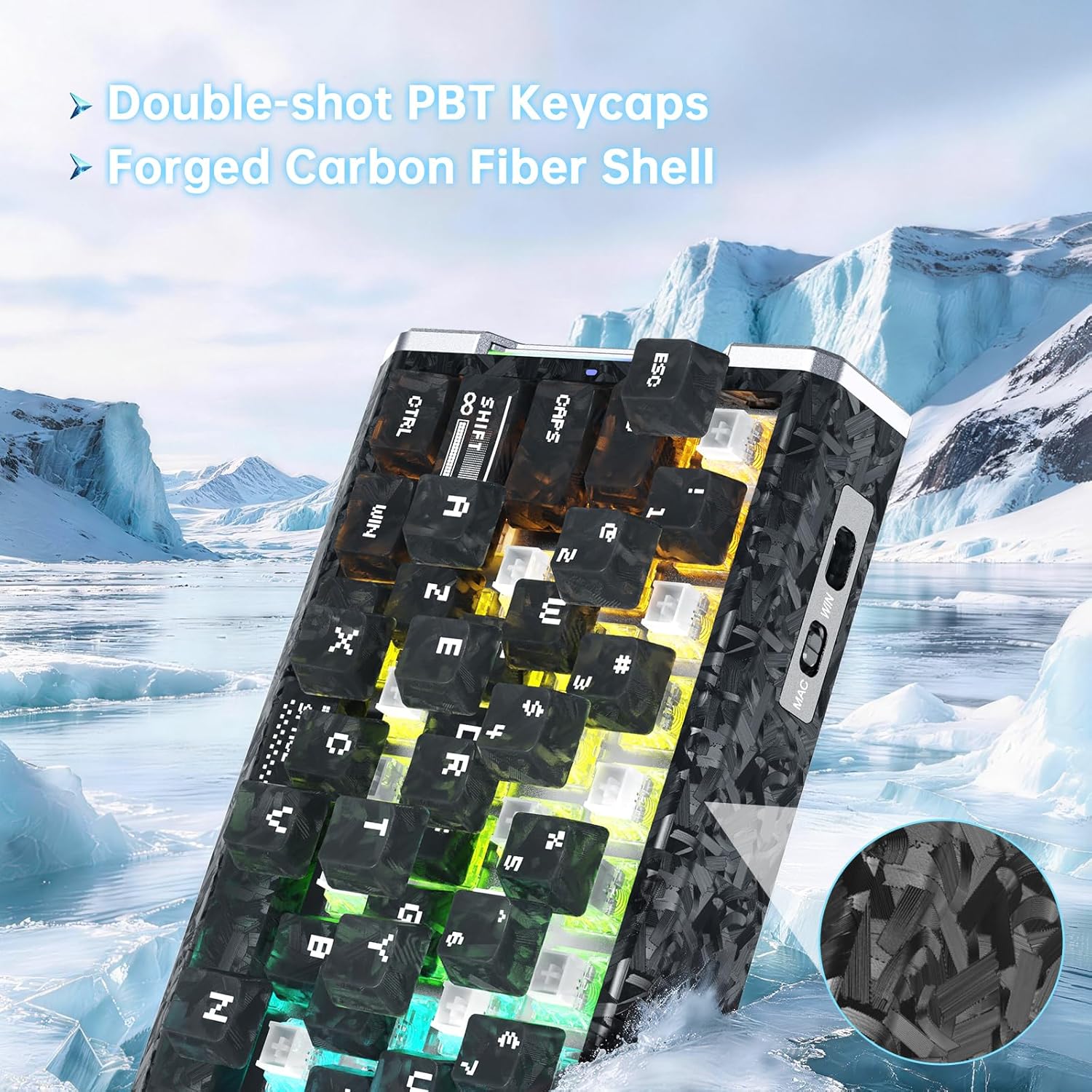
Зображення: Детальний view of the keyboard's forged carbon fiber keycaps and shell material, alongside accessories like spare switches and a key puller, relevant for maintenance.
8. Вирішення проблем
If you encounter issues with your ATTACK SHARK R68 HE keyboard, refer to the following common solutions:
| проблема | Можлива причина | Рішення |
|---|---|---|
| Клавіатура не відповідає | Нещільне підключення кабелю, неправильний USB-порт, проблема з драйвером. | Ensure the USB-C cable is securely connected to both the keyboard and the computer. Try a different USB port. Restart your computer. Check device manager for driver issues. |
| RGB-підсвічування не працює або працює неправильно | Lighting settings misconfigured, software conflict. | Use the onboard Fn key combinations to cycle through effects and colors (see Section 5.2). Check the QMK web driver for detailed lighting settings. Ensure no other lighting software is conflicting. |
| Клавіші не реєструються або друкуються двічі | Dust/debris under keycap, magnetic switch calibration needed, software issue. | Remove the keycap and clean the switch area. Perform a "Travel calibration" using the QMK web driver (see Section 4.2). Update or reinstall the keyboard software/driver. |
| Advanced features (RT, DKS, etc.) not working | Features not enabled or configured in software. | Ensure these features are properly configured and enabled within the QMK web driver software (see Section 6). |
| Computer lagging or freezing after connecting keyboard | Potential software conflict or system resource issue (rare). | Ensure your operating system and drivers are up to date. Try connecting the keyboard to a different computer to isolate the issue. If the problem persists, contact customer support. |
9. Технічні характеристики
Detailed technical specifications for the ATTACK SHARK R68 HE Keyboard:
| Особливість | Деталь |
|---|---|
| Бренд | АТАКА АКУЛИ |
| Модель | R68 HE |
| Технологія підключення | USB-C (дротовий) |
| Розкладка клавіатури | 68-Key ANSI (60% Layout) |
| Тип перемикача | Magnetic Hall Effect Switches (Linear) |
| Діапазон спрацьовування | 0.005mm to 3.4mm (Adjustable) |
| Rapid Trigger Accuracy | 0.005 мм |
| Швидкість опитування | 8000 Гц |
| Затримка | 0.08 мс |
| Швидкість сканування | 256 кГц |
| Матеріал кепки | PC Matte Forged Carbon |
| Матеріал корпусу | Carbon Fiber, Aluminum Alloy |
| RGB освітлення | 16.8 Million Colors, Dynamic Backlight & Side Strips |
| Сумісні операційні системи | Windows, Mac OS 14 Sonoma and above |
| Розміри | 325 мм x 122 мм x 20 мм (приблизно 12.8 дюйма x 4.8 дюйма x 0.79 дюйма) |
| UPC | 707630517426 |
Image: A technical diagram illustrating the ANSI layout and physical dimensions of the R68 HE keyboard.
10. Гарантія та підтримка
10.1 Гарантія виробника
The ATTACK SHARK R68 HE keyboard comes with a 1-річна гарантія виробника з дати покупки. Ця гарантія поширюється на дефекти матеріалів та виготовлення за умов нормального використання. Вона не поширюється на пошкодження, спричинені неправильним використанням, нещасними випадками, несанкціонованими модифікаціями або нормальним зносом.
Зберігайте підтвердження покупки для гарантійних претензій.
10.2 Підтримка клієнтів
For technical assistance, warranty claims, or any questions regarding your ATTACK SHARK R68 HE keyboard, please contact ATTACK SHARK customer support through their official channels or the retailer where the product was purchased.
You may also refer to the official brand store on Amazon: ATTACK SHARK Store
11. Відео про продукти
ATTACK SHARK R68 HE Carbon Fiber 8000Hz Rapid Trigger Keyboard Overview
Відео: Посадовець надview of the ATTACK SHARK R68 HE Carbon Fiber 8000Hz Rapid Trigger Keyboard, highlighting its features and design.
R68HE Carbon Fiber Rapid Trigger Keyboard with Magnetic Switch Features
Video: A demonstration of the R68HE Carbon Fiber Rapid Trigger Keyboard, focusing on its magnetic switch technology and rapid trigger capabilities.