
1. Вступ
Thank you for choosing the AIYIMA S4000 Active Bookshelf Speakers. These speakers are designed to deliver high-fidelity audio with versatile connectivity options, suitable for various applications including home entertainment, PC audio, and professional studio monitoring. Please read this manual thoroughly before use to ensure proper setup and operation.
2. Техніка безпеки
To prevent fire, electric shock, or product damage, please observe the following safety guidelines:
- Не піддавайте цей прилад впливу дощу або вологи.
- Не ставте на прилад предмети, наповнені рідинами, такі як вази.
- Забезпечте належну вентиляцію. Не блокуйте вентиляційні отвори.
- Не встановлюйте поблизу будь-яких джерел тепла, таких як радіатори, обігрівачі, печі або інші пристрої (включаючи ampліфікатори), які виробляють тепло.
- Захистіть шнур живлення від натягування або защемлення, особливо біля вилок, розетки та місця, де вони виходять з приладу.
- Використовуйте лише насадки/аксесуари, зазначені виробником.
- Відключайте цей прилад від мережі під час грози або якщо він не використовується протягом тривалого часу.
- Зверніть усі послуги до кваліфікованого обслуговуючого персоналу. Технічне обслуговування вимагається, якщо прилад будь -яким чином пошкоджений.
3. Вміст упаковки
Будь ласка, перевірте наявність усіх предметів у коробці:
- AIYIMA S4000 Studio Monitors (2 units)
- Аудіокабель RCA
- XLR Audio Cable
- Посібник користувача (цей документ)
- Magnetic Grilles (2 units)
- Rubber Feet (8 units)
- Кабель живлення
- Бездротовий ІЧ-пульт дистанційного керування
4. Продукт закінчивсяview
4.1 Передня панель
The front panel features the horn-loaded tweeter and the 4-inch woofer, along with a multi-function rotary control for volume and input selection.

Зображення: Спереду та ззаду view of the AIYIMA S4000 speakers. The front shows the tweeter and woofer, while the rear displays all input/output ports and controls.
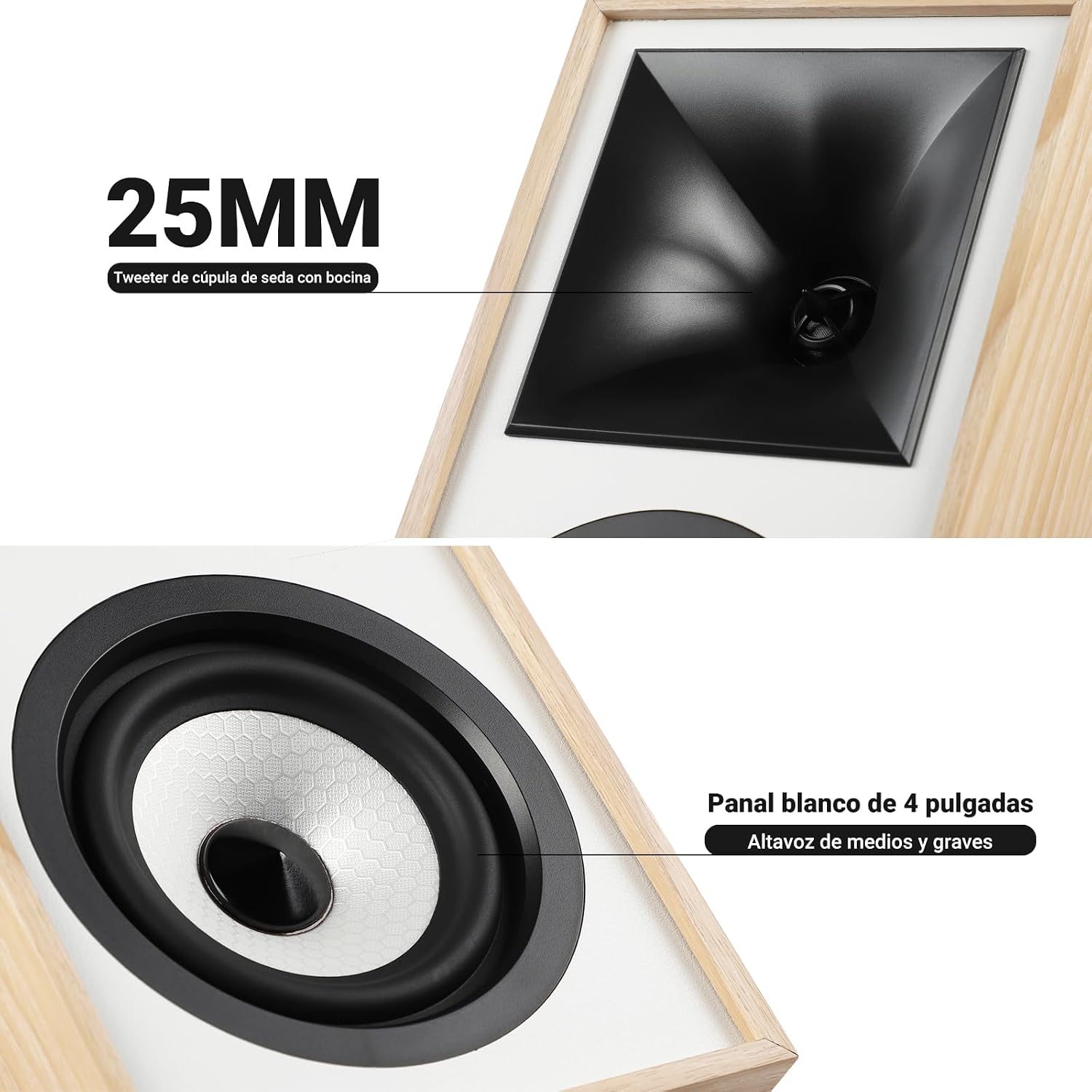
Зображення: Крупний план view of the 25mm horn-loaded silk dome tweeter and the 4-inch white cone woofer on the AIYIMA S4000 speaker.
The S4000 incorporates a 1.25-inch horn-loaded tweeter for enhanced vocal clarity and a 4-inch woofer for deep bass. The cabinet is constructed from 15mm high-density MDF to reduce resonance and distortion.
4.2 Задня панель
The rear panel houses all connectivity ports and additional controls.
Зображення: Детальне view of the rear panel of the AIYIMA S4000 speaker, showing the volume, treble, and bass knobs, RCA and XLR inputs, SUB OUT, power switch, and power input.
- Volume/Input Selector: Rotary knob for volume adjustment and input source selection (Bluetooth, RCA, XLR).
- Контроль високих частот: Knob to adjust high frequencies.
- Регулювання басів: Knob to adjust low frequencies.
- Вхід RCA: For connecting devices via RCA cables.
- Вхід XLR: Professional balanced input for mixers, audio interfaces, etc.
- SUB OUT: Output for connecting an external active subwoofer.
- Вимикач живлення: To turn the speakers on or off.
- Вхід живлення змінного струму: For connecting the power cable (AC 100V-240V).
- SPK-L OUT: Output to connect the passive left speaker.
5. Налаштування
5.1 Розміщення динаміків
For optimal sound quality, place the speakers on a stable surface, such as a bookshelf or speaker stands. Position them at ear level and equidistant from your listening position. Ensure there is adequate space behind the speakers for the L-shaped bass reflex port to function effectively.

Image: AIYIMA S4000 speakers positioned on a wooden cabinet, demonstrating a typical home setup with a turntable.
5.2 Підключення аудіоджерел
The S4000 offers multiple input options:
- Вхід RCA: Connect your audio source (e.g., CD player, TV, PC) to the RCA ports on the rear panel using the provided RCA cable.
- Вхід XLR: For professional audio equipment like mixers or audio interfaces, use XLR cables to connect to the balanced XLR inputs. This input is resistant to interference.
- Bluetooth 5.0: For wireless connection, refer to section 6.4 for Bluetooth pairing instructions.

Image: AIYIMA S4000 speaker shown connected to a laptop and electronic keyboard, highlighting the professional balanced input capabilities.
5.3 Connecting an External Subwoofer (SUB OUT)
To enhance bass performance, you can connect an active subwoofer to the SUB OUT port on the rear panel. The system will automatically adjust the crossover frequency, converting your setup into a 2.1 audio system.

Image: AIYIMA S4000 speakers set up with a television and an external subwoofer, illustrating the SUB OUT functionality for a 2.1 home cinema experience.
5.4 Підключення живлення
Connect the provided power cable to the AC Power Input on the rear panel of the active speaker, then plug it into a wall outlet (AC 100V-240V). Connect the active speaker to the passive speaker using the SPK-L OUT port.
6. Інструкція з експлуатації
6.1 Увімкнення/вимкнення живлення
Flip the Power Switch on the rear panel to the "ON" position to turn on the speakers. Flip it to "OFF" to power them down.
6.2 Регулювання гучності та вибір входу
The multi-function rotary control on the front panel adjusts the volume. Press the knob to cycle through input sources: Bluetooth (BT), RCA, and XLR. The current input will be indicated by an LED.
6.3 Регулювання низьких та високих частот
Use the independent Bass and Treble knobs on the rear panel to fine-tune the sound according to your preference and audio source. Adjustments range from -6dB to +6dB.
6.4 Створення пари Bluetooth
- Turn on the speakers and select Bluetooth input using the front panel knob or remote control. The Bluetooth indicator light will flash.
- На вашому пристрої (смартфоні, планшеті, комп’ютері) увімкніть Bluetooth та знайдіть «AIYIMA S4000».
- Select "AIYIMA S4000" to pair. Once connected, the Bluetooth indicator light will stop flashing and remain solid.
- Тепер ви можете відтворювати аудіо зі свого пристрою бездротовим способом.

Image: AIYIMA S4000 speaker in a room setting, illustrating its Bluetooth 5.0 connectivity for wireless audio streaming.
6.5 Використання дистанційного керування
The included wireless IR remote control allows you to adjust volume, select input modes, and control playback (play/pause, next/previous track for Bluetooth) from up to 20 meters away without requiring line-of-sight.

Image: Composite image showing the AIYIMA S4000 speakers, a close-up of the 15mm MDF cabinet construction, an internal view of the L-shaped bass reflex port, and the wireless remote control.
7. Технічне обслуговування
- Прибирання: Use a soft, dry cloth to clean the speaker cabinets. Do not use liquid cleaners or abrasive materials.
- Зберігання: Якщо динаміки зберігатимуться протягом тривалого часу, від’єднайте їх від живлення та зберігайте в прохолодному, сухому місці, бажано в оригінальній упаковці.
- Решітки: The magnetic grilles can be removed for cleaning or for a different aesthetic. Handle them gently to avoid damage.
8. Вирішення проблем
| проблема | Можлива причина | Рішення |
|---|---|---|
| Ні звуку |
|
|
| Спотворений звук |
|
|
| Проблеми з підключенням Bluetooth |
|
|
| Пульт не працює |
|
|
If the problem persists, please contact AIYIMA customer support.
9. Технічні характеристики

Image: Diagram showing the dimensions of the AIYIMA S4000 speakers: 280mm (11.02 inches) height, 185mm (7.28 inches) depth, and 145mm (5.70 inches) width.
| Особливість | Специфікація |
|---|---|
| Назва моделі | S4000 |
| Бренд | АЙІМА |
| Тип динаміка | Bookshelf, Active, 2-way, Surround Sound |
| Аудіоканали | 2.1 (with SUB OUT) |
| Максимальна вихідна потужність | 80 Watts RMS (2x40W RMS: 2x25W Bass/Mid, 2x15W Treble) |
| АЧХ | 45 Гц - 20 кГц |
| Діаметр НЧ-динаміка | 4 дюймів |
| Тип ВЧ-динаміка | 1.25-inch Horn-loaded Silk Dome |
| Технологія підключення | Bluetooth 5.0, RCA, XLR |
| Діапазон Bluetooth | Up to 20 meters (wireless remote also 20m) |
| Спосіб контролю | Touch (front knob), Remote Control |
| Матеріал корпусу | 15mm High-density MDF |
| Джерело живлення | AC 100V-240V (Power Cable) |
| Розміри продукту (Д x Ш x В) | 18.5 x 14.5 x 28 см (7.28 x 5.70 x 11.02 дюйма) |
| Вага продукту | 6.9 кг (пара) |
| Колір | Brown (wood finish) |
| Рекомендоване використання | Home Entertainment, PC Audio, Recording Studios, Home Cinema |
10. Гарантія та підтримка
AIYIMA products come with a standard manufacturer's warranty. For detailed warranty information, please refer to the warranty card included in your package or visit the official AIYIMA webсайт.
For technical support, troubleshooting assistance, or service inquiries, please contact AIYIMA customer support through their official channels. Please have your product model number (S4000) and purchase information ready when contacting support.
Виробник: АЙІМА