
1. Вступ
The GameSir Pocket Taco is a vertical mobile gaming controller designed to transform your Android smartphone into a retro handheld gaming device. It offers a compact, lightweight design with Bluetooth connectivity and a built-in rechargeable battery, providing an authentic arcade experience for mobile gaming.
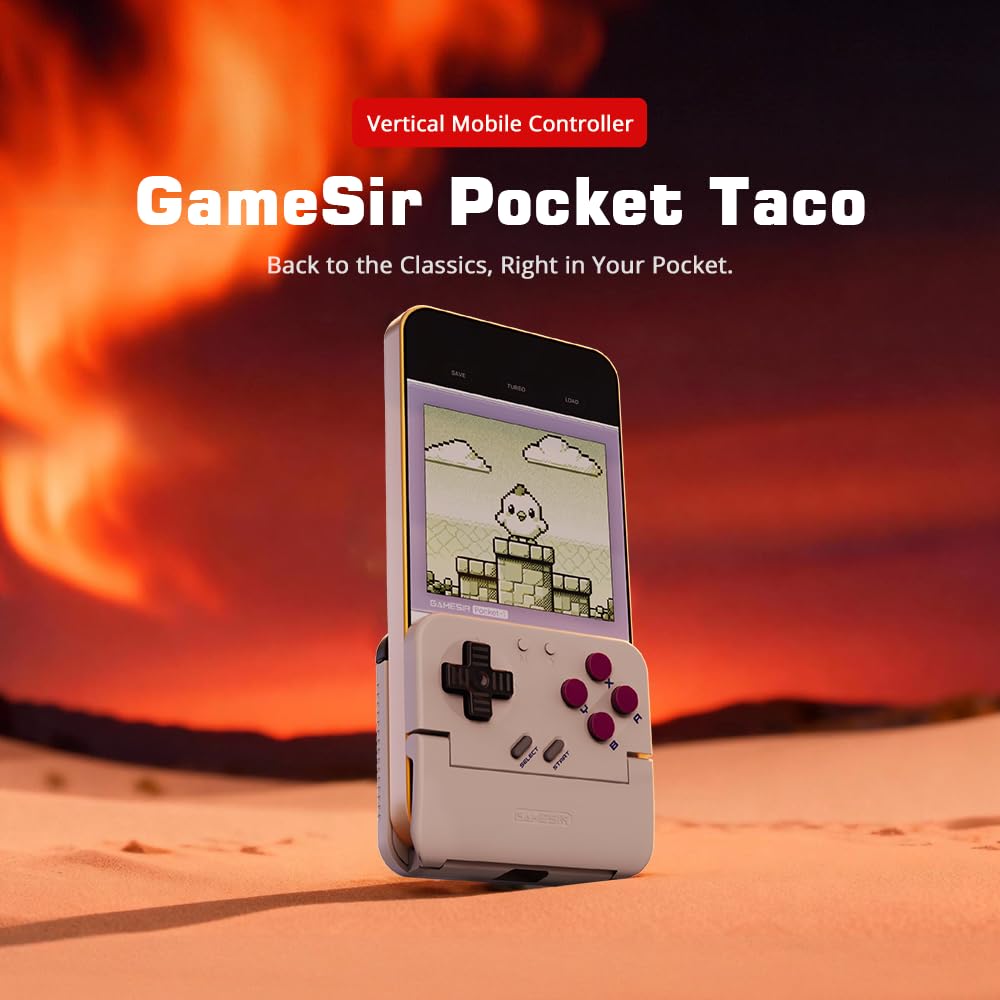
Figure 1: GameSir Pocket Taco attached to a smartphone, ready for vertical gaming.
Відео 1: Кінецьview of the GameSir Pocket Taco Vertical Mobile Gaming Controller, showcasinйого дизайн та особливості.
2. Ключові характеристики
- Vertical Retro Arcade Design: Transforms your phone into a classic vertical handheld gaming device, ideal for retro titles and vertical shoot 'em ups.
- Ультрапортативний та легкий: Weighing only 62.2g, this compact Bluetooth controller is easy to carry and includes a durable PP storage box for protection.
- Smart Power & Seamless Bluetooth Connectivity: Automatically powers on when unfolded and off when closed. Offers low-latency wireless gaming on Android and other compatible devices.
- Long-Lasting 600 mAh Battery & Pass-Through Charging: Provides hours of gameplay on a single charge. The hollow-bottom design allows simultaneous phone charging while gaming.
- Customizable Controls via GameSir App: Remap buttons, enable D-pad diagonal lock, switch to keyboard mode, and access G-Touch/V-Touch support for precise inputs.
- Phone-Friendly Silicone Protection: Soft silicone pads in the clamp area protect your phone from scratches and ensure a secure fit during intense gaming sessions.

Figure 2: Experience vertical handheld gaming by attaching your smartphone to the GameSir Pocket Taco.
3. Налаштування та підключення
3.1 Початкове налаштування
- Розпакувати: Carefully remove the GameSir Pocket Taco from its packaging.
- Оглянути: Check for any visible damage or missing components.
- заряд: Ensure the controller is sufficiently charged before first use. Connect the USB-C cable to the charging port on the controller.
- Введіть номер телефону: Gently open the controller's clamp and insert your smartphone. The silicone pads will secure your device and prevent scratches.
3.2 Підключення Bluetooth
The GameSir Pocket Taco supports multiple connection modes for various platforms. Follow the steps below for your specific device:

Figure 3: The GameSir Pocket Taco offers seamless Bluetooth connectivity across various compatible devices.
3.2.1 iOS Connection (DS4 Mode)
- Натисніть і утримуйте кнопка додому і за замовчуванням Кнопка simultaneously for 2 seconds until the indicator light turns solid and flashes rapidly.
- On your iOS device, open налаштування Bluetooth.
- Select "DUALSHOCK 4 Wireless Controller" from the available devices to connect.
- A solid indicator light on the controller confirms a successful connection.
3.2.2 Android Connection (Android Mode)
- Натисніть і утримуйте кнопка додому і за замовчуванням Кнопка B simultaneously for 2 seconds until the indicator light turns solid and flashes rapidly.
- On your Android device, open налаштування Bluetooth.
- Select "GameSir-Pocket 1" or "GameSir-Pocket 1_G" from the available devices to connect.
- A solid indicator light on the controller confirms a successful connection.
3.2.3 Switch Connection (Switch Mode)
- Натисніть і утримуйте кнопка додому і за замовчуванням кнопка X simultaneously for 2 seconds until the indicator light flashes up and down rapidly.
- On your Nintendo Switch, go to the Головне меню, потім виберіть "Контролери", а потім "Змінити хватку/порядок" щоб увійти в режим сполучення.
- Wait for the connection to be established. A solid indicator light on the controller confirms a successful connection.
3.2.4 G-Touch Mode Connection
- Натисніть і утримуйте кнопка додому і за замовчуванням Кнопка Y simultaneously for 2 seconds until the indicator light turns solid and flashes rapidly.
- On your Android device, open налаштування Bluetooth.
- Select "GameSir-Pocket 1_G" from the available devices to connect.
- A solid indicator light on the controller confirms a successful connection.
4. Інструкція з експлуатації
4.1 Увімкнення/вимкнення живлення
- Увімкнення: Unfold the controller to automatically power it on.
- Вимкнення живлення: Close the controller to automatically power it off.
4.2 Зарядка
The GameSir Pocket Taco features a 600mAh battery. To charge, connect a USB-C cable to the charging port located on the top of the controller. The hollow-bottom design allows you to charge your phone simultaneously while playing.

Figure 4: Key features of the GameSir Pocket Taco, including pass-through charging and protective silicone pads.
4.3 Customizable Controls (GameSir App)
Download the official GameSir App to unlock advanced customization options:
- Перепризначення кнопок: Assign functions to different buttons for personalized gameplay.
- D-pad Diagonal Lock: Enable or disable diagonal input for the D-pad.
- Режим клавіатури: Switch to keyboard mode for a more flexible control experience.
- G-Touch/V-Touch Support: Utilize advanced touch mapping features for specific games.
- Оновлення прошивки: Keep your controller up-to-date with the latest software enhancements.

Figure 5: Customize your GameSir Pocket Taco settings and update firmware using the dedicated GameSir App.
5. Догляд і технічне обслуговування
- Прибирання: Використовуйте м’яку суху тканину для очищення контролера. Уникайте абразивних засобів для чищення або розчинників.
- Зберігання: When not in use, store the GameSir Pocket Taco in its durable PP storage box to protect it from dust, scratches, and impacts.
- Обробка: Do not apply excessive force when opening or closing the controller to prevent damage to the hinge mechanism.
- температура: Avoid exposing the controller to extreme temperatures or direct sunlight for prolonged periods.
6. Вирішення проблем
6.1 Проблеми з підключенням
- Контролер не підключається: If the connection fails, press and hold the 'M' button and the 'Home' button on the controller for 2 seconds to re-enter pairing mode. Ensure Bluetooth is enabled on your device and the correct mode (iOS, Android, Switch, G-Touch) is selected.
- Періодичне з'єднання: Ensure the controller is within range of your device and there are no significant obstructions. Fully charge the controller and your device.
6.2 Чіткість реагування кнопок
- Кнопки не відповідають: Ensure the controller is properly connected. Check for firmware updates via the GameSir App.
- D-pad issues: Some users have reported issues with D-pad responsiveness. Ensure firmware is up-to-date. If issues persist, contact GameSir support.
6.3 Проблеми заряджання
- Контролер не заряджається: Use the provided USB-C cable or a compatible cable. Ensure the cable and power adapter are functioning correctly.
7. Технічні характеристики
| Особливість | Деталь |
|---|---|
| Назва моделі | GameSir Pocket Taco |
| Бренд | GameSir |
| Сумісні пристрої | Android (also supports iOS, Switch, PC via specific modes) |
| Тип контролера | Геймпад |
| Підключення | Бездротовий (Bluetooth) |
| Ємність акумулятора | 600 мАг |
| Порт зарядки | USB-C (Pass-Through Charging for phone) |
| Вага товару | 0.2 кілограма (приблизно 62.2 г) |
| Колір | Білий |
| Апаратна платформа | Смартфон |
8. Гарантія та підтримка
For warranty information, technical support, or service inquiries, please refer to the documentation included with your product or visit the official GameSir webсайт. Зберігайте чек про покупку як підтвердження покупки для гарантійних претензій.