
1. Продукт закінчивсяview
The Edifier W280NB Pro are neckband wireless headphones designed for immersive audio experiences with advanced features. They offer hybrid active noise cancellation, Hi-Res Audio support with LDAC, and a durable, comfortable design suitable for various activities.

Image: Edifier W280NB Pro headphones with key features highlighted.
Ключові характеристики:
- Deep Hybrid Active Noise Cancellation: Up to -45dB noise reduction with 4 selectable modes (High ANC, Medium ANC, Ambient Aware, Wind Reduction).
- Studio-Quality Hi-Res Audio: 10mm dynamic drivers with titanium-coated composite diaphragms, supporting LDAC codec and Hi-Res Audio Wireless certification (20Hz-40KHz frequency response).
- Long-Lasting Battery & Fast Charging: Up to 23 hours of playback (ANC off), 14 hours (ANC on). 15 minutes of charging provides 5 hours of playtime. Full charge in 1.5 hours.
- Стабільне з'єднання Bluetooth 5.4: Ensures stable transmission, low power consumption, and multipoint connection for seamless device switching.
- All-Day Comfort & Secure Fit: Lightweight, flexible neckband with skin-friendly material and multiple sizes of ear wings for a secure fit. Magnetic earbuds for tangle-free storage.
- Durable & Clear Calls: IP55 dust and water resistance. Built-in AI noise-canceling microphones for clear communication in noisy environments.
2. Посібник із налаштування
2.1 Вміст упаковки
Перед використанням переконайтеся, що всі компоненти присутні в упаковці:
- Edifier W280NB Pro Neckband Wireless Headphones
- Зарядний кабель USB-C
- Multiple sizes of ear tips and ear wings
- Посібник користувача (цей документ)
2.2 Заряджання навушників
Charge the headphones fully before first use to ensure optimal battery performance.
- Connect the provided USB-C charging cable to the charging port on the neckband.
- Підключіть інший кінець кабелю до USB-адаптера живлення (не входить до комплекту) або USB-порту комп’ютера.
- The indicator light will show charging status (refer to the LED indicator section for details).
- A full charge takes approximately 1.5 hours. A 15-minute quick charge provides approximately 5 hours of playback.

Image: Visual representation of battery life (23 hours ANC off, 14 hours ANC on) and fast charging (15 mins = 5 hours).
2.3 Fitting the Headphones
Proper fit is crucial for comfort, sound quality, and effective noise cancellation.
- Select the ear tips and ear wings that best fit your ears. Experiment with different sizes for the most secure and comfortable seal.
- Place the neckband around your neck.
- Insert the earbuds into your ear canals and adjust the ear wings to sit snugly in your outer ear for stability.

Image: Diagram showing various ear tip and ear wing sizes for a secure and comfortable fit.
2.4 Створення пари Bluetooth
Pair your Edifier W280NB Pro headphones with your device via Bluetooth.
- Переконайтеся, що навушники заряджені та вимкнені.
- Press and hold the multi-function button (usually the power button) until the indicator light flashes rapidly (e.g., blue and red alternately), indicating pairing mode.
- На вашому пристрої (смартфоні, планшеті, ноутбуці) увімкніть Bluetooth та знайдіть доступні пристрої.
- Select "Edifier W280NB Pro" from the list of found devices.
- Після підключення індикатор зазвичай світитиметься постійним синім світлом або повільно блиматиме.
Багатоточкове підключення:
The W280NB Pro supports multipoint connection, allowing you to connect to two Bluetooth devices simultaneously.
- Сполучіть навушники з першим пристроєм, як описано вище.
- Вимкніть Bluetooth на першому пристрої.
- Поверніть навушники в режим сполучення та з’єднайте їх з другим пристроєм.
- Re-enable Bluetooth on the first device. The headphones should now be connected to both devices, allowing seamless switching.

Image: Illustration of Bluetooth 5.4 technology for stable transmission and multipoint connection.
3. Інструкція з експлуатації
3.1 Увімкнення/вимкнення живлення
- Увімкнення: Press and hold the multi-function button for approximately 3 seconds until the indicator light illuminates.
- Вимкнення живлення: Натисніть і утримуйте багатофункціональну кнопку приблизно 5 секунд, доки індикатор не згасне.
3.2 Кнопки керування
The Edifier W280NB Pro features intuitive button controls on the neckband for easy management of music, calls, and noise cancellation modes.

Image: Diagram illustrating the functions of each button on the neckband for calls, music playback, and mode switching.
| Дія | функція |
|---|---|
| Multi-function Button (Power) | Press and hold 3s: Power On Press and hold 5s: Power Off Press and hold (pairing mode): Enter Bluetooth pairing Single press (during call): Answer/End Call Double press (during call): Reject Call |
| Збільшення гучності (+) | Single press: Increase Volume Press and hold: Next Track |
| Зменшення гучності (-) | Single press: Decrease Volume Press and hold: Previous Track |
| Кнопка відтворення/паузи | Single press: Play/Pause Music |
| Кнопка режиму ANC | Single press: Cycle through ANC modes (High ANC, Medium ANC, Ambient Aware, Wind Reduction, ANC Off) |
3.3 Режими активного шумозаглушення (ANC)
The W280NB Pro offers four distinct noise cancellation modes to adapt to your environment.

Image: Visual guide to the four ANC modes and their typical use cases.
- High ANC: Provides maximum noise reduction, ideal for very noisy environments like airplanes or subways.
- Medium ANC: Offers a balanced level of noise cancellation, suitable for offices or cafes.
- Ambient Aware: Allows you to hear your surroundings while still enjoying your audio, useful for urban environments or when needing to be aware of announcements.
- Зменшення вітру: Specifically designed to minimize wind noise during outdoor activities.
3.4 Здійснення та отримання дзвінків
The headphones feature AI noise-canceling microphones for clear call quality.
- Відповісти на дзвінок: Одне натискання багатофункціональної кнопки.
- Завершити виклик: Одне натискання багатофункціональної кнопки.
- Відхилити виклик: Двічі натисніть багатофункціональну кнопку.

Image: A person using the headphones for a call, highlighting the AI-enhanced clear call feature.
3.5 Додаток Edifier Connect
For advanced settings and customization, download the Edifier Connect app from your device's app store. The app allows you to:
- Перейменуйте свій пристрій.
- Personalize ANC levels.
- Fine-tune audio with preset EQs or custom EQs.
- Locate lost headphones.
4. Технічне обслуговування
4.1 Очищення
The W280NB Pro headphones are IP55 rated for dust and water resistance, but proper cleaning helps maintain their condition.
- Протріть шийну дужку та навушники м’якою, сухою тканиною без ворсу.
- For ear tips, gently remove them and clean with a damp тканиною та м’яким милом, якщо необхідно. Переконайтеся, що вони повністю сухі, перш ніж знову прикріплювати.
- Avoid using harsh chemicals, abrasive materials, or submerging the headphones in water.
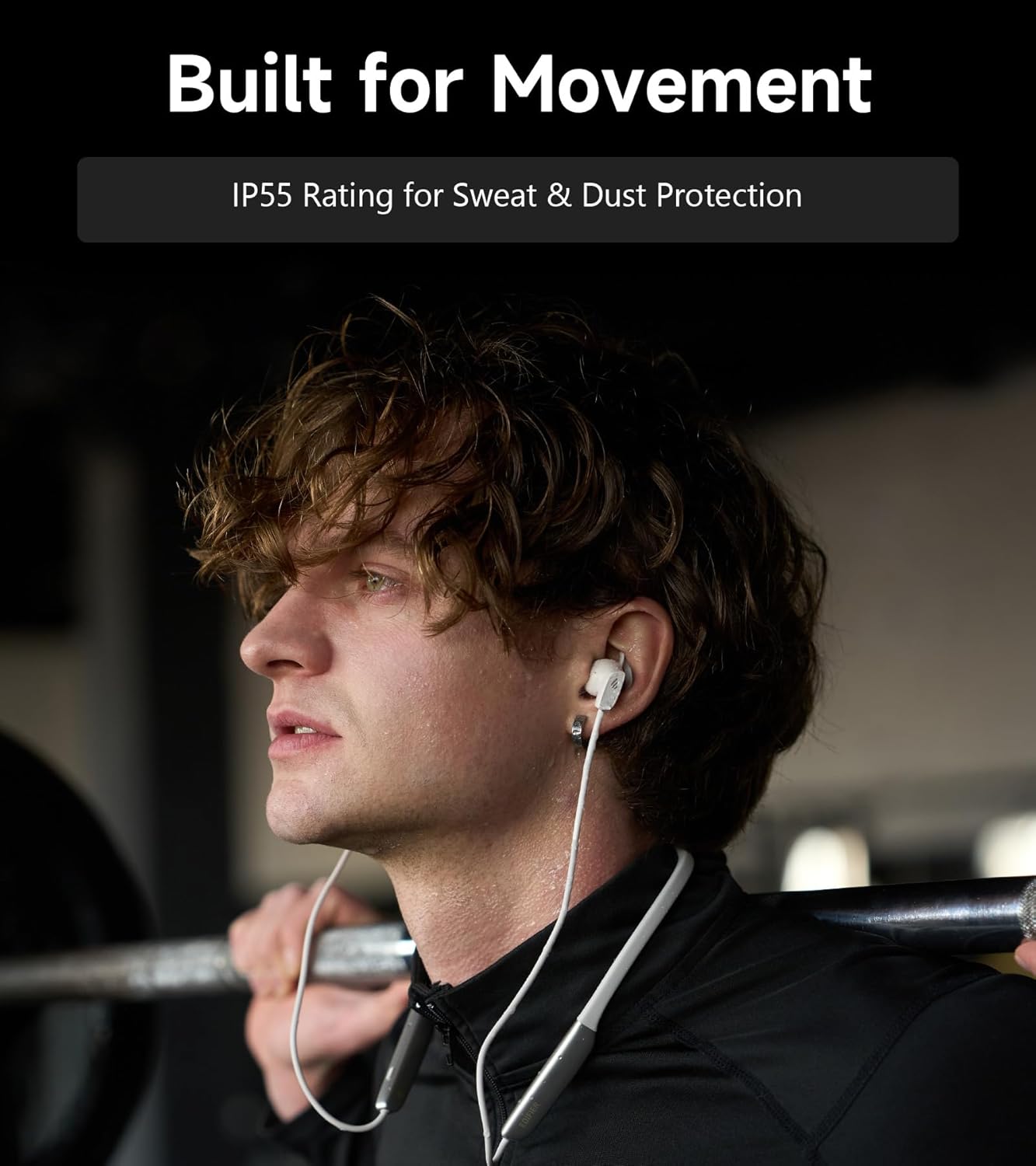
Image: A person wearing the headphones during a workout, illustrating the IP55 sweat and dust protection.
4.2 Зберігання
When not in use, store your headphones properly to prevent damage.
- The earbuds are magnetic, allowing them to snap together for tangle-free storage around your neck or in a bag.
- Зберігайте в прохолодному, сухому місці подалі від прямих сонячних променів і екстремальних температур.
4.3 Догляд за акумулятором
- Уникайте частого повного розряджання акумулятора.
- Регулярно заряджайте навушники, навіть якщо вони не використовуються протягом тривалого часу, щоб підтримувати справність акумулятора.
5. Вирішення проблем
If you encounter issues with your Edifier W280NB Pro headphones, refer to the following common problems and solutions.
| проблема | Можлива причина | Рішення |
|---|---|---|
| Навушники не вмикаються. | Низький заряд батареї. | Повністю зарядіть навушники. |
| Не вдається з’єднати пристрій. | Навушники не в режимі сполучення. Bluetooth disabled on device. Пристрій занадто далеко від навушників. | Ensure headphones are in pairing mode (flashing indicator). Увімкніть Bluetooth на своєму пристрої. Перемістіть пристрій ближче до навушників (до 10 метрів). Try resetting the headphones (refer to manual for specific reset procedure if available, or power cycle). |
| Немає звуку або гучність низька. | Занадто низька гучність у навушниках або на пристрої. Headphones not connected. На пристрої вибрано неправильний аудіовихід. | Increase volume on both headphones and device. Переконайтеся, що навушники успішно сполучено та підключено. Check your device's audio settings to ensure output is set to Edifier W280NB Pro. |
| Погана якість звуку. | Погане з’єднання Bluetooth. Неправильне прилягання вушних насадок. Якість джерела аудіо. | Підійдіть ближче до підключеного пристрою. Ensure ear tips provide a secure seal. Спробуйте інше джерело аудіо або file. |
| Активне шумозаглушення неефективне. | Неправильне прилягання вушних насадок. Incorrect ANC mode selected. Extreme noise conditions. | Ensure ear tips provide a secure seal. Cycle through ANC modes to select the most appropriate one. ANC works best for low-frequency, constant noise. |
| Мікрофон не працює під час дзвінків. | Headphones not selected as input device. Мікрофон на пристрої вимкнено. | Check your device's call settings to ensure Edifier W280NB Pro is selected for microphone input. Переконайтеся, що мікрофон на вашому пристрої не вимкнено. |
6. Технічні характеристики
Detailed technical specifications for the Edifier W280NB Pro Neckband Wireless Headphones.
| Особливість | Деталь |
|---|---|
| Бренд | Едифікатор |
| Назва моделі | W280NB Професійний |
| Колір | чорний |
| Розташування вуха | Вухо |
| Форм-фактор | Пов'язка на шию |
| Імпеданс | 24 Ом |
| Контроль шуму | Активне шумозаглушення |
| Діапазон частот | 20 Гц-40 КГц |
| Тип аудіо драйвера | Dynamic Driver (10mm with Titanium-Coated Diaphragm) |
| Технологія підключення | Бездротовий (Bluetooth) |
| Версія Bluetooth | 5.4 |
| Діапазон Bluetooth | 10 метрів (33 фути) |
| Battery Average Life (Playback) | 23 годин (ANC вимкнено), 14 годин (ANC увімкнено) |
| Час зарядки батареї | 1.5 години |
| Рівень водонепроникності | IP55 (Dust & Waterproof) |
| Сумісні пристрої | Смартфони, планшети, ноутбуки, розумні колонки |
| матеріал | Silicone (Enclosure) |
| UPC | 628430220005 |
7. Інформація про гарантію
The Edifier W280NB Pro Neckband Wireless Headphones come with a 1 роки гарантії від виробника.
This warranty covers defects in materials and workmanship under normal use. It does not cover damage caused by misuse, accidents, unauthorized modifications, or normal wear and tear. Please retain your proof of purchase for warranty claims.
8. Підтримка клієнтів
For further assistance, technical support, or warranty inquiries, please contact Edifier customer service.
- Webсайт: Відвідайте офіційний Edifier webсайт із поширеними запитаннями, ресурсами підтримки та контактною інформацією.
- Електронна пошта/Телефон: Refer to the Edifier website or your product packaging for specific contact details in your region.