1. Вступ
This manual provides detailed instructions for the safe and effective use of your Akozon Action Camera. Please read this manual thoroughly before operating the device and retain it for future reference. The Akozon Action Camera is designed for capturing high-quality video and photos in various active scenarios, featuring a compact, wearable design and a 1.47-inch HD display.
2. Вміст упаковки
Перевірте, чи всі перелічені нижче предмети входять до вашої упаковки. Якщо будь-які предмети відсутні або пошкоджені, зверніться до служби підтримки клієнтів.
- 1 x Akozon Action Camera
- 1 x зарядний футляр
- 1 x кардрідер
- 1 x Magnetic Chest Mount
- 1 x USB кабель для передачі даних
- 1 x Посібник користувача (цей документ)

This image displays the various components included with your Akozon Action Camera: the charging case, a card reader, a magnetic chest mount, and a USB data cable, alongside the camera itself.
3. Продукт закінчивсяview
The Akozon Action Camera is a compact and versatile device designed for capturing your adventures. It features a 1.47-inch HD color screen for real-time preview and playback, and supports 1080P video recording and 12MP photography.
3.1 Компоненти камери
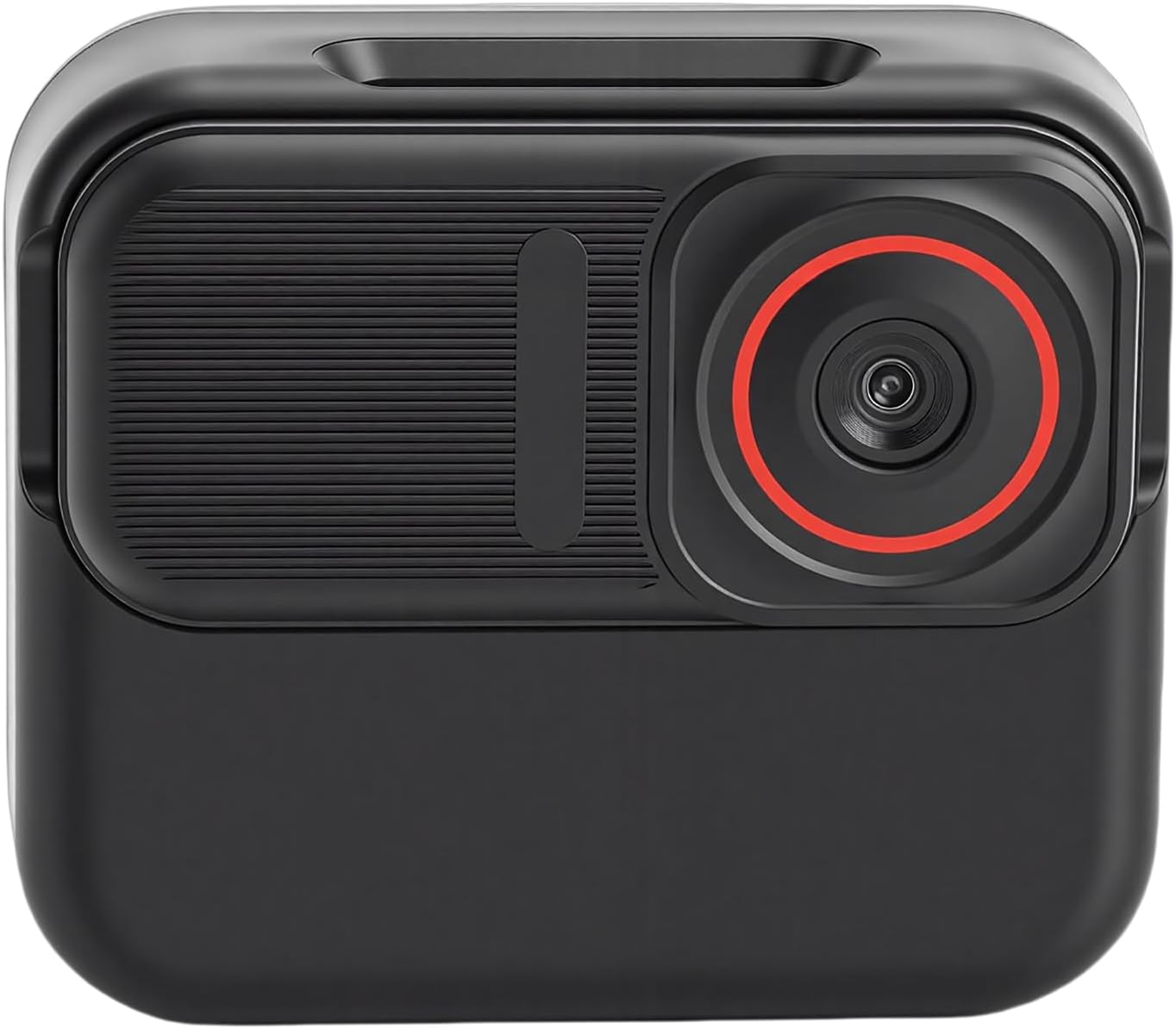
This image shows the front of the Akozon Action Camera, highlighting the camera lens with a red ring accent and the textured surface of the device.

This image presents the back of the camera, featuring its 1.47-inch HD color screen, which is used for live preview і навігація по меню.

This image illustrates a side view of the camera, showing the gold charging contacts and a portion of the display screen.
4. Налаштування
4.1 Charging the Camera and Charging Case
Before first use, fully charge both the action camera and its charging case.
- Connect the USB data cable to the charging case and a power source (e.g., USB wall adapter, computer USB port).
- Place the action camera into the charging case. Ensure the charging contacts align.
- The indicator lights on the charging case will show the charging status. A full charge typically takes approximately 2-3 hours.
The camera has a built-in 400mAh Li-Ion battery, and the charging case has a 1000mAh Li-Ion battery.
4.2 Вставлення карти пам'яті
The camera supports a memory card up to 128GB (not included). A high-speed (Class 10 or U3 recommended) microSD card is required for optimal performance.
- Знайдіть гніздо для карти пам’яті збоку камери.
- Gently insert the microSD card with the gold contacts facing down until it clicks into place.
- Щоб вийняти, злегка натисніть на карту, доки вона не вискочить.
4.3 Встановлення камери
The camera features a magnetic design for easy attachment to the included chest mount.
- Attach the magnetic chest mount to your clothing or desired surface. Ensure it is secure.
- Align the back of the action camera with the magnetic plate on the chest mount. The magnets will secure the camera in place.
- Adjust the camera angle as needed for your desired first-person perspective (POV) recording.
4.4 Увімкнення/вимкнення
- Щоб увімкнути: Press and hold the Power/Mode button (usually located on the top or side) for a few seconds until the screen illuminates.
- Щоб вимкнути: Знову натисніть і утримуйте кнопку живлення/режиму протягом кількох секунд, доки екран не вимкнеться.
5. Інструкція з експлуатації
5.1 Основна навігація
Use the Power/Mode button to cycle through different modes (Video, Photo, Playback, Settings). Use other buttons (if present) or the touchscreen (if applicable) to navigate menus and select options.
5.2 Запис відео
The camera supports 1920x1080P Full HD video recording.
- Ensure the camera is in Video Mode. If not, press the Power/Mode button until the video icon appears on the screen.
- Press the Shutter/Record button (usually a prominent button on the top or front) to start recording. A red indicator light will typically flash, and a timer will appear on the screen.
- Press the Shutter/Record button again to stop recording. The video file will be saved to the memory card.
5.3 Фотографування
Capture high-resolution 12MP photos.
- Switch to Photo Mode by pressing the Power/Mode button until the photo icon is displayed.
- Frame your shot using the 1.47-inch HD color screen.
- Press the Shutter/Record button to take a photo. The image will be saved to the memory card.
5.4 Цикловий запис
The camera supports loop recording, which automatically overwrites the oldest files when the memory card is full. This feature is useful for continuous recording without manual deletion of old footage. Check the camera settings to enable or disable this function and adjust loop duration if available.
5.5 Використання мобільного застосунку
For live video preview and management, download the dedicated mobile application (refer to the camera's on-screen instructions or packaging for app name and QR code). Connect your camera to your smartphone via Wi-Fi (if supported) to access features such as:
- Наживо в режимі реального часу view of the camera's feed.
- Remote control of recording and photo capture.
- Playback and download of recorded content to your smartphone.
- Accessing and modifying camera settings.
6. Технічне обслуговування
Proper maintenance ensures the longevity and optimal performance of your Akozon Action Camera.
- Прибирання: Use a soft, dry cloth to clean the camera body. For the lens and screen, use a specialized lens cleaning cloth and solution. Avoid abrasive materials or harsh chemicals.
- Зберігання: Зберігайте камеру в прохолодному, сухому місці, подалі від прямих сонячних променів та екстремальних температур. Вийміть карту пам’яті, якщо зберігатимете її протягом тривалого часу.
- Догляд за акумулятором: Щоб підтримувати справність акумулятора, уникайте частого повного розряджання. Якщо ви зберігаєте його протягом тривалого часу, заряджайте акумулятор приблизно до 50% кожні кілька місяців.
- Водонепроникність: The product description does not specify water resistance. Avoid exposing the camera to water or moisture unless explicitly stated otherwise by the manufacturer.
7. Вирішення проблем
Якщо у вас виникли проблеми з камерою, зверніться до наступних поширених проблем та способів їх вирішення:
| проблема | Можлива причина | Рішення |
|---|---|---|
| Камера не вмикається. | Низький заряд батареї; несправна батарея; несправність камери. | Charge the camera fully. Ensure the charging contacts are clean. If the issue persists, contact support. |
| Не вдається записувати відео/фотографувати. | Карта пам'яті переповнена; помилка карти пам'яті; неправильний режим. | Check memory card storage. Format the memory card (this will erase all data). Ensure the camera is in the correct mode. Try a different memory card. |
| Погана якість відео/фото. | Брудний об'єктив; погане освітлення; неправильні налаштування. | Clean the camera lens. Ensure adequate lighting. Check camera settings for resolution and exposure. |
| Камера зависає або перестає реагувати. | Збій програмного забезпечення; проблеми з картою пам'яті. | Perform a soft reset (press and hold power button for 10-15 seconds). Remove and reinsert the memory card. |
8. Технічні характеристики
Below are the technical specifications for the Akozon Action Camera (Model: Akozone4ciuk5sfn):
| Особливість | Деталь |
|---|---|
| Бренд | Акозон |
| Назва моделі | Akozone4ciuk5sfn |
| Роздільна здатність відео | 1080P, 720P (1920x1080P Full HD) |
| Фото пікселі | 12 МП |
| Розмір екрана | 1.47-дюймовий кольоровий HD-екран |
| Підтримка карт пам'яті | Up to 128GB (MicroSD, not included) |
| Акумулятор фотоапарата | 400mAh Li-Ion Battery (Built-in) |
| Акумулятор зарядного пристрою | 1000mAh Li-Ion Battery (Built-in) |
| Формат захоплення відео | AVI |
| Максимальна роздільна здатність дисплея | 1280 x 1024 пікселів |
9. Гарантія та підтримка
Гарантія: This product comes with a manufacturer warranty for 90 days from the date of purchase. This warranty covers manufacturing defects and workmanship. It does not cover damage caused by misuse, accidents, unauthorized modifications, or normal wear and tear.
Підтримка клієнтів: If you have any questions, encounter issues not covered in this manual, or require warranty service, please contact Akozon customer support through the retailer where the product was purchased or visit the official Akozon webсайт для контактної інформації.
Please have your product model number (Akozone4ciuk5sfn) and proof of purchase ready when contacting support.