
1. Вступ
This manual provides essential information for the safe and effective operation of your elecci YL059 GPS Drone. Please read this manual thoroughly before operating the drone to ensure proper usage and to prevent damage or injury. The YL059 drone is designed for aerial photography and recreational flight, featuring GPS-assisted flight capabilities, obstacle avoidance, and a screen remote controller for an enhanced user experience.
2. Вміст упаковки
Перевірте, чи всі перелічені нижче предмети присутні у вашій упаковці:
- 1 × elecci YL059 Drone
- 1 × Screen Remote Controller
- 2 × Batteries
- 1 × Зарядний пристрій
- 4 × Propellers (plus spares)
- 1 × Посібник користувача
- 1 × Handbag
- 1 × SD Card
3. Продукт закінчивсяview
The elecci YL059 GPS Drone integrates advanced features for stable and intelligent flight. Key components include a brushless motor system for efficient power, an adjustable lens camera for versatile aerial shots, and a screen remote for direct FPV viewінж.
Ключові характеристики:
- GPS Auto-Return: Automatically returns to the takeoff point on low battery, signal loss, or user command.
- Advanced Obstacle Avoidance: Real-time detection to navigate complex environments safely.
- Screen Remote & FPV Transmission: Integrated screen on the remote controller for direct first-person view фуtage.
- Безщіткові двигуни: Provides smooth, quiet, and long-lasting flight performance.
- Регульована лінза: Electronic lens allows for dynamic angle adjustments during flight.
- Збільшений час польоту: Includes two high-capacity batteries for prolonged operation.
- One-Key Airdrop: Functionality for dropping small items.
Visual Overview:

Image: The elecci YL059 GPS Drone in its folded state alongside its screen remote controller, highlighting its compact design and integrated display.

Image: The elecci YL059 GPS Drone and its screen remote controller displayed on a dark surface, showcasing the product's aesthetic.
Демонстраційне відео продукту:
Video: An official demonstration of the elecci YL059 GPS Drone, showcasing its folding design, obstacle avoidance, camera capabilities, screen remote control, GPS positioning, image transmission, airdrop function, and intelligent flight modes.
4. Збірка та налаштування
4.1 Заряджання акумулятора
- Підключіть зарядний пристрій до джерела живлення.
- Insert the drone battery into the charger.
- Allow the battery to charge fully. The indicator light on the charger will change when charging is complete.
4.2 Встановлення пропелера
- Identify the correct propellers (marked A or B) for each motor arm.
- Attach the propellers firmly to the corresponding motor shafts. Ensure they are securely fastened to prevent detachment during flight.
4.3 Налаштування пульта дистанційного керування
- Ensure the remote controller is charged.
- Увімкніть пульт дистанційного керування.
- Увімкніть дрон.
- Follow the on-screen prompts on the remote controller to pair it with the drone.
5. Підготовка до польоту
5.1 Передпольотний контрольний список
- Переконайтеся, що батареї дрона та пульта дистанційного керування повністю заряджені.
- Переконайтеся, що пропелери правильно встановлені та не мають пошкоджень.
- Check that the camera lens is clean.
- Ensure the SD card is inserted if recording is desired.
- Оберіть відкриту, чисту зону для польоту, подалі від перешкод, людей та обмеженого повітряного простору.
- Calibrate the drone's compass and gyroscope as instructed by the remote controller or drone's voice prompts.
6. Основна операція
6.1 Зліт та посадка
- Покладіть дрон на рівну рівну поверхню.
- Ensure GPS signal is acquired (indicated on the remote controller screen).
- Press the One-Key Takeoff button on the remote controller, or manually initiate takeoff using the control sticks.
- To land, press the One-Key Landing button, or manually descend the drone to a safe landing spot.
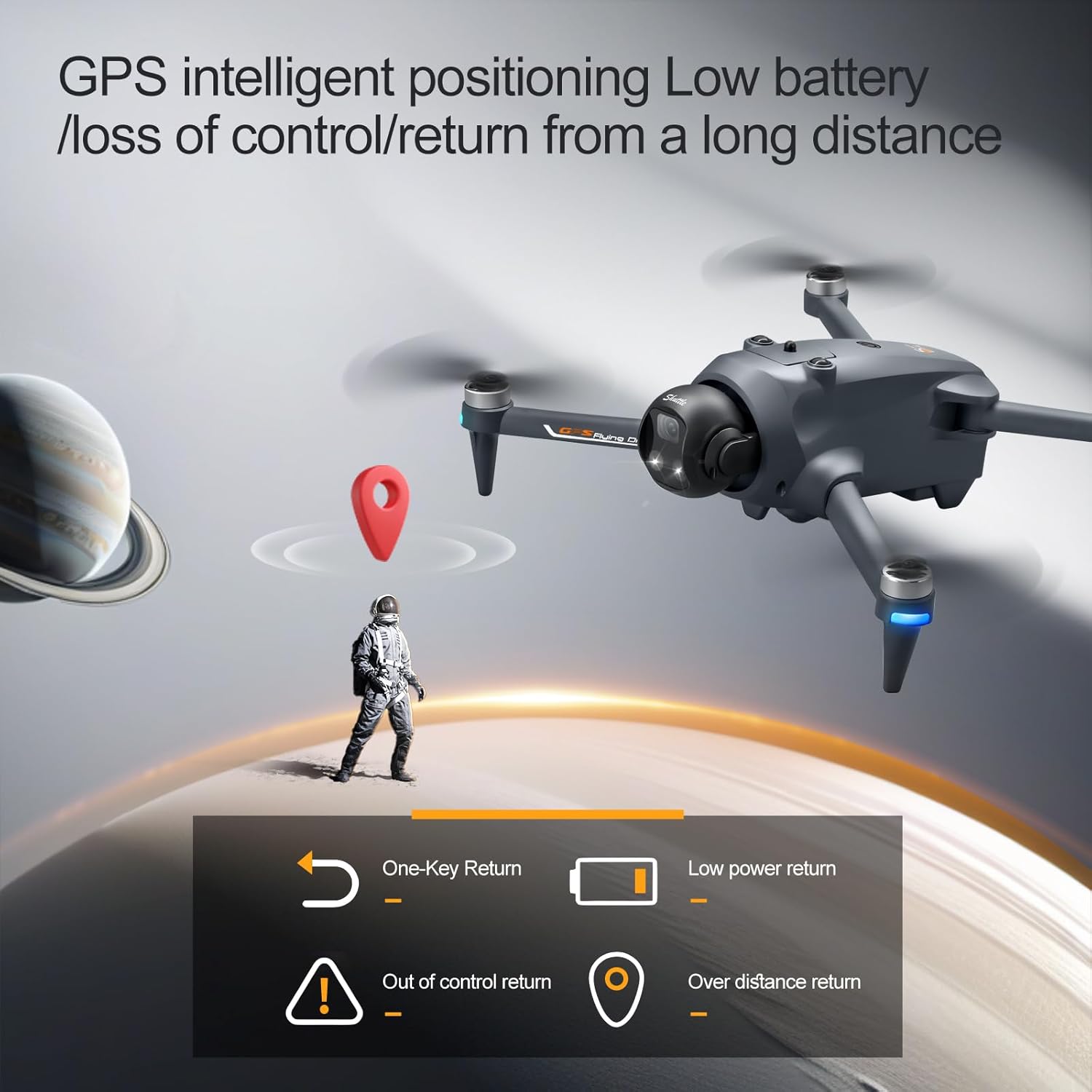
Image: The elecci YL059 GPS Drone in flight, illustrating its GPS intelligent positioning for stable hovering and return functions.
6.2 Керування польотом
Use the joysticks on the remote controller to control the drone's movement:
- Лівий джойстик: Керує висотою (вгору/вниз) та обертанням (рискання вліво/вправо).
- Правий джойстик: Керує рухом вперед/назад та вліво/вправо.
Refer to the remote controller diagram in the quick start guide for specific button functions.
7. Розширені функції
7.1 GPS Auto-Return
The drone features an automatic return-to-home function. This can be activated manually via the remote controller, or it will engage automatically under conditions such as low battery or loss of signal. Ensure a clear path for the drone's return.
7.2 Уникнення перешкод
The YL059 drone is equipped with sensors for real-time obstacle detection. When active, the drone will attempt to avoid obstacles in its flight path, enhancing safety, especially in environments like forests or urban areas.

Image: The elecci YL059 GPS Drone showcasing its lift-type obstacle avoidance module, designed for sensitive perception and automatic evasion.
7.3 One-Key Airdrop
This feature allows the drone to carry and release small payloads. To use, attach the item securely to the drone's designated airdrop mechanism. Activate the airdrop function via the remote controller when the drone is in the desired position.

Image: The elecci YL059 GPS Drone demonstrating its one-click airdrop capability, with a small item being released from the drone.
7.4 Робота камери (фото/відео)
The drone's camera can capture 4K video and high-resolution photos. Use the dedicated buttons on the remote controller to switch between photo and video modes and to initiate recording or capture images. The electronic lens can be adjusted for optimal framing.
7.5 Інтелектуальне відстеження
When activated, the drone can automatically follow a designated subject, maintaining a set distance and altitude. This feature is ideal for capturing dynamic footagрухомих об'єктів.
7.6 GPS Surround Mode
In this mode, the drone will orbit a specified point of interest, capturing a 360-degree view. Set the center point and radius using the remote controller.
8. Технічне обслуговування
- Прибирання: Regularly wipe the drone and remote controller with a soft, dry cloth. Do not use harsh chemicals or solvents.
- Вібратори: Inspect propellers for cracks or damage before each flight. Replace damaged propellers immediately.
- Акумулятори: Зберігайте акумулятори в прохолодному, сухому місці. Не перезаряджайте та не перерозряджайте.
- Зберігання: When not in use, store the drone and its components in the provided handbag or a protective case, away from direct sunlight and extreme temperatures.
9. Вирішення проблем
| проблема | Можлива причина | Рішення |
|---|---|---|
| Дрон не вмикається | Низький рівень заряду батареї; батарея неправильно вставлена | Зарядіть акумулятор; надійно вставте акумулятор назад |
| Пульт дистанційного керування не підключається | Не сполучено; Поза зоною дії; Перешкоди | Re-pair controller; Move closer to drone; Avoid areas with strong interference |
| Нестабільний політ/Дрейф | Improper calibration; Wind; Damaged propellers | Recalibrate gyroscope/compass; Fly in calm conditions; Replace damaged propellers |
| Погана якість зображення/відео | Dirty lens; SD card issue; Low light | Clean lens; Check/replace SD card; Use camera fill light in low light conditions |
| Втрата сигналу GPS | Flying indoors; Obstructions; Magnetic interference | Fly outdoors in open areas; Avoid tall buildings/metal structures |
10. Технічні характеристики
| Особливість | Деталь |
|---|---|
| Бренд | elecci |
| Назва моделі | YL059 |
| Роздільна здатність захоплення відео | 4K |
| Технологія підключення | Bluetooth, WiFi |
| Вага товару | 0.4 фунта |
| Склад батареї | Літій-іонний |
| Технологія оптичного датчика | Optical Flow, CMOS |
| Розміри предмета (Д x Ш x В) | 9.05 см (Д) x 4.55 см (Ш) x 7.08 см (В) |
| Особливості | 360 Degree Flip, Auto Follow, One Button Return, One Key Rotation, Obstacle Avoidance |
11. Правила безпеки
Adhere to the following safety guidelines to ensure a safe flight experience:
- Завжди використовуйте дрон на відкритих майданчиках, подалі від людей, тварин, будівель та ліній електропередач.
- Maintain a visual line of sight with the drone at all times.
- Do not fly the drone in strong winds, rain, or other adverse weather conditions.
- Respect local regulations and airspace restrictions. Check with local authorities for any drone flight restrictions.
- Перед польотом переконайтеся, що всі пропелери надійно закріплені.
- Тримайте руки та обличчя подалі від обертових пропелерів.
- Do not operate the drone under the influence of alcohol or drugs.
- Виконуйте передпольотні перевірки перед кожним польотом.
12. Гарантія та підтримка
For warranty information, technical support, or service inquiries, please refer to the contact details provided on the product packaging or the official elecci webсайт. Зберігайте чек про покупку як підтвердження покупки для гарантійних претензій.