
вступ
Дякуємо за покупкуasing the Ewin Wireless Foldable Bluetooth Keyboard. This compact and versatile keyboard is designed for enhanced productivity across multiple devices, featuring a JIS Japanese layout, an integrated touchpad, and multi-device pairing capabilities. This manual will guide you through its setup, operation, and maintenance to ensure optimal performance.
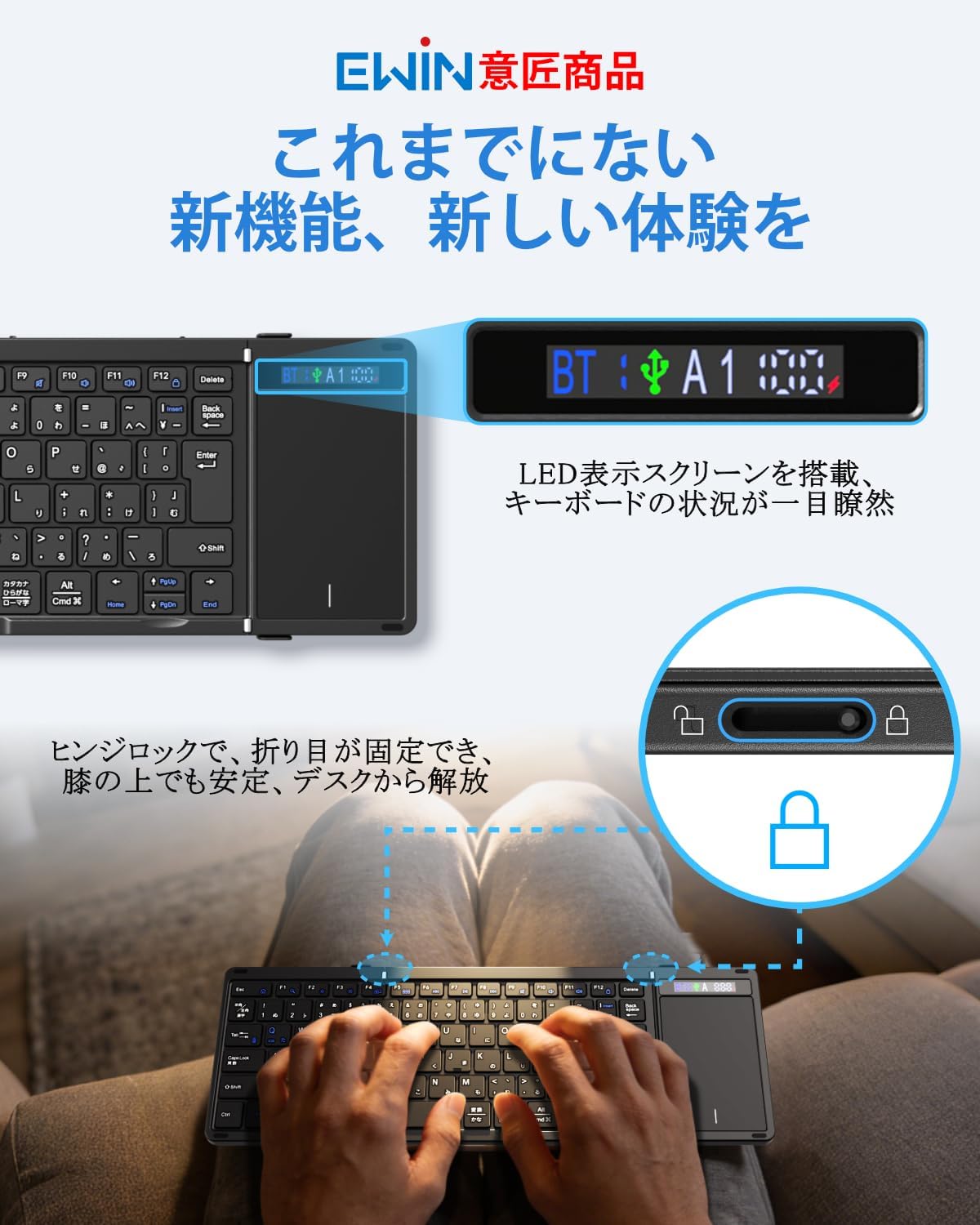
Image: The Ewin Wireless Foldable Bluetooth Keyboard, showcasing its compact, folded form and its full-size, unfolded layout with an integrated touchpad.
1. Налаштування
1.1 Вміст упаковки
Переконайтеся, що всі предмети присутні в упаковці:
- Ewin Wireless Foldable Bluetooth Keyboard
- Зарядний кабель USB-C
- Інструкція з експлуатації

Image: The Ewin keyboard, USB-C cable, and instruction manual as typically found in the product package.
1.2 Заряджання клавіатури
Before first use, fully charge the keyboard. Connect the supplied USB-C cable to the keyboard's charging port and the other end to a USB power source (e.g., computer, USB wall adapter). The display screen will indicate charging status.

Image: A close-up of the keyboard's USB-C port with a charging cable connected, illustrating the charging process.
1.3 Увімкнення/вимкнення
Unfold the keyboard to automatically power it on. Fold the keyboard to power it off and protect the keys. The hinge lock mechanism ensures stability when unfolded.

Image: The Ewin keyboard in its unfolded state, highlighting the display screen for connection and battery status, and a detail of the hinge lock for stable typing.
1.4 Створення пари Bluetooth
The keyboard supports multi-device pairing (up to 3 devices via Bluetooth). To pair:
- Розгорніть клавіатуру, щоб увімкнути її.
- Прес fn + A (for Device 1), Fn + S (for Device 2), or Fn + D (for Device 3) to select a pairing channel. The corresponding indicator on the display screen will flash.
- On your device (smartphone, tablet, PC), enable Bluetooth and search for "Ewin Keyboard".
- Select "Ewin Keyboard" from the list of available devices to connect. The indicator on the keyboard's display will stop flashing once connected.
- Щоб перемикатися між сполученими пристроями, натисніть Fn + A/S/D для потрібного пристрою.

Image: The Ewin keyboard demonstrating multi-device pairing with a tablet, smartphone, and laptop, showing seamless switching capability.

Image: A diagram illustrating how to switch between three paired Bluetooth devices using Fn+A, Fn+S, and Fn+D keys.
1.5 Дротове підключення
The keyboard also supports a wired connection. Connect the USB-C cable from the keyboard to your computer's USB port. This allows for typing while charging.
Image: The Ewin keyboard connected to a desktop computer via a USB-C cable, demonstrating wired usage.
1.6 Перемикання операційної системи
To optimize key functions for your operating system, press the following combinations:
- Fn + Q for iOS/iPadOS
- Fn + W для Windows
- Fn + E для Android
- Fn + R для macOS
2. Робота з клавіатурою
2.1 Розкладка клавіатури та функціональні клавіші
The keyboard features a JIS standard Japanese layout with a large inverted L-shaped Enter key and symmetrical Shift keys for comfortable typing. It includes 13 dedicated function keys for various shortcuts.

Зображення: Детальний view of the Ewin keyboard's JIS Japanese layout, showing the placement of the large Enter key, symmetrical Shift keys, and 13 function keys. The scissor-switch mechanism is also illustrated.
The keys utilize a scissor-switch mechanism, similar to laptop keyboards, providing a responsive and quiet typing experience with a 19mm key pitch.
2.2 Робота з сенсорною панеллю
The integrated high-precision touchpad supports multi-touch gestures, eliminating the need for an external mouse. Refer to the following gestures:
- Дотик одним пальцем: Лівий клік
- One-finger slide: Рух курсору
- Two-finger slide (up/down): Прокрутка
- Two-finger slide (left/right): Горизонтальна прокрутка
- Розтиснути/звести: Zoom (OS dependent)

Image: The keyboard's touchpad with visual guides for common gestures: single-finger tap for left-click, single-finger slide for cursor movement, two-finger vertical slide for scrolling, and two-finger horizontal slide for side-to-side navigation.
To temporarily disable the touchpad and prevent accidental input, press Fn + пробіл. Press again to re-enable.
2.3 Екран дисплея
The integrated display screen provides real-time information on the keyboard's status, including:
- Bluetooth connection status (BT)
- Active device channel (A1, A2, A3)
- Індикатор рівня заряду батареї
This allows for quick confirmation of your connection and power status.
3. Технічне обслуговування
3.1 Очищення
Щоб очистити клавіатуру, обережно протріть поверхню м’якою сухою тканиною. Для видалення стійкого бруду злегкаamp можна використовувати тканину, після чого негайно висушити. Уникайте використання агресивних хімікатів або абразивних матеріалів.
The back of the keyboard is equipped with high-grade PU leather, which is dirt-resistant and protects against scratches and slips.

Image: The reverse side of the Ewin keyboard, highlighting its premium PU leather finish designed for durability and protection against dirt and scratches.
3.2 Догляд за акумулятором
The keyboard has a built-in 500mAh large-capacity battery, providing up to 70 hours of continuous use. It supports Type-C fast charging.
- Щоб перевірити рівень заряду батареї, натисніть Fn + Tab. The display screen will show the current battery status.
- The keyboard features an automatic sleep function. If inactive for 20 minutes, it will enter sleep mode to conserve power. Press any key to wake it up.
Image: An illustration detailing the keyboard's 500mAh battery, 70-hour continuous use, Type-C charging, and the Fn+Tab shortcut to check battery status, along with the 20-minute auto-sleep function.
4. Вирішення проблем
| проблема | Можлива причина | Рішення |
|---|---|---|
| Клавіатура не вмикається. | Low battery or not unfolded correctly. | Charge the keyboard fully. Ensure the keyboard is fully unfolded. |
| Не вдається підключитися через Bluetooth. | Keyboard not in pairing mode, device Bluetooth off, or interference. | Ensure keyboard is in pairing mode (indicator flashing). Check device Bluetooth settings. Move closer to the device. Try re-pairing. |
| Клавіші не реагують або натискаються неправильно. | Incorrect OS mode selected or temporary software glitch. | Switch to the correct OS mode (Fn + Q/W/E/R). Restart the keyboard and device. |
| Сенсорна панель не працює. | Touchpad disabled or OS incompatibility. | Прес Fn + пробіл to enable the touchpad. Some advanced gestures may be OS-dependent. |
| Keyboard frequently disconnects. | Low battery, too far from device, or interference. | Charge the keyboard. Ensure it is within 10 meters of the device. Minimize interference from other wireless devices. |
5. Технічні характеристики
| Особливість | Деталь |
|---|---|
| Бренд | Ewin |
| Номер моделі | EW-TKB304 |
| Технологія підключення | Bluetooth 5.2, USB-C (дротовий) |
| Опис клавіатури | Foldable, Bluetooth & Wired, Display Screen, Hinge Lock, JIS Japanese Layout, Multi-pairing, Touchpad, Compact, Lightweight, Silent |
| Сумісні пристрої | Smartphones, Tablets, Laptops, PCs (iOS, Windows, Android, macOS) |
| Особливості | Trackpad, Rechargeable, Foldable, Lightweight, Silent |
| Колір | чорний |
| Стиль | Foldable, Compact, Thin, Lightweight, Portable |
| Розміри продукту (Д x Ш x В) | 34.3 x 11.9 x 1 см (у розгорнутому вигляді) |
| матеріал | ABS (Exterior), Polycarbonate (Keyplate) |
| Кількість клавіш | 90 |
| Розкладка клавіатури | QWERTY (JIS Japanese) |
| Тип перемикача | Ножиці-перемикач |
| Ємність акумулятора | 500 мАг |
| Час безперервного використання | До 70 годин |
| вага | 314 грами |
6. Гарантія та підтримка
6.1 Інформація про гарантію
На цей продукт надається гарантія виробника терміном 1 рік з дати покупки. Будь ласка, збережіть чек про покупку для пред'явлення претензій за гарантією. Гарантія поширюється на дефекти матеріалів та виготовлення за умов нормального використання.
6.2 Підтримка клієнтів
For any questions, technical assistance, or warranty inquiries, please contact Ewin customer support through the retailer where you purchased the product or refer to the contact information provided on the official Ewin webсайт.