
1. Вступ
The VENTION Wireless HDMI Extender Kit provides a reliable solution for transmitting HDMI signals wirelessly over long distances. This kit includes one transmitter (TX) and two receivers (RX), designed for plug-and-play operation with an upgraded LED display for real-time status monitoring. It supports 4K decoding with 1080p@60fps output, making it suitable for various applications from home entertainment to professional presentations.
The system features advanced heat control for stable performance and supports multi-display expansion, allowing a single transmitter to connect with up to six receivers (additional receivers sold separately). Its wide compatibility ensures seamless connection with most HDMI-enabled devices.
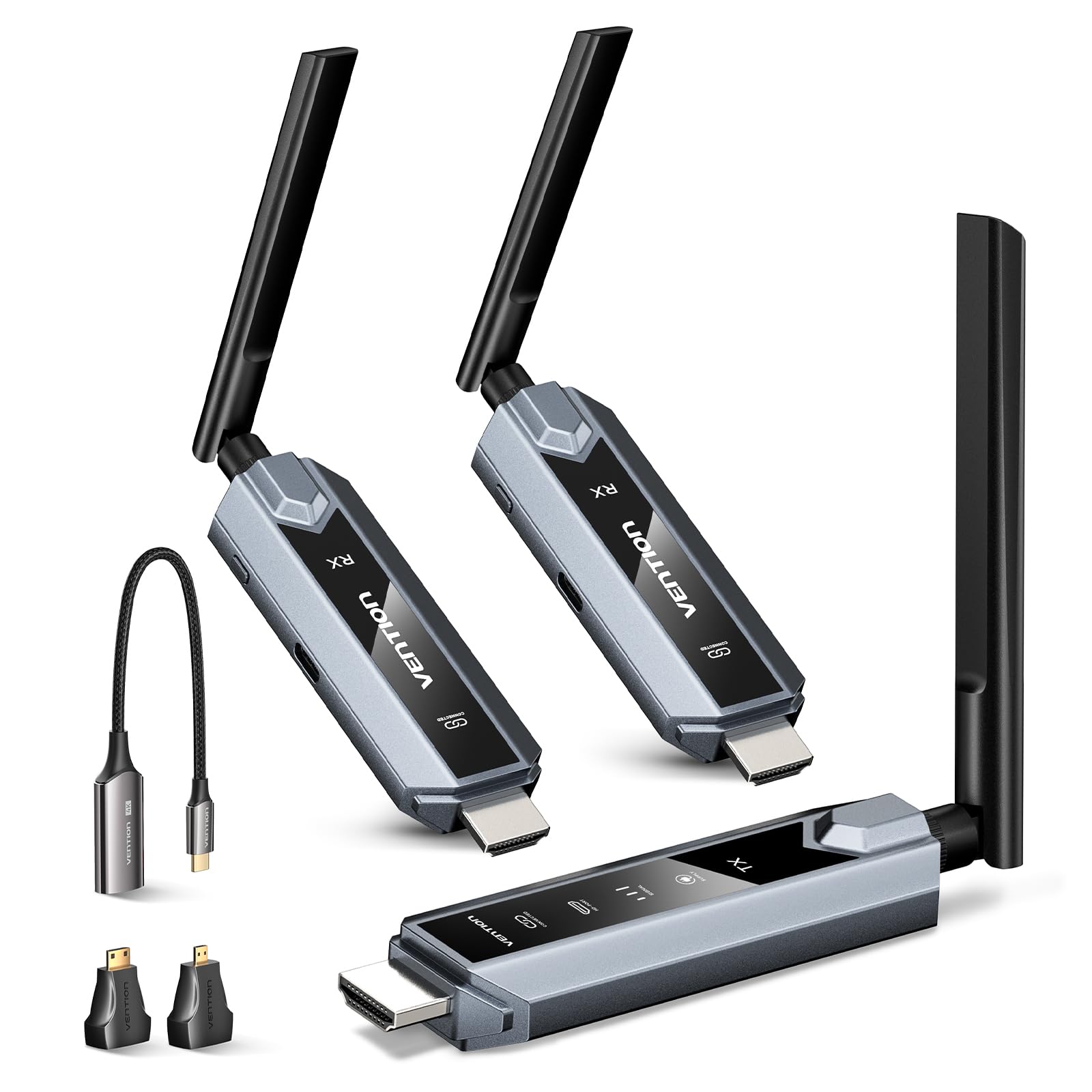
Зображення 1.1: закінченоview of the VENTION Wireless HDMI Extender Kit (1TX+2RX).
2. Вміст упаковки
Будь ласка, перевірте наявність усіх предметів у вашій упаковці:
- 1 x Бездротовий передавач HDMI (TX)
- 2 x Бездротовий HDMI-приймач (RX)
- 2 x HDMI Extension Cable (0.2m)
- 3 x USB-C Power Cord (1m)
- 1 x адаптер USB-C на HDMI
- 1 x адаптер Micro HDMI на HDMI
- 1 x адаптер Mini HDMI-HDMI
- 1 x Посібник користувача (цей документ)

Image 2.1: Visual representation of all items included in the VENTION Wireless HDMI Extender Kit.
3. Особливості продукту
- Бездротова передача: Extends HDMI signals up to 656 feet (200 meters) in an open area, or up to 393 feet (120 meters) with one transmitter and two receivers. Transmission distance may be affected by obstacles like walls.
- Підтримка кількох дисплеїв: One transmitter can connect to up to six receivers simultaneously for multi-screen viewing (additional receivers sold separately).
- 4K Decoding, 1080P Output: Supports 4K video decoding and outputs at 1080p@60fps for clear, high-definition visuals.
- Світлодіодний дисплей: Real-time LED indicators show connection status, signal strength, output status, and power, simplifying setup and troubleshooting.
- Контроль тепла: Advanced thermal design with smart temperature control and strategic heat vents ensures cool operation during extended use.
- Plug & Play: Для негайного використання не потрібна установка драйверів чи програмного забезпечення.
- Широка сумісність: Compatible with 99.99% of HDMI devices, including laptops, PCs, TV boxes, projectors, monitors, cameras, and more. Includes USB-C, Micro HDMI, and Mini HDMI adapters.
- ZeroDrop Technology: Designed for lag-free operation and stable streaming.
- MIMO & LDS Technology: Enhances signal reception for superior performance.

Image 3.1: The LED display provides real-time status for connection, signal, output, and power.

Image 3.2: Illustration of the ultra-long distance transmission range of the wireless HDMI extender.

Image 3.3: Diagram showing transmission distances with multiple receivers (1TX to 1RX, 2RX, 3RX, 4RX).
4. Інструкції з налаштування
Follow these steps to set up your VENTION Wireless HDMI Extender Kit:
- Power the Units: Connect the USB-C power cords to both the transmitter (TX) and receiver (RX) units. Plug the other end of the USB-C power cords into a 5V/2A power adapter (not included) or a USB port that provides sufficient power. The power indicator light on each unit will illuminate.
- Підключення приймача (RX): Connect the receiver unit to your display device (monitor, TV, projector) using an HDMI cable. If needed, use the provided HDMI extension cable.
- Підключення передавача (TX): Connect the transmitter unit to your source device (laptop, PC, TV box, camera) via its HDMI output. Use the appropriate adapter (USB-C to HDMI, Micro HDMI to HDMI, Mini HDMI to HDMI) if your source device requires it.
- Автоматичне підключення: Wait approximately 5 seconds. The transmitter and receiver should automatically pair. The indicator light on both units will turn on, confirming a successful connection.
Важлива примітка: Both the transmitter and receiver must be connected to a power source using cables. Ensure a stable power supply that meets the minimum requirement of 5V/2A for each unit. If the power indicator is red, it indicates insufficient power; please use a stronger 5V/2A power adapter.

Image 4.1: Visual guide for connecting the transmitter and receiver units.
4.1 Re-pairing Steps
If the connection does not complete automatically or is lost, you may need to re-pair the units:
- Receiver Pairing Mode: Hold the receiver's function key for more than 5 seconds. The receiver will enter pairing mode, indicated by an interface prompt "Pairing Timeout: 80s".
- Сполучення передавача: Hold the transmitter's function key for more than 5 seconds. The transmitter will automatically pair with the receiver. A device connection confirmation will be displayed.
Image 4.2: Instructions for re-pairing the transmitter and receiver units.
5. Інструкція з експлуатації
5.1 Основна операція
Once the transmitter and receiver are successfully paired and connected, the video and audio from your source device will be wirelessly transmitted to your display. No further configuration is typically required for basic mirroring.
5.2 Multi-Display Expansion
To use multiple receivers with a single transmitter (up to 6 receivers supported), simply connect each additional receiver to its respective display and power it on. The transmitter will automatically detect and connect to available paired receivers. This allows for simultaneous streaming to multiple screens.

Зображення 5.1: Наприкладample of multi-screen streaming with one transmitter and multiple receivers.
5.3 Mirror and Extend Modes
The VENTION Wireless HDMI Extender supports both mirror and extend modes, depending on your source device's capabilities and operating system settings. You can configure these modes through your computer's display settings.
- Дзеркальний режим: Duplicates your source device's screen onto the connected display(s).
- Розширений режим: Extends your desktop across the connected display(s), providing more screen real estate.
Примітка: Ensure your computer supports extended mode if you wish to use this feature.

Image 5.2: Illustration of mirror mode and extend mode functionality.
5.4 Сумісність
The kit is designed for broad compatibility with various devices and operating systems. It includes adapters for different HDMI interfaces to ensure connectivity with a wide range of equipment.

Image 5.3: Diagram showing compatible transmitter and receiver devices.

Зображення 5.4: Наприкладamples of different HDMI interfaces and adapters for connectivity.
5.5 Сценарії використання
This wireless HDMI extender is suitable for a variety of environments:
- Business Meetings and Presentations
- Home Entertainment (e.g., streaming movies, sports)
- Educational Settings (e.g., teaching presentations)
- Gaming Entertainment
- Live Streaming setups

Зображення 5.5: Візуальний прикладamples of the wireless HDMI extender in various settings.
6. Вирішення проблем
If you encounter issues with your VENTION Wireless HDMI Extender Kit, please refer to the following common problems and solutions:
- Проблеми з сигналом/з'єднанням:
- Ensure both the transmitter (TX) and receiver (RX) are properly powered with a 5V/2A power source. Check if the power indicator is red, indicating insufficient power.
- Verify that all HDMI cables are securely connected to both the source and display devices.
- Perform the re-pairing steps as described in Section 4.1.
- Reduce the distance between the TX and RX units, or remove any large obstacles (thick walls, metal objects) that may interfere with the wireless signal.
- Image Quality Issues (Lag, Stuttering):
- Ensure the TX and RX units are within the recommended transmission range.
- Мінімізуйте бездротові перешкоди від інших пристроїв, що працюють на частоті 5 ГГц.
- Check the source device's output resolution and refresh rate. While the system decodes 4K, the output is 1080p@60Hz.
- Без звуку:
- Verify audio settings on both your source device and display device.
- Переконайтеся, що кабель HDMI підтримує передачу аудіо.
- Smartphone/Tablet Compatibility:
- When using with smartphones or tablets, confirm that the device supports HDMI output (e.g., via USB-C Alt Mode). Normal functionality cannot be guaranteed if the device does not support HDMI output.
If issues persist after following these steps, please contact VENTION customer support for further assistance.
7. Технічні характеристики
| Особливість | опис |
|---|---|
| Бренд | ВЕНЦІЯ |
| Назва моделі | TZ-ADP |
| Технологія підключення | HDMI |
| Тип роз'єму | HDMI |
| роздільна здатність | 4K (decoding), 1080p@60Hz (output) |
| Діапазон передачі | Up to 656ft/200m (open area), 393ft/120m (1TX to 2RX) |
| Джерело живлення | 5 В/2 А (через USB-C) |
| Особливості | Real-Time LED Indicators, MIMO & LDS Tech, Multi-Screens (Up to 6 RXs), Heat-Control, ZeroDrop, No Delay |
| Сумісні пристрої | Cable boxes, Blu-ray players, DVD, laptops, PCs, MacBooks, streaming devices, DSLR cameras, camcorders, set-top boxes, soundbars, TVs, projectors, monitors |
8. Технічне обслуговування
To ensure the longevity and optimal performance of your VENTION Wireless HDMI Extender Kit, follow these maintenance guidelines:
- Прибирання: Use a soft, dry cloth to clean the units. Avoid using liquid cleaners or aerosols.
- Зберігання: Зберігайте пристрої в прохолодному, сухому місці, подалі від прямих сонячних променів та екстремальних температур.
- Обробка: Handle the units with care. Avoid dropping them or subjecting them to strong impacts.
- Джерело живлення: Always use a stable 5V/2A power supply for each unit to prevent damage and ensure proper operation.
9. Гарантія та підтримка
The VENTION Wireless HDMI Extender Kit comes with a Гарантія від виробника 1 рік. VENTION also provides a Гарантія на заміну 24 місяців for complete peace of mind.
For technical support, warranty claims, or any questions regarding your product, please contact VENTION Official Store customer service through your purchase platform.
10. Важливі примітки та інформація з безпеки
- Both the transmitter and receiver must be connected to a power source using cables.
- When used with smartphones or tablets, please verify that the device supports HDMI output; otherwise, normal functionality cannot be guaranteed.
- Transmission distance and speed may be affected when signals pass through walls or other obstacles. For optimal performance, minimize obstructions between the transmitter and receiver.
- Ensure a stable power supply that meets the minimum requirement of 5V/2A for each unit.
- Не розбирайте та не намагайтеся ремонтувати пристрій самостійно. Це призведе до анулювання гарантії.
- Тримайте пристрій подалі від води, вогню та високих температур.
11. Відео про продукт
Перегляньте офіційне відео продукту для ознайомленняview of the VENTION Wireless HDMI Transmitter and Receivers:
Video 11.1: Official product video demonstrating the VENTION Wireless HDMI Transmitter and Receivers.