
1. Вступ
Дякуємо за покупкуasing the Sharp PS-916 Bluetooth Party Speaker System. This system includes two identical portable Bluetooth speakers designed to deliver powerful audio with versatile connectivity options. Please read this manual carefully before using the product to ensure proper operation and to maximize your listening experience.
Вміст упаковки:
- 2 x Sharp PS-916 Party Speakers
- 1 x кабель для зарядки
- 1 x Пульт дистанційного керування
- 1 х посібник користувача

Image: The Sharp PS-916 system includes two speakers for a complete stereo experience.
2. Налаштування
2.1 Charging the Speakers
The PS-916 speakers are equipped with rechargeable batteries, providing up to 12 hours of playback. Before initial use, fully charge both speakers.
- Connect the charging cable to the DC IN port on the rear of each speaker.
- Plug the other end of the charging cable into a suitable power adapter (not included) or USB power source.
- The charging indicator light will illuminate. It will change color or turn off once charging is complete.
2.2 Увімкнення/вимкнення
To power on or off each speaker, press and hold the ON/STAND BY INPUT кнопку, розташовану на панелі керування.
2.3 Сполучення Bluetooth (один динамік)
- Ensure the speaker is powered on and in Bluetooth mode. The Bluetooth indicator will flash, indicating it is ready for pairing.
- На мобільному пристрої ввімкніть Bluetooth і знайдіть доступні пристрої.
- Select "Sharp PS-916" from the list of devices.
- Після підключення індикатор Bluetooth перестане блимати та світитиметься постійно.
2.4 Сполучення True Wireless Stereo (TWS) (два динаміки)
TWS allows you to connect two PS-916 speakers wirelessly for a stereo sound experience.
- Power on both PS-916 speakers.
- Ensure neither speaker is currently connected to a Bluetooth device.
- На одному з динаміків (це буде основний динамік) натисніть кнопку TWS button. The speaker will enter TWS pairing mode.
- The primary speaker will automatically search for the secondary speaker. Once connected, you will hear an audible confirmation, and the TWS indicator lights on both speakers will illuminate.
- Тепер підключіть свій мобільний пристрій до основного динаміка через Bluetooth, як описано в розділі 2.3. Аудіо відтворюватиметься через обидва динаміки в стереозвукі.
3. Операційна
3.1 Панель керування надview

Image: Main control panel for the Sharp PS-916 speaker.
- ON/STAND BY INPUT: Power on/off, switch input modes (Bluetooth, USB, TF, AUX, FM).
- PLAY/PAUSE (►/∕∕): Відтворення або призупинення відтворення аудіо.
- PREVIOUS (◀◀): Перейти до попереднього треку.
- ДАЛІ (▶▶): Перейти до наступного треку.
- РУЧКА ГРОМКОСТІ: Поверніть, щоб налаштувати загальну гучність.
- TWS: Initiate or disconnect True Wireless Stereo pairing.
- Еквалайзер: Cycle through preset equalizer modes.
- БАС: Activate or deactivate bass boost.
- СВІТЛО: Change or turn off the LED light effects.
- MIC CONTROL: Adjust microphone volume or echo (if applicable).
3.2 вхідних портів
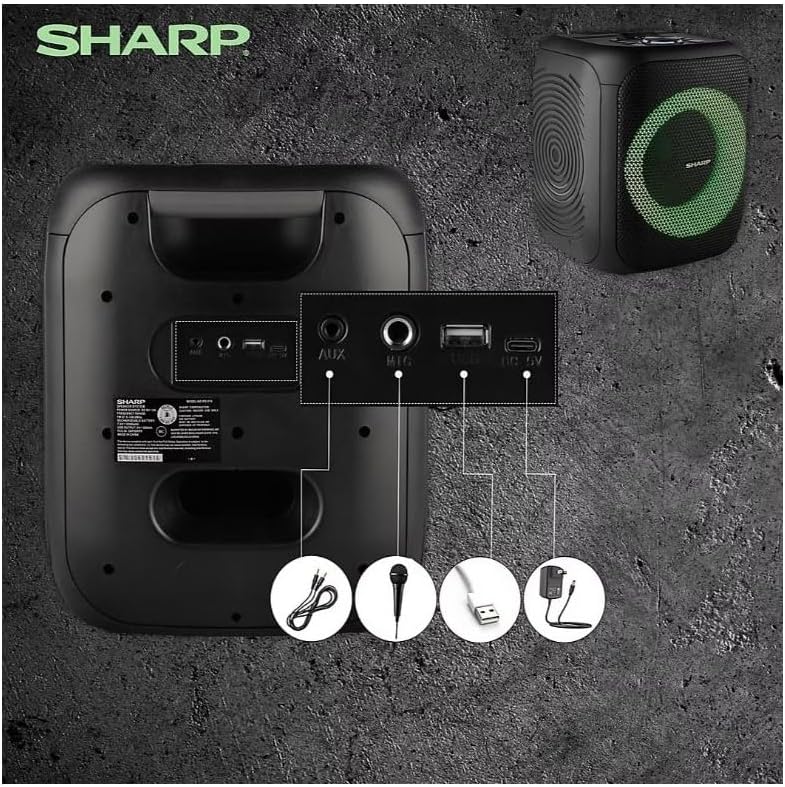
Image: Rear panel with various input and charging ports.
- AUX IN: Підключіть зовнішні аудіопристрої за допомогою аудіокабелю 3.5 мм.
- ВХІД МІКРОФОНА: Connect a microphone (sold separately) for karaoke or announcements.
- USB: Вставте флеш-накопичувач USB для відтворення аудіо.
- TF КАРТКА: Вставте карту TF (microSD) для відтворення аудіо.
- DC IN: Connect the charging cable to power and charge the speaker.
3.3 Playing Audio from USB/TF Card
- Insert a USB flash drive or TF card into the corresponding port.
- Натисніть ON/STAND BY INPUT button repeatedly until the display shows the USB or TF mode.
- Відтворення розпочнеться автоматично. Використовуйте ВІДТВОРЕННЯ/ПАУЗА, ПОПЕРЕДНІЙ, і ДАЛІ кнопки для керування відтворенням.
3.4 Використання AUX-входу
- Connect one end of a 3.5mm audio cable to the AUX IN port on the speaker.
- Підключіть інший кінець до роз'єму для навушників або аудіовиходу зовнішнього пристрою.
- Натисніть ON/STAND BY INPUT button repeatedly until the display shows AUX mode.
- Керуйте відтворенням та гучністю зі свого зовнішнього пристрою.
3.5 Робота FM-радіо

Image: The PS-916 features an integrated FM Tuner.
- Натисніть ON/STAND BY INPUT button repeatedly until the display shows FM mode.
- Натисніть і утримуйте ВІДТВОРЕННЯ/ПАУЗА кнопку для автоматичного сканування та збереження доступних FM-станцій.
- Використовуйте ПОПЕРЕДНІЙ і ДАЛІ кнопки для навігації по збереженим станціям.
3.6 світлодіодних світлових ефектів
Натисніть СВІТЛО button to cycle through different LED light modes or to turn the lights off.
4. Технічне обслуговування
4.1 Очищення
- Завжди вимикайте динамік та від’єднуйте його від джерела живлення перед чищенням.
- Використовуйте м’яку, суху тканину для протирання зовнішніх поверхонь.
- Не використовуйте рідкі засоби для чищення, аерозолі або розчинники, оскільки вони можуть пошкодити покриття або внутрішні компоненти.
4.2 Зберігання
- Зберігайте динаміки в прохолодному, сухому місці, подалі від прямих сонячних променів та екстремальних температур.
- Якщо акумулятор зберігатиметься протягом тривалого періоду, заряджайте його приблизно до 50% кожні кілька місяців, щоб підтримувати його в робочому стані.
5. Вирішення проблем
If you encounter issues with your Sharp PS-916 speakers, please refer to the following common problems and solutions:
| проблема | Можливе рішення |
|---|---|
| Динамік не вмикається. | Переконайтеся, що акумулятор заряджений. Підключіть зарядний кабель і спробуйте ще раз. |
| Немає звуку з динаміка. | Перевірте рівень гучності як на динаміку, так і на підключеному пристрої. Переконайтеся, що вибрано правильний режим входу. |
| Не вдається підключити пристрій Bluetooth. | Ensure the speaker is in Bluetooth pairing mode (indicator flashing). Move your device closer to the speaker. Disconnect from other Bluetooth devices. |
| Не вдалося підключити TWS. | Ensure both speakers are powered on and not connected to any other Bluetooth devices. Try initiating TWS pairing again. |
| Спотворений звук. | Reduce the volume on both the speaker and your connected device. Ensure the audio source is not distorted. |
6. Технічні характеристики
| Особливість | Деталь |
|---|---|
| Бренд | Гострий |
| Назва моделі | ПС-916 |
| Конфігурація динаміка | 8" Woofer, 1" Tweeter (per speaker) |
| Пікова вихідна потужність | 400 Вт (на динамік) |
| Середньоквадратична вихідна потужність | 40 Вт (на динамік) |
| Технологія підключення | Bluetooth |
| Додаткові входи | USB, TF Card, 3.5mm AUX, Microphone Input |
| Термін служби батареї | До 12 годин |
| Особливості | True Wireless Stereo (TWS) Pairing, Bass Boost, LED Light Effects, FM Tuner |
| Колір | чорний |
| Вага товару | 6.5 фунта (на один динамік) |
| UPC | 728434122111 |
| GTIN | 728434122111 |
7. Гарантія та підтримка
7.1 Інформація про гарантію
This Sharp PS-916 product comes with a 90-day limited warranty. This warranty covers manufacturing defects under normal use. It does not cover damage caused by misuse, accidents, unauthorized modifications, or normal wear and tear.
7.2 Підтримка клієнтів
For technical assistance, warranty claims, or further inquiries, please refer to the contact information provided with your purchase documentation or visit the official Sharp support webсайт.