
вступ
Thank you for choosing the MEETION C9990 Wireless Bluetooth Keyboard and Mouse combo. This product offers versatile connectivity options (2.4GHz USB and dual Bluetooth channels), an ergonomic design for comfort, and rechargeable batteries for extended use. This manual will guide you through the setup, operation, and maintenance of your new device.
Вміст упаковки
- MEETION C9990 Wireless Keyboard
- MEETION Wireless Mouse
- USB-приймач (зберігається у відсіку для батарейок миші)
- Зарядний кабель USB-C
- Посібник користувача
Продукт закінченийview
Функції клавіатури
- Повнорозмірний макет: Includes a numeric pad for comprehensive data entry.
- Low-Noise Scissor-Switch Keys: Provides a quiet and comfortable typing experience.
- Мультимедійні клавіші: Спеціальні функціональні клавіші для швидкого доступу до елементів керування медіа та системних функцій.
- Fixed Anti-Slip Stand: Ensures stability and an ergonomic typing angle.
- Ультратонкий дизайн: Естетично зручноasing and space-efficient.

Image: Close-up of the keyboard keys, illustrating the low-noise scissor-switch design for quiet and comfortable typing.

Image: The keyboard features a fixed-angle anti-slip stand for enhanced stability and typing comfort.
Особливості миші
- Ергономічний скульптурний дизайн: Contoured shape supports natural wrist and hand posture.
- Регульований DPI: Four DPI settings (800-2400) for precise cursor control.
- Tilt-Scroll Wheel: Allows for horizontal and vertical scrolling.
- Перемикач режимів: Easily switch between 2.4GHz and Bluetooth modes.

Image: The mouse features an ergonomic sculpted design to provide comfort during extended use.

Image: Detailed diagram of the mouse highlighting its various components and functions, including buttons, scroll wheel, and switches.
Інструкції з налаштування
1. Заряджання пристроїв
Both the keyboard and mouse are equipped with built-in rechargeable batteries. Before first use, or when the battery indicator shows low power, charge both devices using the provided USB-C cable.
- Connect the USB-C end of the charging cable to the charging port on the keyboard and mouse.
- Підключіть кінець зарядного кабелю USB-A до джерела живлення USB (наприклад, USB-порту комп’ютера, USB-адаптера).
- Індикатор заряджання світитиметься під час заряджання та вимкнеться після повного заряджання.
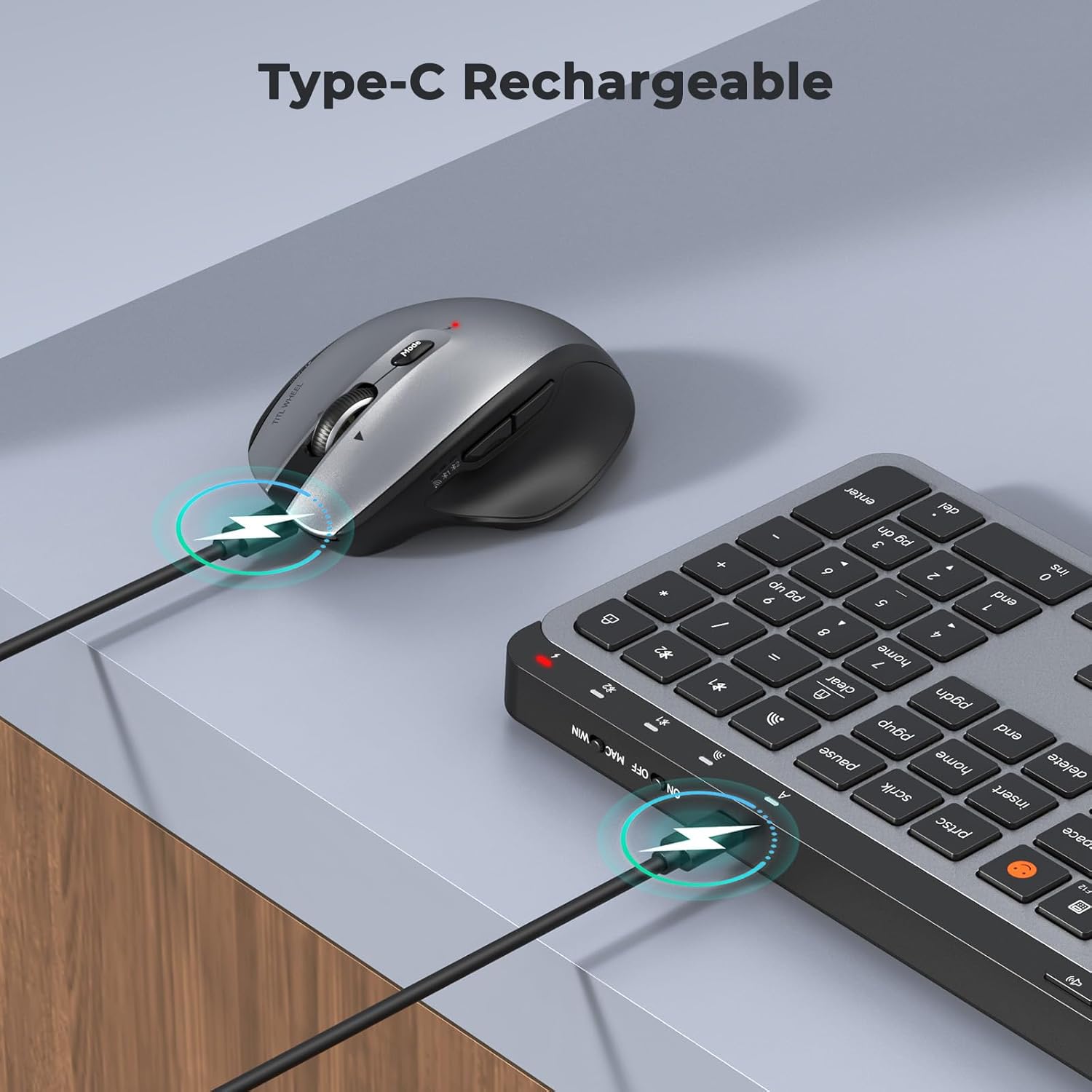
Image: Both the keyboard and mouse are rechargeable via USB-C, ensuring convenience and eliminating the need for disposable batteries.
2. Підключення до пристроїв
The C9990 combo supports three connection modes: 2.4GHz wireless (via USB receiver) and two Bluetooth channels (BT1, BT2).
2.1. Бездротове з'єднання 2.4 ГГц
- Locate the USB receiver, typically stored in the mouse's battery compartment.
- Підключіть USB-приймач у вільний USB-порт на комп’ютері.
- Увімкніть клавіатуру та мишу за допомогою відповідних перемикачів живлення.
- For the keyboard, press the 2.4G button (usually indicated by a USB icon) to switch to 2.4GHz mode.
- For the mouse, switch the mode selector to the 2.4G положення.
- Пристрої повинні підключитися автоматично.
2.2. З’єднання Bluetooth (BT1 / BT2)
- Увімкніть клавіатуру та мишку.
- Для клавіатури: Натисніть і утримуйте BT1 or BT2 button for 3-5 seconds until the indicator light flashes rapidly, indicating pairing mode.
- Для миші: Switch the mode selector to the BT1 or BT2 position, then press and hold the Bluetooth pairing button (often located on the underside) until the indicator light flashes.
- На вашому пристрої (ноутбуці, планшеті, смартфоні) перейдіть до налаштувань Bluetooth та здійсніть пошук нових пристроїв.
- Select "MEETION Keyboard" and "MEETION Mouse" from the list to pair.
- Repeat for the second Bluetooth channel (BT2) if connecting to another device.
3. Перемикання між пристроями
The C9990 allows seamless switching between up to three connected devices (one 2.4GHz and two Bluetooth).
- Для клавіатури: Натисніть виділену 2.4G, BT1, або BT2 button to switch to the desired connected device.
- Для миші: Use the mode switch on the underside of the mouse to select 2.4G, BT1, або BT2.

Image: The keyboard and mouse can switch between three devices (PC, tablet, phone) with a single click, indicated by the Bluetooth and 2.4G icons.
Інструкція з експлуатації
Функції клавіатури
- Multimedia Keys (F1-F12): These keys provide quick access to functions like brightness control, display window, home, dictation, sleep, app switcher, screen mirroring, screen capture, music player, email, and calculator. Functions may vary slightly depending on the operating system.
- Ключ емодзі: The dedicated emoji key supports Windows, macOS, iPad (iPadOS), and Android Samsung devices. It does not support iPhone (iOS).

Image: The keyboard features a row of multimedia keys (F1-F12) for quick access to various system functions.
Функції миші
- Регулювання DPI: Press the DPI switch button (usually located near the scroll wheel) to cycle through the available DPI settings (800, 1200, 1600, 2400). Adjust to your preference for cursor speed and precision.
- Tilt-Scroll Wheel: In addition to vertical scrolling, tilt the scroll wheel left or right for horizontal scrolling in applications that support it (e.g., spreadsheets).
- Кнопки «Вперед/Назад»: Використовуйте бічні кнопки для швидкої навігації web браузери та file дослідники.
Технічне обслуговування
- Прибирання: Використовуйте м’яку суху тканину для очищення поверхонь клавіатури та миші. Для стійкого бруду злегкаampПротріть тканину водою або м’яким миючим розчином. Уникайте агресивних хімікатів або абразивних матеріалів.
- Догляд за акумулятором: To prolong battery life, avoid fully discharging the devices frequently. Charge them when the low battery indicator appears. If storing for an extended period, charge them to about 50% and recharge every few months.
- Зберігання: Зберігайте пристрої в прохолодному, сухому місці, подалі від прямих сонячних променів та екстремальних температур.
Усунення несправностей
Проблеми з підключенням
- Пристрій не підключається: Ensure both the keyboard and mouse are powered on and fully charged. Check that the correct connection mode (2.4G, BT1, or BT2) is selected on both devices. For Bluetooth, ensure your host device's Bluetooth is enabled and the devices are in pairing mode.
- Періодичне з'єднання: Move the devices closer to your computer. Avoid using them near strong electromagnetic interference sources (e.g., Wi-Fi routers, other wireless devices).
- Приймач 2.4 ГГц не розпізнано: Try plugging the USB receiver into a different USB port. Ensure the receiver is fully inserted.
Проблеми з функціональністю
- Keys or mouse unresponsive: Recharge the devices. Restart your computer or device. Re-pair the devices if using Bluetooth or re-insert the USB receiver for 2.4GHz.
- Курсор миші працює нестабільно: Clean the mouse sensor. Ensure you are using the mouse on a suitable surface (not highly reflective or transparent). Adjust DPI settings.
Технічні характеристики
| Номер моделі | C9990 |
| Технологія підключення | Bluetooth, USB (2.4GHz Wireless) |
| Розкладка клавіатури | QWERTY, Full Size |
| Виявлення руху миші | Оптичний |
| Параметри DPI миші | 800, 1200, 1600, 2400 |
| Джерело живлення | Живлення від батареї (можливість перезаряджання через USB-C) |
| Сумісні операційні системи | Windows, macOS, Linux, Chrome OS, Android |
| Вага товару | 1.16 Kilograms (combined) |
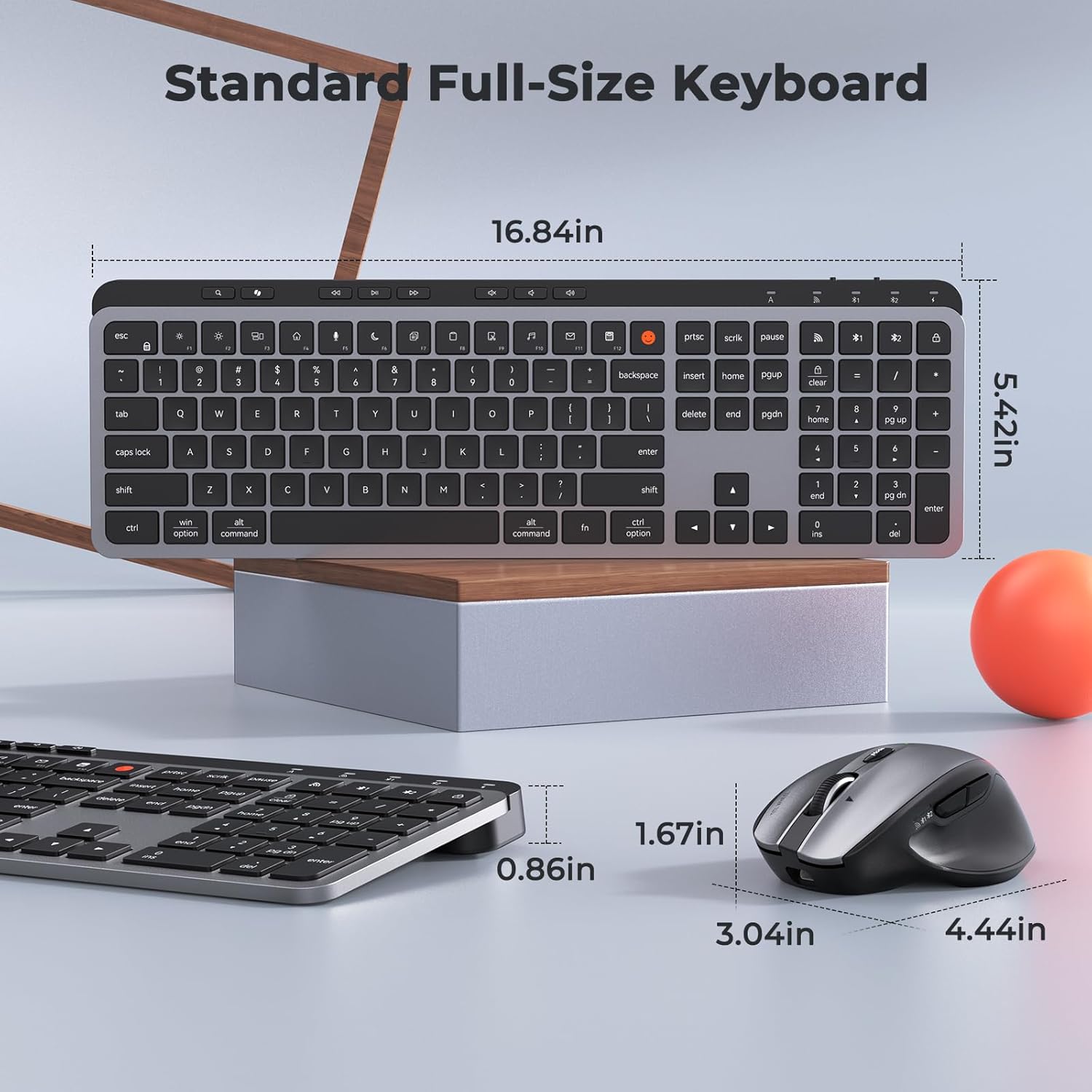
Image: Dimensions of the MEETION C9990 keyboard and mouse for reference.
Гарантія та підтримка
The MEETION C9990 Wireless Bluetooth Keyboard and Mouse comes with a Гарантія 1 рік з дати покупки. Ця гарантія поширюється на виробничі дефекти за умов нормального використання.
For technical support, troubleshooting assistance, or warranty claims, please contact MEETION customer service through the retailer where you purchased the product or visit the official MEETION webсайт для контактної інформації.
Інформація про безпеку
- Не піддавайте пристрої впливу води, вологи або екстремальних температур.
- Уникайте падіння пристроїв або сильних ударів.
- Do not attempt to disassemble or repair the devices yourself. Refer to qualified service personnel.
- Зберігати в недоступному для дітей місці.
- Утилізуйте батарейки та електронні компоненти відповідально згідно з місцевими правилами.