
1. Вступ
The MoKo Wireless CarPlay Adapter seamlessly converts your car's existing wired CarPlay system into a wireless experience. This adapter is designed for quick auto-connection and stable performance, allowing you to enjoy navigation, music, calls, and Siri assistant without the need for cables. Its compact design and durable construction ensure a reliable and convenient driving experience.

Figure 1: Comparison of wired vs. wireless CarPlay setup, demonstrating reduced cable clutter.
2. Продукт закінчивсяview
The MoKo Wireless CarPlay Adapter features a compact form factor with a flexible nylon braided cable for enhanced durability. It includes an upgraded 2025 core chip for ultra-fast startup and low-latency connection. An LED indicator provides status feedback.
2.1 Вміст упаковки
- MoKo Wireless CarPlay Adapter
- USB-C to USB-A Adapter (for broader compatibility)
- Короткий посібник

Figure 2: The MoKo Wireless CarPlay Adapter with its flexible nylon braided cable and LED indicator.

Figure 3: The adapter shown with both USB-A and USB-C connection options.
3. Інструкції з налаштування
Setting up your MoKo Wireless CarPlay Adapter is a simple plug-and-play process. No complex installations or tools are required.
- Плагін: Connect the MoKo Wireless CarPlay Adapter into your car's USB port that supports wired Apple CarPlay. Use the appropriate USB-A or USB-C connector.
- Підключити Bluetooth: On your iPhone, go to Bluetooth settings and pair with the adapter (usually named 'Wireless-Adapter-XXXX'). Ensure your iPhone's Wi-Fi is also turned on.
- Підключення до CarPlay: Once paired, your car's display will prompt you to connect to CarPlay. Confirm the connection.
The adapter is designed to auto-connect to your iPhone when you start your car, significantly reducing connection time compared to traditional wired setups.
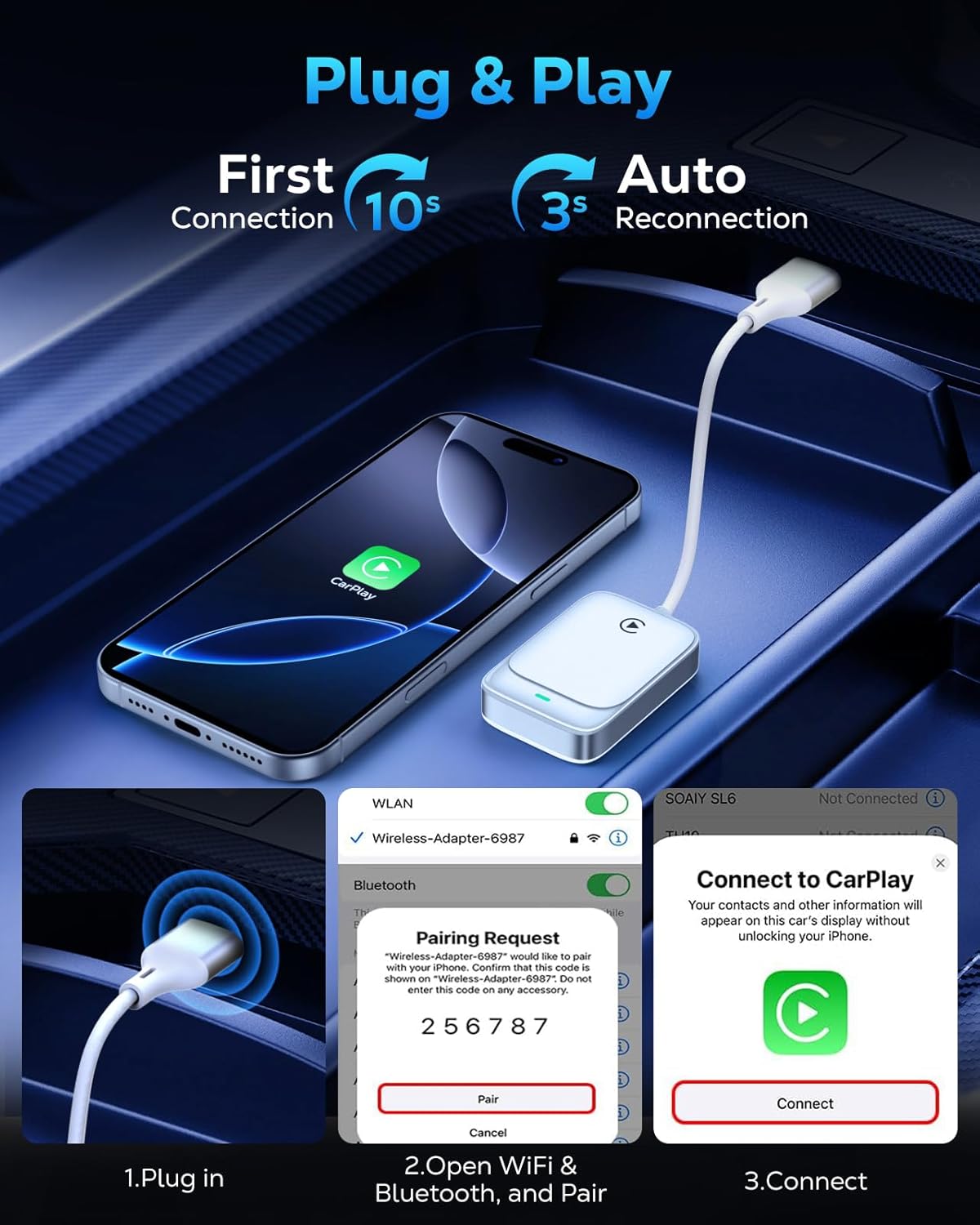
Figure 4: Visual guide for the three-step plug and play connection process.
3.1 Відеопосібник з налаштування
Video 1: This video demonstrates the seamless wireless CarPlay experience, including the unboxing and quick setup process of the MoKo Wireless CarPlay Adapter in a vehicle.
4. Інструкція з експлуатації
Once connected, the MoKo Wireless CarPlay Adapter allows you to utilize all standard CarPlay functions wirelessly, maintaining your car's original control methods.
4.1 Основні функції
- Навігація: Use Apple Maps or other compatible navigation apps directly on your car's display.
- Відтворення музики: Stream music from your iPhone's library or favorite apps.
- Siri Assistant: Activate Siri for voice commands, hands-free messaging, and more.
- Телефонні дзвінки: Make and receive calls safely using your car's infotainment system.

Figure 5: Display of various CarPlay functions available through the adapter.
4.2 Методи контролю
The adapter supports your car's original control mechanisms for a familiar user experience:
- Голосовий помічник: Use Siri for hands-free operation.
- Елементи керування на кермі: Керуйте аудіо, дзвінками та навігацією безпосередньо з керма.
- Управління сенсорним екраном: Interact with CarPlay apps via your car's touch screen.
- Оригінальна ручка керування: Utilize your car's original equipment manufacturer (OEM) control knobs.

Figure 6: Illustration of different control methods supported by the adapter.
4.3 Відеопосібник з експлуатації
Відео 2: Це відео надає вичерпний оглядview of the MoKo Wireless CarPlay Adapter, demonstrating its features and how it enhances the in-car experience.
5. Сумісність
The MoKo Wireless CarPlay Adapter offers broad compatibility with specific requirements:
- Сумісність з автомобілями: Compatible with any car equipped with a factory-installed wired Apple CarPlay system.
- Сумісність з iPhone: Supports iPhone 6 and later models.
- Версія iOS: Requires iOS 10 or above.
Note: This adapter is NOT compatible with vehicles that lack Apple CarPlay or with Android Auto systems. Please verify your car's specifications before purchase.
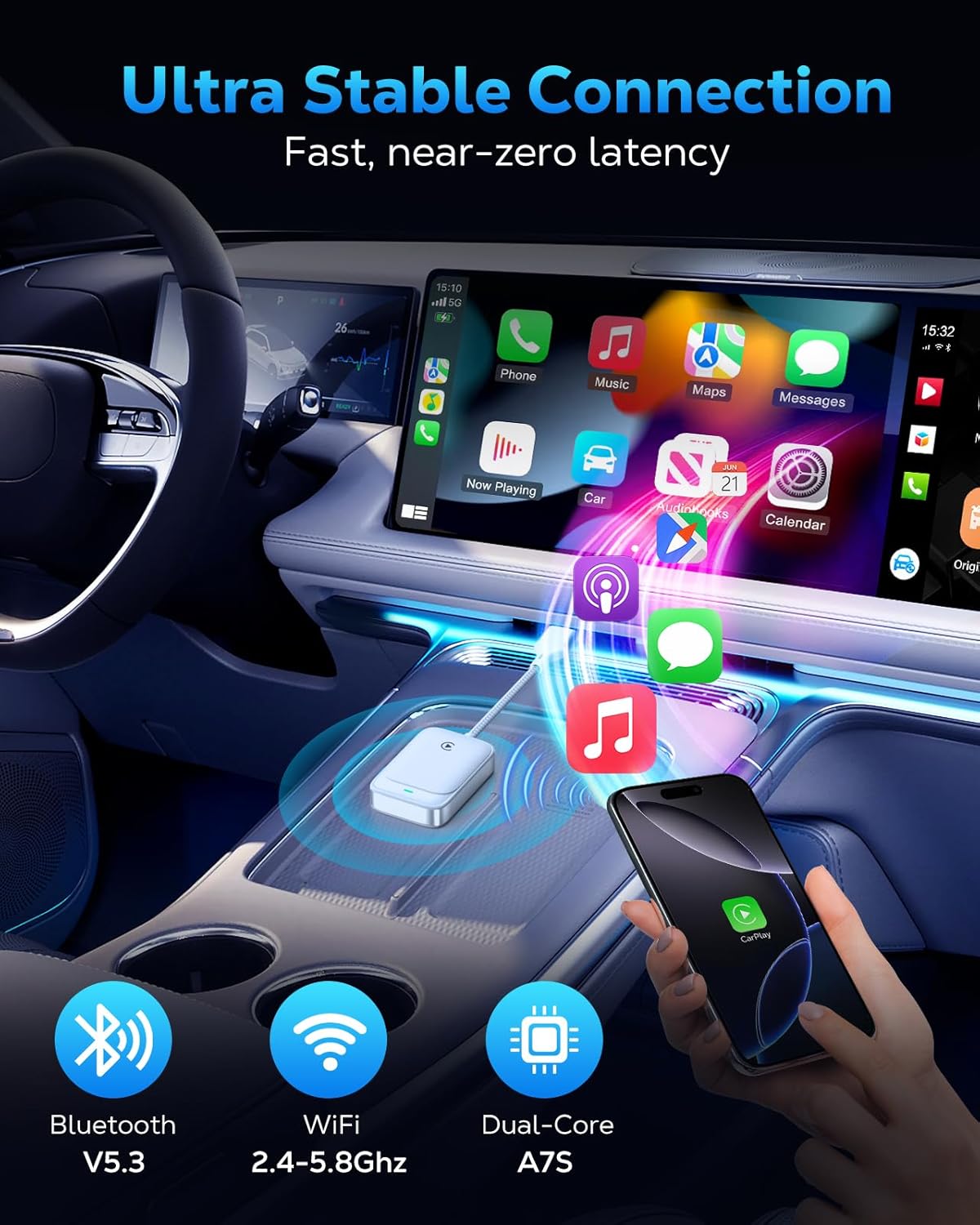
Figure 7: The adapter's advanced chip for stable and fast connection.
6. Вирішення проблем
If you encounter issues with your MoKo Wireless CarPlay Adapter, consider the following common solutions:
- Проблеми з підключенням: If the adapter fails to connect or disconnects frequently, ensure your iPhone's Bluetooth and Wi-Fi are both enabled. Try restarting both your iPhone and your car's infotainment system.
- Оновлення прошивки: The adapter supports firmware updates for optimal functionality and to resolve potential issues. Refer to the official MoKo support website for instructions on how to check for and apply updates.
- Перевірка на сумісність: Double-check that your vehicle has factory-installed wired Apple CarPlay and that your iPhone meets the iOS 10+ requirement.
For persistent issues, please refer to the detailed solutions in the included manual or contact our professional technical support team.
7. Технічні характеристики
| Особливість | Деталь |
|---|---|
| Розміри продукту | 7.6 x 1.34 x 0.47 дюймів |
| Вага товару | 0.74 унції |
| Підключення | 5.8GHz WiFi, Bluetooth V5.3 |
| Чіпсет | 2025 Upgraded Core Chip (e.g., Cortex A7S) |
| Сумісність | Cars with factory wired Apple CarPlay, iPhone 6+ with iOS 10+ |
8. Технічне обслуговування
To ensure the longevity and optimal performance of your MoKo Wireless CarPlay Adapter, follow these simple maintenance guidelines:
- Тримати в чистоті: Регулярно протирайте адаптер м’якою сухою тканиною, щоб видалити пил та сміття. Уникайте використання рідких засобів для чищення.
- Уникайте екстремальних температур: Do not expose the adapter to extreme heat or cold, as this can affect its internal components.
- Обережно поводьтеся: While the braided cable is durable, avoid excessive bending or pulling on the cable and connectors to prevent damage.
- Безпечне розміщення: Ensure the adapter is placed in a secure location within your vehicle to prevent it from being dislodged or damaged during driving.
9. Підтримка
MoKo is committed to providing excellent customer support. If you have any questions, encounter issues, or require technical assistance with your Wireless CarPlay Adapter, please do not hesitate to contact our professional technicians. We are always ready to help you.
For the latest firmware updates and support resources, please visit the official MoKo webсайт або зверніться до контактної інформації, зазначеної у вашому Короткому посібнику з початку роботи.


