
Ulefone RugKing Pad Pro
Ulefone RugKing Pad Pro Android 16 Rugged Tablet User Manual
Model: RugKing Pad Pro | Brand: Ulefone
1. Вступ
This manual provides essential instructions for setting up, operating, and maintaining your Ulefone RugKing Pad Pro rugged tablet. Please read this manual thoroughly before using the device to ensure proper function and longevity.
2. Вміст упаковки
Перевірте наявність усіх елементів у вашій упаковці:
- Ulefone RugKing Pad Pro Tablet x 1
- AC Charger (100~240V) x 1
- Type-C Data Cable (100 cm) x 1
- Protective Film (Pre-installed) x 1
- Metal Pry Opener x 1
- Portable Strap x 1
- Гвинти x 2
- Multilingual User Manual x 1
- Charging Instruction Card x 1
- Safety Warning Declaration x 1

Figure 2.1: Contents of the Ulefone RugKing Pad Pro package.
3. Продукт закінчивсяview
The Ulefone RugKing Pad Pro is a rugged tablet designed for durability and performance. Familiarize yourself with its physical components.
3.1 Фізичні компоненти
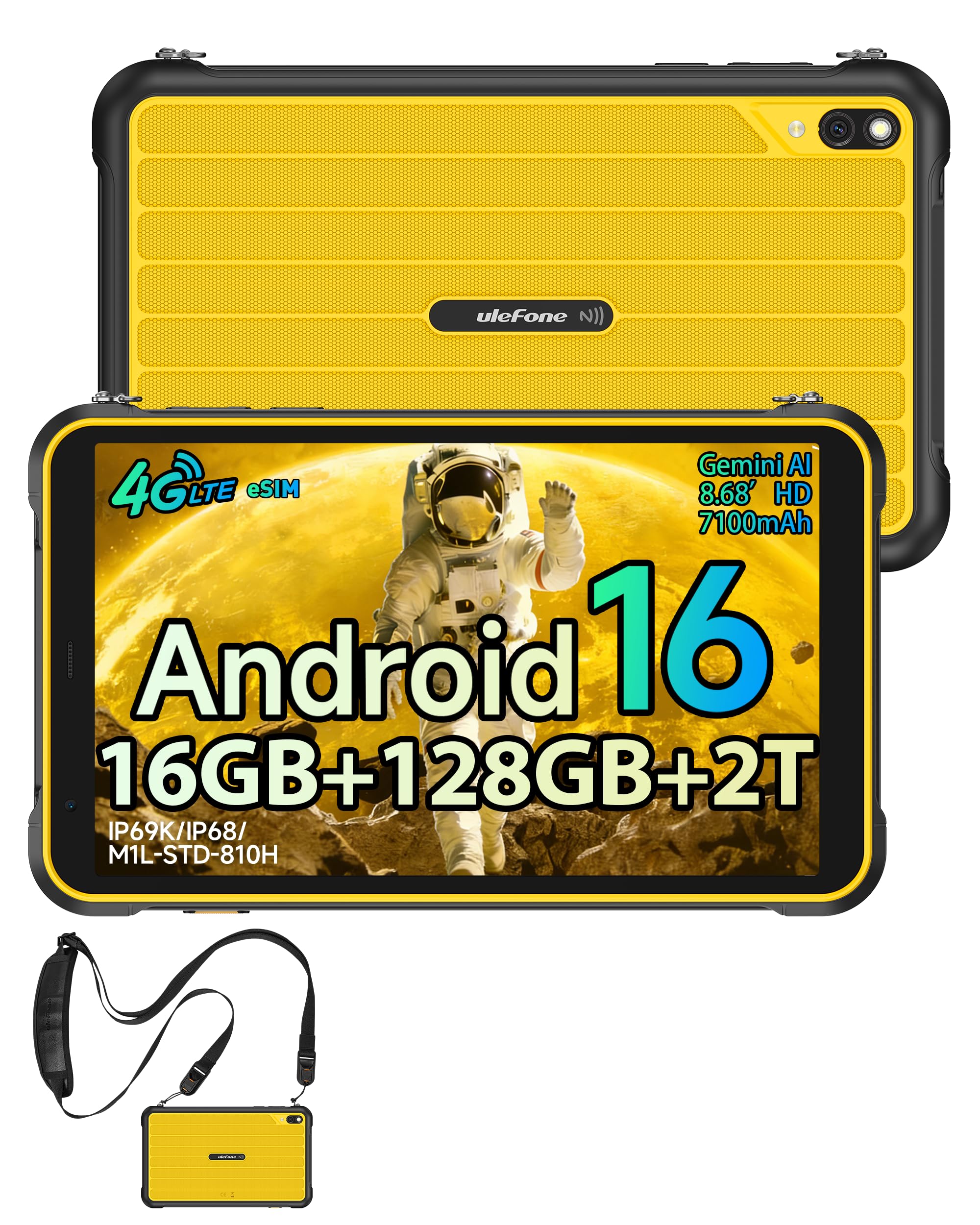
Малюнок 3.1: Спереду view of the Ulefone RugKing Pad Pro.

Малюнок 3.2: Сторона view з кнопками та портами.
- Дисплей: 8.68-inch, 90Hz refresh rate, Corning Gorilla Glass.
- Кнопка живлення: Розташований збоку, використовується для ввімкнення/вимкнення або пробудження/переведення пристрою в режим сну.
- Кнопки гучності: Налаштуйте рівні звуку.
- Порт USB Type-C: Для зарядки та передачі даних.
- Решітки динаміка: Dual stereo speakers for audio output.
- Камера: 16MP rear camera, 8MP front camera.
- Ліхтарик: Integrated 133 lumen Super Torch.
- Слот для SIM-картки/MicroSD: Supports dual SIM and up to 2TB microSD expansion.
- uSmart Expansion Connector: For compatible peripherals like endoscopes.
- Гніздо для навушників 3.5 мм: For audio accessories.
4. Налаштування
4.1 Початкове ввімкнення
- Натисніть і утримуйте Кнопка живлення until the Ulefone logo appears.
- Дотримуйтесь підказок на екрані, щоб вибрати мову, регіон і підключитися до мережі Wi-Fi.
- Увійдіть за допомогою свого облікового запису Google або створіть новий, щоб отримати доступ до Google Play Store та інших сервісів.
4.2 SIM Card and eSIM Setup
The RugKing Pad Pro supports dual physical SIM cards and eSIM functionality for 4G LTE connectivity.

Figure 4.1: Triple card slot for SIM and MicroSD.
4.2.1 Physical SIM Card Installation
- Знайдіть лоток для SIM-картки на бічній панелі планшета.
- Use the provided metal pry opener to eject the tray.
- Place your Nano-SIM cards into the designated slots.
- Обережно вставте лоток назад у планшет.
4.2.2 eSIM Activation
To activate eSIM, navigate to Налаштування > Мережа та інтернет > SIM-картки and follow the instructions to add a new mobile plan. You will typically need a QR code or activation code from your network provider.

Figure 4.2: eSIM connectivity feature.
5. Інструкція з експлуатації
Операційна система 5.1 Android 16
The RugKing Pad Pro runs on Android 16, offering a dynamic and fluid user interface with enhanced security and usability features. Enjoy desktop-like window views for multitasking and smarter notification management.

Figure 5.1: Android 16 user interface.
5.2 Відображення та взаємодія
The 8.68-inch display with a 90Hz refresh rate provides smooth navigation and streaming. With 860 nits peak brightness, the screen is readable even in bright sunlight. Corning Gorilla Glass offers enhanced scratch resistance.

Figure 5.2: Display features including 90Hz refresh rate and Gorilla Glass.
5.2.1 Режим рукавички
For use in cold environments or industrial settings, enable Glove Mode in settings to allow touch input while wearing gloves. Note that some leather gloves may not be compatible due to material differences.

Figure 5.3: Tablet operation with gloves enabled.
5.3 Camera and Flashlight
The tablet features a 16MP rear camera for clear photos and document scanning, and an 8MP front camera for video calls. The integrated 133 lumen Super Torch provides bright illumination in low-light conditions.

Figure 5.4: Camera and Super Torch features.
5.4 Підключення та навігація
- 4G LTE: Stay connected with dual SIM or eSIM.
- NFC: Supports Google Pay and other NFC functions for identification and authentication.
- GPS: Integrated GPS, GLONASS, BeiDou, and Galileo for accurate navigation.
- Wi-Fi: Supports 802.11b/g/n standards.
- Bluetooth: Для підключення бездротових аксесуарів.

Figure 5.5: NFC enabled device for various applications.

Figure 5.6: GPS navigation in a vehicle.
5.5 Особливості
- Спеціальний ключ: Assign specific functions to a programmable key for quick access.
- Ідентифікатор обличчя: Розблокуйте свій пристрій за допомогою розпізнавання обличчя.
- FM-радіо: Listen to FM radio without headphones.
- uSmart Expansion Connector: Connect compatible external peripherals such as endoscopes (uSmart E01, E02) or digital microscopes (uSmart C01).

Figure 5.7: uSmart expansion connector and peripherals.
6. Характеристики довговічності
The RugKing Pad Pro is built to withstand extreme conditions, certified with IP68, IP69K, and MIL-STD-810H standards.
- IP68: Dustproof and resistant to continuous immersion in water up to 2 meters for 30 minutes.
- IP69K: Protected against high-pressure, high-temperature jet sprays.
- MIL-STD-810H: Military-grade standard ensuring reliable resistance to shocks, vibrations, and extreme temperatures.

Figure 6.1: Rugged design and certifications.

Figure 6.2: Dust, water, and drop resistance tests.
7. Керування батареєю
The RugKing Pad Pro is equipped with a 7100 mAh battery, offering extended usage. It supports 492 hours of standby time or 10 hours of video playback on a single charge.
7.1 Зарядка
- Стандартна зарядка: Connect the provided Type-C cable and AC charger to the tablet.
- Зарядка Pogo Pin: The tablet is compatible with Pogo Pin charging docks (sold separately) for convenient charging.
- Reverse Charging (OTG): Use the tablet as a power bank to charge other devices via an OTG cable (sold separately).

Figure 7.1: Battery capacity and charging methods.
8. Зберігання та продуктивність
Powered by an Unisoc T7250 Octa-core processor, the RugKing Pad Pro handles complex applications and demanding tasks efficiently. It comes with 16GB RAM (8GB physical + 8GB virtual) and 128GB internal storage, expandable up to 2TB via microSD card.

Figure 8.1: Octa-core processor for uninterrupted flow.

Figure 8.2: Memory and storage specifications.
*MicroSD card is sold separately for storage expansion. Dynamic RAM activation is user-configurable in Settings.
9. Технічне обслуговування
9.1 Очищення пристрою
- Використовуйте м’яку тканину без ворсу для очищення екрана та корпусу.
- Для стійкого бруду злегкаampпрополощіть тканину водою. Уникайте агресивних хімікатів або абразивних матеріалів.
- Ensure all port covers are securely closed before cleaning with liquids to maintain water resistance.
9.2 Оновлення програмного забезпечення
Regularly check for software updates to ensure optimal performance, security, and access to new features. Navigate to Налаштування > Система > Оновлення системи щоб перевірити наявність доступних оновлень та встановити їх.
9.3 Керування сховищем
Періодично переview ваші збережені files and applications. Delete unnecessary data to free up space and maintain device speed. Utilize the microSD card slot for large media files.
10. Вирішення проблем
| проблема | Рішення |
|---|---|
| Пристрій не включається. | Переконайтеся, що акумулятор заряджений. Підключіть зарядний пристрій і зачекайте кілька хвилин, перш ніж спробувати знову ввімкнути живлення. |
| Екран не реагує. | Perform a forced restart by holding the Power button for 10-15 seconds. If the issue persists, ensure Glove Mode is not causing interference if not needed. |
| Неможливо підключитися до Wi-Fi. | Check if Wi-Fi is enabled in settings. Restart your router and the tablet. Verify the Wi-Fi password. |
| SIM-карта не виявлена. | Переконайтеся, що SIM-картка правильно вставлена в лоток. Перезавантажте планшет. Перевірте, чи SIM-картка активна у вашого оператора. |
| Акумулятор швидко розряджається. | Reduce screen brightness, close unused apps, disable unnecessary connectivity features (Bluetooth, GPS, Wi-Fi) when not in use. Check for background app activity. |
11. Технічні характеристики
| Особливість | Деталь |
|---|---|
| Назва моделі | Ulefone RugKing Pad Pro |
| Операційна система | Android 16 |
| Процесор | Восьмиядерний Unisoc T7250 |
| ОЗУ | 16 ГБ (8 ГБ фізичної + 8 ГБ віртуальної) |
| Внутрішня пам'ять | 128 ГБ |
| Розширюване сховище | До 2 ТБ через microSD |
| Розмір дисплея | 8.68 дюймів |
| Роздільна здатність дисплея | 1400x800 pixels (HD+) |
| Частота оновлення | 90 Гц |
| Захист дисплея | Corning Gorilla Glass |
| Задня камера | 16 Мп |
| Фронтальна камера | 8 Мп |
| Відеозапис | FHD 1080p |
| Ємність акумулятора | 7100 мАг (літій-полімерний) |
| Термін служби батареї (середній) | 13 Days (standby), 10 Hours (video playback) |
| Підключення | 4G LTE (Dual SIM, eSIM), Wi-Fi (802.11b/g/n), Bluetooth, NFC |
| Навігація | GPS, ГЛОНАСС, BeiDou, Galileo |
| Рейтинги довговічності | IP68, IP69K, MIL-STD-810H |
| Функції безпеки | Face ID |
| Розміри (Д х Ш х В) | 20 х 10 х 1 см |
| вага | 450 грамів |
12. Гарантія та підтримка
12.1 Інформація про гарантію
The Ulefone RugKing Pad Pro comes with a 2-річна гарантія виробникаЦя гарантія поширюється на дефекти матеріалів та виготовлення за умов нормального використання. Будь ласка, збережіть чек про покупку для пред'явлення претензій за гарантією.


Figure 12.1: Ulefone brand and 2-year warranty indication.
12.2 Підтримка клієнтів
For technical assistance, warranty claims, or further inquiries, please contact Ulefone customer support. A service center is available in Europe.
- Refer to the official Ulefone webна сайті для отримання контактної інформації.
- Consult the "Multilingual User Manual" included in your package for additional information.
- The tablet includes a "Service Center 2.0" application for intelligent support.
Ask a question about this manual
Ask about setup, troubleshooting, compatibility, parts, safety, or missing instructions. Manuals+ will review the question and use this page’s manual context to help answer it.