
1. Вступ
Thank you for choosing the UGREEN 11-inch Keyboard Case. This product is designed to enhance your iPad experience by providing a comfortable typing solution and versatile viewing angles, transforming your tablet into a portable workstation. This manual provides essential information for setup, operation, maintenance, and troubleshooting to ensure optimal performance.
2. Сумісність
Цей чохол-клавіатура сумісний з такими моделями iPad:
- iPad Air 11-inch (M4/M3/M2, 2026/2025/2024)
- iPad Pro 11-inch (4th/3rd/2nd/1st Gen)
- iPad Air 5th Generation (2022)
- iPad Air 4th Generation (2020)
Compatible Model Numbers: A3459, A2902, A3266, A1980, A2228, A2759, A2377, A2316, A2588.
Примітка: This case is ні compatible with iPad Pro 11-inch (M4) 2024.

Figure 2.1: Detailed compatibility chart for UGREEN 11-inch Keyboard Case.
3. Вміст упаковки
Будь ласка, переконайтеся, що всі предмети присутні у вашій упаковці:
- UGREEN 11-inch Keyboard Case
- Зарядний кабель USB-C (3 фута)
- Посібник користувача
4. Продукт закінчивсяview
The UGREEN Keyboard Case features a robust design with several key functionalities:
- Precision Magnetic Back Plate: Ensures a secure and stable attachment for your iPad.
- 125° Регульований Viewкут нахилу: Allows for flexible positioning for typing, browsing, or viewінж.
- Клавіші перемикання ножиць: Provides a smooth, quiet, and consistent typing experience.
- 3-Level Adjustable Backlight: Offers illumination for comfortable use in various lighting conditions.
- Чуйний тачпад: Enables precise cursor control and supports multi-gesture navigation.
- Dual Orientation Viewing: Supports both portrait and landscape modes.
- Акумулятор 650 мАг: Provides extended usage and standby times.

Figure 4.1: Powerful magnetic hold for stable iPad attachment.

Figure 4.2: Quick-set magnetic stand with 125° adjustable viewкут.

Figure 4.3: Scissor-switch keyboard design and 3-level adjustable backlighting.

Figure 4.4: Responsive touchpad with multi-gesture support.
5. Інструкції з налаштування
5.1 Підключення iPad
- Align your compatible iPad with the magnetic back plate of the case.
- The iPad will securely snap into place due to the strong magnetic connection.
5.2 Powering On the Keyboard
- Locate the power switch on the right side of the keyboard.
- Slide the switch to the 'ON' position. The indicator light will briefly illuminate.
5.3 Створення пари Bluetooth
- Переконайтеся, що клавіатуру увімкнено.
- На вашому iPad перейдіть до Налаштування > Bluetooth.
- Turn on Bluetooth. Your iPad will search for nearby devices.
- Select "UGREEN Keyboard" (or similar name) from the list of available devices.
- Дотримуйтеся будь-яких підказок на екрані, щоб завершити процес створення пари.
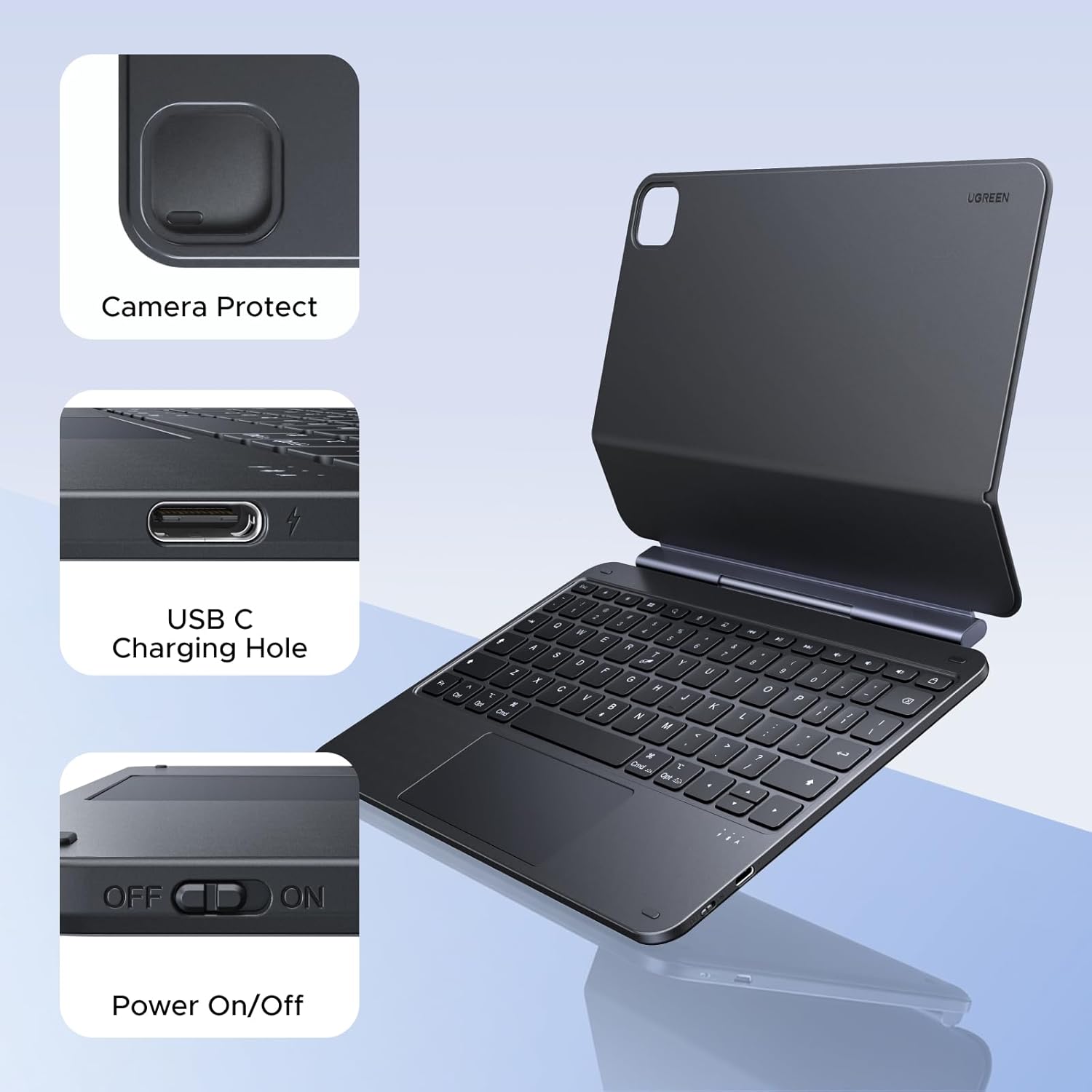
Figure 5.1: Location of the power switch and USB-C charging port.
6. Інструкція з експлуатації
6.1 Регулювання Viewкут нахилу
The magnetic stand allows for a 125° adjustable viewing angle. Gently tilt your iPad to achieve your desired position for typing, drawing, or media consumption.
6.2 Використання сенсорної панелі
The integrated touchpad supports various multi-touch gestures for intuitive navigation:
- Дотик одним пальцем: Click/Select
- Прокручування двома пальцями: Прокручування вгору/вниз або вліво/вправо
- Розведіть пальці, щоб збільшити: Збільшення/зменшення
- Three-finger swipe up: Відкрити перемикач програм
- Three-finger swipe down: Повернутися на головний екран
- Проведення трьома пальцями вліво/вправо: Перемикання між відкритими програмами
6.3 Регулювання підсвічування
Натисніть light icon key (usually next to the function keys) to cycle through the 3 levels of backlight brightness or to turn it off.
6.4 Dual Orientation Viewінж
The case supports both portrait and landscape orientations. Simply rotate your iPad while it is magnetically attached to switch modes. This allows for flexible viewing during video calls, streaming, or browsing without compromising stability.

Figure 6.1: Versatile usage modes including typing, viewing, sketching, and reading.
7. Заряджання клавіатури
The keyboard is equipped with a 650mAh battery for extended use.
- Термін служби батареї: Up to 6 months standby time, or 5 months of regular use with the backlight off.
- Час зарядки: Приблизно 2 години для повної зарядки.
- Спосіб зарядки: Use the included USB-C cable to connect the keyboard's USB-C port to a power source.

Рисунок 7.1: Продуктивність акумулятора протягомview.
8. Технічне обслуговування
To ensure the longevity and optimal performance of your UGREEN Keyboard Case, follow these maintenance guidelines:
- Прибирання: Використовуйте м'який, damp тканиною для протирання зовнішньої частини корпусу. Уникайте використання агресивних хімічних речовин або абразивних матеріалів. Для видалення пилу та сміття для клавіш клавіатури використовуйте м’яку щітку або стиснене повітря.
- Зберігання: When not in use, store the keyboard case in a clean, dry environment away from extreme temperatures and direct sunlight.
- Обробка: Avoid dropping the case or subjecting it to strong impacts, which could damage internal components or the magnetic mechanism.
9. Вирішення проблем
If you encounter issues with your UGREEN Keyboard Case, refer to the following common problems and solutions:
9.1 Keyboard Not Pairing or Connecting
- Перевірте живлення: Переконайтеся, що вимикач живлення клавіатури знаходиться в положенні «УВІМК.».
- Рівень заряду батареї: Verify that the keyboard has sufficient battery charge. Charge it if necessary.
- Bluetooth on iPad: Confirm that Bluetooth is enabled on your iPad (Налаштування > Bluetooth).
- Відновлення пари пристрою: If the keyboard was previously paired, try forgetting the device on your iPad's Bluetooth settings and then re-pairing it.
- Перезавантажте пристрої: Перезавантажте і iPad, і клавіатуру.
9.2 Inconsistent Touchpad Response
- Очищення сенсорної панелі: Переконайтеся, що поверхня сенсорної панелі чиста та не має бруду чи вологи.
- Оновлення мікропрограми: Check the UGREEN website for any available firmware updates for the keyboard.
- Налаштування iPad: Review your iPad's touchpad settings under Налаштування > Загальний > Trackpad & Mouse.
9.3 iPad Feels Top-Heavy or Unstable
- Стабільність поверхні: Ensure the keyboard case is placed on a flat, stable surface.
- Регулювання кута: Відрегулюйте viewing angle to a more balanced position. Extreme angles may reduce stability.
- Магнітне з'єднання: Confirm the iPad is fully and securely attached to the magnetic back plate.
10. Технічні характеристики
| Особливість | Деталь |
|---|---|
| Бренд | UGREEN |
| Номер моделі | i711 |
| Сумісні пристрої | Tablet (Specific iPad models listed in Compatibility section) |
| Технологія підключення | Bluetooth |
| Опис клавіатури | Flexible, Scissor-switch |
| Розкладка клавіатури | QWERTY |
| матеріал | Plastic, Steel (Keyboard Plate) |
| Джерело живлення | Живлення від батареї (літієва батарея 650 мАг) |
| Особливості | Magnetic Case, Adjustable Backlight, Touchpad |
11. Гарантія та підтримка
11.1 Інформація про гарантію
Цей продукт UGREEN охоплений Гарантія від виробника 2 рік з дати покупки. Ця гарантія поширюється на дефекти матеріалів і виготовлення за нормального використання.
Гарантія не поширюється на:
- Пошкодження, спричинені нещасним випадком, зловживанням, неправильним використанням, повінню, пожежею, землетрусом або іншими зовнішніми причинами.
- Damage caused by operating the product outside the permitted or intended uses described by UGREEN.
- Damage caused by service performed by anyone who is not a representative of UGREEN.
11.2 Підтримка клієнтів
For technical support, warranty claims, or general inquiries, please contact UGREEN customer service through the following channels:
- Webсайт: Відвідайте офіційний UGREEN webсайт із ресурсами підтримки та контактною інформацією.
- Електронна пошта: Зверніться до упаковки вашого продукту або до UGREEN webсайт для отримання відповідної адреси електронної пошти служби підтримки.
- Інтернет-продавець: If purchased from an online retailer, you may also contact their customer service for assistance.
Please have your product model number (i711) and proof of purchase ready when contacting support.