
1. Вступ
Thank you for choosing the Gawfolk 32-inch 4K 144Hz Gaming Monitor. This monitor is designed to provide an immersive visual experience with its 4K UHD resolution, high refresh rate, and adaptive synchronization technology. This manual provides essential information for setting up, operating, maintaining, and troubleshooting your monitor to ensure optimal performance and longevity.
2. Інформація про безпеку
- Уважно прочитайте всі інструкції перед використанням монітора.
- Тримайте монітор подалі від води, вологи та екстремальних температур.
- Не перекривайте вентиляційні отвори.
- Використовуйте лише адаптер живлення, що постачається з монітором.
- Уникайте розміщення важких предметів на шнурі живлення.
- Від’єднайте штекер живлення від розетки, якщо монітор не використовуватиметься протягом тривалого часу.
- Звертайтеся до кваліфікованого сервісного персоналу.
3. Налаштування
3.1 Розпакування та вміст упаковки
Обережно вийміть усі компоненти з упаковки. Переконайтеся, що всі перелічені нижче елементи присутні:
- Gawfolk 32-inch 4K 144Hz Monitor
- Підставка для монітора (основа та шия)
- Адаптер живлення
- Кабель HDMI
- Кабель DisplayPort
- Посібник користувача
3.2 Збірка підставки
- Покладіть монітор екраном вниз на м’яку, чисту поверхню, щоб запобігти подряпинам.
- Прикріпіть шийку підставки до задньої панелі монітора за допомогою наданих гвинтів. Переконайтеся, що вона надійно закріплена.
- Attach the stand base to the stand neck, tightening the screw at the bottom of the base.
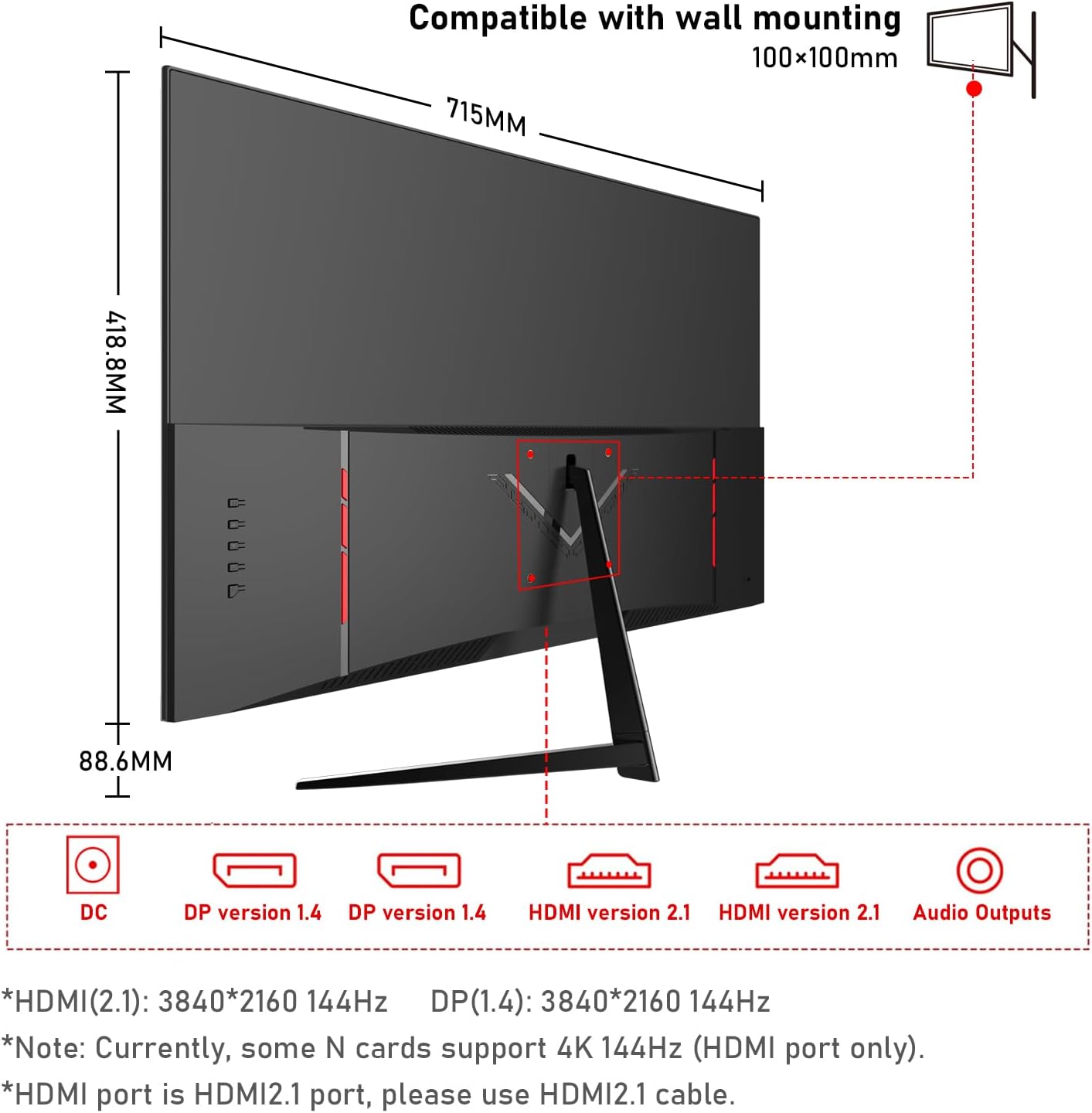
3.3 Підключення монітора
Підключіть монітор до комп’ютера або інших пристроїв за допомогою відповідних кабелів.
- Підключення живлення: Connect the power adapter to the monitor's DC input port, then plug the adapter into a power outlet.
- Підключення відео:
- For 4K@144Hz, use an HDMI 2.1 cable (if your graphics card supports it) or a DisplayPort 1.4 cable.
- Connect one end of the HDMI or DisplayPort cable to the corresponding port on your monitor and the other end to your computer's graphics card.
- Аудіоз'єднання: If you wish to use external speakers or headphones, connect them to the 3.5mm audio output port on the monitor.
3.4 Початкове ввімкнення
Press the power button on the monitor. The monitor should display the Gawfolk logo and then your computer's desktop. If no image appears, ensure all cables are securely connected and the correct input source is selected in the monitor's On-Screen Display (OSD) menu.
4. Експлуатація монітора
4.1 Екранне меню (OSD)
The OSD menu allows you to adjust various monitor settings. Typically, buttons are located on the back or bottom edge of the monitor. Use these buttons to navigate the menu and select options.
4.2 Налаштування дисплея
- роздільна здатність: The monitor supports 4K UHD (3840 x 2160) resolution. Ensure your computer's display settings are configured to this resolution for the sharpest image.
- Частота оновлення: For smooth visuals, especially in gaming, set the refresh rate to 144Hz in your computer's display settings.
- Параметри кольору: This monitor offers 100% sRGB coverage and 16.7 million colors for vibrant and accurate color reproduction. Adjust brightness, contrast, and color temperature via the OSD menu to suit your preference.

4.3 Ігрові функції
- Час відгуку 1 мс: The monitor features a 1ms response time (GTG), minimizing motion blur and ghosting for a more responsive gaming experience.
- Адаптивна синхронізація (FreeSync): This technology synchronizes the monitor's refresh rate with your GPU's frame rate, eliminating screen tearing and stuttering. Enable FreeSync in your graphics card settings and the monitor's OSD menu.

4.4 Технологія догляду за очима
The monitor incorporates low blue light and flicker-free technology to reduce eye strain during prolonged use. These features are designed to enhance viewкомфорту.
4.5 Вбудовані два динаміки
The monitor includes built-in dual speakers, providing convenient audio without the need for external speakers. You can adjust the volume through your computer's audio settings or the monitor's OSD menu.

5. Технічне обслуговування
- Очищення екрану: Злегка протріть м’якою тканиною без ворсу dampened with water or a specialized screen cleaner. Do not spray cleaner directly onto the screen.
- Очищення Casing: Використовуйте м’яку суху тканину для протирання монітора casing. Уникайте використання абразивних засобів для чищення або розчинників.
- Вентиляція: Ensure the ventilation openings on the monitor are clear and not obstructed to prevent overheating.
6. Вирішення проблем
- Немає живлення: Перевірте, чи кабель живлення надійно підключено до монітора та розетки. Переконайтеся, що адаптер живлення справний.
- Без зображення: Перевірте, чи відеокабель (HDMI/DisplayPort) правильно підключено як до монітора, так і до комп’ютера. Переконайтеся, що в екранному меню вибрано правильне джерело вхідного сигналу.
- Мерехтіння екрана: Check the video cable connection. Ensure the refresh rate is set correctly in your computer's display settings. Enable Adaptive Sync if supported by your graphics card.
- Погана якість зображення: Adjust resolution, brightness, contrast, and color settings via the OSD menu. Ensure the video cable is not damaged.
- Немає звуку: Check the audio cable connection (if using external speakers/headphones). Adjust volume settings on both the monitor and your computer. Ensure the correct audio output device is selected on your computer.
7. Технічні характеристики
| Особливість | Специфікація |
|---|---|
| Бренд | Гоуфолк |
| Номер моделі | GF320L |
| Розмір екрана | 32 дюймів |
| роздільна здатність | 4K UHD 2160p (3840 x 2160 Pixels) |
| Частота оновлення | 144 Гц |
| Час відгуку | 1 Millisecond (GTG) |
| Співвідношення сторін | 16:9 |
| Тип дисплея | LED (VA Technology) |
| Опис поверхні екрана | Глянцевий |
| Особливість | Вигнутий |
| Viewкут нахилу | 178 градусів |
| Яскравість | 320 кд/м² |
| Кольорова гамма вартість | 120% sRGB |
| Покращення якості зображення | Eye-Care + Adaptive Sync |
| Апаратура для підключення до | 2x HDMI, 2x DisplayPort, 3.5mm Audio |
| Adaptive Synchronization | FreeSync |
| Колір | чорний |
| Вага товару | 6.34 кілограма |
| Розміри предмета (Д x Ш x В) | 50.7 х 71.5 х 19 сантиметрів |
8. Гарантія та підтримка
Gawfolk provides a 12-month after-sales service for this monitor. If you encounter any issues during use, please do not hesitate to contact our customer support for assistance. Our team is dedicated to ensuring your satisfaction.