
1. Вступ
This manual provides essential information for setting up, operating, and maintaining your HP OmniDesk Slim Desktop PC, Model S03-0006. This desktop PC is designed for daily tasks, offering an Intel Core i3-14100 processor, ample memory, and various connectivity options for productivity and entertainment.
2. Вміст упаковки
Перевірте наявність усіх елементів в упаковці:
- HP S03-000 OmniDesk Slim Desktop PC
- Джерело живлення
- USB Black Wired Keyboard (if included with specific bundle)
- USB Wired Mouse (if included with specific bundle)
Примітка: Додаткові аксесуари можуть продаватися окремо.
3. Продукт закінчивсяview
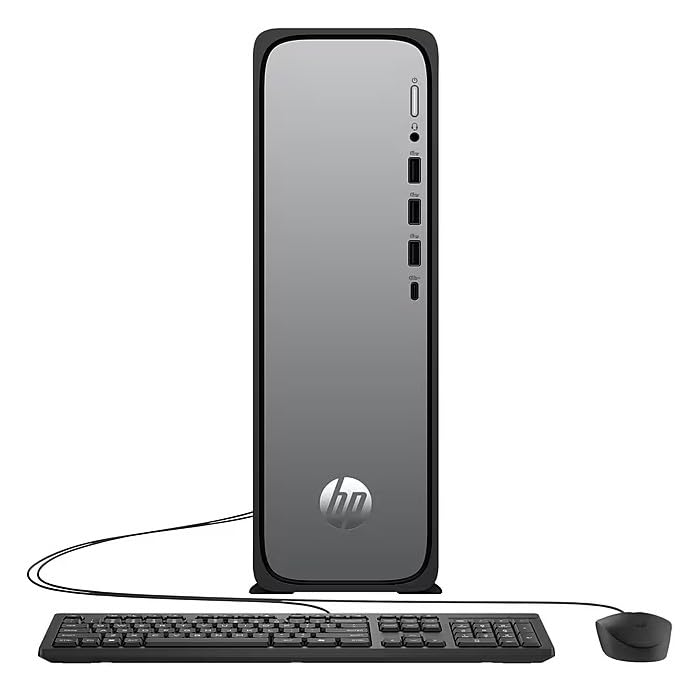
The HP OmniDesk Slim Desktop PC features a compact design with essential components for efficient computing.

малюнок 3.1: HP OmniDesk Slim Desktop PC showcasinйого тонкий професіоналfile, Intel Core i3-14100 processor, 8GB DDR5 RAM, 256GB SSD, Intel UHD Graphics 710, Wi-Fi 6, Bluetooth 5.4, Windows 11, and dual display support.
3.1. Порти та роз'єми
Familiarize yourself with the various ports on your desktop PC for connecting peripherals and displays.
малюнок 3.2: Front and rear port layout of the HP OmniDesk Slim Desktop PC. Front ports include a headphone/microphone combo jack, USB Type-A 5Gbps ports, and a USB Type-C 10Gbps port. Additional ports (typically rear) include 4 USB 2.0 Type-A, 1 RJ-45 (Ethernet), 1 HDMI Out, and 1 DisplayPort 1.4.
- Передні порти:
- Комбінований навушник/мікрофон
- USB Type-A 5Gbps signaling rate (3 ports)
- USB Type-C 10Gbps signaling rate (1 port)
- Задні порти:
- USB 2.0 Type-A (4 ports)
- RJ-45 (Ethernet)
- HDMI 1.4b (1 port)
- DisplayPort 1.4a (1 port)
4. Посібник із налаштування
Follow these steps to set up your HP OmniDesk Slim Desktop PC:
- Підключення монітора: Connect your monitor to the PC using an HDMI or DisplayPort cable. Ensure the cable is securely plugged into both the PC and the monitor.
- Підключення периферійних пристроїв: Plug in your USB keyboard and mouse into the available USB ports on the PC.
- Підключіть живлення: Connect the power supply cable to the PC's power input, then plug the other end into a wall outlet or surge protector.
- Увімкнення: Press the power button on the front of the PC. The system will boot up, and you will see the Windows 11 setup screen.
- Початкове налаштування Windows: Дотримуйтесь інструкцій на екрані, щоб завершити налаштування Windows 11, включаючи мову, регіон, мережеве підключення та створення облікового запису користувача.
5. Інструкція з експлуатації
5.1. Основна операція
- Увімкнення/вимкнення живлення: Натисніть кнопку живлення, щоб увімкнути ПК. Щоб вимкнути комп’ютер, натисніть кнопку «Пуск», потім виберіть «Живлення» > «Вимкнути».
- Перезапуск: Натисніть кнопку «Пуск», потім «Живлення» > «Перезавантажити».
- Режим сну: Click the Start button, then Power > Sleep.
5.2. Підключення до мережі
Your PC supports both wired (Ethernet) and wireless (Wi-Fi) network connections.
- Дротове підключення: Connect an Ethernet cable from your router or modem to the RJ-45 port on the back of the PC.
- Бездротове з'єднання (Wi-Fi 6):
- Клацніть значок Wi-Fi на панелі завдань.
- Виберіть потрібну мережу Wi-Fi зі списку.
- Введіть ключ безпеки мережі (пароль), якщо буде запропоновано, а потім натисніть Підключитися.
5.3. Підтримка двох дисплеїв
To extend your desktop to a second monitor:
- Connect the second monitor to an available video output port (HDMI or DisplayPort) on your PC.
- Right-click on the desktop and select Налаштування дисплея.
- Under "Multiple displays," select how you want the displays to behave (e.g., Extend these displays, Duplicate these displays).
6. Технічне обслуговування
- Оновлення програмного забезпечення: Regularly check for and install Windows updates to ensure system stability and security. Go to Налаштування > Оновлення Windows.
- Оновлення драйверів: Keep your device drivers updated. HP Support Assistant (MyHP) can help manage these updates.
- Прибирання: Use a soft, dry cloth to clean the exterior of the PC. Avoid liquid cleaners directly on components. Ensure ventilation openings are clear of dust.
- Резервні дані: Регулярно створюйте резервні копії важливого fileна зовнішній диск або хмарне сховище, щоб запобігти втраті даних.
7. Вирішення проблем
| проблема | Можливе рішення |
|---|---|
| ПК не вмикається. |
|
| Немає зображення на моніторі. |
|
| Немає підключення до Інтернету. |
|
| Peripherals (keyboard/mouse) not working. |
|
8. Технічні характеристики
| Назва моделі | HP OmniDesk Desktop HP S03-000 PC |
| Номер моделі | OmniDesk Slim S03-0006 |
| Процесор | Intel Core i3-14100 (3.5 GHz, 6 MB Cache) |
| Графіка | Графіка Intel UHD 710 (інтегрована) |
| ОЗУ | 8 GB DDR5 (4800 MT/s), Max 64 GB |
| Зберігання | 256 ГБ SSD (твердотільний накопичувач) |
| Операційна система | Windows 11 Домашня |
| Підключення | Realtek Wi-Fi 6 (2x2), Bluetooth 5.4, Gigabit Ethernet (RJ-45) |
| Порти |
|
| Розміри (В x Ш x Г) | 11.61 x 3.94 x 11.97 дюймів |
| вага | 8.38 фунта |
| Сертифікати | ENERGY STAR certified, EPEAT Gold with Climate+ |
9. Гарантія та підтримка
9.1. Інформація про гарантію
This HP OmniDesk Slim Desktop PC comes with a 90-денна обмежена гарантіяБудь ласка, зверніться до гарантійної документації, що додається до вашого продукту, щоб дізнатися про конкретні умови.
9.2. Технічна підтримка
Щоб отримати технічну допомогу, завантаження драйверів або додаткову інформацію, відвідайте офіційний сайт підтримки HP. website. You can also utilize the pre-installed MyHP application for device customization, optimization, and access to helpful messages and settings.
Always provide your product model number (S03-0006) and serial number when contacting support.