
1. Вступ
Дякуємо за покупкуasing the ULTIMEA Aura A60 U2621 7.1ch Dolby Atmos Soundbar System. This manual provides essential information for setting up, operating, and maintaining your new sound system. Please read this manual thoroughly before use to ensure proper functionality and to maximize your audio experience.

Figure 1.1: Immersive audio experience with the ULTIMEA Aura A60 system.
2. Інформація про безпеку
Щоб зменшити ризик ураження електричним струмом, пожежі або пошкодження вашого пристрою, дотримуйтесь наступних запобіжних заходів безпеки:
- Не піддавайте цей прилад впливу дощу або вологи.
- Не ставте на пристрій предмети, наповнені рідиною, наприклад вази.
- Забезпечте належну вентиляцію. Не блокуйте вентиляційні отвори.
- Не встановлюйте поблизу будь-яких джерел тепла, таких як радіатори, обігрівачі, печі або інші пристрої (включаючи ampліфікатори), які виробляють тепло.
- Захищайте шнур живлення від наступання або защемлення, особливо біля вилок, розеток і в місці виходу з пристрою.
- Використовуйте лише насадки/аксесуари, зазначені виробником.
- Відключайте цей пристрій від мережі під час грози або якщо він не використовується протягом тривалого часу.
- Звертайтеся до кваліфікованого сервісного персоналу.
3. Вміст упаковки
Будь ласка, перевірте наявність усіх предметів та їх належний стан:
- ULTIMEA Aura A60 Soundbar
- Wireless Subwoofer (4-inch, BassMX Technology)
- 4 x Surround Speakers (2 front, 2 rear)
- Пульт дистанційного керування
- Кабель HDMI
- Адаптер/кабелі живлення
- Посібник користувача (цей документ)
4. Продукт закінчивсяview
The ULTIMEA Aura A60 U2621 is a 7.1ch Dolby Atmos soundbar system designed to deliver an immersive home theater audio experience. It features a main soundbar unit, a powerful wireless subwoofer with BassMX technology, and four surround speakers.
4.1 Основний саундбар
The main soundbar unit houses 3 main channels for clear dialogue and primary audio. It serves as the central hub for all audio connections.

Figure 4.1: Main soundbar unit with front surround speakers.
4.2 Бездротовий сабвуфер
The dedicated 4-inch wireless subwoofer incorporates BassMX technology to enhance low frequencies, providing deep and resonant bass for a more impactful audio experience.

Figure 4.2: Wireless subwoofer with BassMX technology.
4.3 динаміків об'ємного звуку
The system includes four surround speakers: two front and two rear. The rear speakers connect wirelessly to the soundbar, minimizing cable clutter and allowing flexible placement to create an expansive acoustic space.

Figure 4.3: Diagram of 7.1ch sound distribution.
4.4 Порти введення/виведення
The soundbar features multiple input options for versatile connectivity:
- HDMI eARC: For high-quality audio transmission and seamless TV integration.
- Оптичний: Цифровий аудіовхід.
- AUX: Аналоговий аудіовхід.
- USB: Для відтворення медіафайлів.
- Bluetooth: Бездротова потокова передача аудіо.

Figure 4.4: Rear panel connections, including HDMI eARC.
5. Налаштування
5.1 Фізичне розміщення
Optimal placement of your sound system components is crucial for the best audio experience.
- звукова панель: Place the soundbar centrally below your television. Ensure it is not obstructed.
- Сабвуфер: Position the wireless subwoofer on the floor near the soundbar. Experiment with placement to find the best bass response for your room.
- Фронтальні динаміки об'ємного звуку: Place the two wired front surround speakers to the left and right of your TV, ideally at ear level when seated.
- Задні динаміки об'ємного звуку: Position the two wireless rear surround speakers behind your primary listening position, to the left and right. These speakers will automatically connect wirelessly to the soundbar once powered on.

Figure 5.1: Recommended speaker placement for Dolby Atmos.
5.2 Підключення
Виконайте такі дії, щоб підключити вашу саундбарну систему:
- Підключення живлення: Connect the power cables to the soundbar, subwoofer, and surround speakers, then plug them into a power outlet.
- HDMI eARC (рекомендовано): Connect one end of the provided HDMI cable to the HDMI eARC port on your soundbar and the other end to the HDMI eARC/ARC port on your TV. This connection supports Dolby Atmos and allows for TV remote control of the soundbar.
- Оптичне підключення (альтернативне): If your TV does not have an HDMI eARC/ARC port, connect an optical cable (not included) from your TV's optical output to the OPTICAL input on the soundbar.
- AUX Connection (Alternative): For analog audio sources, connect a 3.5mm AUX cable (not included) from your device's audio output to the AUX input on the soundbar.
- Підключення USB: Insert a USB drive into the USB port on the soundbar for direct media playback.
- Парування Bluetooth: To connect a Bluetooth device, select the Bluetooth input on the soundbar. On your device, search for 'ULTIMEA Aura A60' and pair.
6. Інструкція з експлуатації
6.1 Увімкнення/вимкнення живлення
Натисніть кнопку живлення на саундбарі або пульті дистанційного керування, щоб увімкнути або вимкнути систему.
6.2 Вибір входу
Use the 'Input' button on the remote control or the soundbar to cycle through available input sources: HDMI eARC, Optical, AUX, USB, and Bluetooth.

Figure 6.1: Remote control for easy operation.
6.3 Регулювання гучності
Adjust the master volume using the 'Volume Up' and 'Volume Down' buttons on the remote control or the soundbar. You can also adjust subwoofer and surround speaker levels independently.
6.4 Sound Modes and EQ Presets
The Aura A60 offers various sound modes and EQ presets to optimize audio for different content and preferences.
- Dedicated Modes: Select from 6 specialized modes: Movie, Music, Voice, Sports, Game, and Night.
- Попередні налаштування еквалайзера: Access 121 professional EQ presets for genres like Bass, Pop, Classical, and Rock via the ULTIMEA app.

Figure 6.2: 121 preset EQ matrix for customized audio.
6.5 Керування програмами
Download the ULTIMEA app to your smartphone for advanced control and customization options, including a 10-band EQ and access to all EQ presets.
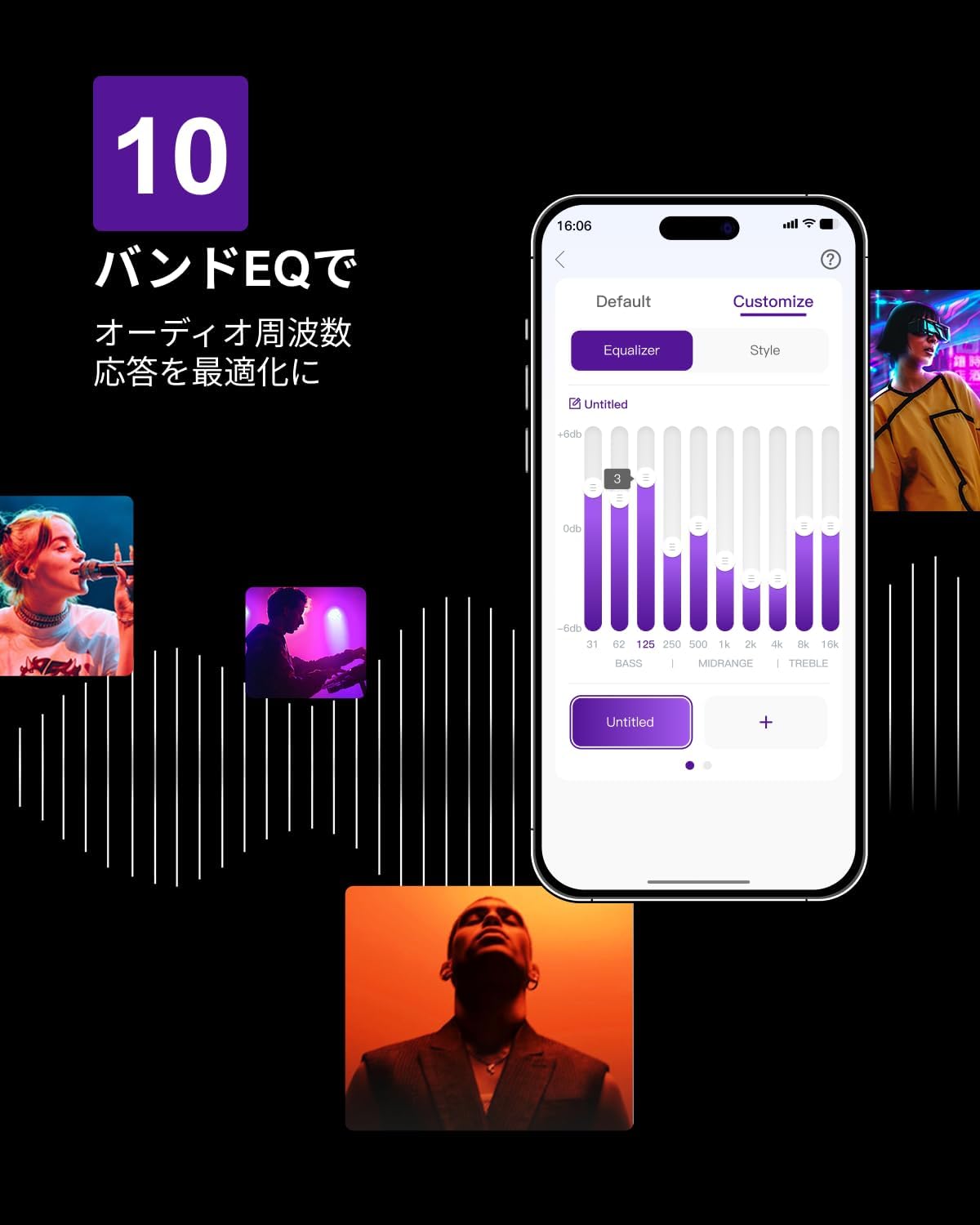
Figure 6.3: ULTIMEA mobile application interface.
7. Технічне обслуговування
To ensure the longevity and optimal performance of your ULTIMEA Aura A60 soundbar system, follow these simple maintenance guidelines:
- Прибирання: Use a soft, dry cloth to wipe the surfaces of the soundbar, subwoofer, and speakers. Do not use liquid cleaners or abrasive materials, as they may damage the finish.
- Вентиляція: Переконайтеся, що всі вентиляційні отвори залишаються вільними та незаблокованими, щоб запобігти перегріву.
- Зберігання: Якщо система зберігатиметься протягом тривалого періоду, від’єднайте її від живлення та зберігайте в прохолодному, сухому місці, подалі від прямих сонячних променів та екстремальних температур.
8. Вирішення проблем
Якщо у вас виникли проблеми із саундбаром, зверніться до наступних поширених проблем та способів їх вирішення:
| проблема | Можлива причина | Рішення |
|---|---|---|
| Немає звуку звукової панелі. | Неправильно вибрано вхід, занадто низька гучність, неправильно підключені кабелі. | Verify the correct input source. Increase volume. Check all cable connections (HDMI, Optical, AUX). Ensure the soundbar is powered on. |
| No sound from subwoofer/surround speakers. | Subwoofer/speakers not paired or powered on, volume too low. | Ensure subwoofer and surround speakers are powered on. They should automatically pair. If not, refer to the pairing instructions in the full manual (if available) or contact support. Increase their individual volume levels. |
| Спотворений або погана якість звуку. | Incorrect audio settings, poor source quality, interference. | Adjust EQ settings or try different sound modes. Ensure the audio source is high quality. Check for nearby electronic devices causing interference. |
| Проблеми з підключенням Bluetooth. | Device out of range, not in pairing mode, interference. | Ensure the soundbar is in Bluetooth pairing mode. Move your device closer to the soundbar. Disconnect and re-pair the device. |
If the problem persists after trying these solutions, please contact ULTIMEA customer support.
9. Технічні характеристики
| Особливість | Деталь |
|---|---|
| Бренд | УЛЬТІМЕЯ |
| Назва моделі | Аура А60 |
| Номер моделі | U2621 |
| Тип динаміка | Soundbar with 7.1ch Surround Sound |
| Аудіотехнології | Dolby Atmos, BassMX Technology |
| Підключення | HDMI eARC, Bluetooth, Optical, AUX, USB |
| Сабвуфер | 4-inch Wired Subwoofer (integrated BassMX) |
| Об'ємні динаміки | 4 (2 wired front, 2 wireless rear) |
| КОНТРОЛЬ | Remote Control, ULTIMEA App |
| Колір | чорний |
| Розміри (Д x Ш x В) | 9 cm x 40 cm x 7 cm (Soundbar, approximate) |
| Країна походження | Китай |
10. Гарантія та підтримка
ULTIMEA is committed to providing high-quality products and customer satisfaction. Your Aura A60 U2621 soundbar system comes with comprehensive support.
10.1 Інформація про гарантію
Specific warranty details may vary by region. Please refer to the warranty card included with your product or visit the official ULTIMEA webсайт для ознайомлення з найактуальнішими гарантійними умовами.
10.2 Підтримка клієнтів
For any questions, technical assistance, or troubleshooting not covered in this manual, please contact our dedicated support team:
- 365-Day Support: Our expert staff is available year-round to assist you.
- Живий чат: Instant responses are available via live chat on our webсайт.
- Повернення: We offer a 30-day return policy with free shipping for your peace of mind.

365-Day Expert Support

Instant Live Chat

30-денне безкоштовне повернення
Для отримання додаткової допомоги, будь ласка, відвідайте ULTIMEA Brand Store.