
1. Вступ
The HanOaki SI4732 Portable Shortwave Receiver is a versatile multi-band digital radio designed for enthusiasts and casual listeners alike. Featuring an ESP32-S3 master control and SI4732 DSP chip, it supports a wide range of broadcasting modes including FM, AM, LSB, and USB. Its compact design, 1.9-inch IPS color screen, and long-lasting battery make it an ideal companion for portable listening.
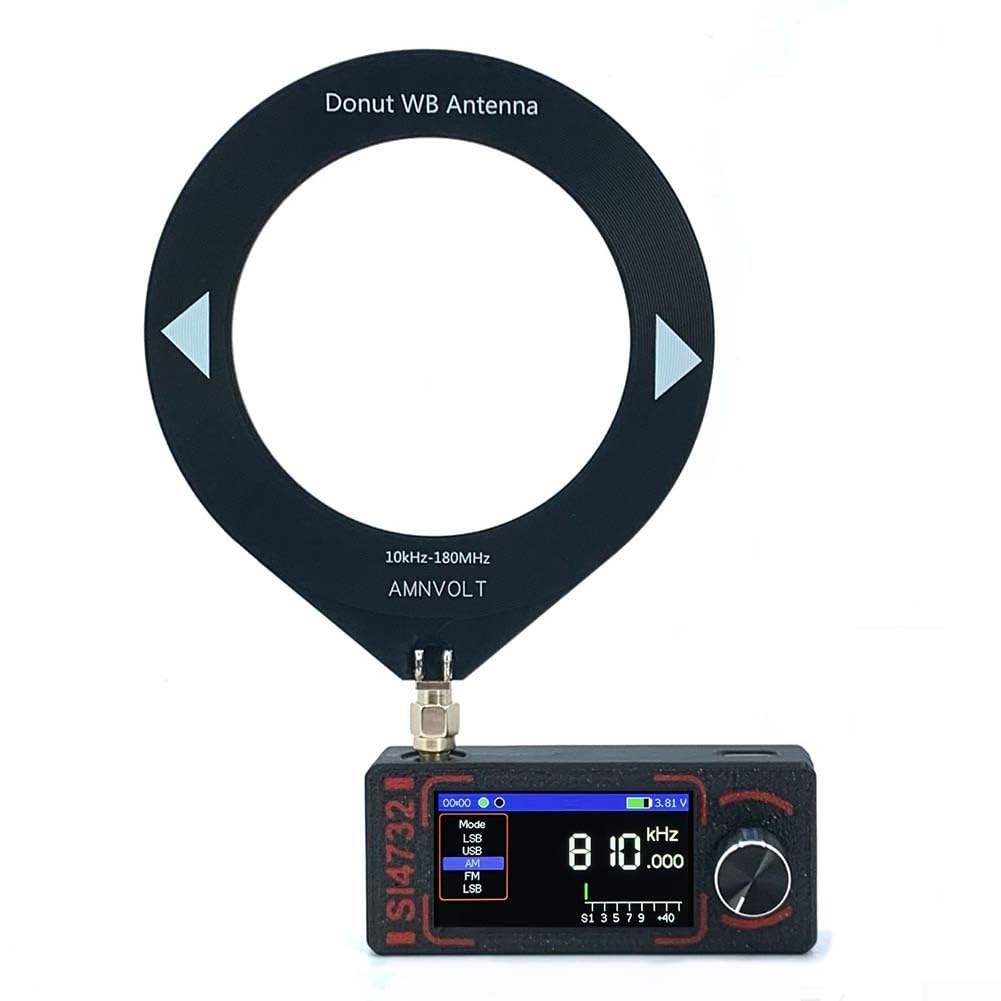
Image 1.1: The SI4732 Portable Shortwave Receiver with an attached loop antenna, held in hand. The screen displays frequency and mode information.
2. Вміст упаковки
Before proceeding with setup, please verify that all items are present in your package:
- SI4732 Portable Shortwave Receiver unit
- Antenna (either a telescopic whip antenna or a loop antenna, depending on your purchase)
- USB Type-C charging cable (not explicitly listed but implied by charging interface)

Image 2.1: The SI4732 radio shown with both the loop antenna (left) and the telescopic whip antenna (right), illustrating the two available antenna options.
3. Налаштування
3.1. Підключення антени
Locate the SMA-KE antenna interface on the top of the receiver. Carefully screw your chosen antenna (loop or whip) onto this connector until it is finger-tight. Do not overtighten.
3.2. Зарядка батареї
The receiver is equipped with an 800mAh built-in battery. Before first use, it is recommended to fully charge the device. Connect the provided USB Type-C cable to the charging port on the side of the receiver and plug the other end into a standard USB power adapter (not included) or a computer USB port. The screen will indicate charging status. Примітка: Avoid using fast-charging adapters as they may damage the device.

Зображення 3.1: Збоку view of the SI4732 receiver, highlighting the antenna connector (top left) and the USB Type-C charging port (top right).
4. Інструкція з експлуатації
4.1. Увімкнення/вимкнення живлення
To power on the device, press and hold the rotary encoder button located on the right side of the unit. Repeat this action to power off the device.
4.2. Screen and Display
The receiver features a 1.9-inch IPS high-definition color screen. You can adjust the screen backlight brightness (from 32 to 255) through the menu options. The screen displays current frequency, operating mode, battery level, and other relevant information.

Зображення 4.1: спереду view of the SI4732 receiver, clearly showing the 1.9-inch IPS color screen and the rotary encoder knob for control.
4.3. Mode Selection and Frequency Tuning
All primary actions, including mode selection (FM, AM, LSB, USB) and frequency tuning, are performed using the rotary encoder button. Rotate the knob to change frequency or navigate menus, and press it to confirm selections or access functions. Refer to the on-screen interface for specific navigation prompts.
4.4. AGC/ATT Functions
The receiver supports Automatic Gain Control (AGC) and Attenuation (ATT) functions to optimize signal reception. These can typically be accessed and adjusted through the device's menu system using the rotary encoder. Consult the on-screen menu for specific controls.
4.5. Аудіо вихід
The device features a built-in 1W power cavity speaker for direct audio output. For private listening, connect standard 3.5mm stereo headphones to the audio interface located on the side of the unit.
5. Технічне обслуговування
5.1. прибирання
Wipe the receiver with a soft, dry cloth. Do not use liquid cleaners or solvents, as they may damage the finish or internal components.
5.2. Догляд за акумулятором
To prolong battery life, avoid fully discharging the battery frequently. Recharge the device when the battery level is low. Store the device in a cool, dry place if not used for extended periods, ensuring it has a partial charge.
5.3. Оновлення мікропрограми
The SI4732 receiver supports firmware upgrades via its TYPE-C interface. Periodically check the manufacturer's website for new firmware versions and follow their instructions for updating to access new features and performance improvements.
6. Вирішення проблем
- Немає живлення: Ensure the battery is charged. Connect the receiver to a power source using the USB Type-C cable. If the issue persists, try a different charging cable or power adapter.
- Поганий прийом: Check that the antenna is securely connected. Extend the whip antenna fully or adjust the position of the loop antenna for optimal signal. Move away from sources of electronic interference.
- Немає звуку: Verify that the volume is not set to minimum. If using headphones, ensure they are properly plugged into the 3.5mm audio jack.
- Екран не відповідає: Try restarting the device by holding the power button. If unresponsive, allow the battery to fully discharge and then recharge.
7. Технічні характеристики
| Назва частини | MINI SI4732 Radio |
| Головний контроль | ESP-32-S3 |
| Чіп DSP | SI4732 |
| Режими роботи | FM/AM/LSB/USB (Does not support aviation band) |
| Діапазон прийому | HF/SW/MW/VHF |
| Діапазон частот | LW, MW, SW (150kHz - 30MHz), VHF (64-108Mhz) |
| Екран | 1.9-дюймовий IPS-дисплей, роздільна здатність 170*320 |
| Регулювання яскравості | 32~255 рівні |
| Інтерфейс зарядки | TYPE-C (Cannot be charged with fast charge) |
| Аудіоінтерфейс | 3.5mm three-stagе стерео |
| Інтерфейс антени | SMA-KE (inner hole) |
| Ємність акумулятора | 800 мАг |
| Матеріал корпусу | метал |
| Вага товару | 147 грамів |
| Номер моделі | 2L6Z4983699PZ7N828Z8FD2UJ4WX3 |
8. Гарантія та підтримка
Warranty information for your HanOaki SI4732 Portable Shortwave Receiver is typically provided at the point of purchase or included with the product packaging. Please refer to these documents for details regarding warranty coverage and terms. For technical support or further assistance, please contact the retailer or manufacturer directly through their official channels.