
1. Вступ
Дякуємо за покупкуasing the ELEPHAS BL128MINI Mini Projector. This manual provides essential information for setting up, operating, and maintaining your projector. Please read it thoroughly before use to ensure optimal performance and longevity of the device.
2. Вміст упаковки
Перевірте, чи всі перелічені нижче предмети входять до вашої упаковки:
- 1 x ELEPHAS BL128MINI Projector
- 1 x Пульт дистанційного керування
- 1 x Посібник користувача (цей документ)
- 1 кабель HDMI
- 1 x Detachable Tripod
3. Продукт закінчивсяview
3.1 Основні характеристики
- Роздільна здатність 1080P Full HD: Supports 1920 x 1080 resolution for clear images.
- 24-bit True Color: Delivers vibrant and accurate colors.
- Проекція на великий екран: Capable of projecting up to a 200-inch screen.
- Detachable Tripod: Provides stable placement and flexible positioning.
- Built-in HIFI Speaker: Offers integrated audio output.
- Кілька варіантів підключення: Includes USB, HDMI, AV, and Audio ports.

Image 3.1: The ELEPHAS BL128MINI Projector offers 1080P Full HD resolution with 24-bit true color, an 8000:1 contrast ratio, and enhanced brightness for a vivid viewнабутий досвід.
3.2 Projector Ports and Controls
Ознайомтеся з різними портами та елементами керування на вашому проекторі для правильного підключення та роботи.

Image 3.2: Rear panel of the ELEPHAS BL128MINI Projector, highlighting DC power input, USB ports, HDMI port, AV port, and audio output. Compatible devices include Xbox, TV Stick, PC, Smartphone, USB drives, speakers, and headphones.
4. Налаштування
4.1 Підключення живлення
- Підключіть адаптер живлення до порту DC IN на проекторі.
- Підключіть адаптер живлення до настінної розетки.
4.2 Встановлення штатива
The included detachable tripod allows for stable placement on various surfaces.
- Locate the tripod mounting screw hole on the bottom of the projector.
- Screw the tripod securely into the mounting hole.
- Adjust the tripod legs to achieve the desired height and angle for projection.

Image 4.2: The detachable tripod provides stability for the projector, whether placed on a desktop or uneven outdoor surfaces.
4.3 Розміщення та відстань проекції
Position the projector on a flat, stable surface. The optimal projection distance ranges from 3.3 to 9.8 feet for screen sizes between 50 and 200 inches.

Image 4.3: Recommended projection distances for achieving various screen sizes, from 50 to 200 inches.
5. Інструкція з експлуатації
5.1 Увімкнення/вимкнення живлення
- Увімкнення: Натисніть кнопку живлення на проекторе або пульті дистанційного керування.
- Вимкнення живлення: Знову натисніть кнопку живлення. Проектор перейде в режим очікування.
5.2 Налаштування фокусу
Повертайте кільце фокусування на об'єктиві проектора, доки проектоване зображення не стане чітким і різким.
5.3 Вибір джерела вхідного сигналу
Use the 'Source' button on the remote control or the projector to select the desired input source (HDMI, USB, AV).
5.4 Підключення зовнішніх пристроїв
Проектор підтримує різні зовнішні пристрої:
- HDMI: Connect laptops, PCs, TV boxes, TV sticks, gaming consoles (e.g., Xbox), or other HDMI-enabled devices using the provided HDMI cable.
- USB: Вставте флеш-накопичувач USB у порт USB, щоб відтворити медіафайли files безпосередньо.
- AV: Use the AV port for older devices with composite video output.
- Смартфони/планшети: For iOS and Android devices, an additional HDMI adapter (not included) is required for connection.
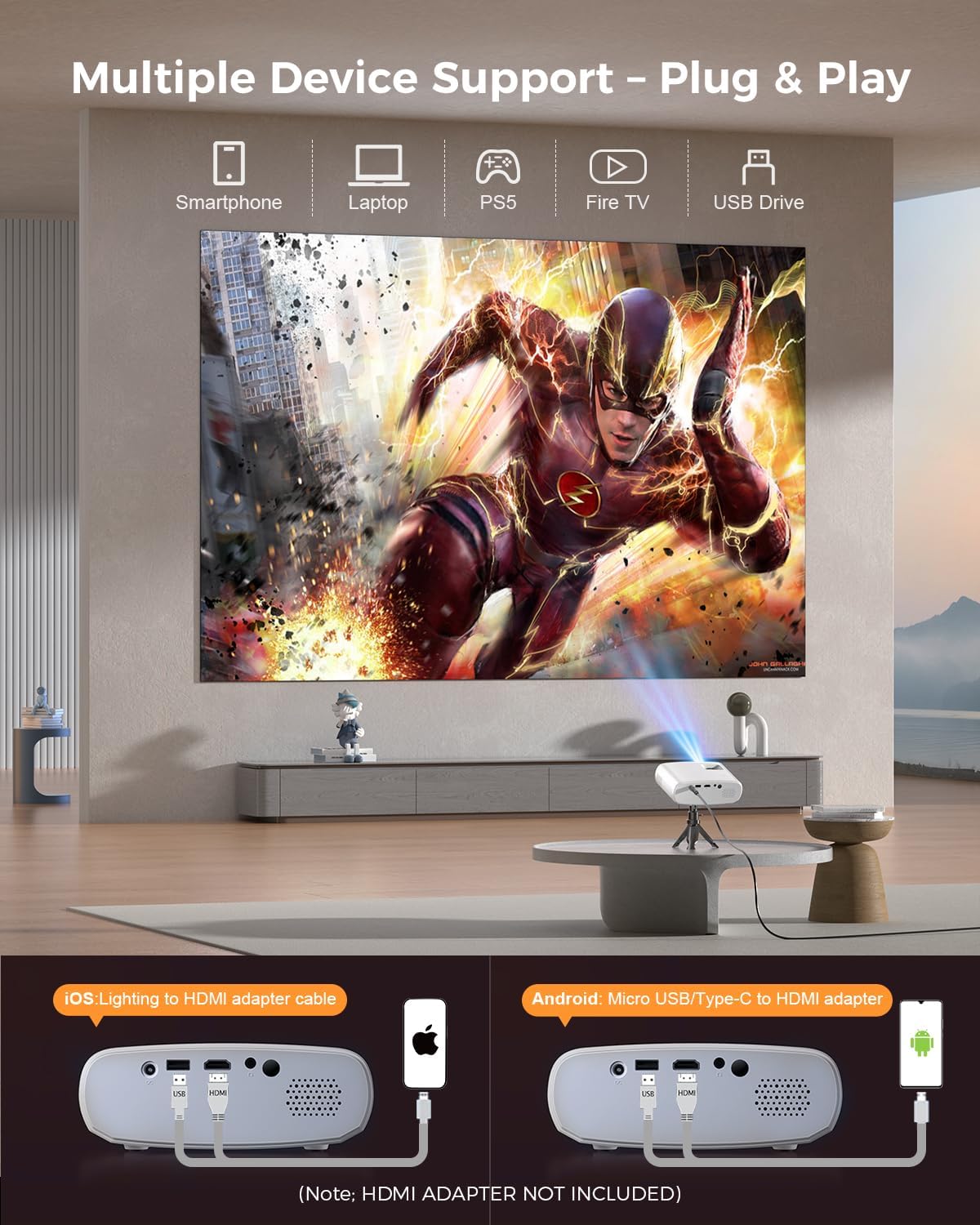
Image 5.4: The projector supports multiple devices via HDMI and USB. Note that an HDMI adapter is required for direct smartphone connection (not included).
5.5 Аудіовихід
The projector has a built-in HIFI speaker. For external audio, connect headphones or external speakers to the Audio Out port.
6. Технічне обслуговування
6.1 Очищення
- Об'єктив: Use a soft, lint-free cloth or lens cleaning paper. Avoid abrasive materials.
- Casing: Протріть проектор casing with a soft, dry cloth. Do not use liquid cleaners or solvents.
- Вентиляція: Ensure ventilation openings are clear of dust and obstructions to prevent overheating.
6.2 Зберігання
When not in use, store the projector in a cool, dry place, away from direct sunlight and extreme temperatures. Use the original packaging or a protective bag to prevent dust accumulation.
7. Вирішення проблем
| проблема | Можлива причина | Рішення |
|---|---|---|
| Зображення не проєктується | Нещільно прикріплений кабель живлення; неправильне джерело вхідного сигналу; пристрій підключено неправильно. | Check power connection; Select correct input source; Reconnect HDMI/USB cable. |
| Зображення розмите | Фокус не налаштовано; проектор розташований занадто близько/далеко від екрана. | Налаштуйте кільце фокусування; налаштуйте відстань проекції. |
| Ні звуку | Занадто низька гучність; звук вимкнено; зовнішній аудіопристрій не підключено. | Збільшити гучність; Увімкнути звук; Перевірити зовнішні аудіопідключення. |
| Пульт не працює | Низький заряд/розряджені батареї; Перешкода між пультом дистанційного керування та проектором. | Замініть батарейки; Забезпечте прямий контакт з ІЧ-приймачем. |
| Cannot play Netflix/Hulu/Prime Video | Захист авторських прав HDCP. | Use an external streaming device like Amazon Fire Stick or Roku Stick (not included). |
8. Технічні характеристики
| Особливість | Деталь |
|---|---|
| Модель | BL128MINI |
| Бренд | ЕЛЕФА |
| Роздільна здатність дисплея | 1920 x 1080 (1080P Full HD) |
| Технологія підключення | HDMI, USB, AV, аудіовихід |
| Особливості | HDMI Connectivity, Portable, Built-in Speakers, Detachable Tripod |
| Рекомендоване використання | В приміщенні/на вулиці |
| Вага товару | 1.96 фунта (приблизно 0.89 кг) |
| Розміри продукту | 6 x 4.4 x 2.4 дюймів (приблизно 15.2 x 11.2 x 6.1 см) |
9. Гарантія та підтримка
ELEPHAS projectors are certified with CE, FCC, and RoHS standards.
- Factory Support: We provide 3-years factory support for this product.
- Технічна підтримка: Доступна довічна технічна підтримка.
- Обслуговування клієнтів: 24/7 professional service is provided.
- Повернення: A 30-day return or exchange policy is in place.
For further assistance, please refer to the contact information provided on the product packaging or the official ELEPHAS webсайт.

Image 9.1: ELEPHAS offers comprehensive customer support, including 24/7 professional service, a 30-day return policy, and lifetime technical support.