
1. Вступ
Дякуємо за покупкуasing the Airbition 10-inch Wall Mount Fan with Light and Remote Control. This manual provides important information regarding the safe installation, operation, and maintenance of your new fan. Please read it thoroughly before use and retain it for future reference.
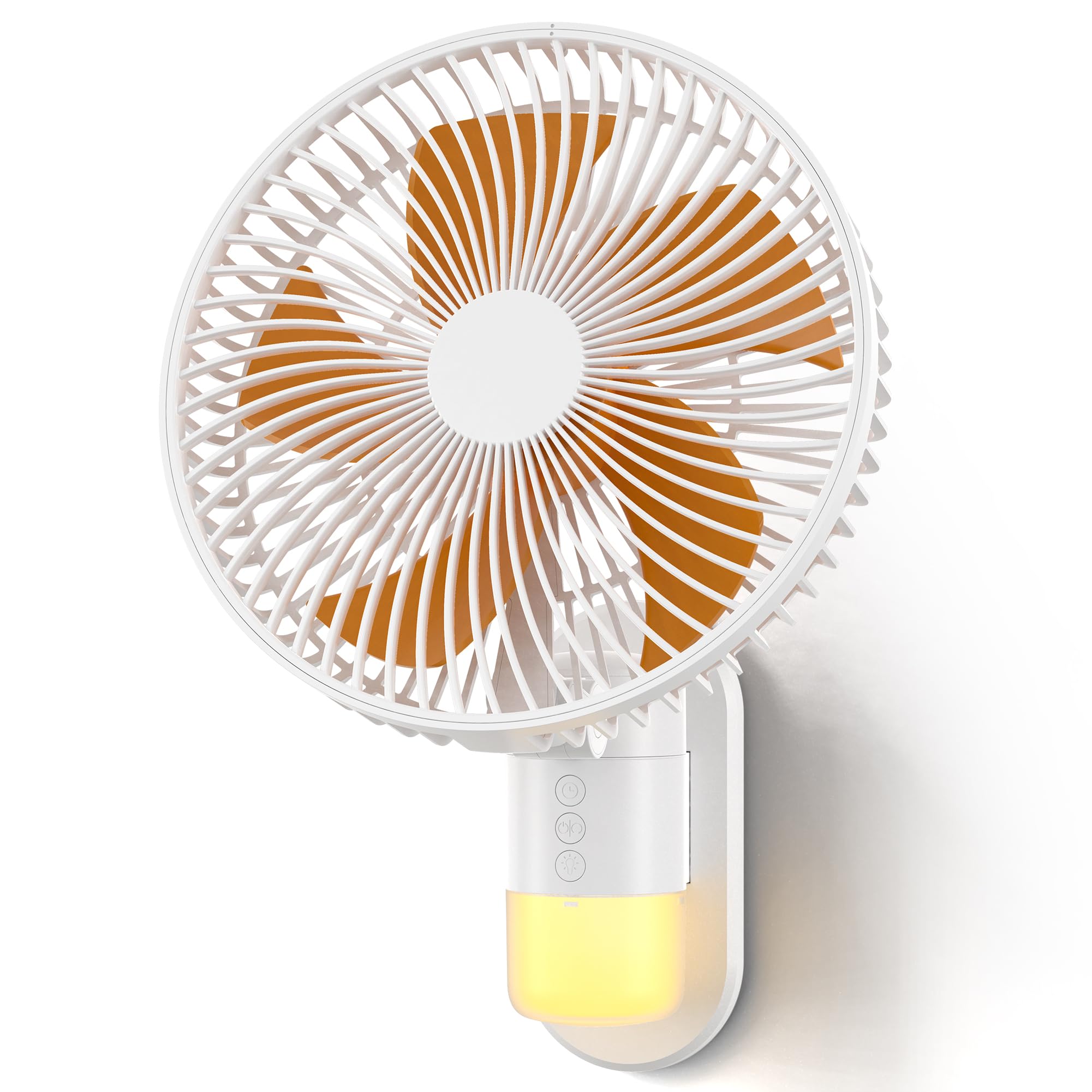
Image: The Airbition 10-inch Wall Mount Fan, showcasinзавдяки компактному дизайну та вбудованому освітленню.
2. Техніка безпеки
Щоб зменшити ризик пожежі, ураження електричним струмом або травмування, будь ласка, дотримуйтесь наступних запобіжних заходів:
- Завжди відключайте вентилятор від мережі перед чищенням або будь-яким технічним обслуговуванням.
- Не вставляйте пальці або будь-які предмети в решітку вентилятора під час його роботи.
- Переконайтеся, що шнур живлення не пошкоджений або не перетиснутий.
- Не використовуйте вентилятор у вологих або damp локації.
- Тримайте вентилятор подалі від штор, портьєр або будь-яких предметів, які можуть бути втягнуті вентилятором.
- Цей прилад не призначений для використання особами (включаючи дітей) з обмеженими фізичними, сенсорними чи розумовими здібностями, або з браком досвіду та знань, якщо вони не перебувають під наглядом або не отримали інструкції щодо використання приладу особою, відповідальною за їх безпеку.
- Слідкуйте за дітьми, щоб переконатися, що вони не граються з пристроєм.
3. Вміст упаковки
Перевірте наявність усіх елементів в упаковці:
- Airbition 10-inch Wall Mount Fan
- Пульт дистанційного керування
- Монтажний кронштейн
- Power Cord (78 inches / 6.56 ft)
- Посібник користувача (цей документ)
4. Особливості продукту
- Потужний потік повітря: Equipped with a high-efficiency DC motor and 5 aerodynamic blades for strong, fast cooling.
- 4 швидкісних режимів: Choose from Low, Medium, High, and Turbo settings for customized comfort.
- Wide Air Circulation: Features 90° oscillation and 120° adjustable tilt to cover a broad area.
- Пульт дистанційного керування: Conveniently operate the fan from up to 13 feet away.
- Розумний таймер: Set an auto-off timer for 2, 4, 6, or 8 hours to save energy.
- Вбудований нічник: Integrated light with 2 tones (Cool White & Warm) and 4 brightness levels for nighttime use.
- Компактний дизайн: Wall-mounted design ideal for bedrooms, RVs, home offices, and garages.
- Міцна конструкція: Made with durable ABS blades and reinforced neck support.
Відео: Оверview of the Airbition 10-inch Wall Mount Fan's features and benefits.

Image: A woman on a bed with the wall-mounted fan providing cooling airflow, highlighting its quiet operation and integrated light.

Image: A child sleeping in a bedroom with the fan's night light providing a soft glow, illustrating the "Cozy Glow for Peaceful Nights" feature.

Image: An illustrative diagram demonstrating how the wall mount fan efficiently circulates air throughout a living space.
5. Налаштування та встановлення
Follow these steps for proper installation of your wall mount fan:
- Prepare the Fan: Attach the Type-C plug of the power cord to the rear power port of the fan's backplate.
- Монтаж монтажної пластини: Choose a suitable location on the wall. Use strong adhesive or screws (not included) to securely fix the mounting plate to the wall. Ensure the plate is level and can support the fan's weight.
- Приєднайте вентилятор: Align the fan with the installed mounting plate and slide it down until it clicks securely into place.
- Підключіть живлення: Підключіть шнур живлення до стандартної електричної розетки.
Video: A step-by-step guide on how to install the Airbition wall mount fan.
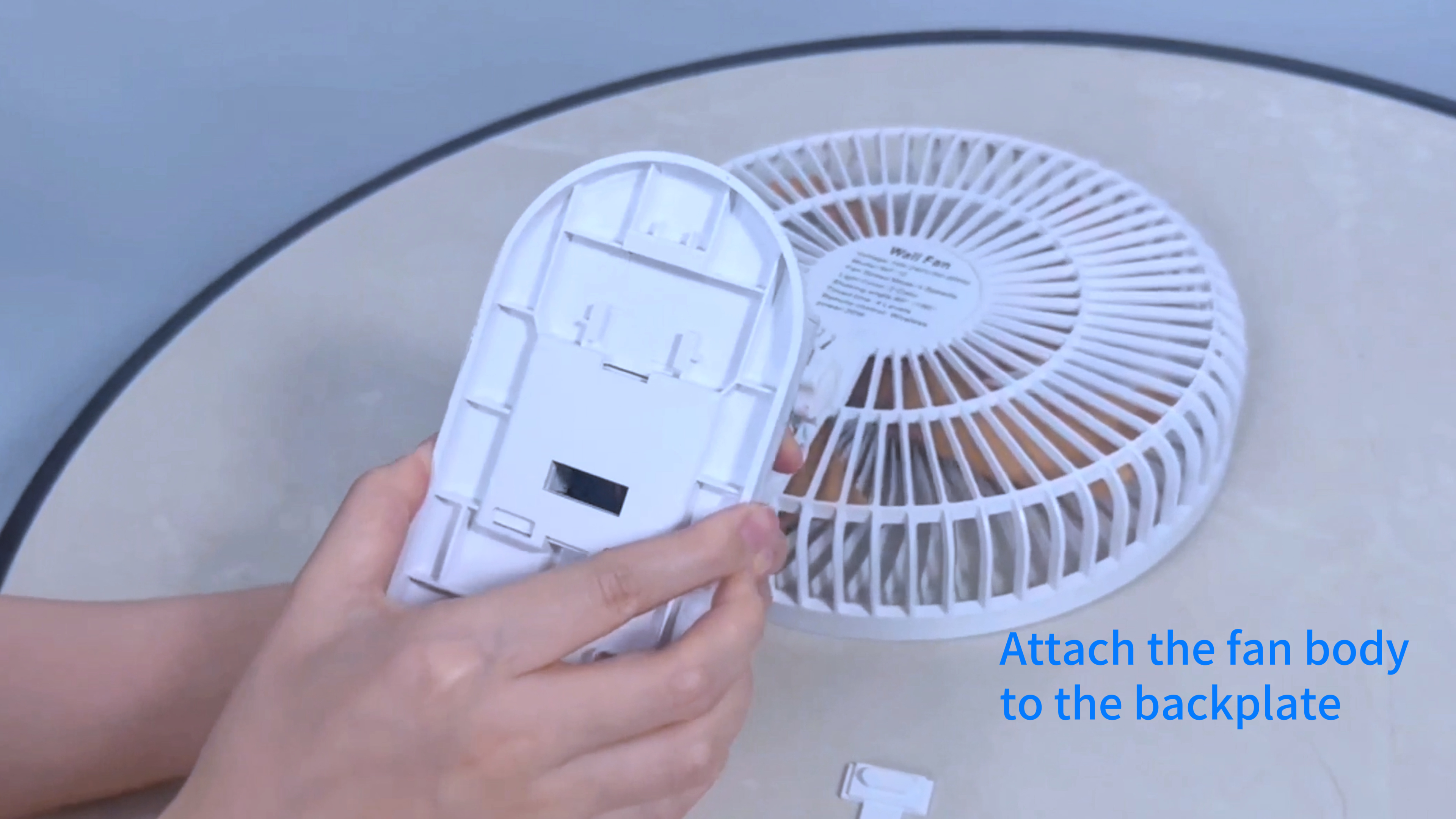
Image: Hands attaching the Type-C power plug to the back of the fan unit.

Image: The Airbition wall mount fan securely installed on a wall.
6. Операція
Your Airbition wall mount fan can be operated using the included remote control or the control panel on the fan unit.
Функції дистанційного керування:
- Кнопка живлення (⏻): Вмикає або вимикає вентилятор.
- Кнопка швидкості (+/-): Adjusts fan speed through Low, Medium, High, and Turbo modes.
- Кнопка коливання (↔): Активує або деактивує функцію коливання на 90°.
- Кнопка світла (💡): Cycles through light tones (Cool White, Warm) and adjusts brightness levels (4 levels).
- Кнопка таймера (⏱): Встановлює таймер автоматичного вимкнення на 2, 4, 6 або 8 годин.
Панель ручного керування:
The fan unit features a control panel with buttons for basic functions, mirroring the remote control. Refer to the icons on the fan for specific button functions.

Image: A woman demonstrating the use of the remote control with the wall-mounted fan.
7. Технічне обслуговування
Регулярне очищення забезпечує оптимальну продуктивність та подовжує термін служби вашого вентилятора.
- Відключити живлення: Завжди відключайте вентилятор від розетки перед чищенням.
- Detachable Grille and Blades: The front grille and fan blades are detachable for easy cleaning. Gently twist or unclip the front grille to remove it.
- Прибирання: Використовуйте м'який, damp cloth to wipe down the exterior surfaces. For the blades and inside the grille, use a soft brush or vacuum cleaner to remove dust. The blades can be rinsed under water if heavily soiled, ensuring they are completely dry before reassembly.
- Повторне складання: Ensure all parts are dry before reattaching the blades and front grille. Securely fasten the grille back into place.

Image: Detachable fan blades being cleaned under running water, demonstrating the "Clean with Ease" feature.
8. Вирішення проблем
Якщо у вас виникли проблеми з вентилятором, зверніться до наступних поширених проблем та способів їх вирішення:
| проблема | Можлива причина | Рішення |
|---|---|---|
| Вентилятор не вмикається. | Немає живлення, погане з'єднання або розряджена батарея пульта. | Check if the power cord is securely plugged in. Ensure the outlet has power. Replace remote control batteries if necessary. |
| Вентилятор шумить. | Dust accumulation, loose parts, or fan not mounted securely. | Clean the fan blades and grille. Ensure all parts are securely fastened. Re-check mounting. |
| Світло не працює. | Light function not activated, or electrical issue. | Press the light button on the remote or control panel. If still not working, contact customer support. |
| Пульт дистанційного керування не реагує. | Розряджені батареї, перешкоди або поза зоною досяжності. | Replace remote batteries. Ensure no obstructions between remote and fan. Operate within 13 ft range. |
9. Технічні характеристики
| Особливість | Деталь |
|---|---|
| Бренд | Airbition |
| Назва моделі | Повітря401 |
| Розміри продукту (Д x Ш x В) | 7.08" Г x 10.24" Ш x 14.17" В |
| Розмір | 10 дюйми |
| Джерело живлення | AC (Standard Electrical Plug) |
| Wattage | 50 Вт |
| томtage | 15 вольт |
| Кількість швидкостей | 4 |
| Кількість лез | 5 |
| швидкість | 5.2 Meters per Second |
| Коливання | 90° |
| Регульований нахил | 120° |
| Тип контролера | Пульт дистанційного керування |
| Особливості | LED Light (2 tones, 4 brightness levels), Timer |
| матеріал | пластик |
| Довжина шнура | 78 inches (6.56 ft) |
| Використання в приміщенні/зовні | закритий |
10. Гарантія та підтримка
Airbition products are designed for reliability and performance. For warranty information or technical support, please refer to the contact details provided with your purchase or visit the official Airbition webсайт.
If you experience any issues not covered in the troubleshooting section, please contact our customer service team for assistance.