
1. Вступ
Thank you for choosing the hygger Programmable LED Aquarium Light, Model HG160. This light is designed to provide a full spectrum lighting solution for planted aquariums, featuring a 24/7 sunrise and sunset cycle, adjustable colors, and brightness levels. This manual provides detailed instructions for installation, operation, and maintenance to ensure optimal performance and longevity of your aquarium light.
2. Техніка безпеки
- Завжди відключайте лампу від розетки перед будь-яким технічним обслуговуванням, очищенням або встановленням.
- Цей виріб призначений лише для використання в приміщенні. Не піддавайте впливу дощу або надмірної вологості.
- Ensure your hands are dry when handling the power adapter and controller.
- Do not operate the light if any part is damaged, especially the power cord or adapter.
- Зберігати в недоступному для дітей місці.
- Ensure the light is securely mounted on the aquarium to prevent accidental falls into the water.
- The light unit is IP68 waterproof, but the controller and power adapter are not. Keep them away from water.
3. Вміст упаковки
Перевірте наявність усіх елементів в упаковці:
- LED Aquarium Light Unit
- Зовнішній контролер
- Extendable Brackets (pre-attached or separate)
- Power Adapter (100-240V AC to 24V/2A DC)
- Посібник користувача (цей документ)
4. Налаштування та встановлення
Follow these steps to install your hygger LED Aquarium Light:
- Розпакуйте компоненти: Обережно вийміть усі предмети з упаковки.
- Прикріпіть кронштейни: If the extendable brackets are not pre-attached, slide them onto the ends of the light unit.
- Габаритний вогонь: Place the light unit on top of your aquarium. Adjust the extendable brackets to fit your tank size (e.g., 29-35 inches for the L size model) securely. Ensure the light is centered and stable.
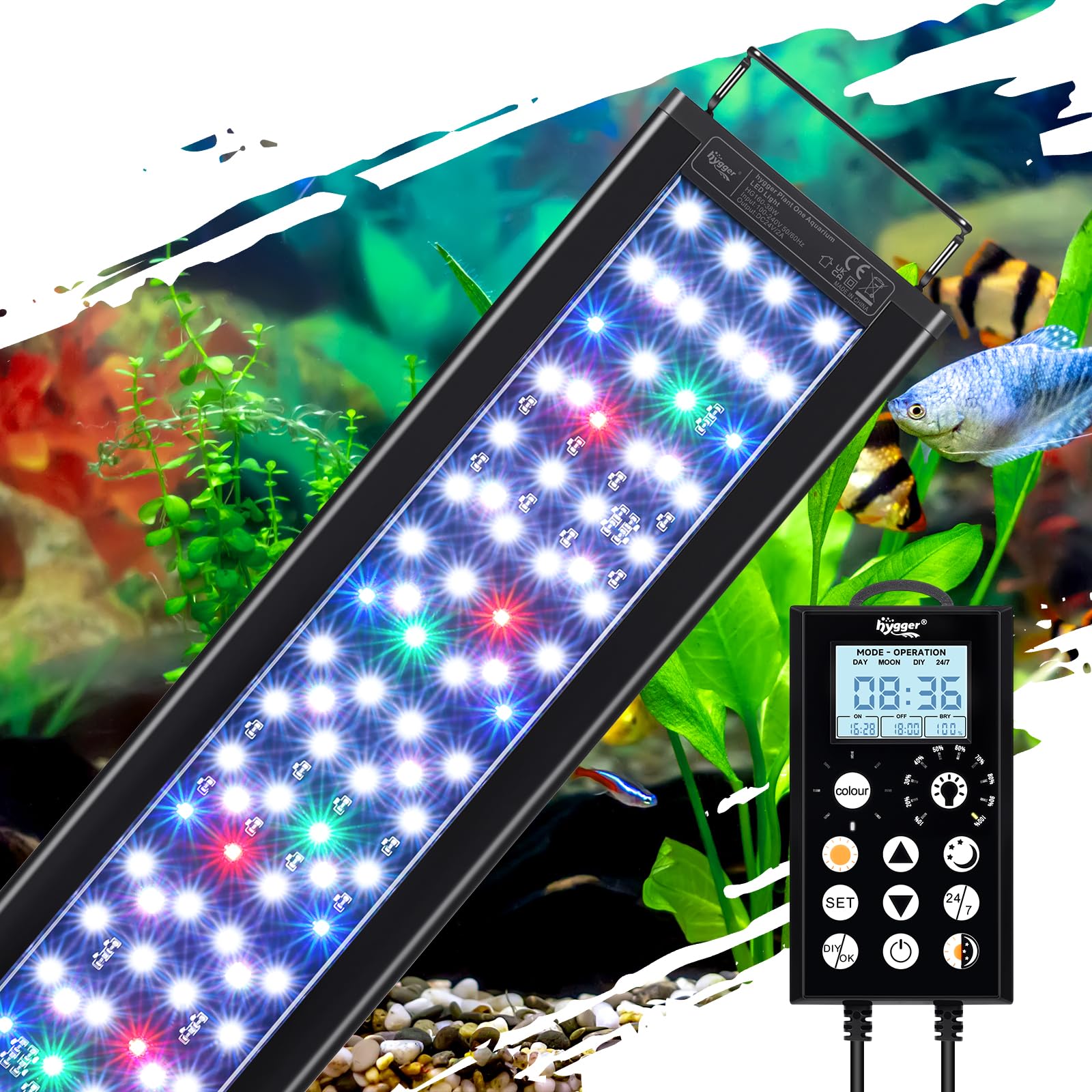
Image: hygger LED Aquarium Light mounted on an aquarium.

Image: Close-up of the adjustable extendable brackets.
- Підключити контролер: Plug the light unit's cable into the designated port on the external controller.
- Підключіть живлення: Підключіть адаптер живлення до контролера, а потім підключіть адаптер до стандартної електричної розетки.
5. Інструкція з експлуатації
5.1 Контролер закінчивсяview
The external controller features an LCD display and several buttons for programming and adjusting the light settings. Familiarize yourself with the button functions:

Image: Detailed diagram of the controller and its functions.
- ГОДИНА/ХВИЛИНА: Adjusts time values.
- НАСТРОЙКА: Enters settings, confirms selections, or switches between hours/minutes.
- КОЛІР: Cycles through 8 available colors in DIY mode.
- ЯСКРАВІСТЬ: Adjusts 10 levels of brightness.
- Стрілки ВГОРУ/ВНИЗ: Adjusts values (time, brightness, color).
- УВІМК./ВИМК.: Short press to turn on, long press (3 seconds) to turn off.
- 24/7: Activates the 24/7 automatic daylight cycle.
- ДЕНЬ: Activates Sunlight constant mode. Long press (3 seconds) to set the daylight timer.
- НІЧ: Activates Moonlight constant mode. Long press (3 seconds) to set the moonlight timer.
- DAY+NIGHT: Switches between daylight mode and moonlight mode. Long press (3 seconds) to set the day/night mode timer.
- DIY/OK: Enters DIY mode, confirms end time of each segment.
5.2 Setting Local Time
Before using timed modes, set the current local time on the controller. Refer to the video below for a visual guide on operating the light, which includes time setting.
Video: Instructions on how to operate the hygger HG160 smart aquarium light, including initial setup and time setting.
5.3 24/7 Default Mode
This mode simulates a natural 24-hour sunrise and sunset pattern, providing a stable lighting environment for your aquarium. It turns on at 6:00 AM and off at 11:00 PM with smooth transitions.
- Ensure the local time is set correctly.
- Коротко натисніть 24/7 button to activate this mode.

Image: Light intensity graph for the 24/7 mode, illustrating sunrise, daylight, dusk, and moonlight phases.
Video: Demonstrates the hygger IP68 Waterproof LED Aquarium Light with Timer, showing its operation.
Video: Shows the Day and Nightlight functionality of the aquarium light.
Video: Demonstrates the Nightlight Mode of the LED Aquarium Light.
Video: Demonstrates the Daylight Mode of the LED Aquarium Light.
5.4 Режим «Зроби сам»
The DIY mode allows you to customize the timing, color, and brightness for up to 5 distinct stages (L1-L5) throughout the day, tailoring the lighting to your specific aquatic ecosystem needs.
- Натисніть DIY/OK button to enter DIY mode.
- For each segment (L1-L5) in sequence:
- Прес ВГОРУ/ВНИЗ arrows to set the start time. Press НАБІР to switch between hours/minutes. Press НАБІР для підтвердження.
- Коротко натисніть КОЛІР button to select a color. Press НАБІР для підтвердження.
- Коротко натисніть ЯСКРАВІСТЬ button to adjust brightness levels (10%-100%). Press НАБІР для підтвердження.
- Коротко натисніть ВГОРУ/ВНИЗ arrows to set the end time for the current segment.
- Прес DIY/OK to proceed to the next segment.
- Repeat for all 5 segments.

Image: Illustration of the DIY 5 Stages Mode, demonstrating customizable light phases.
Video: Demonstrates the DIY Mode of the LED Aquarium Light, showing customization options.
5.5 Manual Modes (Day, Night, Daylight & Moonlight)
These modes allow for constant lighting at specific settings:
- Режим дня: Коротко натисніть ДЕНЬ button for constant sunlight. Long press (3 seconds) to set a specific timer for this mode.
- Нічний режим: Коротко натисніть НІЧ button for constant moonlight. Long press (3 seconds) to set a specific timer for this mode.
- Daylight & Moonlight Mode: Коротко натисніть DAY+NIGHT button to switch between daylight and moonlight. Long press (3 seconds) to set a specific timer for this combined mode.

Image: Comparison of Day Mode and Night Mode settings with the controller.

Image: Controller displaying Daylight & Moonlight Mode.
5.6 Регулювання кольору та яскравості
In DIY or manual modes, you can adjust the light's appearance:
- Кольори: Choose from 8 colors: White, Blue, Red, Green, Yellow, Azure, Orange, Purple. Use the КОЛІР кнопку для перемикання між опціями.
- Яскравість: Adjust between 10 brightness levels (10% to 100%). Use the ЯСКРАВІСТЬ кнопка або ВГОРУ/ВНИЗ стрілки.

Image: Visual representation of the 8 color options and 10 brightness levels.
5.7 Функція інтелектуальної пам'яті
The light features intelligent power recovery. In case of a power outage, all settings are restored. However, the local time may need to be reset. The 24/7 cycle will seamlessly resume if no adjustments are made within 5 minutes of reboot.

Image: Illustration of the Smart Memory Function, showing light states before and after a power interruption.
6. Технічне обслуговування
Регулярне технічне обслуговування забезпечує довговічність та оптимальну роботу вашого акваріумного освітлення.
- Прибирання: Unplug the light before cleaning. Wipe the aluminum alloy shell with a soft, damp cloth. Do not use abrasive cleaners or immerse the controller or power adapter in water.
- Розсіювання тепла: The light features a fin-like texture for efficient heat dissipation. Ensure these fins are not obstructed to maintain proper cooling.
- Перевірка кабелю: Періодично перевіряйте шнур живлення та з’єднання на наявність будь-яких ознак зносу або пошкоджень.

Image: Close-up of the aluminum alloy housing with fin-type design for heat dissipation.
Відео: Кінецьview of the IP68 Waterproof Full Spectrum Aquarium Plant Light, highlighting its features and design.
7. Вирішення проблем
If you encounter issues with your hygger LED Aquarium Light, refer to the following common problems and solutions:
| проблема | Можлива причина | Рішення |
|---|---|---|
| Світло не вмикається. | No power, loose connection, damaged adapter. | Check power outlet. Ensure all connections are secure. Inspect power adapter for damage; replace if necessary. |
| Controller screen is blank or malfunctioning. | Проблема з живленням, внутрішня несправність. | Unplug and replug the power. If issue persists, contact customer support. |
| Specific colors are not working. | LED fault, wiring issue. | Ensure the light is not in a mode that restricts color. If problem persists, contact customer support. |
| 24/7 mode not starting or ending correctly. | Incorrect local time setting. | Verify and reset the local time on the controller. |
If troubleshooting steps do not resolve the issue, please contact hygger customer support for assistance.
8. Технічні характеристики
Key technical specifications for the hygger Programmable LED Aquarium Light (Model HG160):
| Особливість | Деталь |
|---|---|
| Номер моделі | HG160 |
| Wattage | 38 Вт |
| Кількість світлодіодів | 150 (94 white, 6 red, 14 blue, 6 green, 30 RGB) |
| Люмен | 1398 лм |
| Колірна температура | 12781 тис |
| CRI (індекс передачі кольору) | >90 |
| Розміри продукту | 28.5 дюйма (Г) x 4.3 дюйма (Ш) x 0.5 дюйма (В) (72.5 см завдовжки) |
| Застосовуваний розмір резервуара | 29-35 дюйма (75-90 см) |
| Джерело живлення | Corded Electric (100-240V AC to 24V/2A DC adapter) |
| матеріал | Алюмінієвий сплав |
| Рейтинг водонепроникності | IP68 (лише світильник) |
| Тривалість життя | 50,000 години |
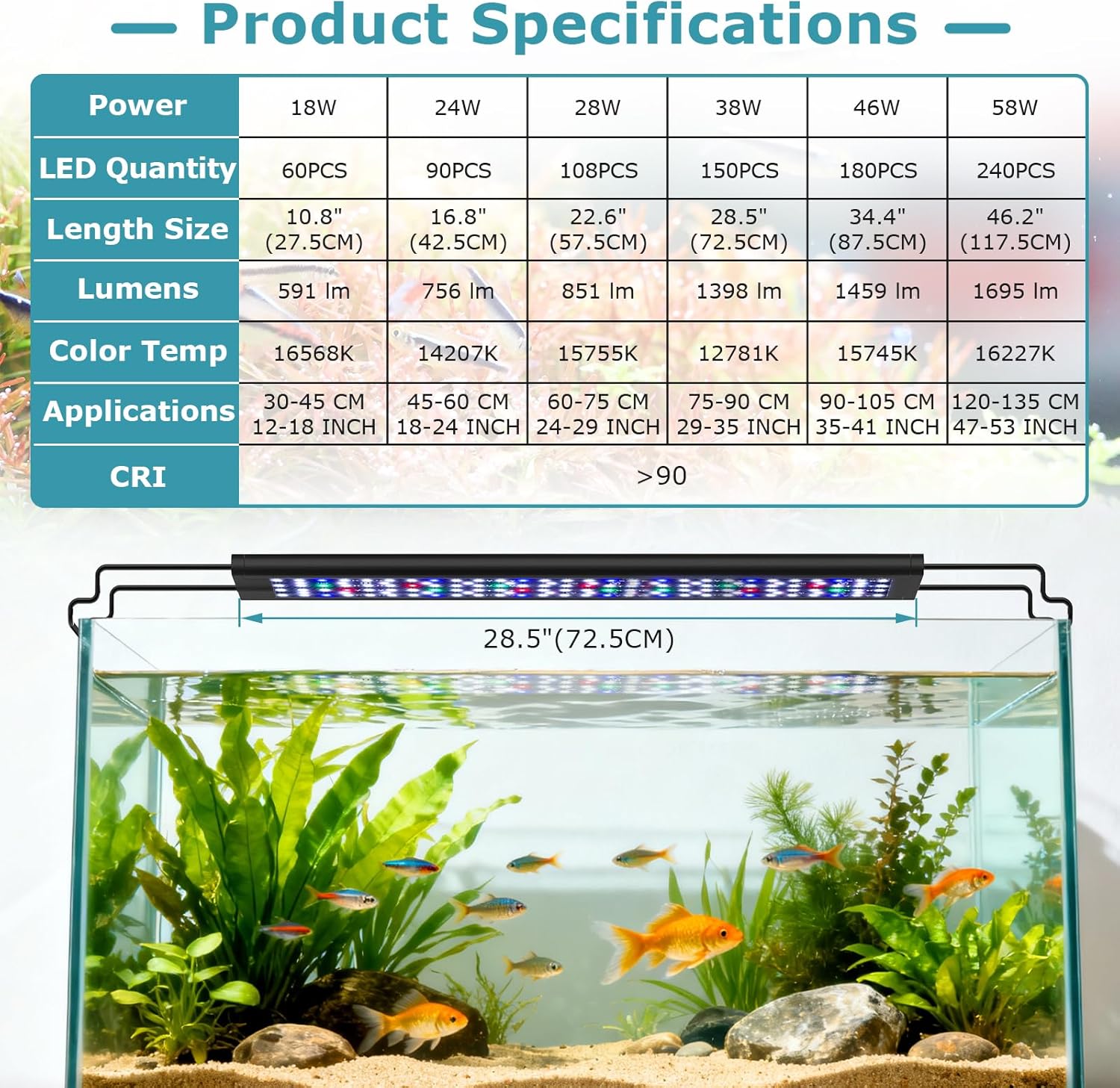
Image: Comprehensive product specifications table for different light sizes.

Image: Details on the 38W full spectrum and high rendering index (CRI >90).
9. Гарантія та підтримка
This hygger LED Aquarium Light comes with a 2-річна гарантія виробника. Ця гарантія поширюється на дефекти матеріалів і виготовлення за нормального використання.
For warranty claims, technical support, or any questions regarding your product, please contact hygger customer service:
- Webсайт: www.hygger-online.com (Будь ласка, перевірте офіційну webсайт для отримання найактуальнішої контактної інформації.)
- Електронна пошта: Зверніться до упаковки вашого продукту або до офіційного webсайт для електронної пошти підтримки.
Please have your model number (HG160) and proof of purchase ready when contacting support.


