
вступ
Thank you for choosing the Panana 37-inch Standing Desk Converter. This height-adjustable workstation is designed to transform your existing desk into an ergonomic sit-to-stand setup, promoting better posture and productivity. This manual provides essential information for safe assembly, operation, and maintenance of your new desk converter.

Image: The Panana Standing Desk Converter in use, showcasing its dual-level design with a laptop on the upper platform and a keyboard on the lower tray.
Інформація про безпеку
- Перед складанням і використанням уважно прочитайте всі інструкції.
- Не перевищуйте максимальну вантажопідйомність 15 кг (33 фунтів). Перевантаження може призвести до нестабільності та пошкодження.
- Ensure the desk converter is placed on a stable, level surface.
- Під час регулювання висоти тримайте руки та пальці подалі від рухомих частин, щоб запобігти защемленню.
- Distribute weight evenly on the desktop and keyboard tray.
- Do not allow children to operate or play with the desk converter.
- Регулярно перевіряйте всі кріплення, щоб переконатися в їх щільності.
Вміст упаковки
The Panana Standing Desk Converter arrives almost fully assembled. Please verify that all components are present and undamaged.
- Main Desk Converter Unit (pre-assembled)
- Лоток для клавіатури
- Mounting Hardware for Keyboard Tray
- Інструкція з експлуатації (цей документ)
Налаштування та збірка
The Panana Standing Desk Converter requires minimal assembly. Follow these steps to prepare your workstation:
- Розпакуйте блок: Carefully remove the main desk converter unit and the keyboard tray from its packaging.
- Attach the Keyboard Tray:
- Locate the pre-drilled holes on the underside of the main unit and on the keyboard tray.
- Align the keyboard tray with the attachment points.
- Secure the keyboard tray using the provided mounting hardware (screws). Ensure it is firmly attached.
- Position on Desk: Place the assembled desk converter on your existing desk. Ensure it is centered and stable.
- Arrange Equipment: Place your monitors, laptop, and other office essentials on the top platform. Position your keyboard and mouse on the lower tray.

Image: The desk converter highlighting its height-adjustable feature and ease of assembly.
Інструкція з експлуатації
The Panana Standing Desk Converter features a gas spring lift system for smooth height adjustments.
- Регулювання висоти:
- To raise the desk: Gently squeeze the adjustment levers located on the sides of the top platform. While holding the levers, lift the platform to your desired standing height. Release the levers to lock it in place.
- To lower the desk: Gently squeeze the adjustment levers. While holding the levers, apply slight downward pressure to lower the platform to your desired sitting height. Release the levers to lock it in place.
- Оптимальна ергономіка:
- When standing, ensure your monitor is at eye level and your elbows are at a 90-degree angle when typing.
- When sitting, maintain good posture with your feet flat on the floor and your back supported.

Image: Illustration of the strong gas spring system enabling smooth height transitions.
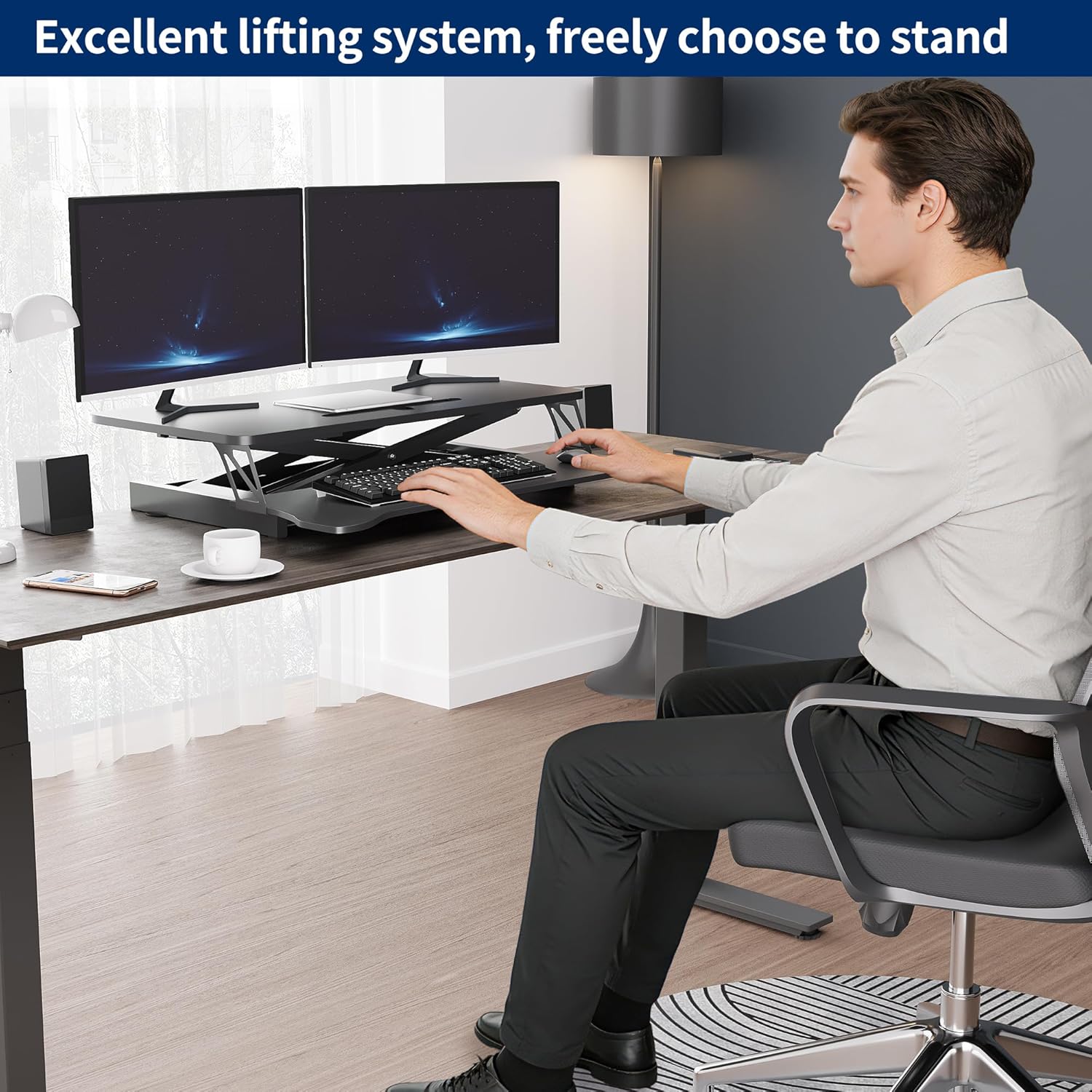
Image: User demonstrating the desk converter in a sitting position.

Image: The desk converter in a standing position, accommodating dual monitors and a laptop.
Технічне обслуговування
To ensure the longevity and proper function of your Panana Standing Desk Converter, follow these simple maintenance guidelines:
- Прибирання: Wipe the surfaces with a dry cloth. Avoid abrasive cleaners or harsh chemicals that may damage the finish.
- Огляд: Періодично перевіряйте всі гвинти та з'єднання, щоб переконатися, що вони надійно затягнуті. За потреби підтягуйте будь-які ослаблені кріплення.
- Рух: Ensure the gas spring mechanism operates smoothly. If you notice any stiffness, ensure no obstructions are present.
Усунення несправностей
| проблема | Можлива причина | Рішення |
|---|---|---|
| Desk is difficult to raise or lower. |
|
|
| Стіл здається нестійким або хитким. |
|
|
| Keyboard tray is loose. |
|
|
Технічні характеристики
| Бренд: | Панана |
| Назва моделі: | Перетворювач стоячого столу |
| Номер моделі: | BOCDLYXMJ |
| колір: | чорний |
| розмір: | 37 дюймів |
| Розміри виробу (Г x Ш x В): | 39.9D x 94W x 50.8H centimetres (15.7D x 37W x 20H inches) |
| Діапазон регулювання висоти: | Від 5.1 дюйма до 20 дюймів (13 см до 50.8 см) |
| Вага: | До 33 фунтів (15 кг) |
| матеріал: | Інженерна деревина, легована сталь |
| особливості: | Adjustable Height, Keyboard Tray Included, Monitor Stand, Gas Spring Lift System |
| Необхідна збірка: | Так (мінімальний) |
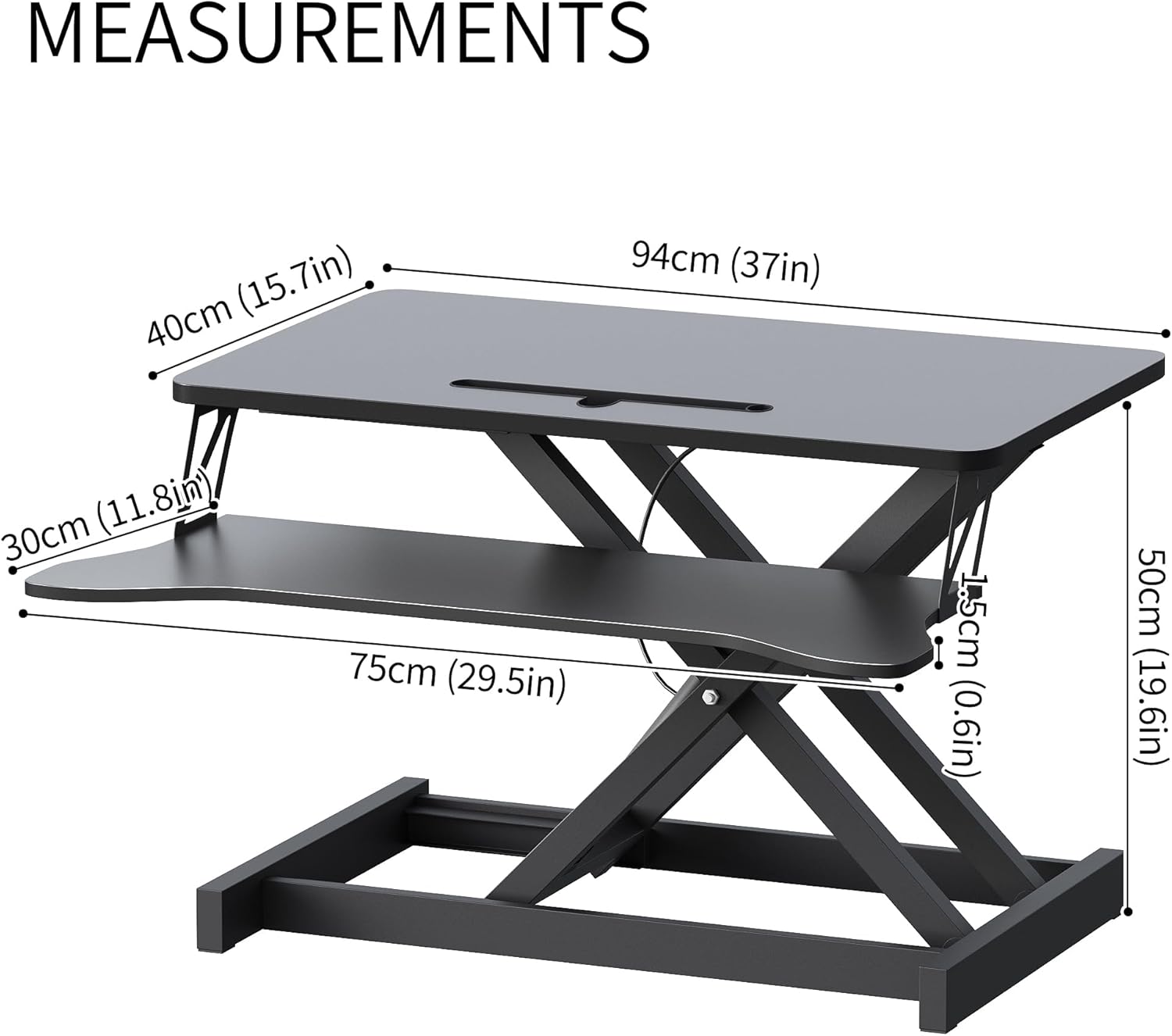
Image: Detailed measurements of the desk converter's dimensions.

Image: Visual representation of the desk converter's quality features, including rounded corners, sturdy metal bracket, smooth tabletop, and stable non-slip pads.
Гарантія та підтримка
Panana is committed to providing high-quality products. For specific warranty information or technical support, please refer to the warranty card included with your purchase or contact Panana customer service through the retailer where the product was purchased.
Будь ласка, збережіть чек про покупку для будь-яких гарантійних претензій.