
1. Вступ
This manual provides instructions for the safe and effective operation of the OWON ADS824A Digital Oscilloscope. The ADS824A is a 200MHz, 4-channel, 12-bit digital oscilloscope designed for high-precision testing. It features a 1.25GSa/s real-time sampling rate and a 50M storage depth, making it suitable for signal integrity verification, circuit fault identification, digital circuit design, debugging, and automotive electronics testing. This device integrates an oscilloscope, frequency counter, voltmeter, and FFT spectrum analyzer into a single unit.
2. Продукт закінчивсяview
2.1 Основні характеристики
- 200MHz bandwidth with four analog channels.
- 1.25GSa/s real-time sampling rate and 50M storage depth.
- Up to 700,000wfms/s waveform refresh rate.
- 12-bit vertical resolution (4096 levels) for capturing microvolt-level signal fluctuations.
- Integrated functions: oscilloscope, frequency counter, voltmeter, and FFT spectrum analyzer.
- Supports 43 automatic measurements with advanced math functions and a built-in glossary.
- 7-inch multi-touch TFT-LCD display.
- Communication interfaces: HDMI, USB device, USB Host, Trig Out(P/F), LAN.
- Supports various triggering modes including edge, video, pulse width, slope, Nth edge, and logic.
- Includes 2-channel hardware decoding for RS-232/UART, I2C, SPI, CAN, and LIN protocols.
2.2 Що в коробці
The OWON ADS824A package typically includes:
- OWON ADS824A Digital Oscilloscope Unit
- Адаптер живлення
- Посібник користувача
- USB кабель
2.3 Фізичний оверview

Малюнок 2.3.1: Спереду view of the OWON ADS824A Digital Oscilloscope, showing the display and control panel.

Figure 2.3.2: Front panel highlighting key specifications such as 4 channels, 1.25GSa/s, 200MHz bandwidth, and 700,000 wfms/s refresh rate.

Малюнок 2.3.3: Збільшений план view of the control knobs for horizontal and vertical adjustments.
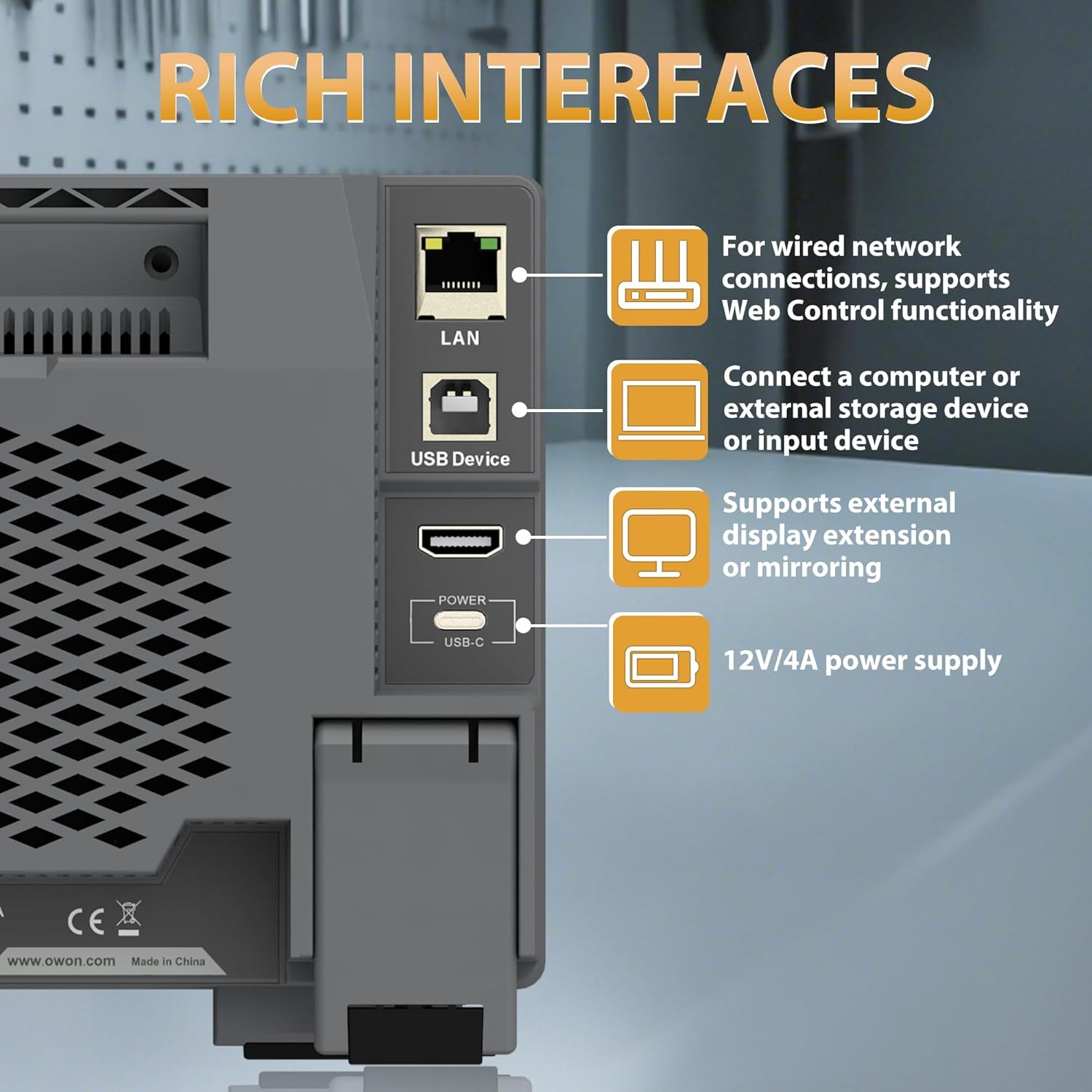
Figure 2.3.4: Rear panel showing the LAN, USB Device, HDMI, and USB-C Power interfaces.

Рисунок 2.3.5: Верхня та задня частини view illustrating the overall dimensions and port layout.
3. Налаштування
3.1 Підключення живлення
- Connect the provided power adapter to the USB-C Power interface on the rear panel of the oscilloscope.
- Підключіть адаптер живлення до відповідної розетки змінного струму.
- Натисніть кнопку живлення, розташовану на передній панелі, щоб увімкнути пристрій.
3.2 Підключення зонда
- Connect the BNC connector of the oscilloscope probe to one of the four input channels (CH1-CH4) on the front panel.
- Ensure the probe's ground clip is securely connected to the ground reference of the circuit under test.
- Attach the probe tip to the test point on the circuit.
4. Інструкція з експлуатації
4.1 Основна операція
The ADS824A features a 7-inch multi-touch display for intuitive control.

Figure 4.1.1: The 7-inch multi-touch TFT-LCD display allows for direct interaction with the waveform and menu settings.
- Увімкнення/вимкнення живлення: Натисніть кнопку живлення на передній панелі.
- Навігація: Use the multi-touch screen or the physical control knobs to navigate menus and adjust settings.
- Autoset: Press the 'Autoset' button to automatically adjust horizontal and vertical settings for optimal waveform display.
4.2 Waveform Display and Control
- Горизонтальні елементи керування: Adjust the time base (s/div) and horizontal position using the dedicated knobs.
- Вертикальні елементи керування: Відрегулюйте гучністьtage scale (V/div) and vertical position for each channel using their respective knobs.
- Масштаб: The device supports zoom windows for detailed waveform analysis.

Figure 4.2.1: Illustration of the waveform capture rate, showing the ability to display complex signals effectively.
4.3 Функції вимірювання
The ADS824A offers extensive measurement capabilities:
- Автоматичні вимірювання: Access 43 automatic measurement functions. A built-in glossary assists in understanding technical terms for quick setup.
- Parametric Statistics: Supports measurement indicators and cursor gating for detailed analysis.
- Cursor Gating: Utilize visual indicators and zoom windows for precise cursor measurements in FFT and XY modes.

Figure 4.3.1: Display showing the interface for 43 auto measurements and the technical terms glossary.

Рисунок 4.3.2: Екран views demonstrating parametric statistics and cursor gating with visual indicators.
4.4 Запуск
The oscilloscope supports various triggering options to capture specific events:
- Типи тригерів: Edge, Video, Pulse Width, Slope, Nth Edge, Logic, Under-amplitude, Over-amplitude, and Timeout.
- налаштування: Access trigger settings via the dedicated 'Trigger' button or on-screen menu.

Figure 4.4.1: Interface showing advanced triggering options and hardware decoding capabilities.
4.5 Розширені функції
- FFT Spectrum Analyzer: Perform 1M-point FFT analysis for accurate frequency component display.
- Digital Voltmeter (DVM): Integrated 4-digit voltmeter for ACrms, DC, and AC+DCrms measurements.
- Лічильник частоти: Integrated 6-digit digital frequency counter.
- Protocol Decoding: Supports 2-channel hardware decoding for common serial protocols including RS-232/UART, I2C, SPI, CAN, and LIN.
- Висока роздільна здатність: The 12-bit vertical resolution (4096 levels) allows for capturing minute signal fluctuations, crucial for power ripple and noise analysis.

Figure 4.5.1: Display illustrating the FFT spectrum analysis and 256-level grayscale display features.

Рисунок 4.5.2: Екран views demonstrating 50Mpts storage depth settings, 4-digit voltmeter, and 6-digit frequency counter.

Figure 4.5.3: Comparison illustrating the enhanced detail provided by the 12-bit high-resolution display compared to a standard oscilloscope.
4.6 Підключення зовнішніх пристроїв
The ADS824A supports various external devices:
- Хост USB: Connect a mouse or keyboard for enhanced control and efficiency.
- USB-пристрій: Connect to a computer for data transfer or remote control.
- LAN: For wired network connections and Web Функціональність керування.
- HDMI: Connect to an external display for extended or mirrored viewінж.
5. Технічне обслуговування
5.1 Очищення
Щоб підтримувати продуктивність та зовнішній вигляд пристрою:
- Протріть зовнішню поверхню м’якою, damp тканина.
- Avoid using abrasive cleaners or solvents that may damage the casing або екран.
- Ensure no liquids enter the device openings.
5.2 Зберігання
When not in use, store the oscilloscope in a clean, dry environment away from direct sunlight and extreme temperatures.
5.3 Догляд за акумулятором
The ADS824A includes a built-in lithium battery for portability. Proper battery care ensures longevity:
- Перед першим використанням повністю зарядіть акумулятор.
- Уникайте частого повного розряджання акумулятора.
- If storing for extended periods, charge the battery to approximately 50% and recharge every few months.
- The built-in battery helps avoid issues caused by ground loops, providing a safe floating ground for measurements.

Figure 5.3.1: Information regarding the built-in lithium battery, emphasizing portability and ground loop avoidance.
6. Вирішення проблем
This section addresses common issues you might encounter with the OWON ADS824A oscilloscope.
| проблема | Можлива причина | Рішення |
|---|---|---|
| Немає живлення | Power adapter not connected or faulty; battery discharged. | Check power connections. Ensure adapter is working. Charge the battery. |
| Не відображається хвиля | Probe not connected; signal too small/large; incorrect trigger settings. | Verify probe connection. Adjust vertical scale (V/div). Press 'Autoset'. Check trigger level and mode. |
| Нестабільна форма хвилі | Incorrect trigger level or mode; noisy signal. | Adjust trigger level. Change trigger mode. Use averaging acquisition mode. |
| Екран не відповідає | Тимчасовий збій програмного забезпечення. | Перезавантажте пристрій. Якщо проблема не зникає, зверніться до служби підтримки. |
7. Технічні характеристики
Detailed technical specifications for the OWON ADS824A Digital Oscilloscope.

Figure 7.1.1: Table detailing key oscilloscope specifications including bandwidth, sampling rate, and vertical resolution.
| Параметр | Значення |
|---|---|
| Пропускна здатність | 200 МГц |
| Канали | 4 |
| Sampлінг -курс | 1.25 GSa/s (Real-time) |
| Max. Waveform Capture Rate | 700,000 XNUMX wfms/s |
| Max Memory Depth | 50 Мп |
| Вертикальна роздільна здатність | 12 біти |
| Діапазон вертикальної чутливості | 500 uV/div - 10 V/div |
| Вхідний опір | 1 MΩ±2%, parallel with 20 pF±5 pF |
| Діапазон часової бази | 1 ns/div - 1000 s/div |
| Точність часової бази | ±(0.01% + 0.1tdv) |
| Розшифрування шини | RS232/UART, I2C, SPI, CAN, LIN |
| Вхідна муфта | DC, AC, Ground |
| Розміри продукту | 10.25 x 3.07 x 6.3 дюймів |
| Вага товару | 3.3 фунта |
8. Гарантія та підтримка
For warranty information and technical support, please refer to the documentation provided with your purchase or visit the official OWON webсайт. Контактна інформація служби підтримки клієнтів зазвичай доступна на сторінці підтримки виробника.