
вступ
Welcome to the HP OmniDesk M03 AI Desktop PC. This manual provides essential information for setting up, operating, maintaining, and troubleshooting your new computer. The HP OmniDesk M03 is designed for performance and efficiency, featuring an Intel Core Ultra 7 265 processor with dedicated AI cores, 16GB DDR5 RAM, and a 2TB NVMe SSD, running on Windows 11 Home.
Що в коробці
Перевірте наявність усіх компонентів в упаковці:
- HP OmniDesk Desktop PC
- Бездротова клавіатура
- миша
- Посібник швидкого встановлення
- Кабель живлення

Image: The HP OmniDesk M03 desktop PC, wireless keyboard, mouse, and power cable, illustrating the contents of the product box.
Налаштування
1. Підключення периферійних пристроїв
Before powering on your PC, connect your monitor, keyboard, and mouse.
- Монітор: Connect your monitor to the PC using an HDMI or DisplayPort cable. The ports are located on the rear of the PC.
- Клавіатура та миша: The included keyboard and mouse are wireless. Insert batteries (if not pre-installed) and connect their USB receiver to an available USB port on the PC.
- Потужність: Connect the power cable to the PC's power input on the rear and then to a wall outlet.
- Мережа (необов'язково): For a wired internet connection, connect an Ethernet cable from your router to the RJ45 port on the rear of the PC.

Image: Rear panel of the HP OmniDesk M03, highlighting the DisplayPort, HDMI, USB, and Ethernet ports for connecting external devices.

Зображення: Збоку view of the HP OmniDesk M03 AI Desktop PC, showing its compact tower design.
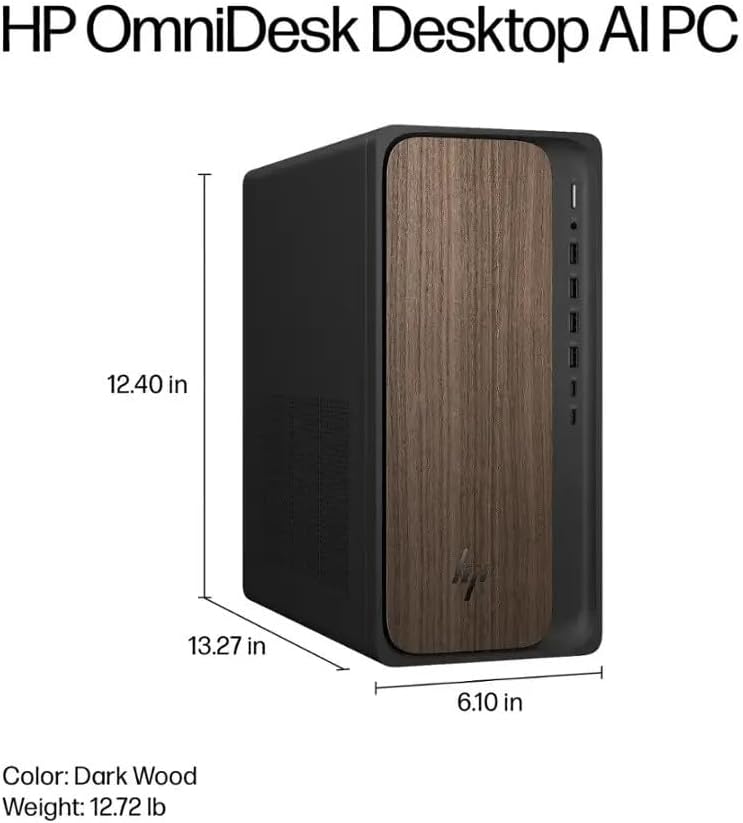
Image: Diagram illustrating the location and type of front and rear ports on the HP OmniDesk M03, including USB-A, USB-C, HDMI, DisplayPort, and audio jacks.
2. Увімкнення та початкове налаштування
Після підключення всіх периферійних пристроїв:
- Натисніть кнопку живлення, розташовану на передній панелі ПК.
- Follow the on-screen instructions to complete the Windows 11 Home initial setup, including language selection, network connection (if not wired), account creation, and privacy settings.

Зображення: спереду view of the HP OmniDesk M03, showing the power button at the top right and various USB ports below it.
Керування ПК
Windows 11 Домашня
Your HP OmniDesk M03 comes pre-installed with Windows 11 Home. Familiarize yourself with the operating system's interface, Start menu, and settings. Microsoft provides extensive online resources for Windows 11 usage.
Особливості ШІ
The Intel Core Ultra 7 265 processor includes dedicated AI cores and Intel AI Boost, enhancing performance for AI-driven applications and features within Windows 11, such as AI Copilot. These features can assist with tasks, content creation, and system optimization.
Підключення
- Wi-Fi 6 (802.11ax): Підключіться до бездротових мереж для доступу до Інтернету. Керуйте налаштуваннями Wi-Fi через мережеві налаштування Windows 11.
- Bluetooth 5.4: Pair wireless devices such as headphones, speakers, or additional input devices. Access Bluetooth settings via the Windows 11 settings menu.
- Ethernet: For a stable, high-speed wired connection, ensure an Ethernet cable is connected to the RJ45 port.
Технічне обслуговування
Cleaning Your PC
- Зовні: Злегка протріть м’якою тканиною без ворсу dampened with water or a mild cleaning solution to wipe down the exterior. Avoid harsh chemicals.
- Віддушини: Періодично очищайте вентиляційні решітки від пилу за допомогою стисненого повітря, щоб забезпечити належний потік повітря та запобігти перегріву.
- Порти: Тримайте порти чистими від пилу та сміття.
Оновлення програмного забезпечення
Regularly update Windows 11 and device drivers to ensure optimal performance, security, and compatibility. Access Windows Update through the Settings menu.
Резервне копіювання даних
Рекомендується регулярно створювати резервні копії важливих даних на зовнішній диск або хмарне сховище, щоб запобігти втраті даних.
Усунення несправностей
У цьому розділі розглядаються поширені проблеми, з якими ви можете зіткнутися.
- Немає живлення:
- Ensure the power cable is securely connected to both the PC and the wall outlet.
- Перевірте справність розетки, підключивши інший пристрій.
- Немає дисплея:
- Check that the monitor is powered on and correctly connected to the PC via HDMI or DisplayPort.
- Переконайтеся, що на моніторі вибрано правильне джерело вхідного сигналу.
- Немає підключення до Інтернету:
- For Wi-Fi, check if the Wi-Fi adapter is enabled and if you are connected to the correct network with the right password.
- Для дротового підключення переконайтеся, що кабель Ethernet правильно підключено, а ваш маршрутизатор працює.
- Клавіатура/миша не реагує:
- Check battery levels for wireless devices.
- Ensure the USB receiver is plugged into a functional USB port.
- Try restarting the PC.
Щодо складніших проблем зверніться до служби підтримки HP webсайту або зв’яжіться зі службою підтримки клієнтів.
Технічні характеристики
Detailed technical specifications for the HP OmniDesk M03 AI Desktop PC:
| компонент | Специфікація |
| Процесор | Intel Core Ultra 7 265 (20-Core, up to 5.3 GHz, Intel AI Boost) |
| Операційна система | Windows 11 Домашня (64-розрядна) |
| Пам'ять (RAM) | 16 ГБ DDR5 5600 МГц |
| Зберігання | Твердотільний накопичувач PCIe NVMe M.2 ємністю 2 ТБ |
| Графіка | Інтегрований Intel Graphics |
| Відеовихід | 1x HDMI 2.1, 1x DisplayPort 1.4a |
| USB-порти (спереду) | 2x USB-A 5Gbps, 2x USB-A 10Gbps, 1x USB-C 5Gbps, 1x USB-C 10Gbps |
| USB-порти (ззаду) | 4x USB 2.0 Type-A |
| Аудіо порти | 1x Headphone/Microphone Combo, 1x Line Input, 1x Line Output |
| Мережа | Wi-Fi 6 (802.11ax), Bluetooth 5.4, Gigabit Ethernet (RJ45) |
| Розміри (В x Ш x Г) | 13.3 дюйма x 6.1 дюйма x 12.4 дюйма (33.8 см x 15.5 см x 31.5 см) |
| вага | 11.77 фунта (5.34 кг) |

Image: Diagram showing the height (13.27 inches), width (6.10 inches), and depth (12.40 inches) of the HP OmniDesk M03 desktop PC.
Гарантія та підтримка
Інформація про гарантію
Your HP OmniDesk M03 AI Desktop PC comes with a 90-денна обмежена гарантія. This warranty covers defects in materials and workmanship under normal use. For detailed terms and conditions, please refer to the warranty documentation included with your product or visit the official HP support webсайт.
Підтримка клієнтів
Щоб отримати технічну допомогу, усунення несправностей або звернутися за гарантійними претензіями, зверніться до служби підтримки клієнтів HP:
- Інтернет-підтримка: Відвідайте чиновника Підтримка HP Webсайт для драйверів, інструкцій та посібників з усунення несправностей.
- Підтримка по телефону: Refer to the Quick Setup Guide or HP's webсайт регіональних контактних телефонів.
When contacting support, please have your product model (M03) and serial number ready.