
1. Вступ
Thank you for choosing the Angrox Backlit Universal Remote Control for LG Smart TVs. This remote is designed to provide a seamless and enhanced television viewing experience, especially in low-light conditions. It serves as a direct replacement for your original LG TV remote, offering broad compatibility and ease of use without requiring complex setup procedures. This manual provides detailed instructions for setting up, operating, maintaining, and troubleshooting your new remote control.
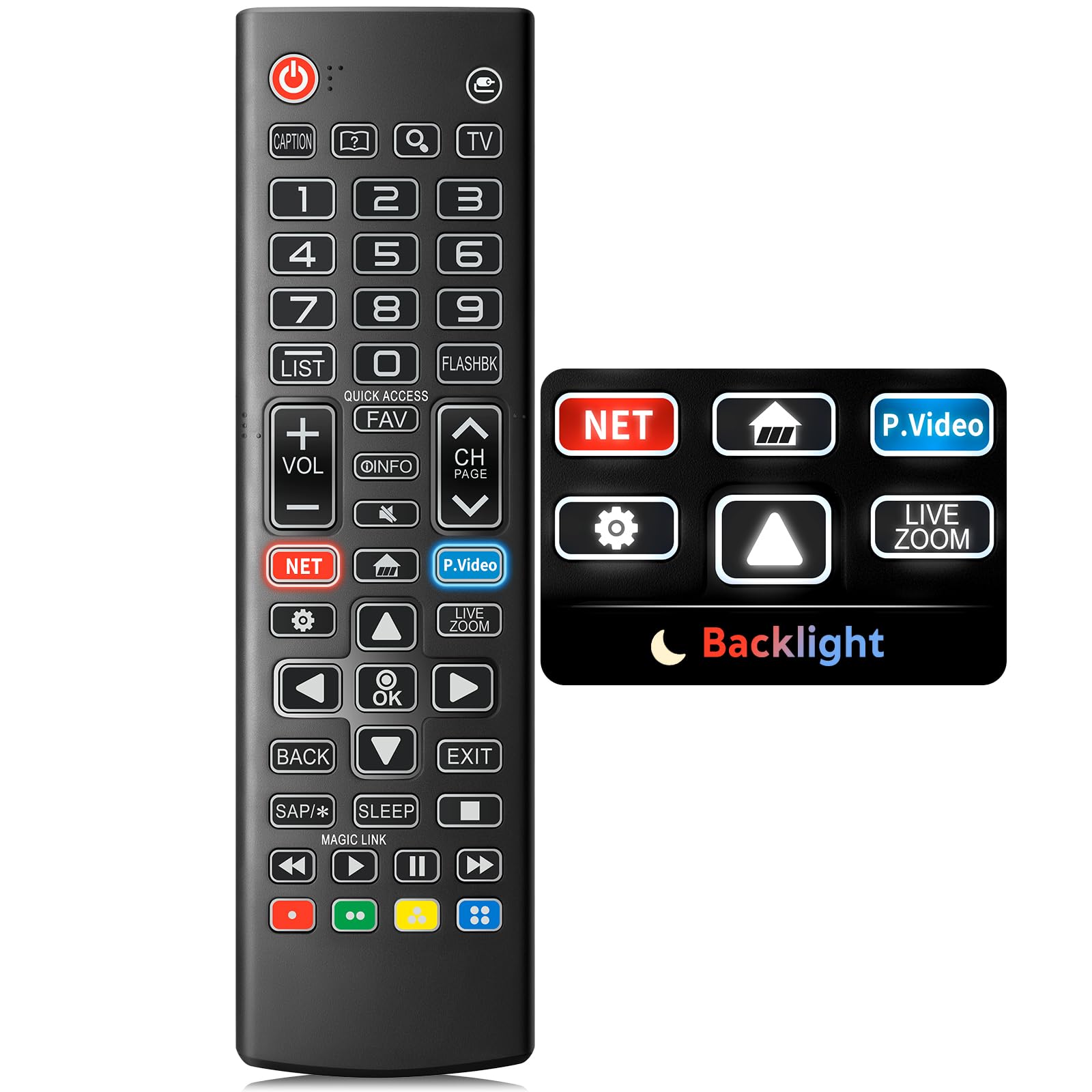
Image: The Angrox Backlit Universal Remote Control, a sleek black remote with clearly labeled buttons.
2. Ключові характеристики
- Easy Nighttime Operation: Features soft glow buttons that illuminate, allowing for clear visibility and use in dark environments without causing glare. The backlight activates with any button press and automatically turns off after 10 seconds of inactivity.
- Універсальна сумісність: Designed as a direct replacement for LG TV remotes, compatible with all LG TV models. No programming or complex pairing is required; it works immediately out of the box.
- High-Quality Performance: Equipped with sensitive buttons and stable signal transmission for smooth and responsive operation.
- Ергономічний дизайн: Shaped to fit comfortably in the hand, reducing fatigue during extended use. The button layout is intuitive for users of all ages.
- Міцний і надійний: Constructed from high-quality, sturdy materials to withstand daily use and accidental drops, ensuring a long lifespan.

Image: A comparison showing the remote control with its backlight off and then with its buttons illuminated, highlighting the easy nighttime operation feature.

Image: The remote control displayed alongside various LG TV models (OLED, UHD, QNED, NanoCell), illustrating its broad compatibility.
3. Інструкції з налаштування
3.1 Встановлення батареї
- Знайдіть кришку батарейного відсіку на задній панелі пульта дистанційного керування.
- Посуньте кришку вниз або натисніть на засувку, щоб відкрити відсік.
- Вставте дві (2) батарейки типу AAA, переконавшись, що позитивна (+) та негативна (-) клеми правильно збігаються з індикаторами всередині відсіку.
- Встановіть кришку відсіку для батарейок, зсунувши її на місце до клацання.
Примітка: Batteries are not included with the remote control. Please use new AAA alkaline batteries for optimal performance.

Image: A visual guide demonstrating the correct insertion of two AAA batteries into the remote control's battery compartment.
3.2 Початкове використання (сполучення не потрібне)
The Angrox Backlit Universal Remote Control is designed for immediate use with LG Smart TVs. No pairing or programming steps are necessary. Once batteries are installed, the remote is ready to control your LG television.
4. Інструкція з експлуатації
This section details the functions of the buttons on your Angrox remote control.

Image: A comprehensive layout of the remote control, with labels pointing to each button and describing its primary function.
4.1 Основні функції
- потужність (
 ): Вмикає або вимикає телевізор.
 - Введення (): Changes the input source (e.g., HDMI 1, HDMI 2).
- Збільшення/зменшення гучності (VOL +/-): Регулює рівень гучності.
- Канал вгору/вниз (CH Page): Змінює телеканал.
- Вимкнути звук (): Вимикає або вмикає звук телевізора.
- Цифрові кнопки (0-9): Безпосереднє введення номерів каналів або інших числових даних.
- Кнопки навігації (Вгору/Вниз/Вліво/Вправо): Використовується для прокручування меню та опцій.
- Кнопка ОК: Selects menu items or confirms your input.
4.2 Special Function Buttons
- Кнопка Netflix: Launches the Netflix application directly.
- Amazon Prime Video Button: Launches the Amazon Prime Video application directly.
- Швидкий доступ: A feature that allows you to enter a specified app or Live TV directly by pressing and holding the number buttons.
- Список: Доступ до списку збережених програм.
- Flashback: Повертається до попереднього viewed channel or input.
- Інформація: Displays information on the current program.
- Улюблене: Доступ до списку улюблених каналів.
- Налаштування (): Accesses the Quick Settings menu.
- Назад: Очищає екранні дисплеї та повертається до телевізора viewінж.
- Вихід: Вихід із поточного меню.
- Сон: Accesses the sleep timer.
- Кнопки керування медіа (відтворення, пауза, зупинка, перемотування вперед, перемотування назад): Controls media content playback.
4.3 Функція підсвічування
The remote control features a soft backlight for easy use in the dark. Simply press any button, and the backlight will turn on. It will automatically turn off after 10 seconds of inactivity to conserve battery life.
Video: A demonstration of the Angrox Backlit Remote for LG Smart TV, showcasing its easy nighttime use and responsive buttons. This video highlights the convenience of the backlit feature in dark environments.
5. Технічні характеристики
| Бренд | ангрокс |
| Назва моделі | AKB75095307 |
| Номер моделі | AKB75095307 |
| Особливості | Backlit, Ergonomic, Lightweight, No Programming Required, Universal |
| Сумісні пристрої | Television (All LG TV models) |
| Максимальна кількість підтримуваних пристроїв | 1 |
| Технологія підключення | Інфрачервоний |
| Кількість кнопок | 30 |
| Тип контролера | Кнопкове керування |
| Максимальна дальність | 10 метри (приблизно 33 футів) |
| Необхідна кількість батарей | 2 батарейки ААА |
| Тип батареї | лужні |
| Розміри предмета (Д x Ш x В) | 9.25 см (Д) x 1.89 см (Ш) x 0.73 см (В) |
6. Вирішення проблем
Якщо у вас виникли проблеми з пультом дистанційного керування, зверніться до наступних поширених рішень:
- Пульт не відповідає:
- Переконайтеся, що батарейки вставлені правильно з дотриманням полярності (+/-).
- Замініть старі батарейки новими лужними батарейками типу AAA.
- Перевірте наявність будь-яких перешкод між пультом дистанційного керування та інфрачервоним приймачем телевізора.
- Ensure you are within the maximum operating range (10 meters) of the TV.
- Підсвічування не працює:
- Verify battery power. Low batteries may affect backlight functionality.
- The backlight is designed to turn off after 10 seconds of inactivity. Press any button to reactivate it.
- Specific buttons not working (e.g., Netflix, Amazon Prime):
- Ensure your LG Smart TV is connected to the internet and the respective applications are installed and updated.
- Some smart TV features or app shortcuts may vary slightly depending on your TV's model and region.
- Remote feels sluggish or unresponsive:
- Замініть батарейки на нові.
- Clean the remote's infrared emitter (at the top) and the TV's IR receiver with a soft, dry cloth to ensure a clear signal path.
7. Технічне обслуговування
To ensure the longevity and optimal performance of your Angrox remote control, follow these maintenance guidelines:
- Прибирання: Use a soft, dry cloth to clean the remote's surface. Avoid using liquid cleaners, aerosols, or harsh chemicals, as they may damage the remote.
- Заміна батареї: Replace batteries promptly when the remote's performance declines or if the backlight becomes dim. Remove batteries if the remote will not be used for an extended period to prevent leakage.
- Зберігання: Зберігайте пульт дистанційного керування в прохолодному, сухому місці, подалі від прямих сонячних променів, екстремальних температур та високої вологості.
- Уникайте крапель: Хоча пульт і міцний, багаторазові падіння можуть пошкодити внутрішні компоненти. Поводьтеся з ним обережно.
8. Гарантія та підтримка
8.1 Інформація про гарантію
The Angrox Backlit Universal Remote Control (Model AKB75095307) is covered by a Гарантія 90 днів from the date of purchase. This warranty covers manufacturing defects and ensures the product functions as described under normal use. It does not cover damage caused by misuse, accidents, unauthorized modifications, or normal wear and tear.
8.2 Підтримка клієнтів
For any questions, technical assistance, or warranty claims, please contact Angrox customer support through the retailer where you purchased the product or visit the official Angrox store online. Please have your purchase receipt and product model number available when contacting support.