
вступ
This manual provides detailed instructions for the setup, operation, and maintenance of your TIGERKING G-Wireless Charging 3-in-1 Biometric Heavy Duty Safe. This innovative product combines the functionality of a nightstand, a secure gun safe, and a general-purpose safe, featuring biometric access, wireless charging, and adjustable lighting. Please read this manual thoroughly before using the product to ensure safe and optimal performance.
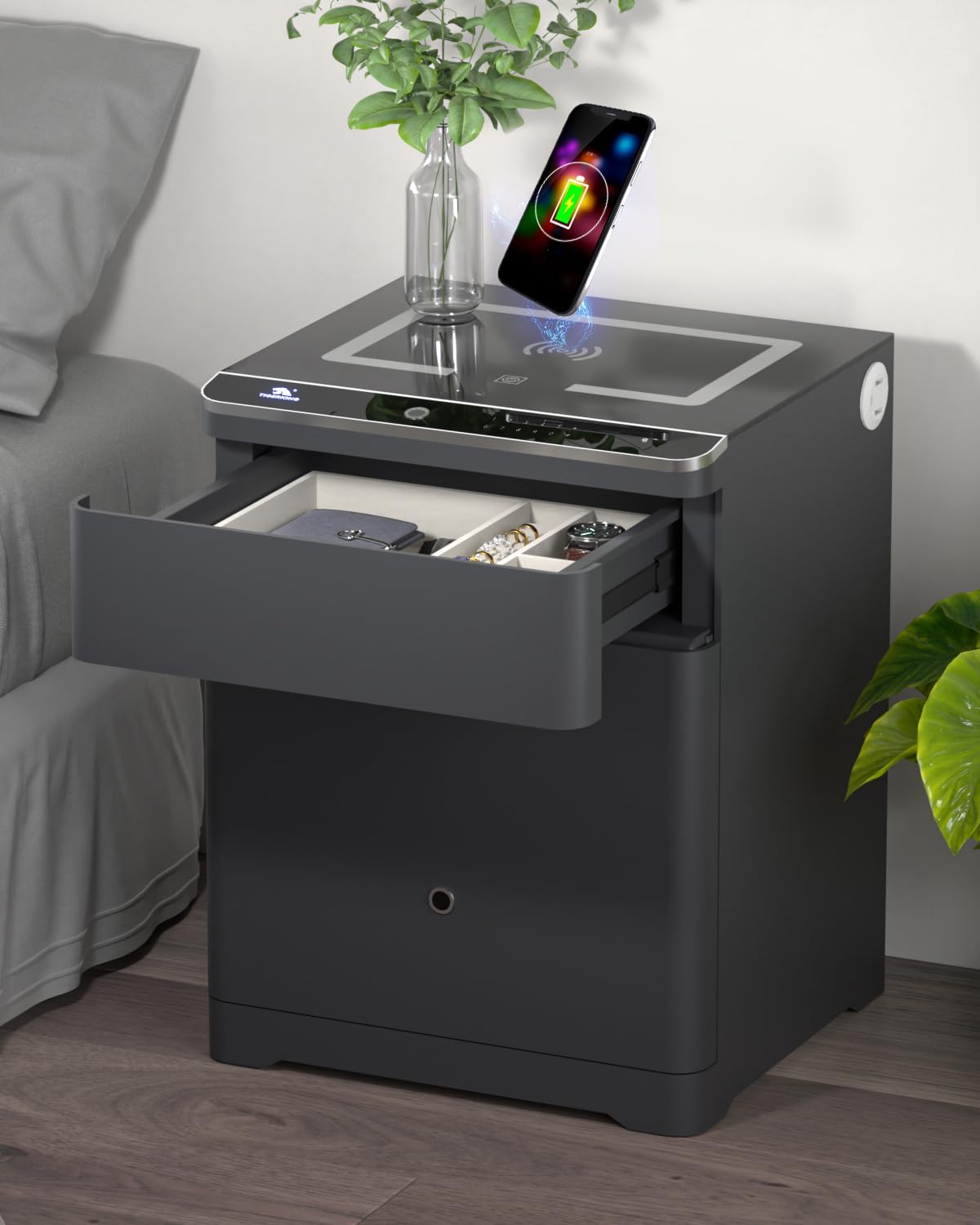
Image: The TIGERKING G-Wireless Charging 3-in-1 Biometric Heavy Duty Safe, showcasinйого елегантний дизайн та інтегровані функції.
Ключові характеристики
- High Quality & Sturdy Construction: Weighing 101.4 pounds, constructed from thicker alloy steel with solid bolts for enhanced security and anti-theft protection.
- 3-in-1 Smart Nightstand Safe: Integrates a nightstand, pistol box, and safe. Features a top drawer for jewelry, handguns, or small valuables, and a spacious cabinet safe below for documents, cash, and car keys.
- Wireless Charging & Adjustable Lighting: Equipped with high-tech wireless charging, USB, and Type-C ports. Includes three touch light modes with adjustable brightness for nighttime use.
- Кілька варіантів розблокування: Access via fingerprint, secure password, or included key. Fingerprint or password offers quick and secure access.
- Practical & Unique Design: Rounded corners for safety, soft and moisture-resistant inner padding to protect valuables. Removable drawer compartment, small hooks inside the safe door, and a hidden bottom compartment maximize storage.
- Double Alarm System: Triggers a 20-second alarm after three incorrect fingerprint/password attempts, locking the keypad for 180 seconds. Manual vibration alarm option available.

Image: Product dimensions (14.96"D x 16.93"W x 22.05"H) and weight (101.4 lbs) of the TIGERKING safe.

Image: Illustration of the flexible storage space, including the top drawer with a removable compartment for jewelry and a handgun, and the main safe compartment below.

Image: Close-up of the biometric fingerprint sensor on the safe's top panel, highlighting the smart unlocking feature.

Image: The smart charging station on the safe's top surface, showing a phone wirelessly charging, along with USB and Type-C ports.

Image: Demonstrates the three adjustable lighting modes (cool white, neutral, warm white) and the brightness adjustment slider on the safe's top panel.

Image: Explains the dual alarm system (incorrect input, vibration) and illustrates the six unlocking methods: single fingerprint, single password, fingerprint + password, dual fingerprint, dual password, and emergency key.

Image: Shows the hidden secret compartment at the bottom of the main safe and the small hooks on the inside of the safe door for keys or other small items.

Зображення: Крупний план view of the safe's construction, highlighting the 6mm thick, pry-resistant door and the 25mm solid and harder locking bolts.
Відео про продукт
A Brief Introduction to Nightstand Safe
Відео: Це відео надає стислий оглядview of the TIGERKING nightstand safe, demonstrating its primary functions and design. Duration: 0:50.
Smart Nightstand Safe - Sleeping with Peace of Mind
Video: This video illustrates how the smart nightstand safe enhances peace of mind, showcasing its secure storage and convenient features in a bedroom setting. Duration: 0:39.
Посібник із налаштування
1. Розпакування
- Обережно вийміть сейф з упаковки.
- Перевірте сейф на наявність будь-яких ознак пошкоджень. У разі пошкодження негайно зверніться до служби підтримки клієнтів.
- Remove all packing materials, including any protective films or foam inserts. Ensure all accessories (keys, manual) are present.
2. Розміщення
- Place the safe on a flat, stable surface, such as a bedroom floor or office space.
- Ensure adequate ventilation around the safe, especially if using the charging features.
- For enhanced security, consider floor mounting the safe using appropriate hardware (not included, consult a professional if needed).
3. Підключення живлення
- Connect the power adapter to the safe's power input port.
- Підключіть адаптер живлення до стандартної електричної розетки.
- The safe's display and charging features will activate upon successful power connection.
Інструкція з експлуатації
1. Unlocking the Safe
Your TIGERKING safe offers multiple unlocking methods for both the top drawer and the main safe compartment.
a. Fingerprint Unlocking
- Міцно покладіть зареєстрований палець на датчик відбитків пальців.
- A green light and an audible confirmation will indicate successful recognition.
- The safe will unlock, allowing access to the drawer or main compartment.
b. Password Unlocking
- Розбудіть клавіатуру, торкнувшись її.
- Enter your registered password followed by the '#' key.
- A green light and an audible confirmation will indicate successful entry.
- The safe will unlock.
c. Key Unlocking (Emergency)
- Locate the emergency keyhole (usually hidden behind a cover).
- Insert the emergency key and turn it to unlock the safe.
- This method bypasses electronic locks and should be used if batteries are depleted or electronic access fails.
2. Registering Fingerprints and Passwords
Refer to the specific instructions provided in the quick start guide or on the safe's internal display for detailed steps on registering new fingerprints and setting up user passwords. The safe supports up to 100 fingerprints and multiple user passwords.
3. Using the Wireless Charging Station
- Ensure the safe is powered on.
- Place your Qi-compatible device (e.g., smartphone) on the designated wireless charging pad on the top surface of the safe.
- The device should indicate that it is charging. The wireless charging supports 10-20W output.
- For wired charging, use the integrated USB and Type-C ports.
4. Adjusting Lighting Modes
- Touch the light control button on the top panel to cycle through the three lighting modes (e.g., cool white, neutral, warm white).
- Press and hold the button to adjust the brightness level within the selected mode.
Технічне обслуговування
1. прибирання
- Протріть зовнішню частину сейфа м’якою тканиноюamp тканиною. Уникайте абразивних засобів для чищення або розчинників.
- For the fingerprint sensor and keypad, use a dry, lint-free cloth to prevent residue buildup.
- Внутрішню оббивку можна обережно пропилососити або протерти злегкаamp cloth. Ensure it is completely dry before closing the safe.
2. Battery Replacement (for electronic lock)
While the safe is primarily powered by an external adapter, the electronic lock may have a backup battery compartment. Consult the quick start guide for specific battery type and replacement instructions. Replace batteries promptly when a low battery indicator appears.
3. Key Care
- Зберігайте аварійні ключі в безпечному місці подалі від сейфа.
- Do not store emergency keys inside the safe.
- Avoid duplicating keys unless absolutely necessary and only through authorized services.
Усунення несправностей
| проблема | Можлива причина | Рішення |
|---|---|---|
| Safe does not open with fingerprint/password. | Incorrect fingerprint/password entered multiple times; low battery; sensor/keypad issue. | Ensure correct input. Use emergency key if electronic access is locked or batteries are low. Replace batteries if needed. Clean fingerprint sensor. |
| Несподівано звучить сигналізація. | Three incorrect entries; vibration alarm activated. | Wait for the keypad to unlock (180 seconds). If vibration alarm is active, ensure the safe is not subjected to excessive movement. Deactivate vibration alarm if not desired. |
| Бездротова зарядка не працює. | Device not Qi-compatible; improper placement; safe not powered on. | Ensure your device supports Qi wireless charging. Reposition the device on the charging pad. Verify the safe is connected to power. |
| Lighting not adjusting. | Incorrect button press; power issue. | Ensure you are touching the correct light control button. Press briefly to change mode, press and hold to adjust brightness. Check power connection. |
Технічні характеристики
| Особливість | Деталь |
|---|---|
| Бренд | ТИГРІВАННЯ |
| Номер моделі | BGX-55CTG-G |
| Розміри продукту (Д x Ш x В) | 14.96" Г x 16.93" Ш x 22.05" В |
| Тип замка | Biometric (Fingerprint, Password, Key) |
| Колір | Сірий |
| матеріал | легована сталь |
| Особливості | Wireless charging, Fingerprint recognition, Digital keyboard, Adjustable lighting, USB & Type-C ports, Dual alarm system |
| Тип монтажу | Підлогове кріплення (необов’язково) |
| Вага товару | 101.4 фунта |
Гарантія та підтримка
Інформація про гарантію
TIGERKING provides a one-year warranty for this product from the date of purchase. This warranty covers manufacturing defects and malfunctions under normal use. Please retain your proof of purchase for warranty claims.
Підтримка клієнтів
For any questions regarding the use, setup, or troubleshooting of your TIGERKING safe, please contact our professional after-sales service team. Contact details can typically be found on the TIGERKING official webсайт або через вашу платформу для покупок.