
1. Вступ
Thank you for choosing the HUANUO Gas Spring Laptop and Monitor Arm. This versatile arm is designed to optimize your workspace by providing flexible positioning for both your laptop and an external monitor. Featuring a gas spring mechanism, it allows for smooth, effortless adjustments to achieve an ergonomic setup, reducing strain and improving productivity. This manual provides detailed instructions for safe installation, operation, and maintenance of your new arm.

Image: The HUANUO 2-in-1 arm configured for a laptop (left) and a monitor (right).
2. Інформація про безпеку
- Перед складанням і використанням уважно прочитайте всі інструкції.
- Do not exceed the maximum load capacity of 9kg (for monitor) or 7.7kg (for laptop).
- Ensure the mounting surface (desk) is stable and strong enough to support the arm and attached devices.
- Тримайте дітей і домашніх тварин подалі під час встановлення.
- Tighten all screws firmly, but do not overtighten to avoid stripping threads or damaging components.
- Adjust the gas spring tension carefully to match the weight of your device. Improper tension can cause the arm to move unexpectedly.
3. Вимоги сумісності
- Ноутбук: Up to 17 inches, weighing up to 7.7kg.
- Монітор: 13 to 34 inches, weighing up to 9kg. Must have VESA mounting patterns of 75x75mm or 100x100mm.
- Товщина столу:
- C-Clamp: від 10 мм до 65 мм
- Grommet Mount: 10mm to 75mm

Image: Detailed compatibility specifications for laptop, monitor, and VESA standards.
4. Посібник із встановлення
4.1 Варіанти монтажу
The arm supports two installation methods: C-clamp and Grommet mount. Choose the method suitable for your desk.

Image: C-clamp and Grommet mounting methods with compatible desk thickness ranges.
4.2 Етапи складання
- Прикріпіть Clamp/Основа люверсу: Secure the chosen mounting base to your desk. Ensure it is tightly fastened to prevent wobbling.
- Встановіть важіль: Slide the arm onto the pole of the base.
- Attach the VESA Plate or Laptop Tray: Secure the VESA plate to your monitor using the provided screws, or attach the laptop tray to the arm.
- Пристрій кріплення: If using a monitor, slide the VESA plate with the monitor onto the arm. If using a laptop, place your laptop on the tray.

Image: Step-by-step visual guide for assembling the arm components.
4.3 Регулювання натягу газової пружини
The gas spring tension must be adjusted to match the weight of your monitor or laptop. This ensures the arm holds its position securely and allows for smooth movement.
- Крок 1: Push the upper arm horizontally downwards.
- Крок 2: Use the provided Allen key to adjust the gas spring tension. Turn towards "+" to increase tension (for heavier devices) or towards "-" to decrease tension (for lighter devices). Adjust until the arm can hold its position freely.

Image: Instructions for adjusting the gas spring tension.
5. Експлуатація та регулювання
Once installed, the HUANUO arm offers extensive adjustability to customize your viewнабутий досвід.
- Регулювання висоти: The gas spring allows for smooth vertical movement. Gently push or pull the arm to your desired height.
- Нахил: Adjust the screen tilt from +80° to -50° to reduce glare and find the optimal viewкут.
- Поворотний: Rotate the arm ±90° left or right to share your screen or change your viewнапрямок.
- Обертання: Плата VESA дозволяє обертати пристрій на 360°, що дозволяє перемикатися між альбомною та портретною орієнтаціями.
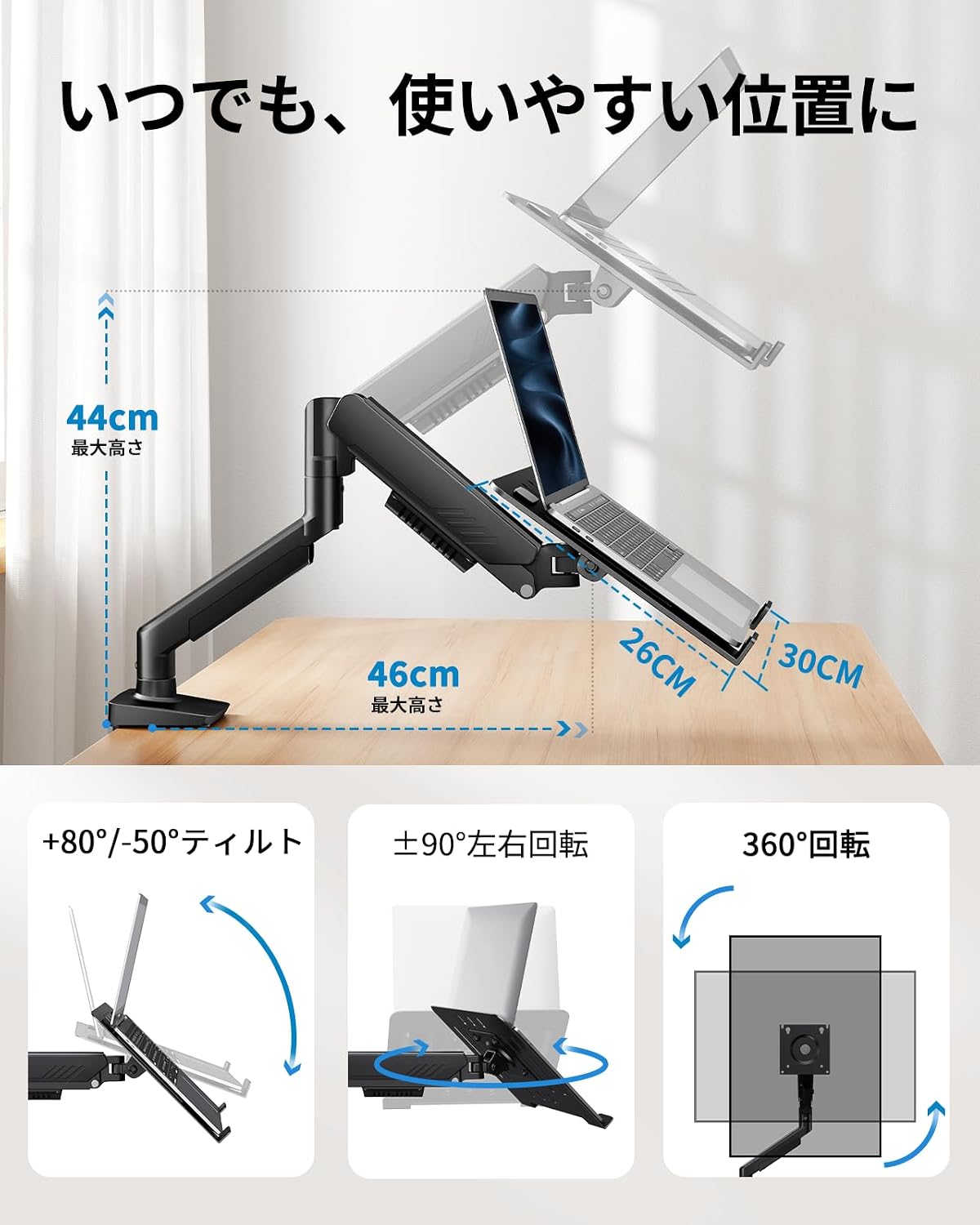
Image: Demonstrating the arm's tilt, swivel, and rotation features.
5.1 Організація кабелів
Integrated cable management clips along the arm help keep your workspace tidy and organized. Route your cables through these clips to prevent clutter and ensure a clean setup.
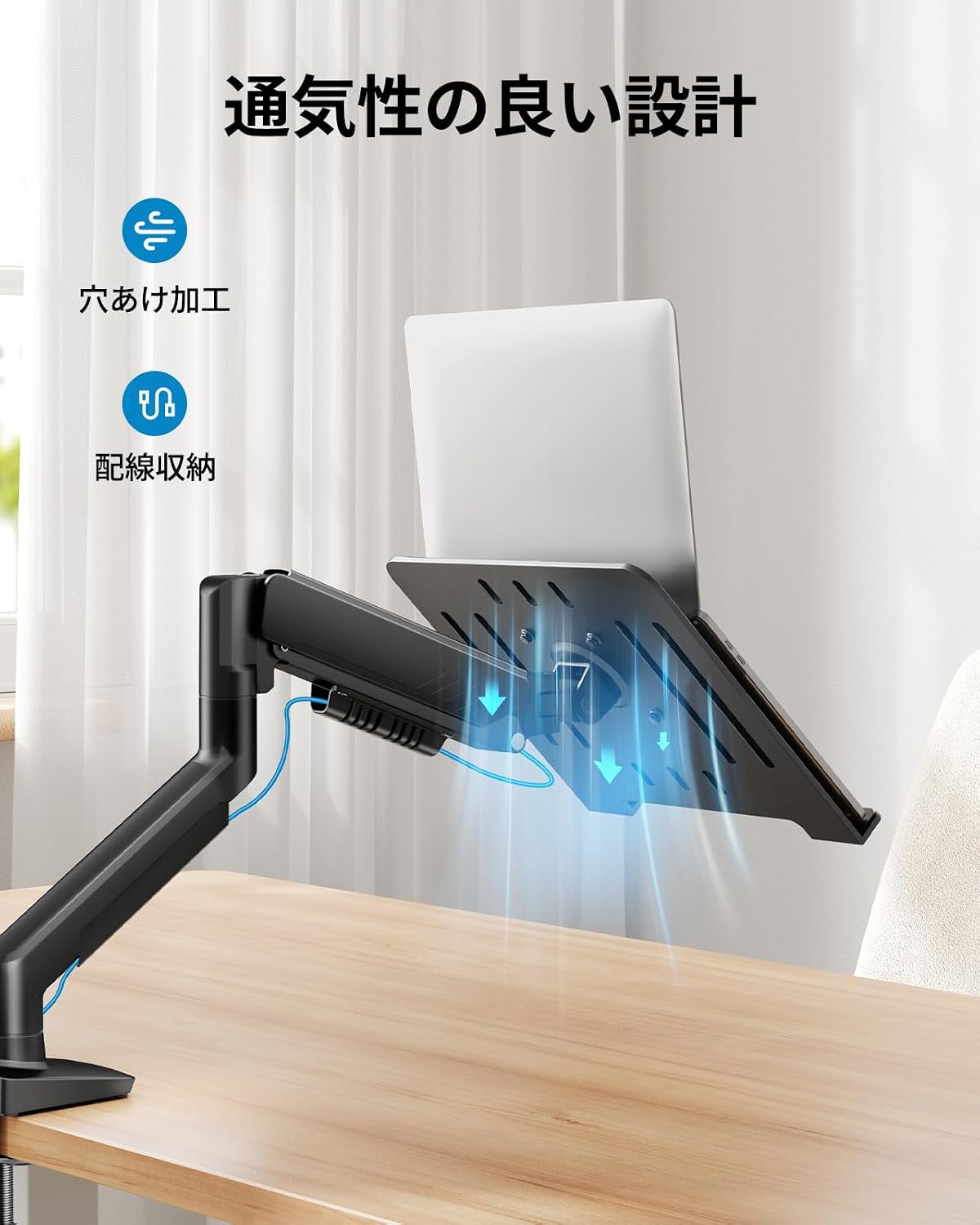
Зображення: Прample of cable routing using the arm's integrated cable management.
6. Технічне обслуговування
Регулярне технічне обслуговування забезпечує довговічність та оптимальну роботу вашого кронштейна для монітора.
- Прибирання: Wipe the arm and tray with a soft, damp тканиною. Уникайте абразивних засобів для чищення або розчинників.
- Перевірте підключення: Періодично перевіряйте всі гвинти та болти, щоб переконатися, що вони міцно затягнуті. За потреби підтягніть.
- Газова пружина: If the arm's movement becomes stiff or loose over time, re-adjust the gas spring tension as described in Section 4.3.
7. Вирішення проблем
| проблема | Можлива причина | Рішення |
|---|---|---|
| Arm does not hold position / Sags | Gas spring tension is too low for the device weight. | Increase gas spring tension (turn towards '+') using the Allen key. Refer to Section 4.3. |
| Arm is difficult to move / Stays too high | Gas spring tension is too high for the device weight. | Decrease gas spring tension (turn towards '-') using the Allen key. Refer to Section 4.3. |
| Arm wobbles or feels unstable | Монтаж клamp/grommet is not tight enough, or desk is unstable. | Переконайтеся, що клamp or grommet mount is securely tightened to the desk. Verify desk stability. |
| Monitor/Laptop not level | Tilt adjustment is loose or uneven. | Tighten the tilt mechanism screws. Adjust the tilt evenly. |
8. Технічні характеристики
- Бренд: ХУАНУО
- модель: B0FVSCTWDZ
- Тип монтажу: Настільне кріплення (C-Clamp & Люверс)
- Тип руху: Rotational, Gas Spring
- матеріал: метал
- колір: чорний
- Сумісні пристрої: Laptops, Monitors
- Сумісність з ноутбуком: Up to 17 inches, Max Load 7.7kg
- Сумісність монітора: 13-34 inches, Max Load 9kg
- Сумісність з VESA: 75х75 мм, 100х100 мм
- Товщина столу (C-Clamp): 10 мм - 65 мм
- Товщина столу (люверс): 10 мм - 75 мм
- Діапазон нахилу: +80° / -50°
- Діапазон повороту: ±90°
- Обертання: 360°
9. Гарантія та підтримка
This HUANUO product comes with a 5-year manufacturer's warranty, covering defects in materials and workmanship under normal use. Please retain your proof of purchase for warranty claims.
For technical support, troubleshooting assistance, or warranty inquiries, please contact HUANUO customer service through the retailer where you purchased the product or visit the official HUANUO webсайт для контактної інформації.
Webсайт: www.huanuo.com (Примітка: Це тимчасовий фрагмент URL. Please refer to your product packaging or official HUANUO documentation for the correct support webсайт.)