
1. Вступ
Thank you for choosing the Acer Gadget Golf Rangefinder. This device is designed to provide precise distance measurements for golf, hunting, and other outdoor activities. Featuring advanced laser technology, 6x magnification, slope compensation, and anti-shake capabilities, it offers reliable performance. Please read this manual thoroughly to understand the proper operation and care of your rangefinder.

The Acer Gadget Golf Rangefinder, a compact and ergonomic device designed for precise distance measurement.
2. Налаштування
2.1 Розпакування та початковий огляд
Після відкриття упаковки переконайтеся, що всі компоненти присутні:
- Acer Range Finder unit
- Зарядний кабель USB-C
- Чохол для транспортування
- Тканина для чищення лінз
- Посібник користувача
Video demonstrating the unboxing process of the Acer Gadget Golf Rangefinder, showing the included accessories.
2.2 Заряджання батареї
The rangefinder is equipped with a built-in USB-C rechargeable battery. Before first use, fully charge the device.
- Знайдіть порт зарядки USB-C збоку далекоміра.
- Connect the provided USB-C cable to the rangefinder and a compatible USB power source (e.g., computer, wall adapter).
- A charging indicator light will illuminate. It will change color or turn off when fully charged.
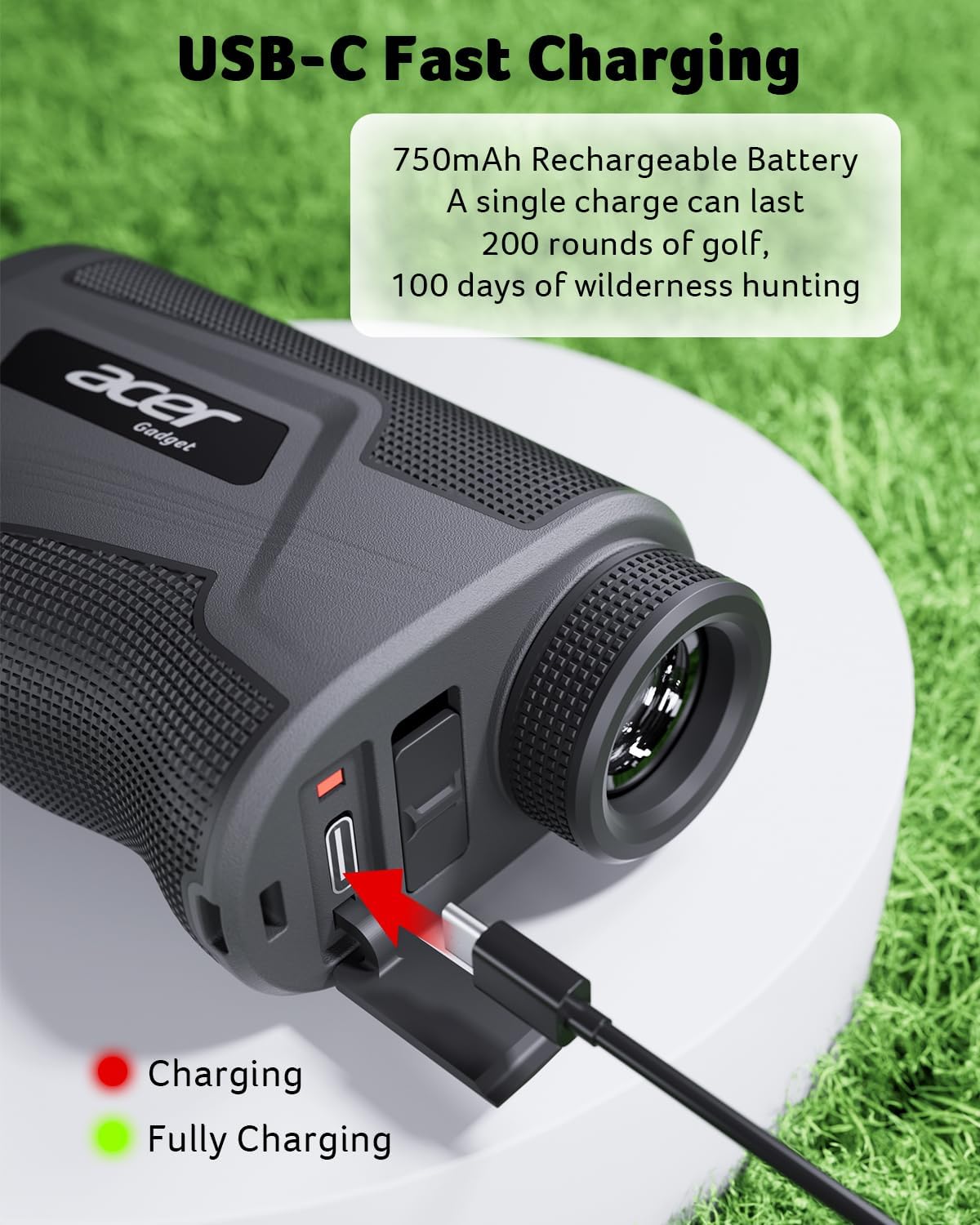
Image showing the USB-C charging port on the rangefinder, with a cable connected and indicating charging status.
2.3 Power On/Off and Focus Adjustment
To power on the device, press the Power/Measure button. To adjust the focus for a clear view, rotate the eyepiece until the display is sharp.
3. Інструкція з експлуатації
The Acer Gadget Golf Rangefinder offers multiple modes for various measurement needs. Use the 'M' (Mode) button to cycle through the available modes.
3.1 Режими вимірювання
- Slope Compensation Mode (Golf): Provides adjusted distances based on elevation changes. This mode can be toggled on or off using the dedicated slope switch for tournament legality. When active, it calculates the 'play as' distance.
- Vertical & Horizontal Distance Mode: Measures the straight-line distance, vertical height, and horizontal distance to a target.
- Режим кута: Displays the angle of inclination or declination to the target.
- Швидкісний режим: Measures the speed of a moving object.
- Режим сканування: Allows continuous measurement by holding down the Power/Measure button, useful for scanning multiple targets or moving objects.
- Flaglock with Vibration: When targeting a flagpole, the device will vibrate to confirm it has locked onto the flag, filtering out background objects.

Illustration of the Slope Assist feature, showing how it calculates adjusted distances for uphill and downhill shots. The image also shows the physical slope switch on the device.

Demonstration of the anti-shake technology, comparing a shaky reading without it to a stabilized reading with it, ensuring easier target lock.

Visual representation of the rangefinder's 800-yard capability and 6x magnification, highlighting its accuracy.

закінченоview of specialized modes for hunting, such as Speed Mode, Scan Mode, and Angle Mode, with continuous scanning capability.
Відеошоуasing the multi-functionality of the rangefinder, demonstrating various measurement modes.
3.2 Switching Units (Yards/Meters)
To switch between yards and meters, long-press the 'M' (Mode) button until the unit changes in the display.
3.3 Magnetic Stripe
The rangefinder features a built-in magnetic stripe, allowing it to be securely attached to metal surfaces, such as a golf cart frame, for convenient access.

Image illustrating the magnetic stripe feature, showing the rangefinder attached to a golf cart and also in a belt clip case.
Informational video discussing key features of the Acer Golf Rangefinder, including its magnetic stripe and various modes.
Video demonstrating the Acer Gadget Golf Rangefinder in use during a golf game, highlighting its ease of use and accuracy.
4. Технічне обслуговування
4.1 Очищення
To maintain optimal performance and clarity:
- Use the provided lens cleaning cloth to gently wipe the lenses. Avoid using abrasive materials or excessive force.
- Clean the body of the rangefinder with a soft, damp тканина. Не використовуйте агресивні хімікати або розчинники.
4.2 Зберігання
When not in use, store the rangefinder in its protective carrying case in a cool, dry place, away from direct sunlight and extreme temperatures.
4.3 Водонепроникність
The device features IPX5 water resistance, meaning it is protected against low-pressure water jets from any direction. It is not designed for submersion.

Image showing the rangefinder with water droplets, demonstrating its water-resistant design.
5. Вирішення проблем
If you encounter issues with your Acer Gadget Golf Rangefinder, refer to the following common problems and solutions:
| проблема | Можлива причина | Рішення |
|---|---|---|
| Неточні або суперечливі показники | Unstable aiming, dirty lens, environmental factors (haze, fog) | Ensure steady aim, clean lenses with provided cloth. Note that extreme haze or fog can affect laser performance. |
| Пристрій не включається | Low battery, device malfunction | Повністю зарядіть акумулятор за допомогою кабелю USB-C. Якщо проблема не зникає, зверніться до служби підтримки клієнтів. |
| Cannot lock onto flag/target | Obstruction, incorrect mode, target too small/far | Ensure a clear line of sight. Try using scanning mode or ensure Flaglock with Vibration is active. Ensure target is within range. |
| Дисплей розмитий | Eyepiece not focused | Rotate the eyepiece to adjust focus until the display is clear. |
6. Технічні характеристики
| Особливість | Деталь |
|---|---|
| Номер моделі | SW-RF700 |
| Діапазон вимірювання | 800 ярдів |
| Збільшення | 6x |
| Точність | ±0.5 ярда |
| Тип батареї | Lithium-Ion, Rechargeable (USB-C) |
| матеріал | Полікарбонат (ПК) |
| Розміри (Д x Ш x В) | 4.2 см x 2.5 см x 1.5 см |
| Вага товару | 0.7 фунта |
| Водонепроникність | IPX5 |

Image displaying the physical dimensions of the Acer Gadget Golf Rangefinder.
7. Гарантія та підтримка
7.1 Інформація про гарантію
This Acer Gadget Golf Rangefinder comes with a 1-year warranty. Please retain your proof of purchase for warranty claims. The warranty covers manufacturing defects under normal use.
7.2 Підтримка клієнтів
For technical assistance, troubleshooting, or warranty inquiries, please contact Acer Gadget Inc. customer support. Refer to the product packaging or the official Acer webсайт для отримання найактуальнішої контактної інформації.