
1. Вступ
Thank you for choosing the Thomson 24-inch HD LED Smart TV, model 24HT2S15. This manual provides essential information to help you set up, operate, and maintain your new television. Please read it thoroughly before use and retain it for future reference.

Зображення: спереду view of the Thomson 24-inch HD LED Smart TV, showcasing its frameless design and key features like HD resolution and Dolby Audio.
Ключові характеристики:
- TiVo OS with Voice Control: Intuitive interface combining live TV and streaming apps, personalized recommendations, and voice commands.
- Бездротовий дисплей: Mirror your smartphone, tablet, or laptop screen to the TV.
- Dolby Audio: Enhanced sound experience with improved dialogue, detail, and surround effects.
- HDR10: Sharper contrast and realistic colors for an immersive viewнабутий досвід.
- Пульт дистанційного керування з підсвічуванням: Easy navigation in low light with direct access buttons for popular streaming services.
- Adjustable Side Feet: Flexible positioning options for the TV.
- Потрійний тюнер: Integrated tuners for cable, satellite, and antenna reception.
2. Що в коробці
Під час розпакування переконайтеся, що всі наступні предмети присутні:
- Thomson 24-inch HD LED Smart TV (Model 24HT2S15)
- Пульт дистанційного керування
- Адаптер живлення
- Посібник користувача
- Гарантійний талон
- Adjustable Side Feet (2x)
If any items are missing or damaged, please contact your retailer or Thomson customer support.
3. Налаштування
3.1 Розпакування та розміщення
Carefully remove the TV from its packaging. It is recommended to have two people for this process. Place the TV on a stable, flat surface or mount it on a wall using a compatible VESA mount (not included).
Забезпечте належну вентиляцію навколо телевізора. Не блокуйте вентиляційні отвори.
3.2 Прикріплення підставки
If you are not wall-mounting the TV, attach the included side feet:
- Покладіть телевізор екраном донизу на м’яку чисту тканину, щоб запобігти пошкодженню екрана.
- Вирівняйте кожну підставку з відповідними отворами для гвинтів на нижній панелі телевізора.
- Secure the stands using the provided screws. The feet are adjustable from 30 cm to 60 cm distance.

Image: The Thomson 24-inch Smart TV showing its dimensions, including a screen diagonal of 60 cm (24 inches), width of 53 cm, and height of 37 cm with the stand. The adjustable stand feet are also illustrated.
3.3 Підключення периферійних пристроїв
Connect your external devices to the TV's ports. Refer to the diagram below for port locations.

Зображення: Детальний view of the rear connection panel of the Thomson 24-inch Smart TV, illustrating various ports including 2x USB 2.0, Antenna input, Satellite input, 3x HDMI 1.4 (one with ARC), Service port, Headphone jack, AV IN, Digital Optical Audio Out, and LAN port.
- Потужність: Connect the power adapter to the TV and then to a wall outlet.
- Антена/Супутник: Connect your antenna or satellite cable to the respective input.
- HDMI: Use HDMI cables to connect devices like Blu-ray players, game consoles, or set-top boxes. HDMI 1.4/ARC supports Audio Return Channel.
- USB: Вставте USB-накопичувачі для відтворення медіафайлів або оновлення програмного забезпечення.
- LAN: Підключіть кабель Ethernet для дротового підключення до Інтернету.
- AV IN: Для старіших пристроїв, що використовують композитне відео та стереоаудіо.
- Навушники: Підключіть навушники для приватного прослуховування.
- Цифровий оптичний аудіовихід: Підключення до зовнішньої звукової системи для цифрового аудіо.
3.4 Початкове увімкнення та перше налаштування
- Підключіть телевізор до розетки.
- Натисніть кнопку живлення на пульті дистанційного керування або на телевізорі.
- Follow the on-screen instructions to select your language, country, and perform channel scanning for your triple tuner (cable/satellite/antenna).
- Підключіться до своєї мережі Wi-Fi, вибравши її зі списку та ввівши пароль.
- Complete the TiVo OS setup, including signing in or creating an account.
4. Керування телевізором
4.1 Функції дистанційного керування
The backlit remote control provides easy access to all TV functions, even in dim lighting. It includes dedicated buttons for popular streaming services.

Image: The Thomson Smart TV remote control, highlighting its backlit buttons, voice control microphone, and direct access buttons for Netflix, YouTube, Prime Video, Disney+, and Canal+.
- Кнопка живлення: Вмикає/вимикає телевізор.
- Цифрові кнопки: Вибір каналів безпосередньо.
- Навігаційна панель (Вгору/Вниз/Вліво/Вправо/OK): Навігація по меню та вибір опцій.
- Назад/Вихід: Повернення до попереднього екрана або вихід з меню.
- Збільшення/зменшення гучності: Відрегулюйте рівень гучності.
- Канал вгору/вниз: Змінити телеканали.
- Вимкнути звук: Вимкнення або увімкнення звуку.
- Головна: Access the TiVo OS home screen.
- Кнопка голосового керування: Activate voice commands (microphone icon).
- Кнопки прямого доступу: Launch Netflix, YouTube, Prime Video, Disney+, Canal+ instantly.
4.2 TiVo OS and Smart Features
The TiVo OS provides a unified platform for live TV and streaming content. Explore personalized recommendations and access your favorite apps.

Image: The Thomson Smart TV screen showing various streaming application icons like Netflix, YouTube, Disney+, Prime Video, Plex, DAZN, Canal+, and Pluto TV, indicating integrated smart TV capabilities.
- Доступ до програми: Navigate to the home screen to find and launch pre-installed apps or download new ones from the app store.
- Голосове керування: Press the voice control button on your remote and speak commands to search for content, launch apps, or control TV functions.
- Бездротовий дисплей: Use the Wireless Display feature to mirror content from your compatible smartphone, tablet, or laptop directly to your TV screen.

Image: An illustration demonstrating the voice control feature of the Thomson Smart TV, showing a remote control with a microphone icon and examples of voice commands like "Open Netflix" or "Play movies with Tom Hanks."

Image: The Thomson Smart TV displaying content mirrored from a smartphone, illustrating the Wireless Display and Google Cast features for seamless content sharing.
4.3 Покращення зображення та звуку
- HDR10: Experience improved contrast, brightness, and color accuracy with HDR10 content. This technology enhances both bright and dark scenes for a more dynamic picture.
- Dolby Audio: Enjoy rich, clear, and powerful sound. Dolby Audio optimizes dialogue, enhances detail, and provides an immersive surround sound experience.

Image: A side-by-side comparison of picture quality, demonstrating the enhanced contrast and color vibrancy of HDR10 on the right compared to standard SDR on the left, with a building and landscape scene.

Image: An illustration depicting sound waves emanating from a TV screen, with the Dolby Audio logo prominently displayed, signifying enhanced audio quality for an immersive viewнабутий досвід.
5. Технічне обслуговування
5.1 Очищення телевізора
- екран: Обережно протріть екран м’якою тканиною без ворсу. Для стійких плям злегка протрітьampпротріть тканину водою або спеціалізованим засобом для чищення екранів. Ніколи не розпилюйте рідину безпосередньо на екран.
- Кабінет: Wipe the TV cabinet and stand with a soft, dry cloth.
- Пульт дистанційного керування: Протирайте пульт дистанційного керування м’якою сухою тканиною.
Увага:
- Завжди відключайте телевізор від мережі перед чищенням.
- Не використовуйте абразивні засоби для чищення, віск або розчинники.
5.2 Оновлення програмного забезпечення
Your Smart TV may receive software updates to improve performance and add new features. It is recommended to enable automatic updates or check for updates periodically through the TV's settings menu to ensure optimal functionality and security.
6. Вирішення проблем
Якщо у вас виникли проблеми з телевізором, зверніться до наступних поширених проблем та способів їх вирішення:
| проблема | Можлива причина | Рішення |
|---|---|---|
| Немає живлення | Кабель живлення відключено; проблема з розеткою | Переконайтеся, що кабель живлення надійно підключений. Перевірте розетку за допомогою іншого пристрою. |
| Немає зображення, але звук є | Неправильне джерело вхідного сигналу; несправний кабель | Check the input source (e.g., HDMI 1, Antenna). Ensure cables are connected correctly. |
| Звуку немає, але зображення є | Гучність вимкнена або занадто низька; проблема зі зовнішньою аудіосистемою | Unmute the TV or increase volume. Check audio settings and external audio connections. |
| Пульт не працює | Розряджені батарейки; перешкода; пульт дистанційного керування не сполучений | Replace batteries. Remove any obstructions. Re-pair the remote if necessary (refer to TV settings). |
| Неможливо підключитися до Wi-Fi | Неправильний пароль; проблема з маршрутизатором; телевізор занадто далеко від маршрутизатора | Verify Wi-Fi password. Restart your router. Move TV closer or use a wired LAN connection. |
| Розумні функції не реагують | Network issue; temporary software glitch | Check internet connection. Restart the TV by unplugging it for a minute and plugging it back in. |
If the problem persists after trying these solutions, please contact Thomson customer support.
7. Технічні характеристики
Detailed technical specifications for the Thomson 24HT2S15 Smart TV:
| Особливість | Деталь |
|---|---|
| Бренд | Томсон |
| Номер моделі | 24HT2S15 |
| Розмір екрана | 24 дюйма (60 см) |
| Технологія дисплея | LED |
| роздільна здатність | 768p (1366 x 768 пікселів) |
| Частота оновлення | 60 Гц |
| Співвідношення сторін | 16:9 |
| Технологія підключення | Ethernet, HDMI, USB, Wi-Fi |
| Особливості | Parental Controls, TiVo OS, Voice Control, HDR10, Dolby Audio |
| Розміри виробу (з підставкою) | 8P x 53l x 37H cm (approx. 8 x 53 x 37 cm) |
| вага | 3.33 кг |
| Включені компоненти | Power Adapter, User Manual, Warranty Card, Remote Control |
| Підтримувані мови | French, English, Italian, Spanish, German |
| Клас енергоефективності | E |
| Інформація про продукт EPREL | https://eprel.ec.europa.eu/qr/1969520 |
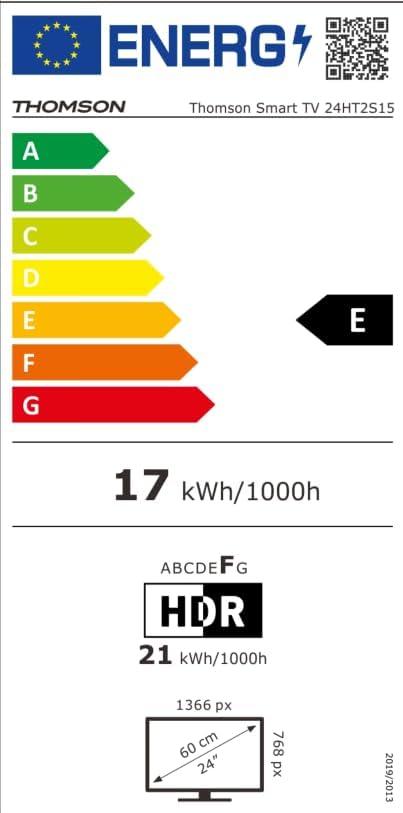
Image: The EU Energy Label for the Thomson Smart TV 24HT2S15, showing an energy efficiency class of E and energy consumption of 17 kWh/1000h for SDR and 21 kWh/1000h for HDR.
8. Гарантія та підтримка
8.1 Інформація про гарантію
Thomson products are covered by a 3-year warranty. For detailed information regarding warranty claims, returns, or defective products, please refer to the warranty card included in your package or visit the Thomson support webсайт.
For specific information on purchases made via Amazon, consult Amazon's help pages regarding returns and defective products.
8.2 Підтримка клієнтів
If you require further assistance or have questions not covered in this manual, please contact Thomson customer support:
- Виробник: Потікview GmbH
- Електронна пошта: контакт@стрімview.com
- Webсайт: www.streamview.com
- Телефон: +4318900066
Please have your model number (24HT2S15) and purchase details ready when contacting support.