
1. Вступ
This manual provides detailed instructions for the installation, operation, and maintenance of your STUDIOFINIX Bluetooth 5.4 4-Zone 8-Channel Audio Amplifier Receiver. This amplifier is designed to deliver high-fidelity audio across multiple rooms, offering independent zone control, various input options, and a professional karaoke function. Please read this manual thoroughly before use to ensure proper setup and optimal performance.
2. Техніка безпеки
- Джерело живлення: Використовуйте лише наданий адаптер живлення. Переконайтеся, що гучністьtage відповідає вимогам, зазначеним на пристрої.
- Вентиляція: Do not block any ventilation openings. Install in a location with adequate airflow to prevent overheating.
- Вода і вологість: Не піддавайте пристрій впливу дощу, вологи або крапель/бризок рідин. Тримайте подалі від джерел води.
- Тепло: Не розміщуйте поблизу джерел тепла, таких як радіатори, обігрівачі, печі або інші прилади, що виробляють тепло.
- Прибирання: Unplug the unit from the power outlet before cleaning. Use a dry, soft cloth only.
- Обслуговування: Не намагайтеся самостійно обслуговувати цей виріб. Зверніть усі послуги до кваліфікованого обслуговуючого персоналу.
- Опір динаміка: Ensure connected speakers have an impedance of 4-8 ohms. Connecting speakers with lower impedance may damage the ampліфірник.
3. Вміст упаковки
Перевірте, чи всі перелічені нижче предмети входять до вашої упаковки:
- СТУДІОФІНІКС Ampліфтер х 1
- Адаптер живлення x 1
- Black Terminal Connectors x 4
- Інструкція з експлуатації x 1

Figure 3.1: Package Contents. The image displays the amplifier unit, its power adapter, four black terminal connectors, and the user manual.
4. Продукт закінчивсяview
4.1 Знайомство з передньою панеллю
The front panel provides access to primary controls and input ports for convenient operation.

Figure 4.1: Front Panel Layout. Key controls include the Volume/Power ON/OFF knob, MIC VOL knob, MIC input, AUX input, USB port, TF Card slot, and Bass/Treble adjustment knobs.
- VOLUME/PWR ON/OFF: Controls the master volume and powers the unit on/off.
- ГУЧНІСТЬ MIC: Регулює гучність підключеного мікрофона.
- Мікрофонний вхід: 3.5-мм роз'єм для підключення мікрофона.
- Вхід AUX: 3.5mm jack for auxiliary audio devices.
- Порт USB: Для відтворення аудіо files з USB-накопичувача.
- Слот для картки TF: Для відтворення аудіо fileз карти пам'яті TF (MicroSD).
- НИЗЬКІ/ВИСОКІ: Adjusts the low and high frequency response of the audio output.
4.2 Вступ до верхньої панелі
The top panel features controls for mode selection, playback, and echo effects for karaoke.

Figure 4.2: Top Panel Layout. This view highlights the MODE button, playback controls (Fast Retreat/Previous Song, Play/Pause, Fast Forward/Next Song), and the ECHO button for microphone effects.
- РЕЖИМ: Switches between input sources (Bluetooth, Optical, AUX, LINE IN, USB, TF Card).
- Елементи керування відтворенням: Buttons for previous track, play/pause, and next track when using USB/TF card or Bluetooth.
- ЕХО: Activates and adjusts the echo effect for the microphone input.
- Zone Control Buttons (1, 2, 3, 4): Independently turn on or off each of the four audio zones.
4.3 Back Panel Introduction
The back panel contains the main speaker outputs and additional wired input options.

Figure 4.3: Back Panel Layout. This image shows the DC IN port, speaker output terminals for Zones 1-4 (supporting 8 speakers), Optical input, and stereo RCA Line In (R/L) inputs.
- DC IN: Power input port for the provided power adapter.
- Speaker Outputs (ZONE 1-4): Connect up to 8 speakers (2 per zone) with 4-8 ohm impedance. Red terminals are positive (+), black terminals are negative (-).
- ОПТИЧНИЙ Вхід: Digital audio input for connecting devices like TVs or game consoles.
- ЛІНІЙНИЙ ВХІД (П/Л): Stereo RCA inputs for connecting analog audio sources.
5. Налаштування
5.1 Підключення динаміка
The amplifier supports up to 8 speakers, divided into 4 independent zones. Ensure your speakers have an impedance of 4-8 ohms.
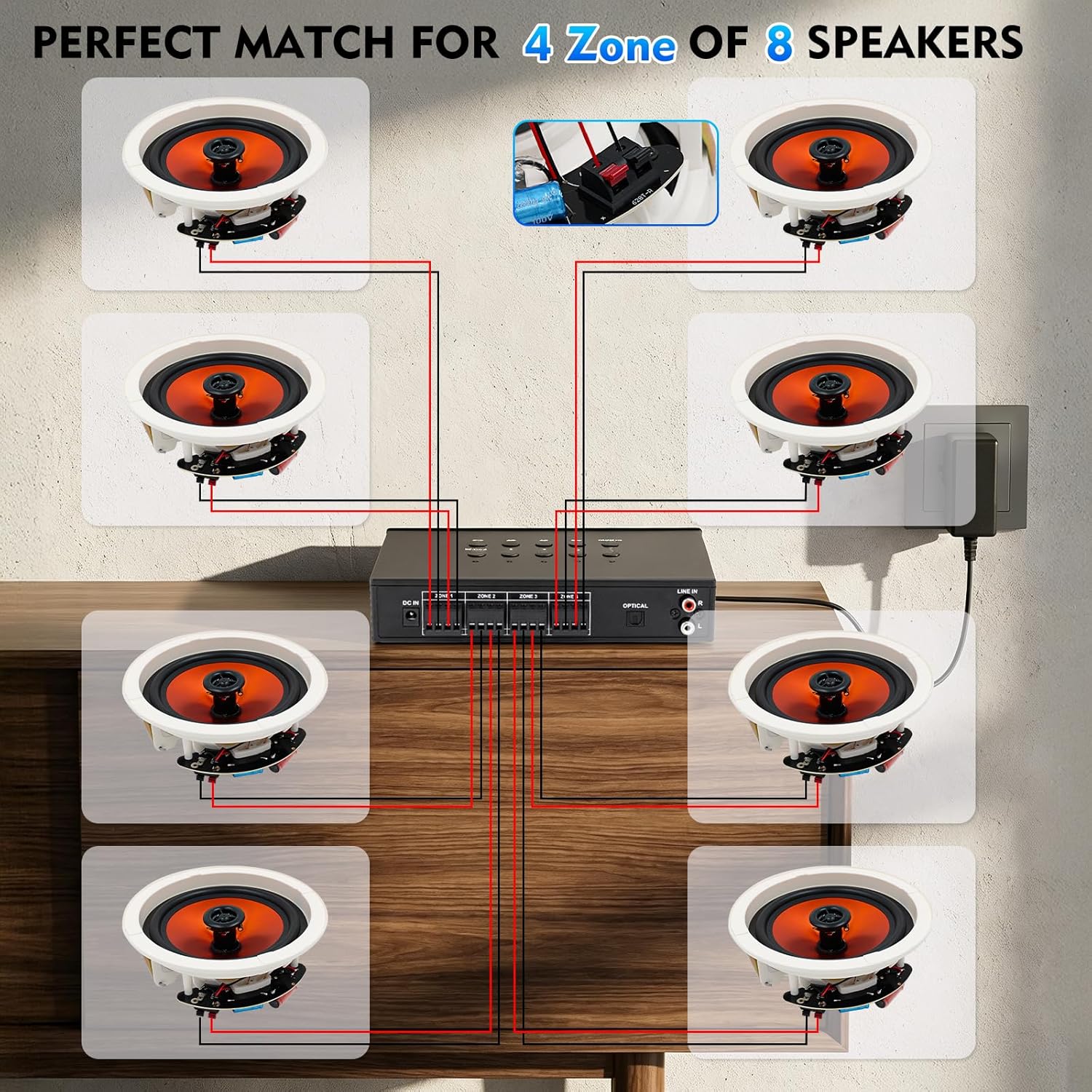
Figure 5.1: Speaker Wiring Diagram. This illustration demonstrates connecting two speakers per zone, with red wires to positive (+) terminals and black wires to negative (-) terminals on the amplifier's back panel.
- Визначте позитивну (+) і негативну (-) клеми на динаміках.
- Connect the positive (+) wire from each speaker to the corresponding red (+) terminal on the amplifier for the desired zone.
- Connect the negative (-) wire from each speaker to the corresponding black (-) terminal on the amplifier for the desired zone.
- Repeat for all speakers across the 4 zones. Ensure all connections are secure.
5.2 Підключення живлення
After connecting all speakers and audio sources, connect the power adapter.
- Insert the DC plug of the power adapter into the 'DC IN' port on the back of the ampліфірник.
- Підключіть адаптер живлення до відповідної розетки.
6. Інструкція з експлуатації
6.1 Увімкнення/вимкнення живлення та регулювання гучності
- Щоб увімкнути ampрятувальний пристрій, поверніть VOLUME/PWR ON/OFF knob clockwise until the display illuminates.
- Щоб вимкнути живлення, поверніть ручку проти годинникової стрілки, доки вона не клацне.
- Adjust the master volume by rotating the VOLUME/PWR ON/OFF ручка.
6.2 Вибір джерела вхідного сигналу
Натисніть РЕЖИМ button on the top panel to cycle through available input sources: Bluetooth, Optical, AUX, LINE IN, USB, and TF Card.
6.3 Створення пари Bluetooth
Щоб підключити пристрій Bluetooth:

Figure 6.1: Bluetooth Connectivity. The image shows a smartphone successfully paired with the amplifier, indicating stable Bluetooth 5.4 connection for wireless audio streaming.
- Виберіть режим Bluetooth за допомогою РЕЖИМ button. The display will show "BT" or a similar indicator.
- На смартфоні, планшеті або іншому пристрої з підтримкою Bluetooth увімкніть Bluetooth і знайдіть доступні пристрої.
- Select "STUDIOFINIX" or a similar name from the list to pair.
- Після сполучення ви можете передавати аудіо бездротовим способом на ampліфірник.
6.4 Wired Input Operation
The amplifier supports various wired audio sources:

Figure 6.2: Multiple External Audio Sources. This graphic illustrates the diverse input options available, including Microphone, Bluetooth, USB, AUX, and TF Card, allowing connection of various external devices.
- Оптичний вхід: Connect a digital audio cable from your source (e.g., TV, game console) to the OPTICAL port on the back panel. Select Optical mode using the РЕЖИМ кнопку.
- Вхід AUX: Connect a 3.5mm audio cable from your device to the AUX port on the front panel. Select AUX mode.
- РЯД: Connect RCA cables from your analog audio source (e.g., CD player) to the LINE IN (R/L) ports on the back panel. Select LINE IN mode.
- USB/TF-карта: Insert a USB drive or TF card into the respective slot on the front panel. The amplifier will automatically switch to USB or TF mode and begin playback. Use the playback controls on the top panel to manage tracks.
6.5 Функція караоке
Enjoy karaoke with the built-in microphone input and echo effect.

Figure 6.3: Karaoke Ready. This image depicts individuals enjoying a karaoke session, highlighting the amplifier's capability to connect a microphone for vocal performances.
- Підключіть мікрофон до Мікрофонний вхід на передній панелі.
- Відрегулюйте гучність мікрофона за допомогою ГУЧНІСТЬ МІКРОФОНА ручка.
- Натисніть ЛУНА button on the top panel to activate and adjust the echo effect for your vocals.
6.6 Independent Zone Control
The amplifier allows you to independently control the power for each of the four speaker zones.

Figure 6.4: 4-Zone Independent Control. This visual demonstrates how the amplifier can manage audio in four separate areas, allowing users to turn zones on or off as needed for multi-room audio customization.
- Використовуйте спеціальний ZONE 1, ZONE 2, ZONE 3, ZONE 4 buttons on the top panel to toggle each zone on or off.
- Note that while zones can be independently turned on/off, the overall volume, bass, and treble settings apply to all active zones simultaneously.
6.7 Регулювання низьких та високих частот
Adjust the audio's tonal characteristics using the БАСС і ТРИБА knobs on the front panel to suit your preference.
7. Технічне обслуговування
- Прибирання: Disconnect the power before cleaning. Use a soft, dry cloth to wipe the exterior of the unit. Do not use liquid cleaners or aerosol sprays.
- Зберігання: If storing the unit for an extended period, disconnect it from power and store in a cool, dry place away from direct sunlight.
- Вентиляція: Regularly check that ventilation openings are clear of dust and debris.
8. Вирішення проблем
| проблема | Можлива причина | Рішення |
|---|---|---|
| Немає живлення | Power adapter not connected; Power outlet not working; Unit is off. | Ensure power adapter is securely connected and plugged into a live outlet. Turn the VOLUME/PWR ON/OFF knob clockwise. |
| Немає звуку з динаміків | Incorrect input source selected; Speaker wires loose or incorrectly connected; Volume too low; Specific zone turned off. | Press MODE to select the correct input. Check speaker wire connections (positive/negative). Increase master volume. Ensure the relevant zone button is ON. |
| Bluetooth не підключається | Not in Bluetooth mode; Device too far; Device already connected to another ampліфірник. | Select Bluetooth mode. Move device closer to the ampвід’єднайтеся від інших пристроїв Bluetooth і спробуйте знову з’єднати пристрій у пару. |
| Мікрофон не працює | Microphone not plugged in; MIC VOL too low. | Ensure microphone is securely plugged into the MIC input. Increase the MIC VOL knob. |
| USB/TF-карта не відтворюється | Incorrect mode; Incompatible file формат; пошкоджений носій. | Select USB or TF mode. Ensure audio files are in a supported format (e.g., MP3). Try a different USB drive or TF card. |
9. Технічні характеристики
| Особливість | Специфікація |
|---|---|
| Бренд | СТУДІОФІНІКС |
| Номер моделі | ST-AMP-8PBT-BK-US |
| Кількість каналів | 8 |
| Вихідна ватtage | 480 Вт (загалом) |
| Версія Bluetooth | 5.4 |
| Імпеданс динаміка | 4-8 Ом |
| Параметри введення | Optical, AUX, LINE IN, USB, TF Card, MIC, Bluetooth |
| АЧХ | ±2dB@20-20kHz |
| Співвідношення сигнал-шум | 85 дБ |
| Розміри (Д x Ш x В) | 195mm x 40mm x 140mm (Approx.) |
10. Інформація про гарантію
This STUDIOFINIX amplifier поставляється з a 1-річна обмежена гарантія from the date of purchase. This warranty covers manufacturing defects in materials and workmanship under normal use. It does not cover damage caused by misuse, accident, unauthorized modification, or improper installation. Please retain your proof of purchase for warranty claims.
11. Підтримка клієнтів
For technical assistance, warranty claims, or general inquiries, please contact STUDIOFINIX customer support through the retailer's platform or visit the official STUDIOFINIX webсайт для контактної інформації.
Інтернет-підтримка: www.studiofinix.com