
вступ
This manual provides detailed instructions for the installation, operation, and maintenance of your Gawfolk GF490D 49-inch Ultra-Wide Curved Gaming Monitor. Please read this manual thoroughly before using the product to ensure proper setup and optimal performance. Keep this manual for future reference.
Інформація про безпеку
Always follow these basic safety precautions when using your monitor:
- Не ставте монітор на нестійкий візок, підставку чи стіл.
- Не перекривайте вентиляційні отвори.
- Do not use near water or sources of heat.
- Використовуйте лише шнур живлення та адаптер, що надаються виробником.
- Звертайтеся до кваліфікованого сервісного персоналу.
- Від’єднуйте монітор від мережі під час грози або якщо він не використовується протягом тривалого часу.
Вміст упаковки
Перевірте наявність усіх компонентів в упаковці:
- Gawfolk GF490D Monitor
- Monitor Stand Components (Base, Neck)
- Адаптер живлення та кабель
- Кабель HDMI
- Кабель DisplayPort
- Посібник користувача
Налаштування
1. Збірка підставки
- Обережно вийміть монітор з упаковки, зберігаючи його на м’якій поверхні в захищеному місці.
- Прикріпіть шийку підставки до панелі монітора.
- Закріпіть основу підставки до шиї за допомогою наданих гвинтів.

малюнок 1: Illustration of monitor ergonomic adjustments, including height adjustment (0-160mm), wall bracket compatibility (75x75mm), and tilt adjustment (-5° to 15°).
2. Підключення до пристроїв
The monitor is equipped with multiple input ports for various devices:
- Power Connector (DC): Connect the power adapter to this port and then to a power outlet.
- Порти HDMI 2.1 (x2): Connect to devices such as PCs, game consoles (PS5/Xbox Series X), or laptops using an HDMI cable.
- Порти DisplayPort 1.4 (x2): Connect to PCs or other compatible devices using a DisplayPort cable for high-resolution and high-refresh-rate signals.
- Інтерфейс аудіовиходу: Підключіть зовнішні динаміки або навушники.

малюнок 2: Задня view of the monitor showing the available input ports: DC power connector, two DisplayPort 1.4 interfaces, two HDMI 2.1 interfaces, and an audio output interface.
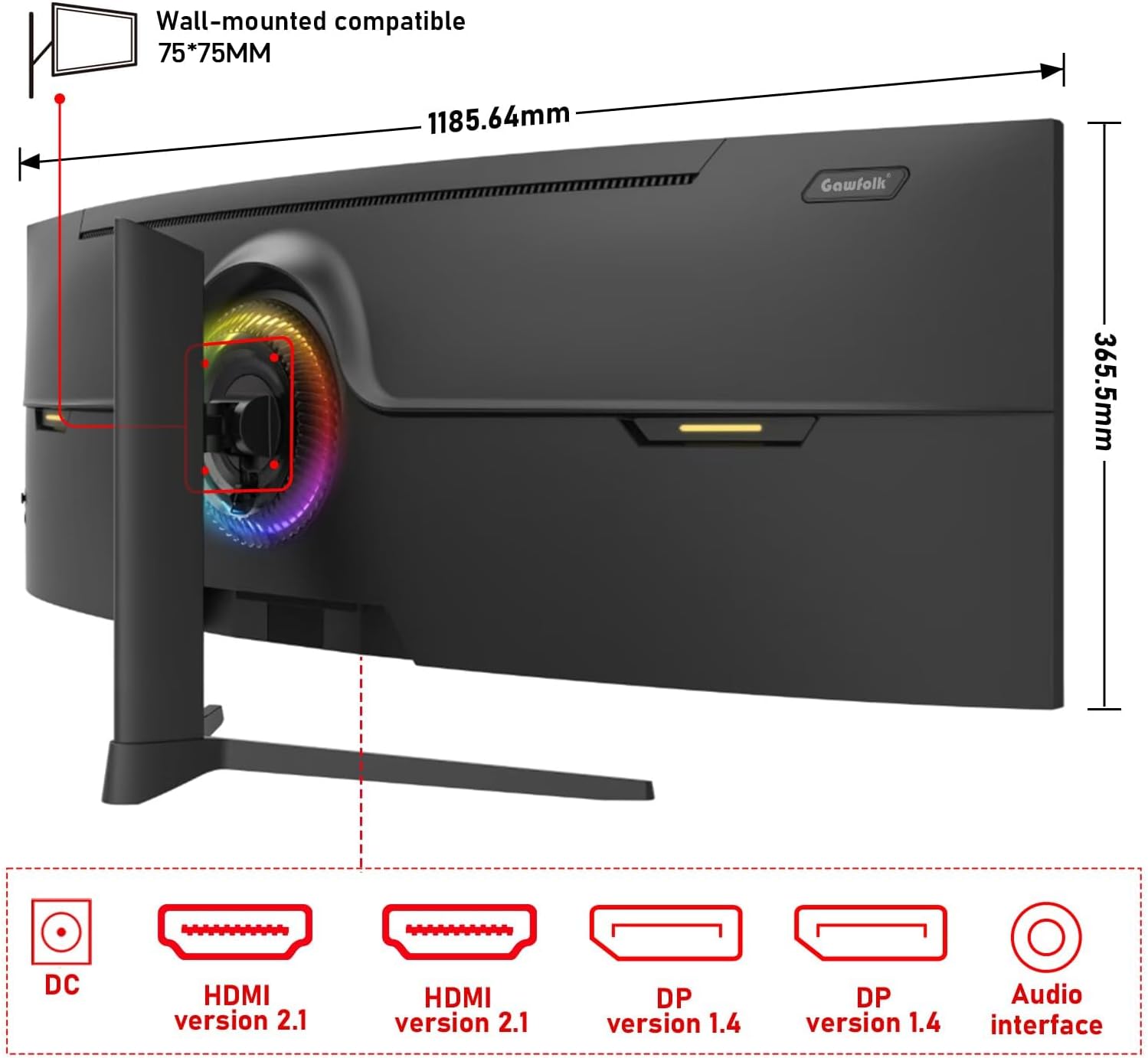
малюнок 3: Задня view of the monitor illustrating its approximate dimensions (1185.64mm width, 365.5mm height without stand) and indicating 75x75mm VESA wall-mount compatibility.
3. Настінне кріплення (додатково)
The monitor supports a 75x75mm VESA wall mount. Ensure the wall mount can support the monitor's weight (7.9 kg) and follow the wall mount manufacturer's instructions for installation.
Інструкція з експлуатації
1. Увімкнення/вимкнення живлення
- Connect the power adapter to the monitor and a power outlet.
- Press the power button (location typically on the rear or bottom-right of the monitor) to turn the monitor on or off.
2. Налаштування параметрів дисплея
The monitor features an On-Screen Display (OSD) menu for adjusting various settings. Use the joystick or buttons (refer to the physical monitor for exact controls) to navigate the OSD menu.
- Джерело введення: Select between HDMI 1, HDMI 2, DP 1, or DP 2.
- Яскравість/Контрастність: Налаштуйте яскравість зображення.
- Параметри кольору: Modify color temperature, gamma, and color gamut (120% sRGB).
- Частота оновлення: The monitor supports up to 240Hz. Ensure your connected device and cable support this refresh rate for optimal performance.
- Адаптивна синхронізація (FreeSync): Enable this feature in the OSD and your graphics card settings to synchronize the monitor's refresh rate with your GPU's frame rate, reducing screen tearing and stuttering.
- Режим слабкого синього світла: Activate to reduce eye strain during prolonged use.

малюнок 4: The 49-inch 32:9 ultra-wide display with DQHD (5120x1440) resolution, offering an expansive field of view compared to traditional 16:9 QHD (2560x1440) monitors.

малюнок 5: Visual comparison demonstrating the smoothness of a 240Hz refresh rate versus lower refresh rates (100Hz and 60Hz), highlighting reduced motion blur and stuttering.

малюнок 6: Illustration of Adaptive Sync (FreeSync) technology, showing how it eliminates screen tearing and input lag for a smoother gaming experience compared to when it is disabled.

малюнок 7: The 1500R curvature of the screen, designed to provide an immersive viewing experience by conforming to the human eye's natural field of vision.

малюнок 8: Display characteristics including 120% sRGB color gamut, 8-bit color depth (16.7 million colors), 3000:1 contrast ratio, and 330 cd/m² brightness, ensuring rich and accurate color reproduction.

малюнок 9: A visual comparison demonstrating the difference between a 1000:1 contrast ratio and the monitor's 3000:1 contrast ratio, showing enhanced detail in dark and bright areas.
3. Фізичні корективи
Підставка для монітора дозволяє ергономічне регулювання:
- Регулювання висоти: Регулювання висоти екрана до 160 мм.
- Поворотний: Rotate the monitor left or right by 15 degrees.
- Нахил: Adjust the screen tilt from -5 degrees to 20 degrees.
4. RGB-підсвічування навколишнього середовища
The monitor features customizable RGB ambient lighting on its rear. This can be configured through the OSD menu to match your preferences or gaming setup.
Технічне обслуговування
Очищення монітора
- Завжди вимикайте монітор перед чищенням.
- Злегка протріть м’якою тканиною без ворсу dampводою або м’яким, неабразивним засобом для чищення екранів.
- Не розпилюйте засіб для чищення безпосередньо на екран.
- Уникайте використання бензолу, розчинника або будь-яких летких розчинників, оскільки вони можуть пошкодити поверхню монітора.
Усунення несправностей
| проблема | Можлива причина | Рішення |
|---|---|---|
| На екрані немає зображення | Від’єднано кабель живлення, від’єднано відеокабель, вибрано неправильне джерело вхідного сигналу. | Перевірте підключення кабелів живлення та відео. Виберіть правильне джерело вхідного сигналу в екранному меню. Переконайтеся, що комп’ютер увімкнено. |
| Зображення розмите або спотворене | Incorrect resolution or refresh rate settings, faulty video cable. | Set the display resolution to 5120x1440 and refresh rate to 240Hz (or compatible with your GPU). Try a different video cable. |
| Розриви або заїкання екрана | Adaptive Sync (FreeSync) is not enabled or not supported by GPU/game. | Enable FreeSync in the monitor's OSD menu and your graphics card control panel. Ensure your GPU supports FreeSync. |
| Биті пікселі | Виробничий брак. | Refer to warranty policy. A small number of dead pixels may be considered within acceptable manufacturing tolerances. |
| Немає звуку | Audio cable disconnected, incorrect audio output selected on PC, monitor volume too low. | Check audio cable connection. Ensure the correct audio output device is selected in your computer's sound settings. Adjust monitor volume. |
Технічні характеристики
| Особливість | Деталь |
|---|---|
| Номер моделі | GF490D |
| Розмір екрана | 49 дюймів |
| роздільна здатність | DQHD (5120x1440 Pixels) |
| Співвідношення сторін | 32:9 |
| Кривизна | 1500R |
| Частота оновлення | 240 Гц |
| Час відгуку | 1 мілісекунда |
| Тип панелі | VA (LCD Display Technology) |
| Яскравість | 350 кандел (кд/м²) |
| Коефіцієнт контрастності | 3000:1 |
| Колірна гамма | 120% sRGB |
| Viewкут нахилу | 178 градусів |
| Адаптивна синхронізація | FreeSync |
| Відеовходи | 2x HDMI 2.1, 2x DisplayPort 1.4 |
| Аудіовихід | 3.5mm Audio Jack |
| Тип монтажу | Wall Mount (75x75mm VESA compatible) |
| Розміри продукту (Д x Ш x В) | 5 x 118.5 x 43 см (з підставкою) |
| Вага товару | 7.9 кілограма |
| Додаткові функції | Blue Light Filter, Curved, Frameless, RGB Ambient Lighting |
Гарантія та підтримка
The Gawfolk GF490D monitor comes with a 12-місячне післяпродажне обслуговування (1 year manufacturer warranty). If you encounter any issues or have questions regarding your monitor, please contact Gawfolk customer support for assistance.
Manufacturer: Shenzhen Qinghong Zhuoyue Technology Co., Ltd.