
вступ
Thank you for choosing the Surfans F20 Pro Android Hi-Res Music Player. This manual provides essential information for setting up, operating, and maintaining your device. Please read it thoroughly to ensure optimal performance and longevity of your music player.
1. Налаштування
1.1 Розпакування та вміст упаковки
Carefully unpack your Surfans F20 Pro. Ensure all components are present.
Пакет повинен містити:
- 1 x Surfans F20 Pro Music Player
- (Other accessories like USB cable, protective case, etc., may be included depending on the specific package.)
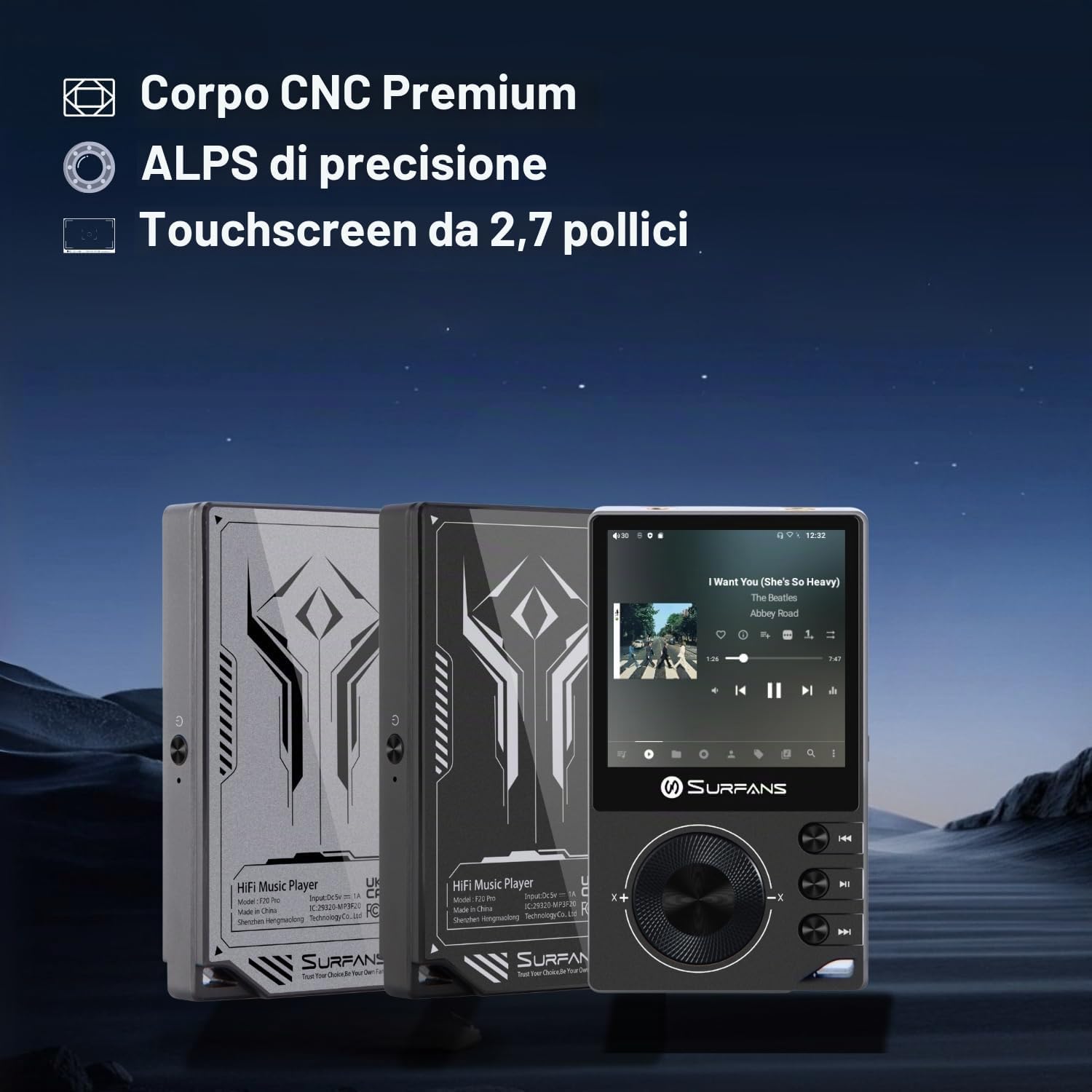
The Surfans F20 Pro features a premium CNC body for durability and aesthetics.
1.2 Зарядка пристрою
Before first use, fully charge the device. Connect the included USB cable to the player's charging port and to a USB power adapter (not included) or a computer's USB port. The charging indicator will show the charging status. A full charge typically takes approximately 3 hours.
The Surfans F20 Pro features a 1450mAh rechargeable battery, providing up to 15 hours of music playback on a full charge.
1.3 Увімкнення/вимкнення
- Щоб увімкнути: Натисніть і утримуйте кнопку живлення, розташовану на бічній панелі пристрою, доки екран не засвітиться.
- Щоб вимкнути: Press and hold the Power button until a power-off menu appears on the screen. Select "Power Off" to shut down the device. A short press will turn the screen on/off.
1.4 Початкова конфігурація
Upon first power-on, you may be guided through an initial setup process. This typically includes:
- Вибір мови: Виберіть бажану мову.
- Налаштування Wi-Fi: Connect to a Wi-Fi network to enable streaming services and software updates. Navigate to Settings > Network & Internet > Wi-Fi.
- Обліковий запис Google: Увійдіть за допомогою свого облікового запису Google, щоб отримати доступ до Google Play Store та інших сервісів Google.
1.5 Розширення сховища
The Surfans F20 Pro comes with 32GB of internal memory. You can expand the storage up to 1TB using a Micro SD card. Insert the Micro SD card into the designated slot on the device.
2. Інструкція з експлуатації
2.1 Пристрій закінчивсяview та Навігація
The F20 Pro features a 2.73-inch touchscreen for primary interaction and physical buttons for quick control.

The Surfans F20 Pro features a touchscreen interface for easy navigation and access to various applications.
- Сенсорний екран: Tap, swipe, and pinch to navigate menus, select options, and control playback.
- Фізичні кнопки: Use the side buttons for power, volume control, and playback (play/pause, skip tracks). The scroll wheel provides tactile navigation.
2.2 Відтворення музики
The F20 Pro supports various audio formats including MP3, AAC, FLAC, WAV, and DSD. You can play music stored on the device's internal memory or Micro SD card, or stream from online services.
- Локальне відтворення: Use the pre-installed music player app to browse and play your local audio files.
- Потокове передавання: Install and use streaming applications like Spotify, Apple Music, Tidal, or YouTube from the Google Play Store.
2.3 Підключення аудіопристроїв
The player offers both wired and wireless audio output options.

The F20 Pro features both 3.5mm single-ended and 4.4mm balanced audio output ports for versatile headphone connectivity.
- Дротові навушники:
- 3.5 мм односторонній: Connect standard headphones to the 3.5mm port.
- 4.4 мм збалансований: For enhanced audio quality and power, connect compatible balanced headphones to the 4.4mm port. This port provides 500mW of power.
- Bluetooth-навушники/колонки:
- The F20 Pro supports Bluetooth 5.0 with LDAC for high-fidelity wireless audio.
- To pair: Go to Settings > Connected devices > Pair new device. Ensure your Bluetooth device is in pairing mode.

The F20 Pro supports Bluetooth 5.0 with LDAC for high-quality wireless audio streaming.
This video demonstrates the process of pairing a Bluetooth device with a music player. The steps shown are generally applicable to the Surfans F20 Pro.
2.4 Підключення до Wi-Fi
The device supports dual-band Wi-Fi (2.4GHz and 5GHz) for fast downloads and smooth streaming.

The Surfans F20 Pro supports dual-band Wi-Fi for reliable internet connection and streaming.
- To connect: Go to Settings > Network & Internet > Wi-Fi. Select your network and enter the password.
- Once connected, you can use pre-installed or downloaded streaming apps.
2.5 Підключення до комп’ютера
You can connect the F20 Pro to a computer via USB to transfer files or use it as a USB DAC.
This video illustrates how to easily connect a music player to a PC for file transfer or other functions. The process is similar for the Surfans F20 Pro.
- Підключіть програвач до комп'ютера за допомогою кабелю USB.
- On the player, swipe down from the top of the screen to access notifications. Tap on the USB connection notification and select "File transfer" or "USB DAC" mode as needed.
3. Технічне обслуговування
3.1 Очищення пристрою
To keep your F20 Pro in optimal condition:
- Використовуйте м’яку, суху тканину без ворсу для протирання екрана та корпусу.
- Avoid using abrasive cleaners, solvents, or aerosol sprays, which can damage the finish.
- Не піддавайте пристрій дії надмірної вологи.
3.2 Догляд за акумулятором
Щоб максимально збільшити термін служби та продуктивність акумулятора:
- Уникайте екстремальних температур.
- Не залишайте пристрій повністю розрядженим протягом тривалого часу.
- Для тривалого зберігання зарядіть акумулятор приблизно до 50% та зберігайте його в прохолодному сухому місці.
3.3 Оновлення програмного забезпечення
The F20 Pro runs on Android 12. Periodically check for software updates to ensure the best performance and access to new features. Connect to Wi-Fi and go to Settings > System > System update.
4. Вирішення проблем
4.1 Пристрій не вмикається
- Переконайтеся, що акумулятор заряджений. Підключіть пристрій до зарядного пристрою щонайменше на 30 хвилин.
- Try pressing and holding the Power button for 10-15 seconds to force a restart.
4.2 Немає виходу звуку
- Check headphone connections (3.5mm or 4.4mm). Ensure they are fully inserted.
- Verify volume levels on the device and any connected Bluetooth audio devices.
- Якщо ви використовуєте Bluetooth, переконайтеся, що пристрій правильно сполучено та підключено.
- Test with different headphones or speakers to rule out a faulty audio accessory.
4.3 Wi-Fi or Bluetooth Connection Issues
- Переконайтеся, що в налаштуваннях увімкнено Wi-Fi або Bluetooth.
- Restart the F20 Pro and your router/Bluetooth device.
- Forget the network/device in settings and try reconnecting.
- Ensure you are within range of the Wi-Fi network or Bluetooth device.
4.4 Повільна продуктивність або збої програми
While the F20 Pro has an Octa-Core processor and 3GB RAM, some apps or heavy multitasking might affect performance.
- Закрийте невикористовувані фонові програми.
- Clear app caches (Settings > Apps > [App Name] > Storage & cache > Clear cache).
- Переконайтеся, що програмне забезпечення пристрою оновлене.
- If issues persist, consider a factory reset (Settings > System > Reset options > Erase all data), but back up your data first.
5. Технічні характеристики
Below are the key technical specifications for the Surfans F20 Pro Music Player:
| Особливість | Деталь |
|---|---|
| Назва моделі | F20 Pro |
| Бренд | Surfans |
| Операційна система | Android 12 |
| Процесор | Восьмиядерний |
| ОЗУ | 3 ГБ |
| Внутрішня пам'ять | 32 ГБ |
| Розширюване сховище | Up to 1TB via Micro SD |
| ЦАП | Dual ESS9018 |
| Підтримка аудіо високої роздільної здатності | DSD512 |
| Підключення | AUX, Bluetooth 5.0 (LDAC), USB, Dual-Band Wi-Fi (2.4GHz & 5GHz) |
| Розмір екрана | 2.73 дюймів |
| Технологія екрану | Сенсорний екран |
| Підтримувані аудіоформати | MP3, AAC, FLAC, WAV, DSD |
| Збалансований вихід | 4.4mm (500mW) |
| Ємність акумулятора | 1450 мАг |
| Термін служби батареї | До 15 годин відтворення музики |

The Surfans F20 Pro features dual ESS9018 DACs for superior audio decoding.

Internal audio architecture showing dual DACs and multi-stage amplifier design for both single-ended and balanced outputs.
6. Гарантія та підтримка
For warranty information and technical support, please refer to the documentation provided with your purchase or contact the seller directly. The seller for this product is SurfansAudio.
Зберігайте чек про покупку для будь-яких гарантійних претензій.