
1. Вступ
This manual provides detailed instructions for the safe and efficient use of your Surfans F20 Pro Android Hi-Res Music Player. Please read this manual thoroughly before operating the device and retain it for future reference.
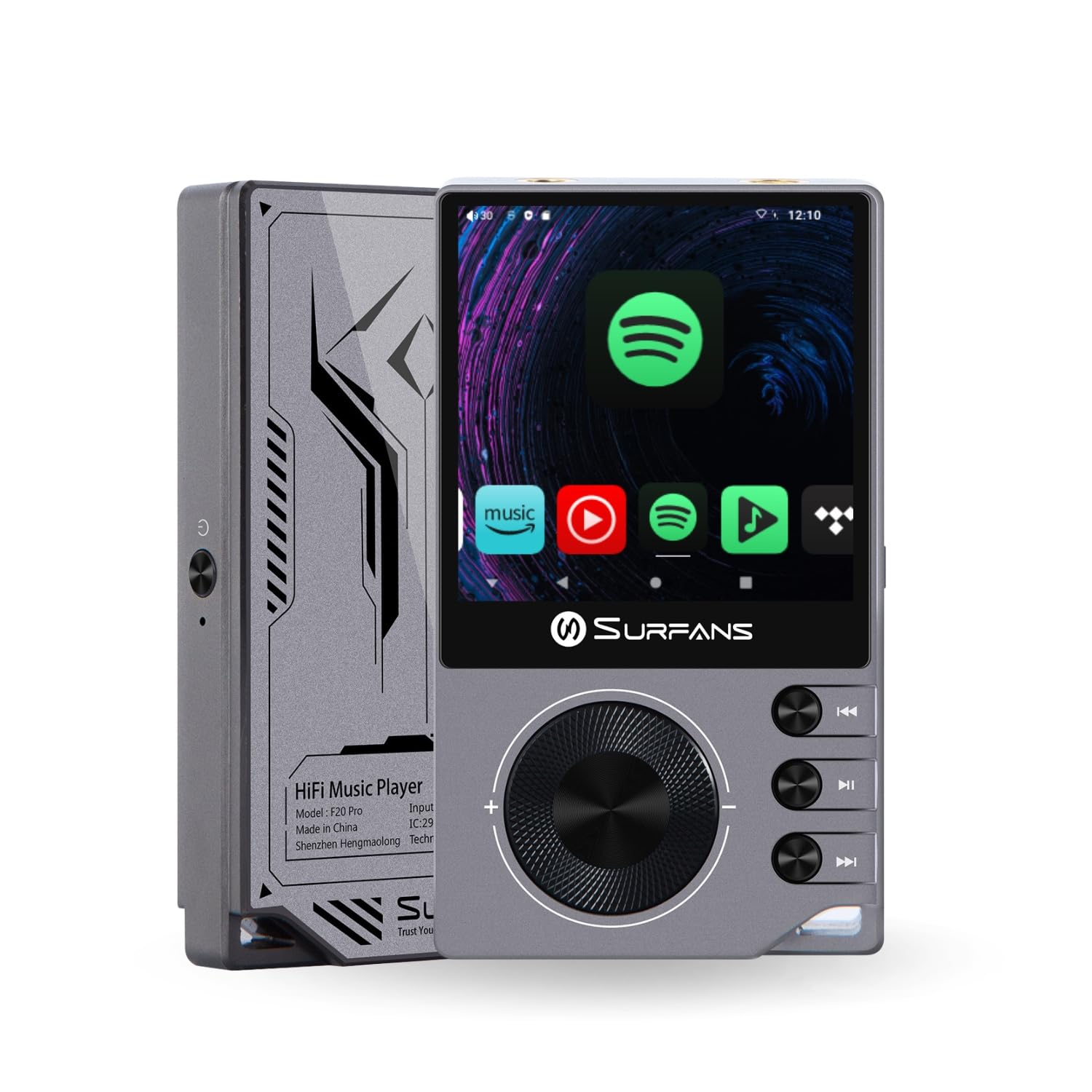
The Surfans F20 Pro Hi-Res Music Player, showcasinйого компактний дизайн та сенсорний інтерфейс.
2. Вміст упаковки
Перевірте наявність усіх елементів в упаковці:
- Surfans F20 Pro Hi-Res Music Player
- USB-кабель Type-C
- 32 GB MicroSD Memory Card (pre-installed or separate)
- Захисний футляр
- Посібник користувача (цей документ)
3. Пристрій закінчивсяview
Familiarize yourself with the physical components and ports of your F20 Pro player.

Спереду і ззаду view of the Surfans F20 Pro, highlighting its robust CNC metal chassis and button layout.
3.1. Ключові характеристики
- Dual ESS9018Q2M DACs: For high-fidelity audio processing.
- Octa-Core Android 12 System: Enables streaming app compatibility and smooth operation.
- 3.5mm Single-Ended & 4.4mm Balanced Outputs: Versatile headphone connectivity.
- Bluetooth 5.0 with LDAC: High-quality wireless audio transmission.
- Dual-Band Wi-Fi (2.4GHz & 5GHz): For stable internet connectivity.
- Розширюване сховище: Supports up to 1TB via MicroSD card.
- 2.7-дюймовий сенсорний екран: Інтуїтивно зрозумілий інтерфейс користувача.
4. Налаштування
4.1. Зарядка пристрою
Before first use, fully charge the F20 Pro. Connect the included USB Type-C cable to the device's charging port and a compatible USB power adapter (not included) or computer USB port. The charging indicator will show the charging status.
4.2. Вставлення карти MicroSD
The F20 Pro supports MicroSD cards up to 1TB for expanded storage. Locate the MicroSD card slot on the side of the device. Gently insert the card until it clicks into place. To remove, push the card in again until it springs out.
4.3. Початкове увімкнення
Press and hold the power button until the screen illuminates. Follow the on-screen prompts to complete the initial setup, including language selection and Wi-Fi connection.
4.4. Підключення до Wi-Fi
Перейдіть до Налаштування > Мережа та інтернет > Wi-Fi. Select your desired network and enter the password if prompted. The F20 Pro supports both 2.4GHz and 5GHz Wi-Fi bands.

The Surfans F20 Pro demonstrating its dual-band Wi-Fi capability for fast and stable connections.
4.5. Підключення Bluetooth
To connect Bluetooth headphones or speakers:
- Переконайтеся, що ваш пристрій Bluetooth перебуває в режимі сполучення.
- On the F20 Pro, go to Налаштування > Підключені пристрої > Створити пару з новим пристроєм.
- Виберіть свій пристрій зі списку та підтвердіть сполучення.

An illustration of the Bluetooth 5.0 chip, indicating support for high-resolution wireless audio codecs like LDAC.
5. Експлуатація пристрою
5.1. Основна навігація
The F20 Pro features a 2.7-inch touchscreen for navigation. Swipe to scroll, tap to select, and use the physical buttons for quick controls:
- Кнопка живлення: Power on/off, screen on/off.
- Колесо гучності: Регулює гучність аудіовиходу.
- Кнопки керування відтворенням: Відтворення/Пауза, Наступний трек, Попередній трек.
5.2. Відтворення музики
The F20 Pro supports various audio formats including DSD512, 192kHz/24bit, FLAC, WAV, WMA, M4A, MP3, MP2, and AAC.
5.2.1. Місцевий Files
Передача музики files to the device's internal storage or MicroSD card via USB connection to a computer. Use the pre-installed music player application to browse and play your library.
5.2.2. Програми для потокового передавання
The Android 12 operating system allows installation of streaming apps like Spotify, Apple Music, Tidal, or YouTube. Connect to Wi-Fi and download apps from the Google Play Store or other compatible sources.

The Surfans F20 Pro's screen showing various streaming application icons, demonstrating its Android capabilities.
5.3. Підключення навушників
The device offers both single-ended and balanced audio outputs.
- 3.5-мм односторонній вихід: Standard headphone jack (125mW/32Ω).
- 4.4 мм збалансований вихід: For enhanced audio performance with compatible headphones (500mW/32Ω).

Крупним планом view of the 3.5mm single-ended and 4.4mm balanced audio output ports on the Surfans F20 Pro.
6. Технічне обслуговування
6.1. прибирання
Use a soft, dry, lint-free cloth to clean the device. Avoid using abrasive cleaners or solvents, which may damage the surface.
6.2. Оновлення програмного забезпечення
Periodically check for software updates to ensure optimal performance and access to new features. Updates can typically be found in Налаштування > Система > Оновлення системи.
6.3. Догляд за акумулятором
Щоб подовжити термін служби акумулятора, уникайте частого повного розряджання пристрою. Зберігайте пристрій у прохолодному сухому місці, коли він не використовується протягом тривалого часу.

Внутрішній view of battery cells, representing the long-lasting battery capacity of the F20 Pro.
7. Вирішення проблем
If you encounter issues with your F20 Pro, refer to the following common problems and solutions:
| проблема | Можлива причина | Рішення |
|---|---|---|
| Пристрій не включається | Низький рівень заряду батареї; збій системи | Charge the device; Press and hold the power button for 10-15 seconds to force restart. |
| Немає звуку | Volume too low; Incorrect output selected; Faulty headphones | Increase volume; Check headphone connection; Test with different headphones. |
| Неможливо підключитися до Wi-Fi | Incorrect password; Out of range; Router issue | Verify password; Move closer to router; Restart router. |
| Повільна продуктивність/Збої програми | Занадто багато запущених програм; Недостатньо місця для зберігання; Застаріле програмне забезпечення | Close background apps; Free up storage; Check for system updates. |
8. Технічні характеристики
Detailed technical specifications for the Surfans F20 Pro:
| Особливість | Деталь |
|---|---|
| Бренд | Surfans |
| Назва моделі | F20 PRO |
| Мікросхеми ЦАП | Dual ESS9018Q2M |
| Оп-Amps | Dual OPA1612 |
| Операційна система | Android 12 |
| ОЗУ | 3 ГБ |
| Внутрішня пам'ять | 32 ГБ |
| Розширюване сховище | До 1 ТБ через карту MicroSD |
| Розмір екрана | 2.73 дюймів |
| Підключення | Aux, Bluetooth 5.0 (LDAC), USB Type-C, Wi-Fi (2.4GHz & 5GHz) |
| Аудіовиходи | 3.5mm Single-Ended (125mW/32Ω), 4.4mm Balanced (500mW/32Ω) |
| Підтримувані аудіоформати | DSD512, 192kHz/24bit, FLAC, WAV, WMA, M4A, MP3, MP2, AAC |
| Колір | Сірий |

An illustration of the dual ESS9018K2M DAC chips, central to the F20 Pro's high-resolution audio capabilities.
9. Інформація про гарантію
The Surfans F20 Pro comes with a Гарантія 1 рік з дати покупки. Ця гарантія поширюється на виробничі дефекти та дефекти виготовлення за умов нормального використання. Вона не поширюється на пошкодження, спричинені неправильним використанням, нещасними випадками, несанкціонованими модифікаціями або нормальним зносом. Будь ласка, збережіть підтвердження покупки для пред'явлення гарантійних претензій.
10. Підтримка клієнтів
For further assistance, technical support, or warranty inquiries, please contact Surfans customer service through the official website or your retailer. You may also find additional resources and FAQs online.