
1. Вступ
The AJAZZ AKP03 Macro Keypad Stream Controller is a versatile device designed to enhance productivity and streamline workflows for gamers, streamers, and professionals. Featuring six programmable keys with LCD displays, three physical knobs, and three toggle switches, it offers extensive customization options for various tasks.
This manual provides detailed instructions for setting up, operating, and maintaining your AKP03 device, ensuring optimal performance and user experience.
2. Особливості продукту
- Six Programmable Macro Keys: Customizable LCD displays for single or continuous actions.
- Three Physical Knobs: For precise control over various functions.
- Three Toggle Switches: Additional control options.
- Операція одним кліком: Instant execution of macro commands, text input, application launches, and media control.
- Intuitive Driver Software: Drag-and-drop functionality for easy key assignment and property configuration.
- Широка сумісність: Seamless integration with platforms like Streamlabs, Twitch, YouTube, and various software applications on Windows and Mac.
- Removable 40° Stand: Provides an ergonomic viewing angle and stable placement.

Малюнок 2.1: Закінченоview of the AJAZZ AKP03 Macro Keypad, highlighting its programmable buttons, toggle switches, and scroll wheels.
3. Вміст упаковки
Перевірте наявність усіх предметів у вашій упаковці:
- AJAZZ AKP03 Macro Keypad Stream Controller
- Кабель USB-C – USB-A
- Removable 40° Stand
- Посібник користувача (цей документ)
4. Налаштування
4.1 Фізичне підключення
- Attach the removable 40° stand to the bottom of the AKP03 for an ergonomic angle, if desired.
- Connect the provided USB-C cable to the USB-C port on the AKP03.
- Підключіть кінець кабелю USB-A до вільного порту USB на вашому комп’ютері (ПК або Mac).
- Пристрій увімкнеться автоматично.

Figure 4.1: Attaching the removable 40° stand to the AKP03.
4.2 Встановлення програмного забезпечення
To unlock the full customization capabilities of your AKP03, you must install the dedicated driver software.
- Відкрийте свій web browser and navigate to the official AJAZZ webсайт: www.a-jazz.com.
- Locate the 'Driver Download' section.
- шукати 'AKP03' or browse for the corresponding driver for your model.
- Download the driver software compatible with your operating system (Windows or macOS).
- Запустіть інсталятор і дотримуйтесь інструкцій на екрані, щоб завершити інсталяцію.
- Якщо буде запропоновано, перезавантажте комп’ютер.
Video 4.1: Demonstrates the software installation process and initial setup for the AJAZZ Macro Keypad.
5. Інструкція з експлуатації
5.1 Customizing Keys and Knobs
The AKP03's driver software provides a user-friendly interface for customization:
- Launch the 'Stream Dock AJAZZ' software from your desktop or applications folder.
- The software will display a visual representation of your AKP03.
- To assign an action, drag and drop a desired function (e.g., launch application, media control, macro command) from the software's library onto one of the six programmable keys.
- For knobs, select the knob in the software and assign functions such as volume control, scrolling, or zooming.
- You can configure properties for each assigned action, including specific file шляхи, web URLs, or macro sequences.
- The LCD displays on the keys will update to show the assigned icon or text.
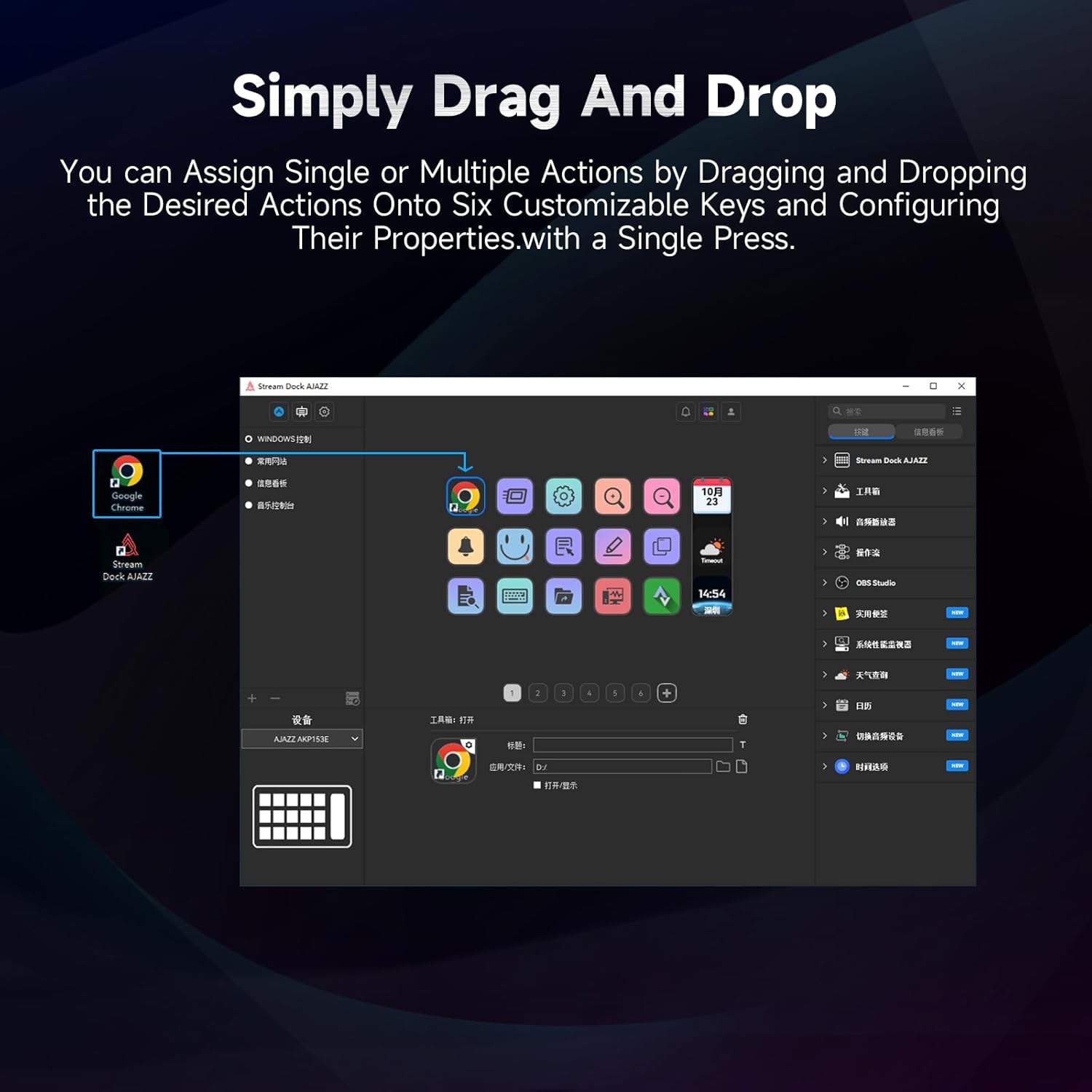
Figure 5.1: Customizing keys using the drag-and-drop interface in the AJAZZ software.
Video 5.1: Demonstration of assigning actions to keys for launching web pages and software with a single click.
5.2 Using Profiles and Pages
The software supports multiple profiles and pages, allowing you to switch between different sets of key assignments for various applications or tasks.
- Створити новий професіоналfiles for specific games, editing software, or streaming setups.
- У кожному профіfile, you can create multiple pages of key assignments, accessible by navigating through the device's buttons or software interface.
- The AKP03 automatically switches to the relevant profile when a linked application is in focus.
Video 5.2: Illustrates the multi-functional capabilities and profile switching of the AKP03 for various tasks.
6. Технічне обслуговування
To ensure the longevity and optimal performance of your AJAZZ AKP03, follow these maintenance guidelines:
- Прибирання: Use a soft, dry cloth to wipe the surface of the device. Avoid abrasive cleaners or solvents.
- Зберігання: Зберігайте пристрій у прохолодному, сухому місці, подалі від прямих сонячних променів та екстремальних температур.
- Догляд за кабелем: Уникайте надмірного згинання або скручування USB-кабелю, щоб запобігти його пошкодженню.
- Оновлення програмного забезпечення: Regularly check the AJAZZ website for software and firmware updates to ensure compatibility and access to new features.
7. Вирішення проблем
If you encounter issues with your AKP03, refer to the following common troubleshooting steps:
- Пристрій не розпізнано:
- Ensure the USB cable is securely connected to both the AKP03 and your computer.
- Спробуйте підключитися до іншого порту USB.
- Перезавантажте комп'ютер.
- Verify that the driver software is correctly installed and up to date.
- Клавіші не реагують:
- Check the software to ensure keys are properly assigned and the correct profile є активним.
- Ensure the driver software is running in the background.
- Проблеми з програмним забезпеченням:
- Reinstall the driver software.
- Check for software updates on the AJAZZ webсайт.
8. Технічні характеристики
| Особливість | Деталь |
|---|---|
| Бренд | AJAZZ |
| Назва моделі | АКП03 |
| Сумісні пристрої | ПК, ноутбук |
| Тип контролера | Клавіатура |
| Технологія підключення | USB-C |
| Кількість кнопок | 6 Programmable Keys (with LCD displays), 3 Physical Knobs, 3 Toggle Switches |
| Вага товару | 0.32 кілограма |
| Розміри предмета (Д x Ш x В) | 5 x 3 x 2 дюймів |
| Джерело живлення | Провідний електричний |
9. Гарантія та підтримка
9.1 Інформація про гарантію
The AJAZZ AKP03 Macro Keypad Stream Controller comes with a 1-річна обмежена гарантія з дати покупки. Ця гарантія поширюється на виробничі дефекти та несправності за умов нормального використання. Вона не поширюється на пошкодження, спричинені неправильним використанням, нещасними випадками, несанкціонованими модифікаціями або неправильним встановленням.
Зберігайте підтвердження покупки для гарантійних претензій.
9.2 Підтримка клієнтів
For technical assistance, troubleshooting, or warranty inquiries, please contact AJAZZ customer support:
- Webсайт: www.a-jazz.com (Refer to the 'Support' or 'Contact Us' section)
- Електронна пошта: [Insert Customer Support Email, if available]
- телефон: [Insert Customer Support Phone Number, if available]
Our support team is available to assist you with any questions or concerns regarding your product.