
вступ
Welcome to the user manual for your Samsung QN65QN990FFXZA 65 Inch QN990F Neo QLED 8K TV. This document provides essential information for setting up, operating, maintaining, and troubleshooting your television. Please read these instructions carefully to ensure proper use and to maximize your viewнабутий досвід.

Малюнок 1: Спереду view of the Samsung QN65QN990FFXZA 65 Inch QN990F Neo QLED 8K TV.
Налаштування
1. Розпакування та розміщення
- Обережно вийміть телевізор та всі аксесуари з упаковки.
- Place the TV on a stable, flat surface or mount it on a wall using a VESA 400mm x 300mm compatible mount. Ensure adequate ventilation around the TV.
2. Підключення бездротового пристрою One Connect Box
The Samsung QN990F utilizes a Wireless One Connect Box to manage all external connections, reducing cable clutter around the TV. Connect all your devices to this box.

Figure 2: Wireless One Connect Box for streamlined connections.
3. Підключення зовнішніх пристроїв
Connect your external devices (e.g., Blu-ray player, game console, soundbar) to the Wireless One Connect Box using the appropriate ports.

Figure 3: Detailed diagram of the Wireless One Connect Box ports.
- Кабель/ANT: Connect for over-the-air antenna or cable TV signals.
- USB-A: Стандартний прямокутний порт для живлення або відтворення медіафайлів.
- EX-Link: Сервісний порт Samsung для зовнішнього керування та діагностики.
- HDMI 1, 2, 4: Transmits high-definition video and audio from external devices. Supports 8K@120Hz / 4K@240Hz for Gaming.
- HDMI 3 (eARC): Enhanced audio return for high-quality sound and advanced formats. Supports 8K@120Hz / 4K@240Hz for Gaming.
- Ethernet: Дротове підключення до Інтернету для потокового передавання даних, оновлень та інтелектуальних функцій.
- Аудіовихід (оптичний): Забезпечує високоякісний цифровий звук на саундбари або ресивери.
- Потужність: Connects the power cable to the Wireless One Connect Box.
4. Підключення живлення
- Connect the power cable to the Wireless One Connect Box, then plug it into a wall outlet.
- Ensure the TV is properly connected to the One Connect Box.
Інструкція з експлуатації
1. Initial Setup and Smart Features
Upon first power-on, the TV will guide you through the initial setup process, including network connection, channel scanning, and smart feature configuration. The TV runs on the One UI Tizen operating system.
- Процесор NQ8 AI Gen3: This processor optimizes content for enhanced viewінж.
- 8K AI Upscaling Pro: Lower resolution content is automatically upscaled to near 8K clarity.

Figure 4: 8K AI Upscaling Pro enhances content to near 8K resolution.
2. Покращення якості зображення
- Без відблисків: This technology minimizes reflections on the screen, improving visibility in bright environments.
- Neo Quantum HDR 8K+: Experience enhanced contrast and color depth.
- Quantum Matrix Technology Pro: Precise light control for detailed images.
- Ультра Viewкут нахилу: Maintains picture quality from various viewпозиції.
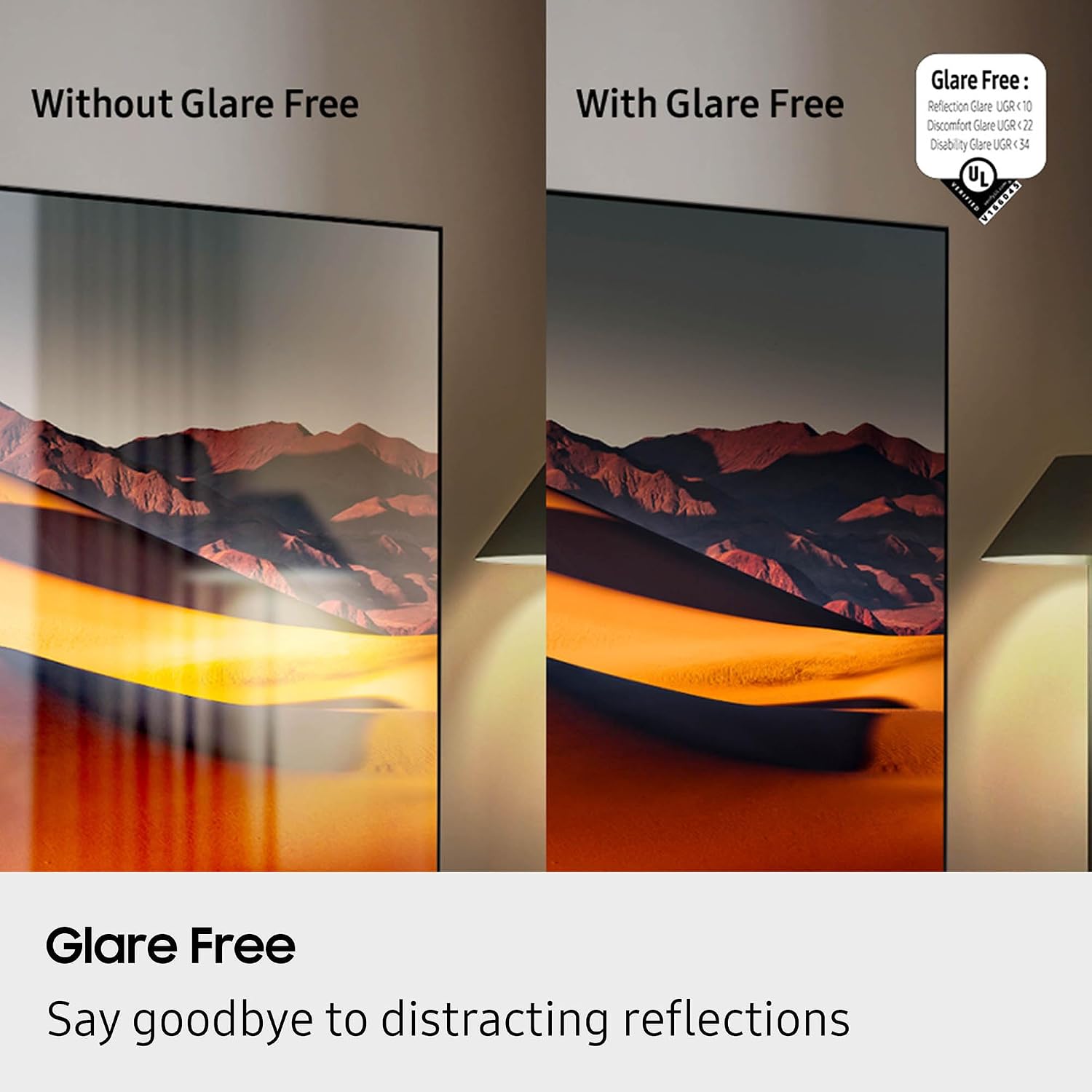
Figure 5: Glare Free technology reduces screen reflections.
3. Аудіофункції
- Dolby Atmos: Забезпечує захопливий, багатовимірний звук.
- Q-Симфонія: Synchronizes TV speakers with compatible Samsung soundbars for a richer audio experience.
- AVA Pro (Active Voice Amplifier Pro): Enhances dialogue clarity in noisy environments.
- Адаптивний звук Pro: Оптимізує звук на основі контенту та акустики приміщення.
- 6.2.4-канальний об'ємний звук: Integrated speaker system for a comprehensive audio field.
4. Ігрові функції
- Ігровий центр: Access cloud gaming services and console games directly from your TV.
- 120Hz Refresh Rate & VRR FreeSync Premium Pro: Ensures smooth, tear-free gaming.

Figure 6: Samsung Gaming Hub for integrated gaming experience.
5. Офіційне відео продукту
Video 1: An informational overview of the Samsung QN990F Series TV features and capabilities.
Технічне обслуговування
1. Очищення екрану
To clean your TV screen, use a soft, lint-free cloth. For stubborn marks, a non-ammonia and alcohol-free screen cleaning solution is recommended.

Figure 7: Recommended screen cleaning solution for display screens.
- Apply cleaning solution to the cloth, not directly to the screen.
- Gently wipe the screen to remove dust, dirt, and fingerprints.
- Уникайте агресивних хімікатів або абразивних матеріалів.
2. Оновлення програмного забезпечення
Periodically check for and install software updates to ensure optimal performance and access to the latest features. This can usually be done through the TV's settings menu under "Support" or "Software Update."
Усунення несправностей
Якщо у вас виникли проблеми з телевізором, зверніться до наступних поширених кроків з усунення несправностей.
Немає живлення / Немає зображення
- Ensure the power cable is securely connected to both the One Connect Box and the wall outlet.
- Verify the One Connect Box is properly connected to the TV.
- Перевірте, чи розетка працює, підключивши інший пристрій.
- Натисніть кнопку живлення на пульті дистанційного керування або на самому телевізорі.
Немає звуку
- Check the volume level on both the TV and any connected audio devices (soundbar, receiver).
- Переконайтеся, що звук телевізора не вимкнено.
- Verify audio cables are correctly connected to the One Connect Box.
- If using external audio, check the audio output settings on the TV.
Погана якість зображення
- Check the source resolution. While 8K AI Upscaling Pro enhances content, native 8K content will provide the best quality.
- Налаштуйте параметри зображення (яскравість, контрастність, різкість, колір) у меню телевізора.
- Ensure all video cables are securely connected and not damaged.
- If using an antenna, check antenna positioning and signal strength.
Пульт дистанційного керування не працює
- Замініть батарейки в пульті дистанційного керування.
- Переконайтеся, що між пультом дистанційного керування та телевізором немає перешкод.
- Try re-pairing the remote control with the TV if it's a Bluetooth remote (refer to the TV's on-screen guide for pairing instructions).
Технічні характеристики
| Особливість | Специфікація |
|---|---|
| Назва моделі | QN65QN990FFXZA |
| Розмір екрана | 65 дюймів |
| Технологія дисплея | Neo QLED |
| роздільна здатність | 8K |
| Частота оновлення | 120 Гц |
| Процесор | Процесор NQ8 AI Gen3 |
| Технологія масштабування | 8K AI Upscaling Pro |
| Операційна система | Один інтерфейс користувача Tizen |
| Підключення | HDMI x 5, USB-A x 3, USB-C x 1, Ethernet, RF, Wireless One Connect, Bluetooth, Wi-Fi |
| Режим аудіовиходу | Об'ємний звук (6.2.4-канальний) |
| Integrated Surround Sound | Dolby Atmos |
| Підтримується формат HDR | HDR10+, HDR10 |
| Розміри продукту (Д x Ш x В) | 10.5" Г x 56.4" Ш x 35.1" В |
| Вага товару | 66.6 фунта |
| Стандарт кріплення VESA | 400 мм х 300 мм |
| Колір | Графіт чорний |
Гарантія та підтримка
Гарантія виробника
Your Samsung QN65QN990FFXZA 65 Inch QN990F Neo QLED 8K TV comes with a full 1-year manufacturer's warranty. This warranty covers defects in materials and workmanship under normal use. Please retain your proof of purchase for warranty claims.
Підтримка клієнтів
For technical assistance, troubleshooting beyond this manual, or warranty service, please contact Samsung Customer Support. Refer to the official Samsung website or your product registration documents for the most current contact information.
- Інтернет-підтримка: Відвідайте офіційну службу підтримки Samsung webсайт.
- Підтримка по телефону: Contact the Samsung customer service hotline.