
1. Вступ
Thank you for choosing the LOEWE Leo Wireless Headphones. These premium headphones are designed to deliver an exceptional audio experience with advanced features such as Hi-Res Audio, adaptive noise cancellation, and real-time voice translation. This manual provides essential information for setting up, operating, and maintaining your headphones to ensure optimal performance and longevity.
2. Вміст упаковки
Before use, please verify that all items are present in the package:
- LOEWE Leo Wireless Headphones
- Зарядний кабель USB-C
- AUX to USB-C Audio Cable
- Шкіряний чохол
- Жорсткий футляр
- Cable Pouch
- Посібник користувача (цей документ)
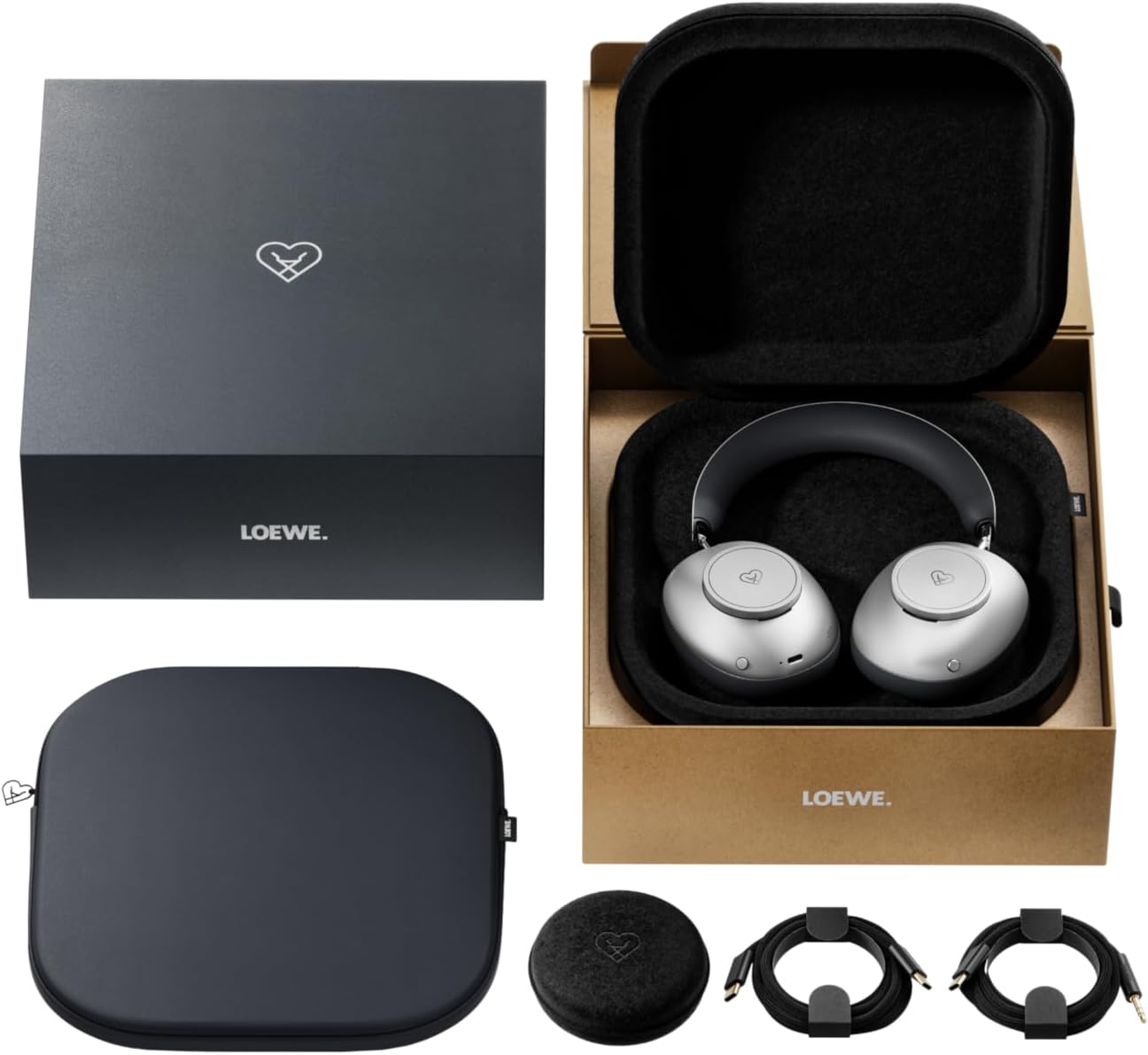
Image: The LOEWE Leo Wireless Headphones package contents, showing the headphones, USB-C cable, AUX cable, leather case, hard case, and cable pouch.
3. Продукт закінчивсяview
Familiarize yourself with the physical components and controls of your LOEWE Leo headphones.

Зображення: спереду view of the LOEWE Leo Wireless Headphones, showcasing амбушури та наголов'я.
3.1. Елементи керування та порти
The headphones feature intuitive controls for easy operation:
- Циферблати керування: Two precision-crafted rotary wheels for volume adjustment and navigation.
- Кнопки дій: Dedicated buttons for playback control, ANC modes, and voice translation activation.
- Порт USB-C: Для заряджання та дротового аудіопідключення.
- Роз'єм 3.5 мм: For traditional wired audio connection.

Зображення: Детальне view of the earcup, highlighting the control dial, USB-C port, and 3.5mm audio jack.
4. Початок роботи
4.1. Зарядка навушників
Before first use, fully charge your LOEWE Leo headphones. A full charge provides up to 65 hours of continuous playback.
- Підключіть зарядний кабель USB-C, що постачається в комплекті, до порту USB-C на навушниках.
- Підключіть інший кінець кабелю до сумісного USB-адаптера живлення (не входить до комплекту) або USB-порту комп’ютера.
- Світлодіодний індикатор на навушниках показуватиме стан заряджання. Зазвичай він вимикається або змінює колір після повного заряджання.
4.2. Увімкнення/вимкнення живлення
- Щоб увімкнути: Натисніть і утримуйте кнопку живлення приблизно 3 секунди, доки не засвітиться світлодіодний індикатор.
- Щоб вимкнути: Натисніть і утримуйте кнопку живлення приблизно 3 секунди, доки світлодіодний індикатор не згасне.
4.3. Підключення Bluetooth
The LOEWE Leo headphones utilize Bluetooth Low Energy (BLE) for faster pairing and reduced power consumption.
- Переконайтеся, що навушники вимкнено.
- Натисніть і утримуйте кнопку живлення приблизно 5 секунд, доки світлодіодний індикатор не почне швидко блимати, що вказує на режим сполучення.
- На вашому пристрої (смартфоні, планшеті, комп’ютері) увімкніть Bluetooth та знайдіть доступні пристрої.
- Select "LOEWE Leo" from the list of found devices.
- Після підключення світлодіодний індикатор перестане блимати та залишиться синім.
4.4. Провідне підключення
For a wired audio experience, use the supplied AUX to USB-C cable.
- Connect the USB-C end of the AUX cable to the headphones.
- Connect the 3.5mm end of the AUX cable to your audio source's 3.5mm jack.
- Навушники автоматично перемикаються в дротовий режим.
5. Керування навушниками
5.1. Відтворення аудіо та регулювання гучності
Use the control dials and action buttons for managing your audio:
- Збільшення/зменшення гучності: Rotate the designated control dial.
- Відтворення/пауза: Press the central action button once.
- Наступний трек: Double-press the central action button.
- Попередній трек: Triple-press the central action button.

Image: Close-up of the earcup's control dial, used for volume and navigation.
5.2. Adaptive Noise Cancellation (ANC)
The LOEWE Leo features advanced adaptive noise cancellation that continuously analyzes your environment and adjusts in real-time.
- Активація/деактивація ANC: Press the dedicated ANC button once.
- Режим прозорості: Press the ANC button twice to allow ambient sounds to pass through, enhancing situational awareness.

Image: Illustration of the adaptive noise cancellation feature, depicting sound wave management.
5.3. Real-time Voice Translation
Communicate across language barriers with the integrated real-time voice translation feature.
- Ensure your headphones are connected to a device with internet access and the LOEWE companion app installed.
- Activate the translation feature via the dedicated button or the companion app.
- Speak into the headphone's microphone. The translated audio will be played back in real-time.

Image: Earcup detail showing the microphone for voice input and the 'leo' icon, representing the real-time translation function.
5.4. Dolby Atmos and Spatial Audio
Experience immersive sound with Dolby Atmos and spatial audio support. This feature is automatically enabled when compatible content is played through a connected device that supports these audio technologies.
6. Технічне обслуговування та догляд
6.1. прибирання
- Протріть навушники м’якою, сухою тканиною без ворсу.
- Не використовуйте абразивні засоби для чищення, спирт або хімічні розчинники.
- Keep moisture away from openings.
6.2. Догляд за акумулятором
- Уникайте частого повного розряджання акумулятора.
- Зберігайте навушники в прохолодному, сухому місці, якщо вони не використовуються протягом тривалого часу.
- The battery is user-replaceable, contributing to the product's longevity.
6.3. Модульна конструкція
The LOEWE Leo headphones feature a durable modular design with replaceable components, such as ear cushions and headbands. This design allows for easy replacement of worn parts, extending the product's lifespan.

Image: The modular construction of the LOEWE Leo headphones, showing detachable earcups and headband for maintenance or replacement.
7. Вирішення проблем
If you encounter issues with your LOEWE Leo headphones, refer to the following common solutions:
- Немає живлення: Переконайтеся, що навушники повністю заряджені. Підключіть їх до джерела живлення за допомогою кабелю USB-C.
- Немає звуку:
- Перевірте рівень гучності як на навушниках, так і на підключеному пристрої.
- Ensure the headphones are properly paired via Bluetooth or the AUX cable is securely connected.
- Спробуйте перезавантажити і навушники, і аудіопристрій.
- Відключення Bluetooth:
- Ensure the headphones are within the Bluetooth range of your device (typically 10 meters).
- Disable and re-enable Bluetooth on your device, then attempt to re-pair.
- Clear the LOEWE Leo from your device's Bluetooth history and pair again.
- АНК не працює ефективно:
- Ensure the earcups form a good seal around your ears. Adjust the fit if necessary.
- Verify that ANC is activated.
- Voice Translation Issues:
- Перевірте підключення вашого пристрою до Інтернету.
- Ensure the LOEWE companion app is up-to-date and configured correctly.
- Говоріть чітко та в помірному темпі.
If problems persist, please contact LOEWE customer support.
8. Технічні характеристики
| Особливість | опис |
|---|---|
| Назва моделі | Лео |
| Номер моделі | 64641J10 |
| Технологія підключення | Wireless (Bluetooth), Wired |
| Бездротовий зв'язок | Bluetooth з низьким енергоспоживанням (BLE) |
| Звукові особливості | Hi-Res Audio, Dolby Atmos, Spatial Audio |
| шумозаглушення | Adaptive Noise Reduction (ANC) |
| Особливості | Real-time Voice Translation, Modular Design with Replaceable Components |
| Термін служби батареї | До 65 годин (приблизно) |
| Тип управління | Button Control, Rotary Dials |
| Сумісні пристрої | Cellular Phone, Tablet, Computer, Laptop |
| вага | 3 Kilograms (product weight as listed, may include packaging) |
9. Гарантія та підтримка
9.1. Гарантія виробника
The LOEWE Leo Wireless Headphones come with a 2-річна гарантія виробникаЦя гарантія поширюється на дефекти матеріалів та виготовлення за умов нормального використання. Будь ласка, збережіть чек про покупку для пред'явлення претензій за гарантією.
For specific terms and conditions of the warranty, please refer to the warranty card included in your product packaging or visit the official LOEWE webсайт.
9.2. Підтримка клієнтів
For technical assistance, troubleshooting, or warranty inquiries, please contact LOEWE customer support through their official webсайт або контактну інформацію, надану в документації до вашого продукту.
Інтернет-ресурси: Visit the official LOEWE webсайт із поширеними запитаннями, оновленнями програмного забезпечення та додатковими ресурсами підтримки.