
вступ
This manual provides detailed instructions for the installation, operation, and maintenance of your Reobiux 2K Outdoor WiFi Surveillance Camera, Model K6Q-1P. Please read this manual thoroughly before using the product to ensure proper functionality and safety.
Вміст упаковки
Перевірте, чи всі перелічені нижче предмети входять до вашої упаковки. Якщо будь-які предмети відсутні або пошкоджені, зверніться до служби підтримки клієнтів.
- 1 x Surveillance Camera
- 1 x адаптер живлення
- 1 x набір кріпильних гвинтів
- 1 x Waterproof Cover Kit
- 1 х посібник користувача
Продукт закінченийview
The Reobiux 2K Outdoor WiFi Surveillance Camera (Model K6Q-1P) is an advanced security solution featuring a dual-lens design for comprehensive monitoring. It offers 2K resolution, color night vision, motion detection, two-way audio, and compatibility with Amazon Alexa.
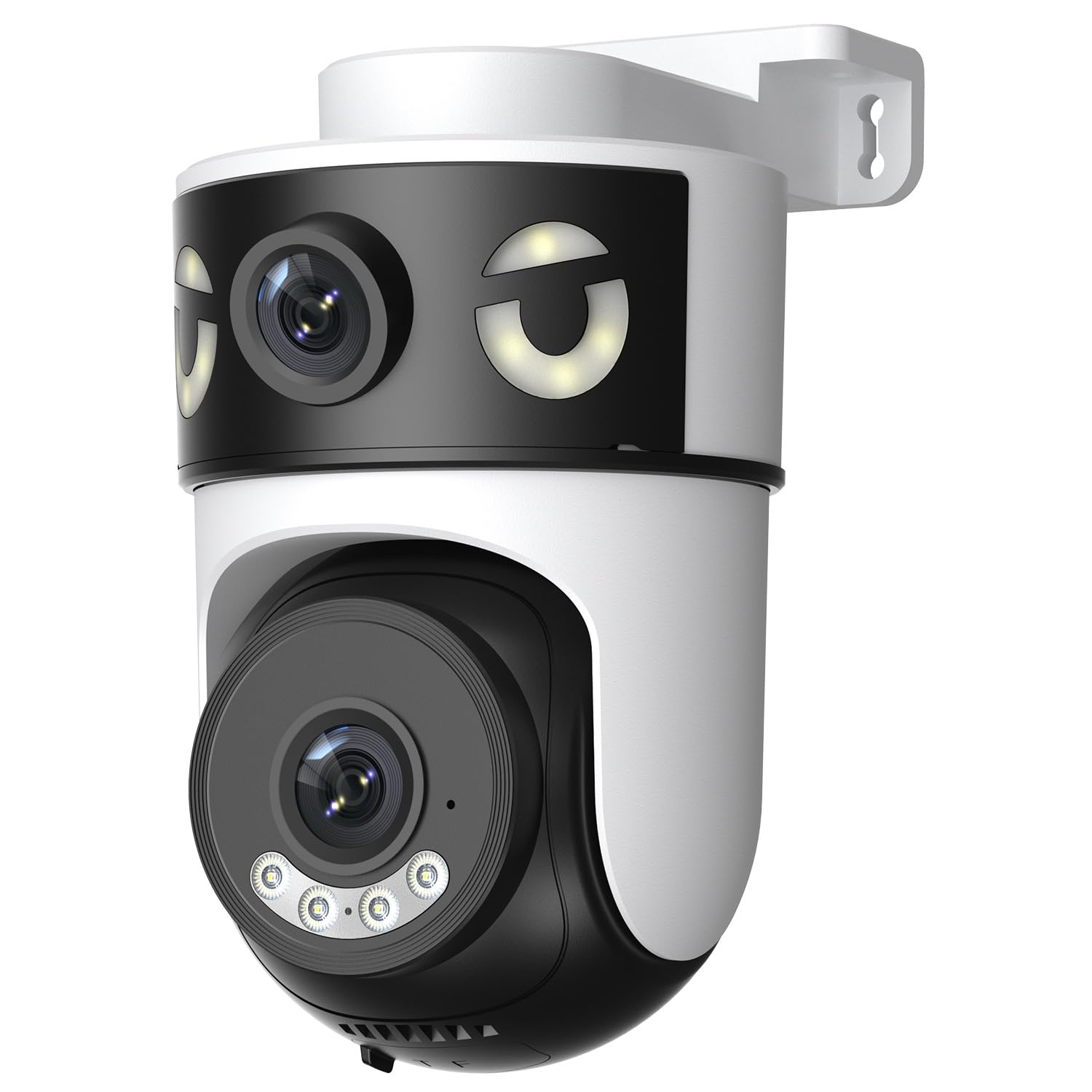
Image: Reobiux 2K Outdoor WiFi Surveillance Camera, Model K6Q-1P. This image shows the camera unit with its dual lenses, two external antennas, and a wall-mount bracket.
Ключові характеристики
- Dual Lens & 355° View: Unique 2-in-1 design supporting fixed area surveillance and mobile full-view monitoring. Features two high-resolution lenses; one fixed and one rotatable for wide panoramic views.
- Роздільна здатність 2K та кольорове нічне бачення: Delivers clear and detailed images and videos. Offers three night vision modes: Infrared, Color, and Smart Night Vision for reliable 24-hour surveillance.
- Motion Detection & Alarm Siren: Advanced motion detection sends real-time alarm notifications to your mobile device upon detecting movement.
- Two-Way Audio & Multi-User Access: Built-in microphone and speaker allow for remote communication. Supports sharing camera access with multiple users.
- SD Card/Cloud Storage & Alexa Compatibility: Supports 24-hour continuous recording to a Micro SD card (max 128GB) or cloud server. Compatible with Amazon Alexa for voice control.
Посібник із налаштування
1. Монтаж камери
The camera is designed for wall mounting. Choose a suitable location that provides the desired surveillance coverage and is within range of your Wi-Fi network and a power outlet.
- Mark the drilling points on the wall using the camera's base as a template.
- Просвердліть отвори та вставте дюбелі, якщо необхідно.
- Secure the camera to the wall using the provided mounting screws.
- Ensure the camera is firmly attached and the waterproof cover kit is properly installed to protect connections.
2. Увімкнення
Підключіть наданий адаптер живлення до входу живлення камери, а потім підключіть його до стандартної електричної розетки. Камера увімкнеться та розпочне послідовність запуску.
3. Мережеве підключення (Wi-Fi)
The camera connects via 2.4GHz Wi-Fi. Follow these steps to connect your camera to your home network:
- Завантажити O-kam Pro application from the App Store (iOS) or Google Play Store (Android) on your smartphone or tablet.
- Зареєструйте новий обліковий запис або увійдіть, якщо у вас вже є обліковий запис.
- Дотримуйтесь інструкцій у додатку, щоб додати нову камеру. Зазвичай це передбачає сканування QR-коду на камері або ручне введення її ідентифікатора.
- Виберіть свою мережу Wi-Fi 2.4 ГГц і введіть пароль, коли буде запропоновано.
- Wait for the camera to connect to the network. A voice prompt or indicator light will confirm a successful connection.

Image: Reobiux camera with a smartphone displaying the O-kam Pro app interface, demonstrating remote control and live view можливості.
Інструкція з експлуатації
Жити View та керування панорамуванням/нахилом
Once connected, open the O-kam Pro app to access the live feed from your camera. The dual-lens system provides both a fixed wide view and a movable PTZ (Pan-Tilt-Zoom) view.
- Натисніть на камеру в додатку, щоб view прямий ефір.
- Use the on-screen controls to pan (horizontal rotation up to 355°) and tilt (vertical movement) the movable lens to adjust the viewкут.
- Switch between the fixed and movable lens views within the app interface.
Режими нічного бачення
Камера пропонує три режими нічного бачення:
- Інфрачервоне нічне бачення: Provides black and white images in low-light conditions using infrared LEDs.
- Кольорове нічне бачення: Використовує вбудовані прожектори для забезпечення повнокольорового зображення вночі.
- Розумне нічне бачення: Автоматично перемикається між інфрачервоним та кольоровим нічним баченням на основі виявленого руху або умов освітлення.
- You can select your preferred night vision mode in the O-kam Pro app settings.
Виявлення руху та сповіщення
Configure motion detection settings and receive alerts on your mobile device:
- Navigate to the camera settings in the O-kam Pro app.
- Увімкніть виявлення руху та налаштуйте рівні чутливості за потреби.
- Set up alert notifications to be sent to your smartphone.
- You can also enable the alarm siren to deter intruders.
Двостороннє аудіо
Use the two-way audio feature to communicate through the camera:
- У прямому ефірі view interface of the O-kam Pro app, tap the microphone icon to speak. Your voice will be transmitted through the camera's speaker.
- Торкніться значка динаміка, щоб прослухати звук з оточення камери.
Запис та зберігання відео
The camera supports continuous 24-hour recording. You have two storage options:
- Micro SD Card: Insert a Micro SD card (up to 128GB, not included) into the designated slot on the camera. The camera will automatically begin recording to the card.
- Хмарне сховище: Subscribe to a cloud storage plan through the O-kam Pro app for secure off-site video storage.
- Доступ до записаного footage via the O-kam Pro app.
Інтеграція Amazon Alexa
Integrate your Reobiux camera with Amazon Alexa for voice control:
- Відкрийте програму Amazon Alexa на своєму мобільному пристрої.
- Go to "Skills & Games" and search for the "O-kam Pro" skill.
- Enable the skill and link your O-kam Pro account.
- Discover devices. You can now use voice commands like "Alexa, show me the front door camera" to view the live feed on compatible Alexa devices.
Технічне обслуговування
- Прибирання: Регулярно протирайте об'єктив і корпус камери м'якою губкоюamp тканиною, щоб видалити пил і бруд. Не використовуйте агресивні хімікати або абразивні засоби для чищення.
- Захист від погодних умов: The camera is waterproof, but ensure all connections are sealed properly, especially the power cable and any SD card slots, to maintain its weather resistance.
- Оновлення прошивки: Check the O-kam Pro app periodically for firmware updates to ensure optimal performance and security.
Усунення несправностей
- Камера не вмикається:
- Ensure the power adapter is securely connected to both the camera and a working electrical outlet. Verify the outlet has power.
- Не вдається підключитися до Wi-Fi:
- Ensure your Wi-Fi network is 2.4GHz. Check your Wi-Fi password for accuracy. Move the camera closer to your Wi-Fi router to improve signal strength. Restart your router and the camera.
- Ні в прямому ефірі view або запис:
- Check your internet connection. Ensure the camera is connected to Wi-Fi. Verify that the Micro SD card is inserted correctly and not full, or that your cloud storage subscription is active.
- Motion detection alerts not received:
- Check app notification settings on your phone and within the O-kam Pro app. Ensure motion detection is enabled and sensitivity is set appropriately. Verify your phone has an active internet connection.
- Двосторонній аудіозв'язок не працює:
- Ensure your phone's microphone and speaker are enabled for the O-kam Pro app. Check the volume settings on your phone and within the app. Ensure there are no obstructions blocking the camera's microphone or speaker.
Технічні характеристики
| Особливість | Специфікація |
|---|---|
| Бренд | Reobiux |
| Назва моделі | K6Q-1P |
| Номер моделі | REO-K6Q-1P |
| Тип монтажу | Настінне кріплення |
| Роздільна здатність запису відео | 2K |
| Кількість предметів | 1 |
| Технологія бездротового зв'язку | Wi-Fi (2.4 ГГц) |
| Viewкут нахилу | 355 градусів (панорамування) |
| Тип установки | Вкручування |
| матеріал | пластик |
| томtage | 5 вольт (постійний струм) |
| потужність | 5 Вт |
| Рівень водонепроникності | Водостійкий |
| Особливості | Two-Way Audio, Local Recording, HD Resolution, PTZ Technology |
| Рекомендоване використання | Охорона на вулиці |
| Сумісні пристрої | Ноутбук, смартфон, планшет, телевізор |
| Джерело живлення | Електричний кабель |
| Протокол підключення | RTSP |
| Тип контролера | O-kam Pro App |
Гарантія та підтримка
Щоб отримати інформацію про гарантію та технічну підтримку, зверніться до офіційного веб-сайту Reobiux. website or contact Reobiux customer service directly. Keep your purchase receipt as proof of purchase for warranty claims.
Manufacturer: Reobiux