
вступ
The Rapoo M308 is a versatile multi-mode wireless mouse designed for efficiency and comfort. It features an ambidextrous design, allowing comfortable use for both right-handed and left-handed individuals. With its dual connectivity options, Bluetooth 5.0 and 2.4 GHz wireless, you can seamlessly connect to up to three devices and switch between them with ease. The mouse is engineered for long-lasting performance, offering a battery life of up to 12 months.
Вміст упаковки
- Rapoo M308 Multi-mode Wireless Mouse
- USB-приймач (зберігається всередині миші)
- 2 батарейки АА
- Короткий посібник (цей посібник)
Продукт закінченийview
Familiarize yourself with the components of your Rapoo M308 mouse.
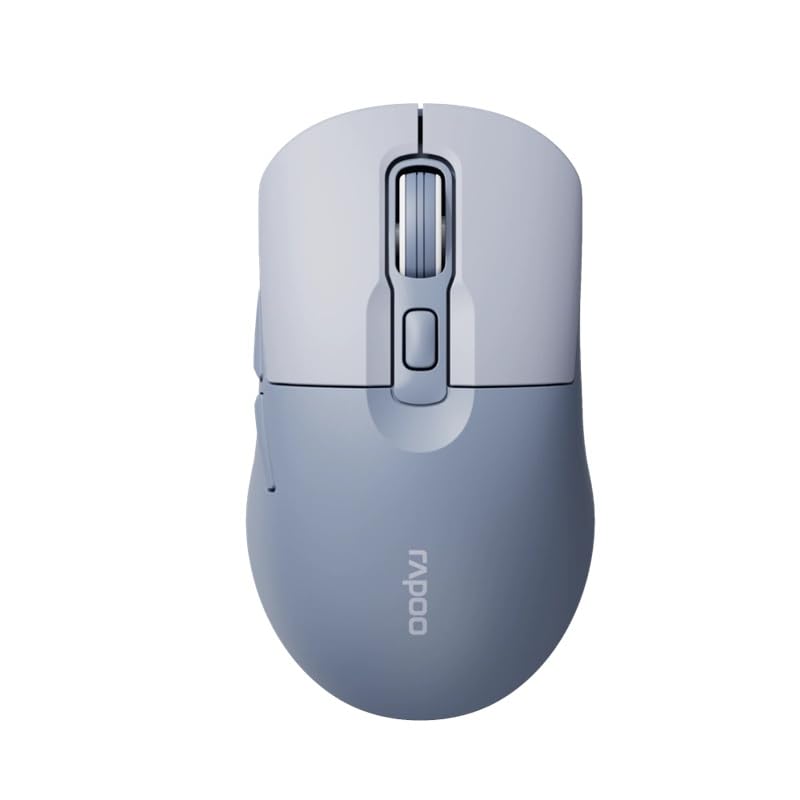
Image: The Rapoo M308 Multi-mode Wireless Mouse in blue, showcasing its ergonomic, ambidextrous design with a scroll wheel and multiple buttons.
- Ліва кнопка: Стандартна функція клацання лівою кнопкою миші.
- Права кнопка: Стандартна функція клацання правою кнопкою миші.
- Колесо прокрутки: Для прокручування та функції клацання середньою кнопкою миші.
- Кнопка DPI: Налаштовує чутливість курсора (DPI).
- Mode Switch Button/Indicator: Switches between connected devices (2.4G, Bluetooth 1, Bluetooth 2) and indicates current mode.
- Бічні кнопки: Forward/Backward navigation (programmable).
- Батарейний відсік: Located on the underside, holds 2 AA batteries.
- Слот USB-приймача: Located inside the battery compartment for storage.
Налаштування
1. Встановлення батареї
- Відкрийте кришку відсіку для батарейок на нижній стороні миші.
- Вставте дві батарейки типу АА, дотримуючись правильної полярності (+/-).
- Закрийте кришку батарейного відсіку.
2. Connecting via 2.4 GHz Wireless
- Remove the USB receiver from its storage slot inside the battery compartment.
- Підключіть USB-приймач у вільний USB-порт на комп’ютері.
- Turn on the mouse. The mouse should automatically connect to your computer. The mode indicator light will show a steady green light for a few seconds.
3. Підключення через Bluetooth
The M308 mouse supports two Bluetooth connections (BT1 and BT2).
- Увімкніть мишку.
- Press the mode switch button to select either Bluetooth 1 (blue light flashes slowly) or Bluetooth 2 (blue light flashes slowly).
- Press and hold the mode switch button for 3 seconds until the blue light starts flashing rapidly. This indicates the mouse is in pairing mode.
- На комп’ютері або пристрої перейдіть до налаштувань Bluetooth та знайдіть нові пристрої.
- Select "Rapoo M308" from the list of available devices to pair.
- Once paired, the blue light will become steady for a few seconds and then turn off.
Інструкція з експлуатації
Перемикання між пристроями
The Rapoo M308 allows you to connect to up to three devices (one 2.4G wireless and two Bluetooth devices) and switch between them.
- Briefly press the mode switch button to cycle through the connected devices: 2.4G (green light), Bluetooth 1 (blue light), Bluetooth 2 (blue light).
- The indicator light will briefly illuminate in the corresponding color to confirm the selected mode.
Налаштування DPI
Press the DPI button (usually located behind the scroll wheel) to cycle through different DPI settings. This changes the cursor speed and sensitivity. The indicator light may flash to show the current DPI level (e.g., one flash for low DPI, two for medium, etc.).
Технічне обслуговування
- Прибирання: Використовуйте м’яку суху тканину для очищення миші. Для стійкого бруду злегкаamp Можна використовувати тканину, але переконайтеся, що волога не потрапляє всередину пристрою.
- Заміна батареї: When the mouse performance degrades or the indicator light signals low battery, replace the two AA batteries following the installation steps.
- Зберігання: Якщо миша не використовується протягом тривалого часу, вимикайте її, щоб заощадити час роботи акумулятора. Зберігайте USB-приймач всередині миші, щоб запобігти його втраті.
Усунення несправностей
- Миша не реагує:
- Перевірте, чи миша увімкнена.
- Переконайтеся, що батарейки правильно встановлені та не розряджені. За потреби замініть їх.
- Для підключення 2.4G переконайтеся, що USB-приймач надійно підключено до робочого USB-порту. Спробуйте інший USB-порт.
- For Bluetooth connection, ensure the mouse is in the correct Bluetooth mode (BT1 or BT2) and successfully paired with your device. Re-pair if needed.
- Рух курсора нерівномірний або повільний:
- Очистіть оптичний датчик на нижній стороні миші.
- Переконайтеся, що ви використовуєте мишу на відповідній поверхні (невідбивній, непрозорій).
- Налаштуйте параметр DPI за допомогою кнопки DPI.
- Неможливо перемикатися між пристроями:
- Ensure all devices are properly connected (2.4G receiver plugged in, Bluetooth devices paired).
- Briefly press the mode switch button to cycle through modes. A long press will initiate Bluetooth pairing mode.
Технічні характеристики
| Торгова марка | Rapoo |
| Модель | M308 |
| Технологія підключення | Bluetooth 5.0, радіочастота 2.4 ГГц |
| Особливості | Легкий |
| Виявлення руху | Оптичний |
| Кількість кнопок | 4 |
| Орієнтація руки | Амбідекстр |
| Рекомендоване використання | Офіс |
| Сумісні пристрої | Персональний комп'ютер, ноутбук |
| Вага товару | 50 грами |
| Операційна система | Linux, Mac, Windows |
| Термін служби батареї | 12 місяці |
| Кількість батарей | 2 AA (в комплекті) |
| Джерело живлення | Працює від батареї |
| Необхідна мінімальна ОС | Mac OS 14 Sonoma, Windows 11 |
| матеріал | пластик |
| Країна походження | Китай |
| Включені компоненти | миша |
Гарантія та підтримка
The Rapoo M308 Multi-mode Wireless Mouse comes with a Гарантія 2 рік з дати покупки. Ця гарантія поширюється на виробничі дефекти та несправності за умов нормального використання.
For technical support, warranty claims, or further assistance, please refer to the contact information provided on the Rapoo official website or your local distributor's support channels. Please retain your proof of purchase for warranty validation.