
1. Вступ
This manual provides detailed instructions for the installation, operation, and maintenance of your IIWEY C4 PRO 4-Channel Dash Cam and its accompanying hardwire kit. The C4 PRO system is designed to provide comprehensive video surveillance for your vehicle, offering multi-channel recording and advanced parking monitoring features.
2. Вміст упаковки
Будь ласка, перевірте, чи всі перелічені нижче предмети входять до вашої упаковки:
- C4 PRO Dash Cam Set (Main unit with front, interior, and rear cameras)
- Type C Port Hardwire Kit
- Installation Crowbar
- 8 x Fuse Tap Cables (various types: LP, Mini, ATO, Micro2)
- 4 x Cable Hiding Clips

Image: Contents of the hardwire kit, including the main cable, various fuse taps, and a pry tool.
3. Налаштування та встановлення
3.1 Встановлення відеореєстратора
- Монтаж основного блоку: Виберіть відповідне місце на лобовому склі, зазвичай за задньою частиноюview дзеркало, яке не загороджує вам view. Clean the area thoroughly before attaching the dash cam mount.
- Підключення камер: Connect the interior and rear cameras to the main unit. Ensure cables are routed neatly and securely, using the provided cable hiding clips.
- Підключення живлення: For continuous power and parking mode functionality, connect the dash cam to the hardwire kit.

Зображення: Оверview of the IIWEY C4 PRO dash cam system, illustrating its multi-camera setup and connectivity.
3.2 Встановлення комплекту жорсткої проводки
The hardwire kit enables 24-hour parking surveillance and protects your vehicle's battery from draining.
- Визначте блок запобіжників: Locate your vehicle's fuse box, typically found under the dashboard or in the engine bay.
- Підключіть дроти: The hardwire kit has three wires:
- Red (BAT): Connect to a constant power fuse (always on, even when the ignition is off).
- Yellow (ACC): Connect to an accessory power fuse (on only when the ignition is on).
- Чорний (GND): Connect to a metal bolt or screw on the vehicle's chassis for ground.
- Use Fuse Taps: Select the appropriate fuse tap cable (LP/Mini/ATO/Micro2) that matches your vehicle's fuse type. Insert the original fuse into the lower slot of the tap, and a new fuse (same amperage) for the dash cam into the upper slot.
- Прокладка кабелів: Use the installation crowbar to neatly tuck the cables along the vehicle's trim and headliner to conceal them.

Зображення: Детальне view of the hardwire kit's ACC, GND, and BAT wires for proper connection.

Image: Illustration of different fuse tap types and a typical hardwire kit installation in a vehicle's fuse box.
4. Інструкція з експлуатації
4.1 Основна операція
Once properly installed and powered, the dash cam will typically power on and begin recording automatically when your vehicle starts. It will power off shortly after the vehicle is turned off, unless parking mode is active via the hardwire kit.
4.2 Parking Modes (with Hardwire Kit)
The hardwire kit enables 24-hour surveillance with two distinct parking modes:
- Режим паркування з уповільненою зйомкою: The dash cam records footage at a low frame rate (e.g., 1 frame per second) to conserve memory while continuously monitoring your parked vehicle. This allows for extended recording periods.
- Режим паркування виявлення зіткнень: The dash cam remains in standby mode and automatically activates to record and lock video footage upon detecting a significant impact or collision.

Image: Explanation of 24-hour parking modes, including time-lapse and collision detection.
4.3 Multi-Channel Recording
The C4 PRO supports various recording configurations:
| Режим | Фронтальна камера | Права камера | Ліва камера | Задня камера |
|---|---|---|---|---|
| 4-Канал | 2.7K (1440P) | 1080P | 1080P | 1440P |
| 3-Канал | 1944P | 1080P | / | 1440P |
| 2-Канал | 1944P | / | / | 1440P |
| Single Front | 1944P | / | / | / |
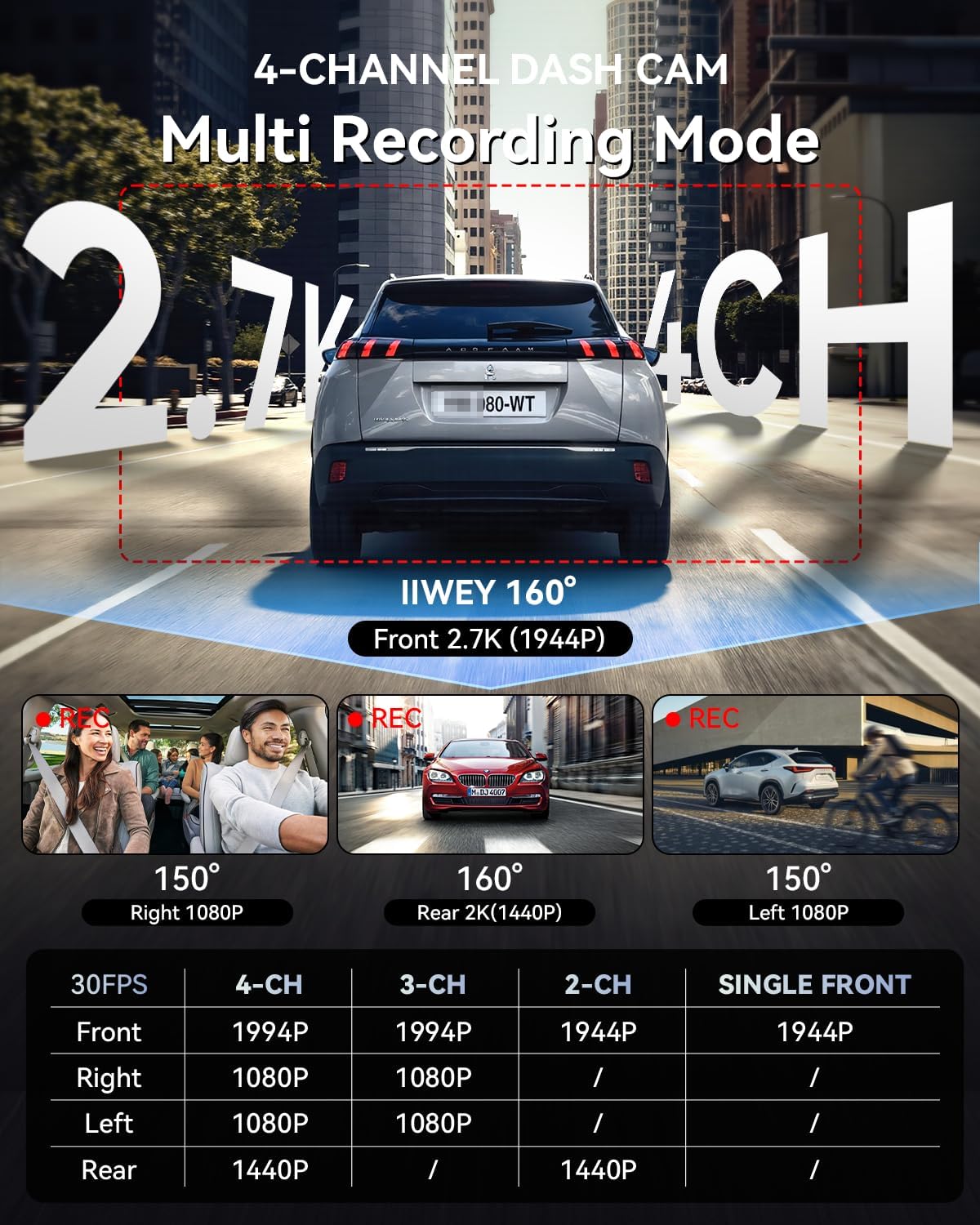
Image: Multi-recording mode options and corresponding resolutions for the C4 PRO dash cam.
4.4 Низька гучністьtage Захист
The hardwire kit includes a smart power management chip that monitors your vehicle's battery voltagд. Якщо обtage drops below 11.6V, the kit will automatically cut off power to the dash cam, ensuring sufficient power remains to start your engine.

Image: Illustration of the hardwire kit's low voltagмеханізм захисту.
5. Технічне обслуговування
- Управління SD-карткою: Regularly format the microSD card (at least once a month) to ensure optimal performance and prevent data corruption. Use a high-quality, high-endurance microSD card.
- Очищення лінз: Keep camera lenses clean using a soft, lint-free cloth to ensure clear video recordings.
- Оновлення прошивки: Check the official IIWEY webперіодично перевіряйте сайт на наявність оновлень прошивки для покращення продуктивності та додавання нових функцій.
6. Вирішення проблем
- Відеореєстратор не вмикається:
- Check all power connections. Ensure the hardwire kit is correctly installed and receiving power from the fuse box. Verify the vehicle's battery voltage вище низької гучностіtage protection threshold (11.6V).
- Parking Mode is not working:
- Confirm the hardwire kit is correctly installed with the ACC and BAT wires connected to their respective constant and accessory power sources. Ensure parking mode is enabled in the dash cam's settings.
- Відео footagзображення розмите або нечітке:
- Clean the camera lenses. Ensure the protective film has been removed from the lenses. Check if the dash cam is securely mounted and not vibrating.
- Помилка SD-карти:
- Format the microSD card. If the issue persists, try a different high-quality microSD card.
7. Технічні характеристики
| Особливість | Деталь |
|---|---|
| Бренд | IIWEY |
| Назва моделі | C4 PRO |
| Роздільна здатність захоплення відео | 2.7K 1440P (Front) |
| Частота кадрів | 30 FPS |
| Особливості | Parking Assistant, Time Lapse, Low Voltage Захист |
| Hardwire Kit Input | 12В-24В |
| Hardwire Kit Output | 5В/3А |
| Низька гучністьtage Зріз | 11.6 В |
| Сумісний тип автомобіля | Car, Truck, Van |
| Тип дисплея | ЖК |
| Колір | чорний |
8. Гарантія та підтримка
For warranty information, technical support, or any inquiries regarding your IIWEY C4 PRO Dash Cam, please refer to the contact information provided with your purchase or visit the official IIWEY webсайт. Зберігайте чек про покупку як підтвердження покупки для гарантійних претензій.
A video guide for installation may be available by scanning a QR code provided in the physical manual or on the product packaging.

Image: Reference to a video guide and manual for wiring the dash cam.