
1. Вступ
Thank you for choosing the OMOTON WK209 Wireless Keyboard and Mouse Set. This manual provides detailed instructions for setting up, operating, and maintaining your new wireless peripheral set. Please read this manual carefully before use to ensure optimal performance and longevity of your product.
2. Вміст упаковки
The OMOTON WK209 Wireless Keyboard and Mouse Set package includes the following items:
- 1 x OMOTON WK209 Wireless Keyboard
- 1 x OMOTON Wireless Mouse
- 1 x USB 2.4 GHz Receiver
Note: AAA batteries are required for operation but are not included in the package.
3. Посібник із налаштування
3.1. Встановлення батарей
Before using the keyboard and mouse, you need to install batteries.
- Знайдіть відсік для батарейок на нижній стороні клавіатури та миші.
- Відкрийте кришки акумуляторних відсіків.
- Insert two AAA batteries into the keyboard and one AAA battery into the mouse, ensuring correct polarity (+/-).
- Щільно закрийте кришки батарейних відсіків.

This image displays the battery compartments for the OMOTON WK209 keyboard and mouse. The keyboard requires two AAA batteries, and the mouse requires one AAA battery. Please note that batteries are not included with the product.
3.2. Підключення USB-приймача
The OMOTON WK209 set uses a single USB receiver for both the keyboard and mouse.
- Locate the USB 2.4 GHz receiver, usually stored in the mouse's battery compartment or packaging.
- Підключіть USB-приймач до вільного USB-порту на вашому комп'ютері (ноутбуці або настільному ПК).
- The system will automatically detect and install the necessary drivers. This is a Plug & Play process and typically requires no manual installation.
- Turn on the mouse using the ON/OFF switch located on its underside. The keyboard does not have a separate power switch; it activates when keys are pressed.

This image illustrates the 2.4 GHz wireless connection of the OMOTON WK209 keyboard and mouse set. It highlights features such as Plug & Play functionality, a stable 2.4G connection, and a wireless range of up to 10 meters (33 feet).
3.3. Сумісність
The OMOTON WK209 set is compatible with a wide range of Windows operating systems.
- Операційні системи: Windows 11, Windows 10, Windows 8, Windows 7, Windows XP.
- Пристрої: Laptop, Desktop PC.

This image demonstrates the broad compatibility of the OMOTON WK209 set with different Windows operating systems, including Windows 7, 8, 10, and 11, across desktop PCs and laptops.
4. Інструкція з експлуатації
4.1. Використання клавіатури
The WK209 keyboard features a full-size QWERTZ layout with multimedia keys for enhanced productivity. Simply begin typing after successful connection.
- Мультимедійні клавіші: Access functions like volume control, play/pause, and more directly from the keyboard.
- QWERTZ Layout: Standard German keyboard layout for familiar typing experience.
- Нахил 8°: The keyboard is designed with a natural 8-degree tilt for ergonomic comfort during extended use.

This image provides the physical dimensions of the OMOTON WK209 full-size QWERTZ keyboard (43.8 cm x 12.4 cm) and mouse (10.3 cm x 6.6 cm x 3.6 cm). It also notes the keyboard's natural 8-degree tilt for comfortable typing.
4.2. Використання миші
The WK209 mouse offers precise control and several functional buttons.
- Клацніть лівою кнопкою миші: Стандартний вибір та активація.
- Клацніть правою кнопкою миші: Доступ до контекстних меню.
- Колесо прокрутки: Для вертикального прокручування та функції клацання середньою кнопкою миші.
- Кнопка Назад: Переходить назад web браузери або file дослідники.
- Кнопка вперед: Переміщується вперед web браузери або file дослідники.
- Desktop Show/Hide Button: Quickly minimizes all open windows to show the desktop, and restores them with another press.

This image highlights the features of the OMOTON WK209 wireless mouse, including the scroll wheel, left-click button, right-click button, back button, forward button, and a button for showing/hiding the desktop. It also emphasizes its ergonomic design and quiet click functionality.
5. особливості
- Бездротове з'єднання 2.4 ГГц: Provides a stable and reliable connection with a range of up to 10 meters (33 feet).
- Plug & Play: Easy setup without the need for additional software or drivers.
- Full-size QWERTZ Layout: Comfortable and familiar typing experience.
- Мультимедійні клавіші: Convenient access to media controls.
- Ергономічний дизайн: The mouse is shaped for comfortable use, and the keyboard features a natural 8-degree tilt.
- Тиха робота: Both the keyboard and mouse are designed for silent clicks and keystrokes, ideal for quiet environments.
- Індикатор низького заряду батареї: The keyboard features an indicator light to alert you when batteries are running low.

This image illustrates the quiet operation of the OMOTON WK209 keyboard and mouse, highlighting its silent keys and noiseless mouse clicks, suitable for quiet environments.
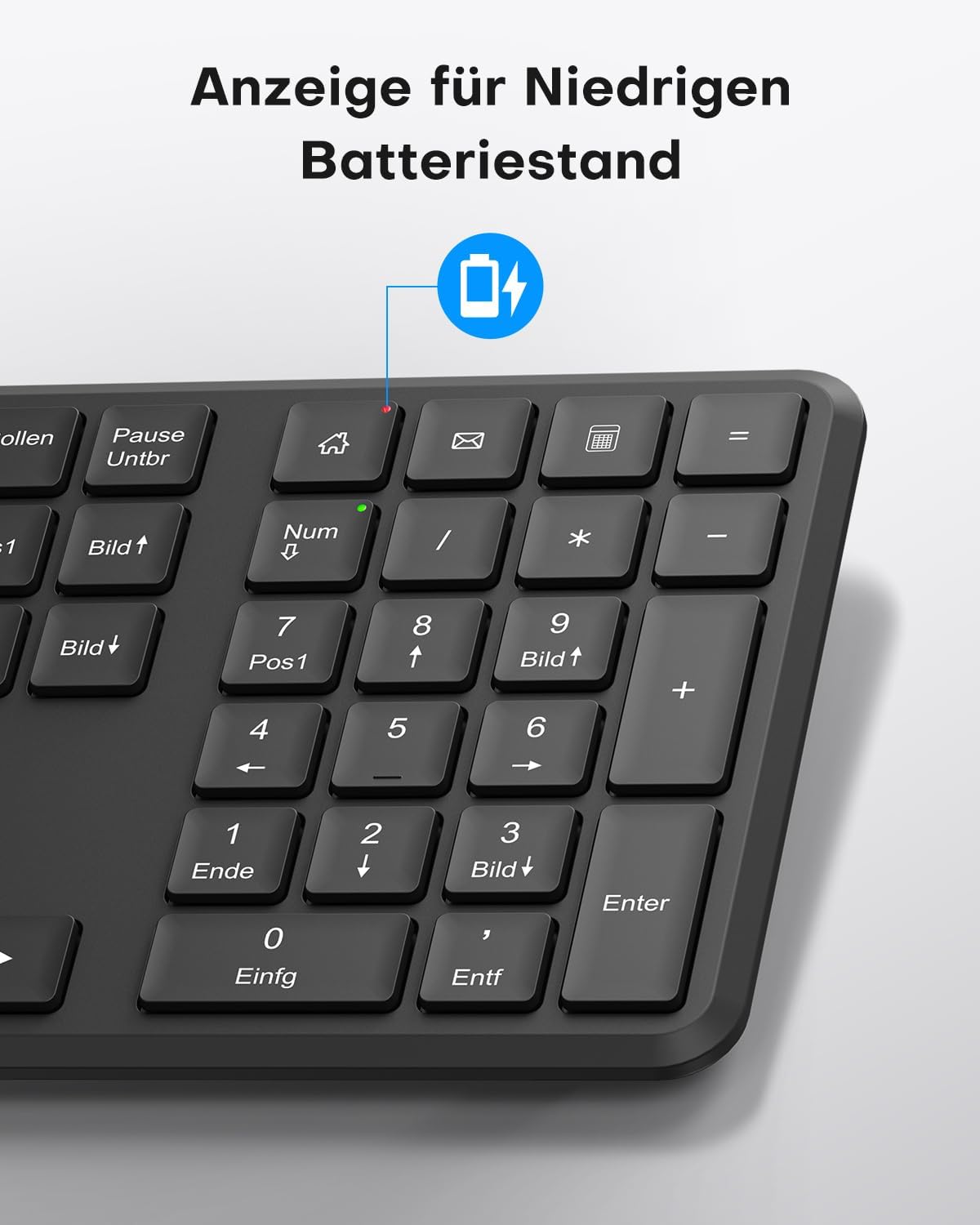
This image points out the low battery indicator on the OMOTON WK209 keyboard, which illuminates to alert the user when batteries need to be replaced.
6. Технічне обслуговування
To ensure the longevity and optimal performance of your OMOTON WK209 set, follow these maintenance guidelines:
- Прибирання: Використовуйте м’яку суху тканину для очищення поверхонь клавіатури та миші. Для стійкого бруду злегкаamp cloth can be used, but ensure no moisture enters the devices.
- Заміна батареї: Replace batteries promptly when the low battery indicator appears or when performance degrades. Always use fresh, high-quality AAA batteries.
- Зберігання: Якщо пристрої не використовуються протягом тривалого часу, виймайте батарейки, щоб запобігти витіканню. Зберігайте пристрої в прохолодному, сухому місці.
- Уникайте рідин: Тримайте клавіатуру та мишу подалі від рідин, щоб запобігти пошкодженню.
7. Вирішення проблем
If you encounter issues with your OMOTON WK209 set, try the following troubleshooting steps:
- Немає відповіді від клавіатури/миші:
- Переконайтеся, що батарейки правильно встановлені та не розряджені. За потреби замініть їх.
- Make sure the mouse's ON/OFF switch is in the 'ON' position.
- Переконайтеся, що USB-приймач надійно підключено до робочого USB-порту вашого комп’ютера. Спробуйте інший USB-порт.
- Перезавантажте комп'ютер.
- Затримка або переривчасте з'єднання:
- Перемістіть клавіатуру та мишу ближче до USB-приймача.
- Ensure there are no large metal objects or other wireless devices (e.g., Wi-Fi routers, cordless phones) interfering with the 2.4 GHz signal.
- Try plugging the USB receiver into a front USB port or using a USB extension cable to bring it closer to the devices.
- Keys Not Working Correctly:
- Перевірте наявність будь-якого сміття під клавішами.
- Ensure the keyboard layout setting on your computer matches the QWERTZ layout.
- Курсор миші стрибає або відображається неточно:
- Очистіть оптичний датчик на нижній стороні миші.
- Використовуйте мишу на чистій, неблискучій поверхні або килимку для миші.
8. Технічні характеристики
| Особливість | Деталь |
|---|---|
| Бренд | ОМОТОН |
| Модель | WK209 |
| Колір | чорний |
| Технологія підключення | 2.4 ГГц бездротовий |
| Розкладка клавіатури | Full-size QWERTZ (German Layout) |
| Особливості | 2.4 GHz, Full-size, QWERTZ-layout, Battery-operated, Multimedia keys |
| Сумісні пристрої | Ноутбук, ПК |
| Сумісні операційні системи | Windows 11/10/8/7/XP |
| Джерело живлення | Battery-Powered (2x AAA for keyboard, 1x AAA for mouse - not included) |
| Вага товару (приблизно) | 514 Grams (total set, including packaging) |
| Розміри упаковки | 44.79 х 13.9 х 5.3 см |
| ASIN | B0FQNS3FFB |
9. Гарантія та підтримка
OMOTON products are designed for reliability and performance. For warranty information and customer support, please refer to the warranty card included with your purchase or visit the official OMOTON website. If you experience any issues that cannot be resolved using the troubleshooting guide, please contact OMOTON customer service for assistance.


