
вступ
This manual provides detailed instructions for the setup, operation, and maintenance of your LIGE EF19-A Smartwatch. This device features a 1.85-inch HD display, Bluetooth calling capabilities, extensive health monitoring, and over 100 sports modes. It is designed for durability with IP68 waterproofing and a robust build. Please read this manual thoroughly to ensure proper use and to maximize the functionality of your smartwatch.
1. Налаштування
1.1 Вміст упаковки
- 1 x LIGE EF19-A Smartwatch
- 2 x Watch Straps (1 steel, 1 silicone)
- 1 x USB-кабель для зарядки
- 1 кабель для заряджання Type-C
- 1 x Strap Adjuster (Regulator)
- 1 х посібник користувача
1.2 Заряджання смарт-годинника
Before initial use, fully charge your smartwatch.
- Підключіть магнітний зарядний кабель до зарядних контактів на задній панелі смарт-годинника.
- Connect the other end of the charging cable (USB or Type-C) to a compatible power source (e.g., USB wall adapter, computer USB port, power bank, car charger).
- Дисплей годинника показуватиме стан заряджання. Повне заряджання зазвичай триває приблизно 2 години.

Image: The smartwatch connected to a charging cable, illustrating its 1000 mAh battery capacity and charging process.
A fully charged battery provides up to 7-15 days of normal use and up to 50 days in standby mode.
1.3 Встановлення та сполучення програм
To access all features, download the companion app on your smartphone. The smartwatch is compatible with Android 5.1 and higher, and iOS 9.0 and higher.
- Scan the QR code provided in the manual or on the watch packaging, or search for the app name (usually specified in the quick start guide) in your phone's app store (Google Play Store for Android, Apple App Store for iOS).
- Встановіть програму та створіть обліковий запис, якщо буде запропоновано.
- Переконайтеся, що Bluetooth увімкнено на вашому смартфоні.
- Open the app and follow the on-screen instructions to add your device. The app will search for your smartwatch.
- Select your smartwatch (e.g., "EF19-A" or similar Bluetooth name) from the list of available devices to pair.
- Confirm the pairing request on both your smartphone and smartwatch if a prompt appears.
1.4 Strap Installation/Adjustment
The smartwatch comes with two interchangeable straps: a steel strap and a silicone strap.
- Щоб прикріпити ремінець: Align the spring bar with the lug holes on the watch body and slide the pin into place.
- Щоб зняти ремінець: Locate the small lever on the spring bar, pull it inwards, and gently detach the strap from the watch body.
- For the steel strap: Use the provided strap adjuster (regulator) to remove or add links for a comfortable fit. Refer to the specific instructions for the strap adjuster if needed.
2. Інструкція з експлуатації
2.1 Основна навігація
- Сенсорний екран: Проведіть пальцем ліворуч/праворуч, вгору/вниз, щоб переходити між меню та функціями. Торкніться, щоб вибрати.
- Бічна кнопка(и): Typically, one button serves as a power on/off, back, or home button. Long press for power options, short press to return to the watch face or previous screen.
2.2 Виклики та сповіщення через Bluetooth
Once paired with your smartphone, the smartwatch allows you to manage calls and receive notifications.
- Здійснення/прийом дзвінків: When a call comes in, the watch will display the caller ID. You can answer or reject calls directly from the watch. You can also dial numbers or select contacts from the watch interface.
- Сповіщення про повідомлення: Receive notifications for SMS, Facebook, WhatsApp, Twitter, TikTok, and other apps directly on your watch. Swipe down from the watch face to view останні сповіщення.

Image: The smartwatch showing an incoming call, message notifications, and the voice assistant interface.
2.3 Моніторинг здоров'я
The smartwatch continuously monitors various health metrics.
- ЧСС: Access the heart rate monitoring function to view ваш поточний пульс та дані з історії.
- Кисень крові (SpO2): Виміряйте рівень кисню в крові.
- Якість сну: The watch automatically tracks your sleep patterns, including deep sleep, light sleep, and wake times. View детальні звіти про сон у супутньому додатку.
- Рівень стресу: Слідкуйте за рівнем стресу протягом дня.
- Тренування дихання: Engage in guided breathing exercises to help manage stress.

Image: A user wearing the smartwatch, with the display showing real-time heart rate, blood oxygen saturation, and breathing exercise prompts.
Примітка: This device is not a medical device. Health monitoring data is for reference only and should not be used for medical diagnosis or treatment.
2.4 спортивних режимів
The smartwatch supports over 100 sports modes for tracking your physical activity.
- Navigate to the "Workout" or "Sports" menu on your watch.
- Select your desired activity (e.g., running, cycling, swimming, hiking, yoga, badminton, basketball, golf).
- The watch will begin tracking metrics such as steps, distance, calories burned, and heart rate.
- End the workout by following the on-screen prompts. Detailed summaries are available on the watch and in the companion app.

Image: A person cycling while wearing the smartwatch, with the display showing steps, distance, calories, and heart rate for different sports activities.
2.5 Функція пальника
The smartwatch includes a built-in torch function for instant illumination.
- Access the torch function from the quick settings menu or app list.
- It offers different modes such as constant light, warning mode, and SOS mode.
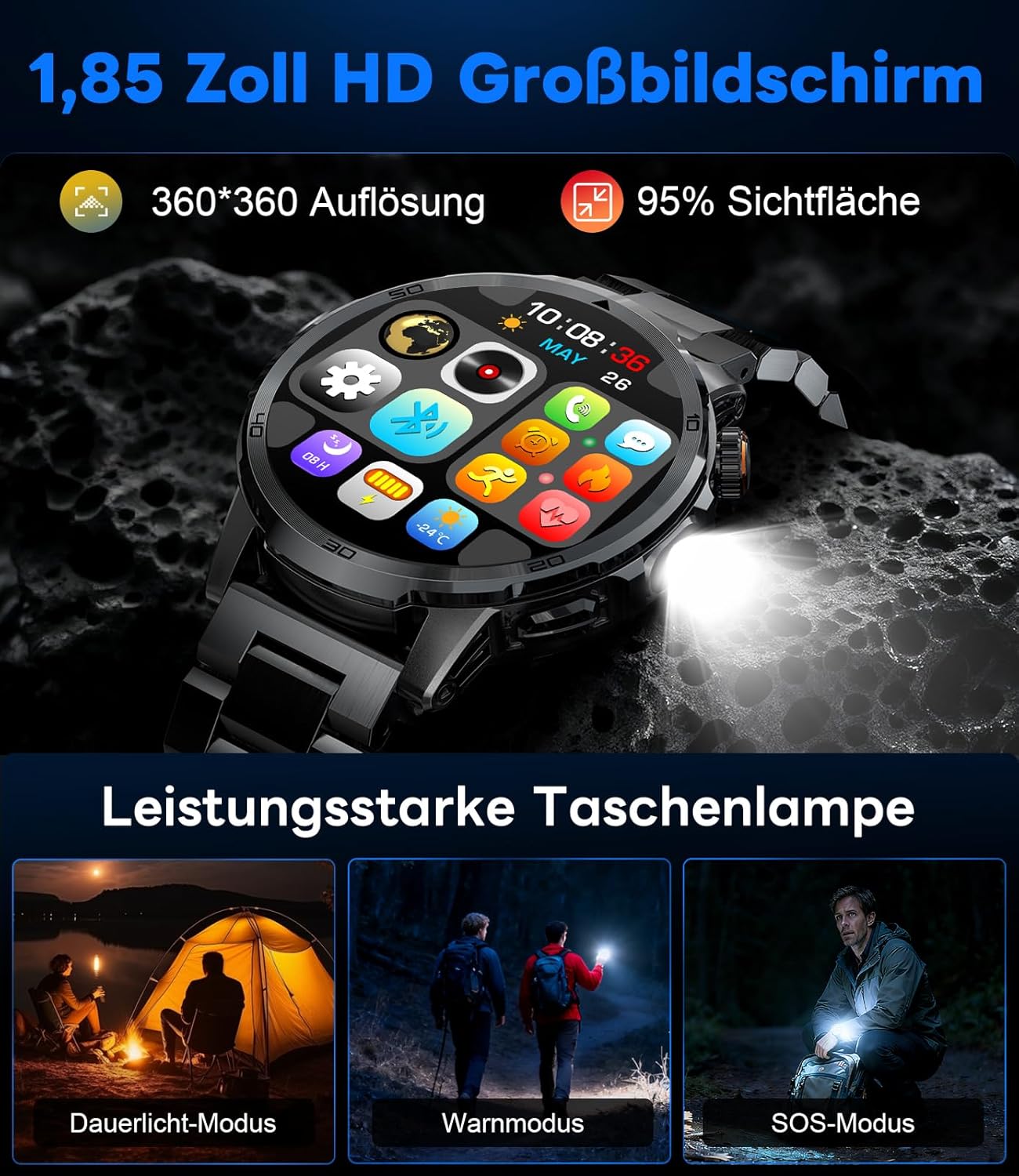
Image: The smartwatch displaying its 1.85-inch HD screen and demonstrating its powerful flashlight feature with different modes.
2.6 Інші функції
- Голосовий помічник: Activate the voice assistant to control your phone or get information (e.g., "What's the weather?").
- Керування музикою: Control music playback on your smartphone (play, pause, skip tracks, adjust volume) directly from your watch.
- Керування камерою: Використовуйте свій годинник як пульт дистанційного керування затвором для камери смартфона.
- Прогноз погоди: View поточні погодні умови та прогнози.
- Будильники та таймери: Set alarms and use stopwatch/timer functions.
- Нагадування про напої: Встановіть нагадування про необхідність пити воду.
- Дивитися обличчя: Customize your watch face from over 100 options or upload your own photos via the app.

Image: The smartwatch interface displaying icons for music control, flashlight, camera control, weather, alarm, and drink reminders.

Image: A selection of diverse watch faces available for customization on the LIGE EF19-A Smartwatch.
3. Технічне обслуговування
3.1 Очищення
- Regularly clean your smartwatch and straps with a soft, dry, lint-free cloth.
- Якщо необхідно, використовуйте злегка damp тканину з м’яким милом, потім витріть насухо.
- Уникайте використання агресивних хімікатів, абразивних засобів для чищення або розчинників, оскільки вони можуть пошкодити покриття та ущільнювачі годинника.
- Перед заряджанням переконайтеся, що зарядні контакти чисті та сухі.
3.2 Водостійкість (IP68)
The LIGE EF19-A Smartwatch is IP68 waterproof, meaning it is resistant to dust and can withstand immersion in water up to 1.5 meters for up to 30 minutes.
- It is suitable for daily use, such as hand washing, rain, and shallow water swimming.
- Avoid using the watch in hot water, saunas, or steam rooms, as steam can penetrate the seals and cause damage.
- Не натискайте кнопки під водою.
- After exposure to water, wipe the watch dry before charging or using.

Image: The smartwatch highlighting its robust military-grade design, including resistance to temperature extremes, shock, dust, and IP68 water resistance.
4. Вирішення проблем
4.1 Годинник не вмикається
- Переконайтеся, що годинник повністю заряджений. Підключіть його до зарядного пристрою щонайменше на 30 хвилин.
- Try long-pressing the side button for 10-15 seconds to force a restart.
4.2 Не вдається з’єднати пристрій зі смартфоном
- Переконайтеся, що Bluetooth увімкнено на вашому смартфоні.
- Ensure the smartwatch is within Bluetooth range (typically 10 meters).
- Перезавантажте і смартфон, і смарт-годинник.
- Check if the app has the necessary permissions (location, Bluetooth, etc.).
- If previously paired, try "forgetting" the device in your phone's Bluetooth settings and re-pairing through the app.
4.3 Неточні дані про здоров'я
- Переконайтеся, що годинник щільно прилягає до зап'ястя, приблизно на ширину одного пальця вище зап'ястя.
- Уникайте надмірних рухів під час вимірювань.
- Очистіть датчик на задній панелі годинника.
- Фактори навколишнього середовища та індивідуальна фізіологія можуть впливати на показники.
4.4 Сповіщення не відображаються
- Verify that the watch is successfully paired with your smartphone.
- Check notification settings within the companion app to ensure desired apps are enabled for notifications.
- Ensure your phone's notification settings allow the companion app to display notifications.
- Make sure your phone is not in "Do Not Disturb" mode.
5. Технічні характеристики
| Особливість | Специфікація |
|---|---|
| Номер моделі | EF19-A |
| Дисплей | 1.85-inch IPS HD Touch Screen, 360x360 pixels |
| Ємність акумулятора | Літій-полімерний 1000 мАг |
| Термін служби батареї (звичайне використання) | 7-15 днів |
| Термін служби батареї (в режимі очікування) | До 50 днів |
| Час зарядки | прибл. 2 години |
| Підключення | Bluetooth 5.2 |
| Водонепроникність | IP68 (водонепроникний) |
| Ємність пам'яті | 128 Мб |
| Сумісні пристрої | Android 5.1+ / iOS 9.0+ Smartphones |
| Моніторинг здоров'я | Heart Rate, Blood Oxygen, Sleep Quality, Stress Level |
| Спортивні режими | 100+ (e.g., Running, Cycling, Swimming, Hiking, Yoga) |
| Додаткові функції | Bluetooth Calls, Message Notifications, Torch, Voice Assistant, Music Control, Camera Control, Weather, Alarms, Timers, Drink Reminder, Customizable Watch Faces |
| GPS | Через смартфон |
| Цільова аудиторія | Чоловіки |
6. Інформація про гарантію
The LIGE EF19-A Smartwatch comes with a Гарантія 2 рік з дати покупки. Ця гарантія поширюється на виробничі дефекти та несправності за умов нормального використання.
Гарантія не поширюється на:
- Пошкодження, спричинені неправильним використанням, нещасним випадком, зловживанням, недбалістю або несанкціонованою модифікацією.
- Normal wear and tear, including scratches, dents, or cosmetic damage.
- Damage caused by exposure to extreme temperatures, liquids (beyond IP68 rating), or corrosive environments.
- Damage to accessories (straps, charging cables) unless defective upon receipt.
Щоб скористатися гарантійним обслуговуванням, збережіть чек про покупку та зверніться до служби підтримки клієнтів.
7. Підтримка клієнтів
If you encounter any issues or have questions regarding your LIGE EF19-A Smartwatch that are not covered in this manual, please contact our customer support team.
- Refer to the contact information provided on the product packaging or the official LIGE webсайт.
- When contacting support, please provide your product model number (EF19-A) and a detailed description of the issue.