
вступ
This manual provides comprehensive instructions for the setup, operation, maintenance, and troubleshooting of your T-Wolf T60 Wired 60% Mechanical Keyboard. Please read this manual carefully before using the product to ensure proper function and longevity.
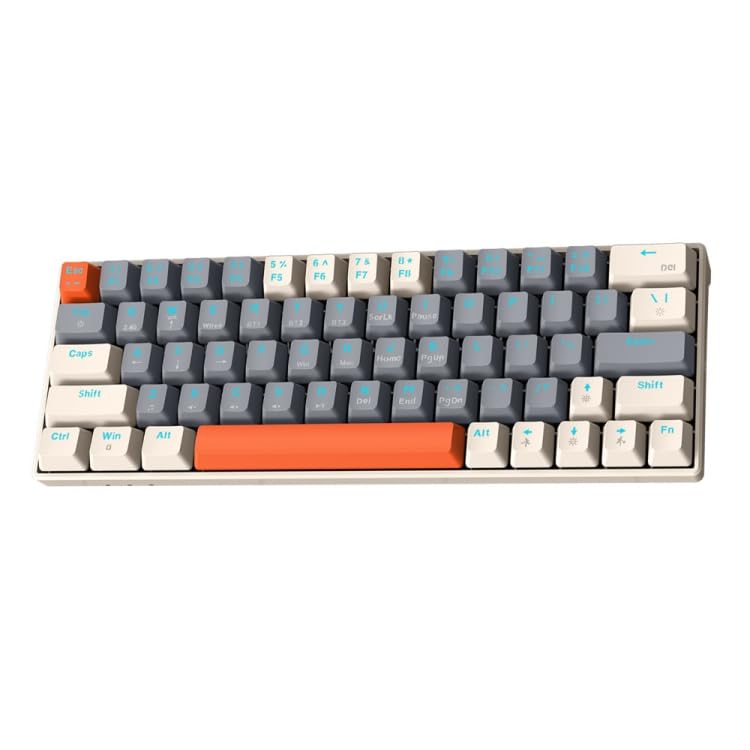
Image: T-Wolf T60 Wired 60% Mechanical Keyboard. This image displays the compact design of the keyboard, highlighting its 63-key layout and wired connectivity.
Налаштування
- Розпакування: Carefully remove the keyboard and all included accessories from the packaging. Verify that all components are present: T-Wolf T60 keyboard and USB-C to USB cable.
- Підключення клавіатури:
- Знайдіть порт USB-C на клавіатурі.
- Вставте кінець USB-C наданого кабелю в порт USB-C клавіатури.
- Insert the USB-A end of the cable into an available USB 2.0 port on your computer (PC, desktop, or laptop).
- Встановлення драйвера: The T-Wolf T60 keyboard is plug-and-play. Your operating system should automatically detect and install the necessary drivers. No manual driver installation is typically required.
- Початковий тест: Open a text editor or word processor and type to confirm the keyboard is functioning correctly.
Операція
The T-Wolf T60 is a 60% mechanical keyboard with 63 keys, designed for efficient typing and gaming. It features RGB backlighting and multi-key anti-ghosting.
- Основні ключові функції: All standard alphanumeric and symbol keys function as expected. Due to the compact 60% layout, some functions (like F-keys, arrow keys, and navigation keys) are accessed via a Function (Fn) key combination. Refer to the keyboard's keycap legends for specific Fn key combinations.
- RGB-підсвічування: Клавіатура оснащена налаштовуваним RGB-підсвічуванням.
- To cycle through different lighting modes, use the designated Fn key combination (e.g., Fn + \ or Fn + P).
- To adjust brightness, use the designated Fn key combination (e.g., Fn + Up/Down arrow keys, if available via Fn layer).
- To change lighting speed, use the designated Fn key combination (e.g., Fn + Left/Right arrow keys, if available via Fn layer).
- Multi-Key Anti-Ghosting: This feature ensures that multiple simultaneous key presses are registered accurately, which is beneficial for fast-paced gaming and complex commands.
Технічне обслуговування
Proper maintenance helps extend the lifespan of your keyboard.
- Прибирання:
- Від’єднайте клавіатуру від комп’ютера перед чищенням.
- Використовуйте балончик зі стисненим повітрям, щоб видалити пил та сміття між клавішами.
- Протріть клавіші та поверхню клавіатури м’якою, злегка змоченою ганчіркоюamp, тканина без ворсу. Уникайте надмірної вологості.
- Do not use harsh chemicals, abrasive cleaners, or solvents, as these can damage the keyboard's finish and keycap legends.
- Зберігання: Якщо клавіатура не використовується протягом тривалого часу, зберігайте її в чистому, сухому місці, подалі від прямих сонячних променів та екстремальних температур.
- Догляд за кабелем: Avoid bending or twisting the USB-C cable excessively to prevent internal damage.
Усунення несправностей
If you encounter issues with your T-Wolf T60 keyboard, refer to the following common solutions:
- Клавіатура не реагує:
- Переконайтеся, що кабель USB-C надійно підключено як до клавіатури, так і до комп’ютера.
- Спробуйте підключити клавіатуру до іншого USB-порту на комп'ютері.
- Test the keyboard on another computer to determine if the issue is with the keyboard or the original computer's setup.
- Перезавантажте комп'ютер.
- Підсвічування RGB не працює або працює неправильно:
- Переконайтеся, що клавіатура правильно підключена та отримує живлення.
- Try cycling through the RGB modes using the Fn key combinations mentioned in the Operation section.
- Check if the brightness is set to maximum.
- Клавіші не реєструються або друкуються двічі:
- Clean the keyboard thoroughly, especially around the affected keys, using compressed air.
- Переконайтеся, що під ковпачками клавіш немає сміття.
- Якщо проблема не зникає, це може свідчити про апаратний збій.
Технічні характеристики
| Особливість | Деталь |
|---|---|
| Бренд | Т-ВОВК |
| Модель | T60 |
| Технологія підключення | USB-C (дротовий) |
| Сумісні пристрої | PC, desktop, laptop |
| Опис клавіатури | Ігрові, Механічні |
| Кількість клавіш | 63 |
| Особливості | RGB Backlighting, Multi-Key Anti-Ghosting |
| матеріал | пластик |
| Розкладка клавіатури | QWERTY |
Гарантія та підтримка
Щоб отримати інформацію про гарантію та технічну підтримку, зверніться до документації, що надається разом із покупкою, або зверніться безпосередньо до продавця/виробника. Зберігайте чек про покупку для гарантійних претензій.
Manufacturer: T-Wolf