
1. Вступ
Thank you for choosing the Dyness 14.6V 20A LiFePO4 Smart Automatic 3-Level Battery Charger. This charger is specifically designed for 12V (12.8V) Lithium Iron Phosphate (LiFePO4) batteries, offering efficient and safe charging with advanced protection features. Please read this manual thoroughly before use to ensure proper operation and to maximize the lifespan of your battery and charger.
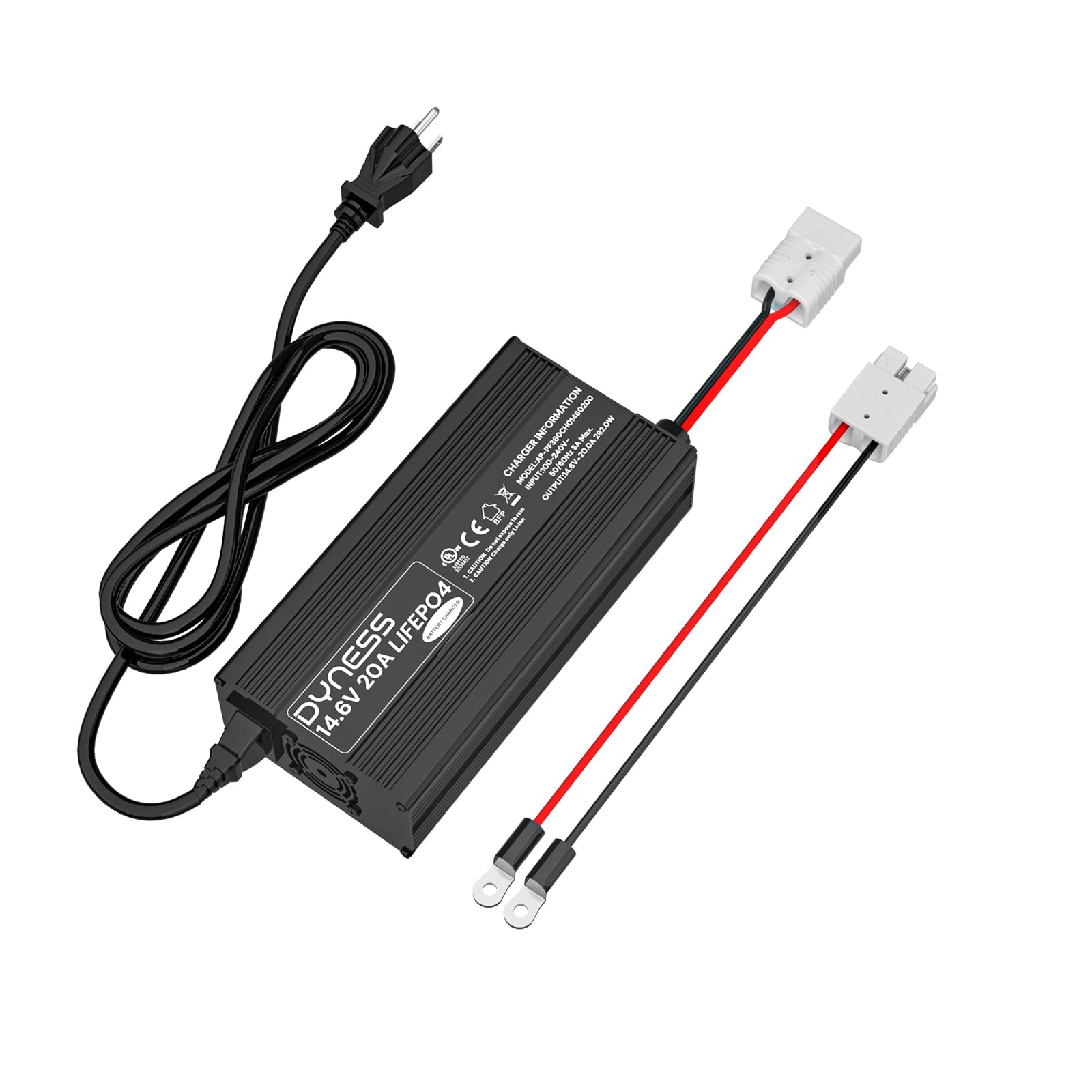
малюнок 1: Dyness 14.6V 20A LiFePO4 Battery Charger.
2. Інформація про безпеку
Always prioritize safety when operating electrical equipment. This charger incorporates multiple safety features, but proper handling is crucial.
- Використання за призначенням: This charger is designed exclusively for 12V (12.8V) LiFePO4 batteries. Do not use it with other battery types (e.g., lead-acid, Ni-MH, Ni-Cd) as this may cause damage to the battery or charger, or pose a safety risk.
- Вентиляція: Ensure adequate ventilation during charging. Do not cover the charger or operate it in an enclosed space.
- Умови навколишнього середовища: Avoid exposing the charger to water, moisture, direct sunlight, or extreme temperatures. Operate within the specified temperature range.
- Підключення: Завжди підключайте зарядний пристрій до акумулятора, перш ніж підключати його до розетки змінного струму. Від’єднайте його від мережі змінного струму, перш ніж від’єднувати від акумулятора.
- Пошкоджене обладнання: Do not operate the charger if it or its cables are damaged. Contact customer support for assistance.
- Діти та домашні тварини: Зберігайте зарядний пристрій та акумулятор у недоступному для дітей та домашніх тварин місці.
Integrated Multi-Protection System
The Dyness LiFePO4 charger is equipped with several built-in protection mechanisms to ensure safe operation:
- Захист від перегріву: Automatically shuts down if the internal temperature exceeds safe limits.
- Захист від короткого замикання: Запобігає пошкодженням у разі короткого замикання.
- Захист від зворотної полярності: Захищає від неправильного підключення акумулятора.
- Переволtage Захист: Запобіжні заходи проти надмірного обсягуtage вихід.

малюнок 2: Visual representation of the charger's multi-protection system, including safeguards against overheating, short-circuits, reverse polarity, and overvoltage.
3. Компоненти продукту
The Dyness 14.6V 20A LiFePO4 Battery Charger package includes the following items:
- Dyness 14.6V 20A LiFePO4 Battery Charger Unit
- Кабель змінного струму
- DC Output Cable with Anderson 50A Connector and M8 terminals
- Посібник користувача (цей документ)
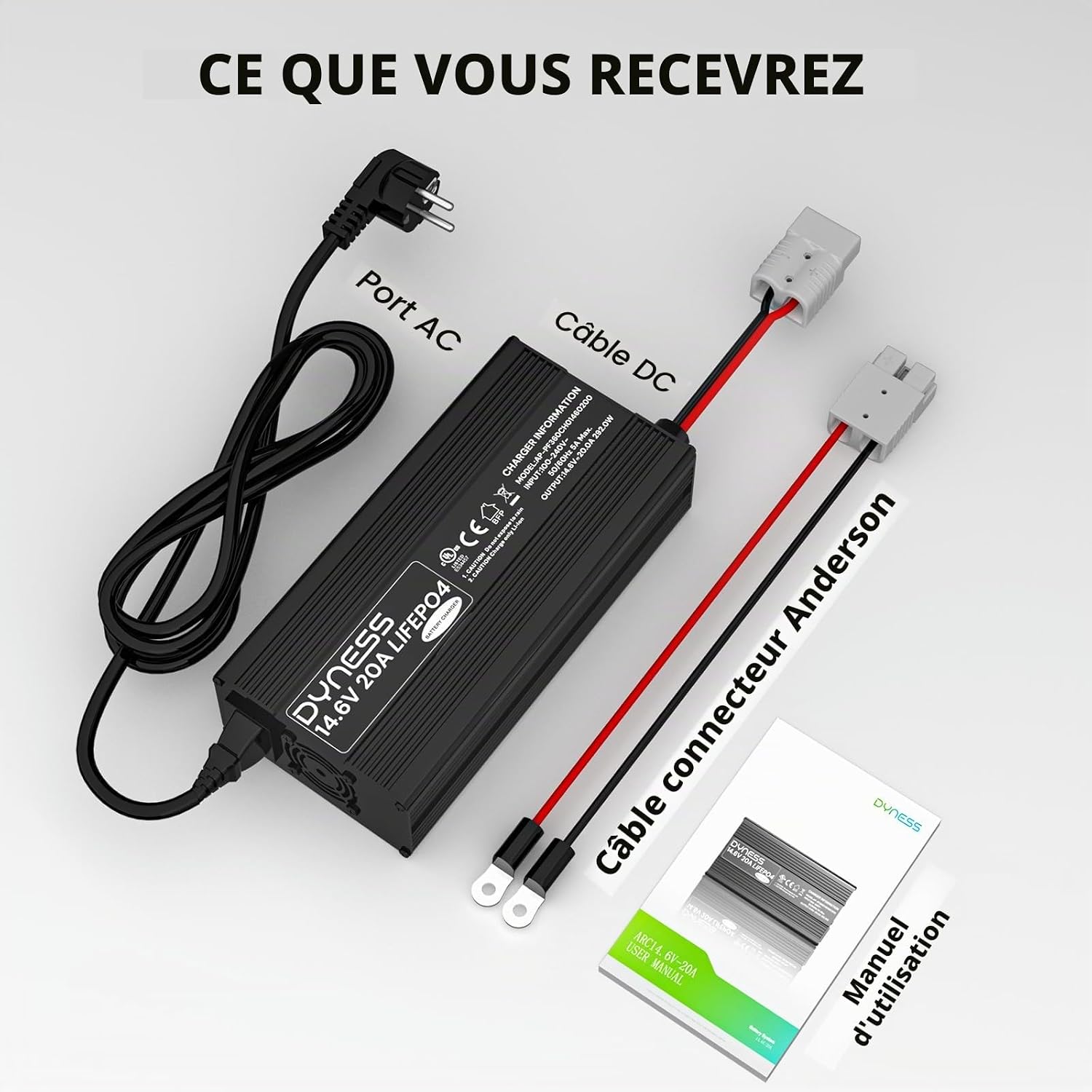
малюнок 3: The package contents, including the charger unit, AC power cable, DC cable with Anderson connector, and user manual.
4. Налаштування та підключення
Follow these steps to properly connect your Dyness LiFePO4 charger to your battery and power source:
- Підготуйте батарею: Ensure your LiFePO4 battery is in a stable, well-ventilated area. Verify that the battery terminals are clean and free of corrosion.
- Підключення кабелю виходу постійного струму: Connect the DC output cable from the charger to your LiFePO4 battery. The charger features an Anderson 50A connector for easy and secure connection, along with M8 terminals for direct bolt-on applications. Ensure correct polarity: red to positive (+), black to negative (-).
- Підключення кабелю живлення змінного струму: Once the DC cable is securely connected to the battery, plug the AC power cable into the charger's AC input port.
- Підключення до розетки: Finally, plug the AC power cable into a standard wall outlet (100-240V AC, 50/60Hz).
- Перевірте підключення: The LED indicators on the charger will provide real-time status updates (charging/full/error). Refer to the "Operating Instructions" section for details on LED indications.
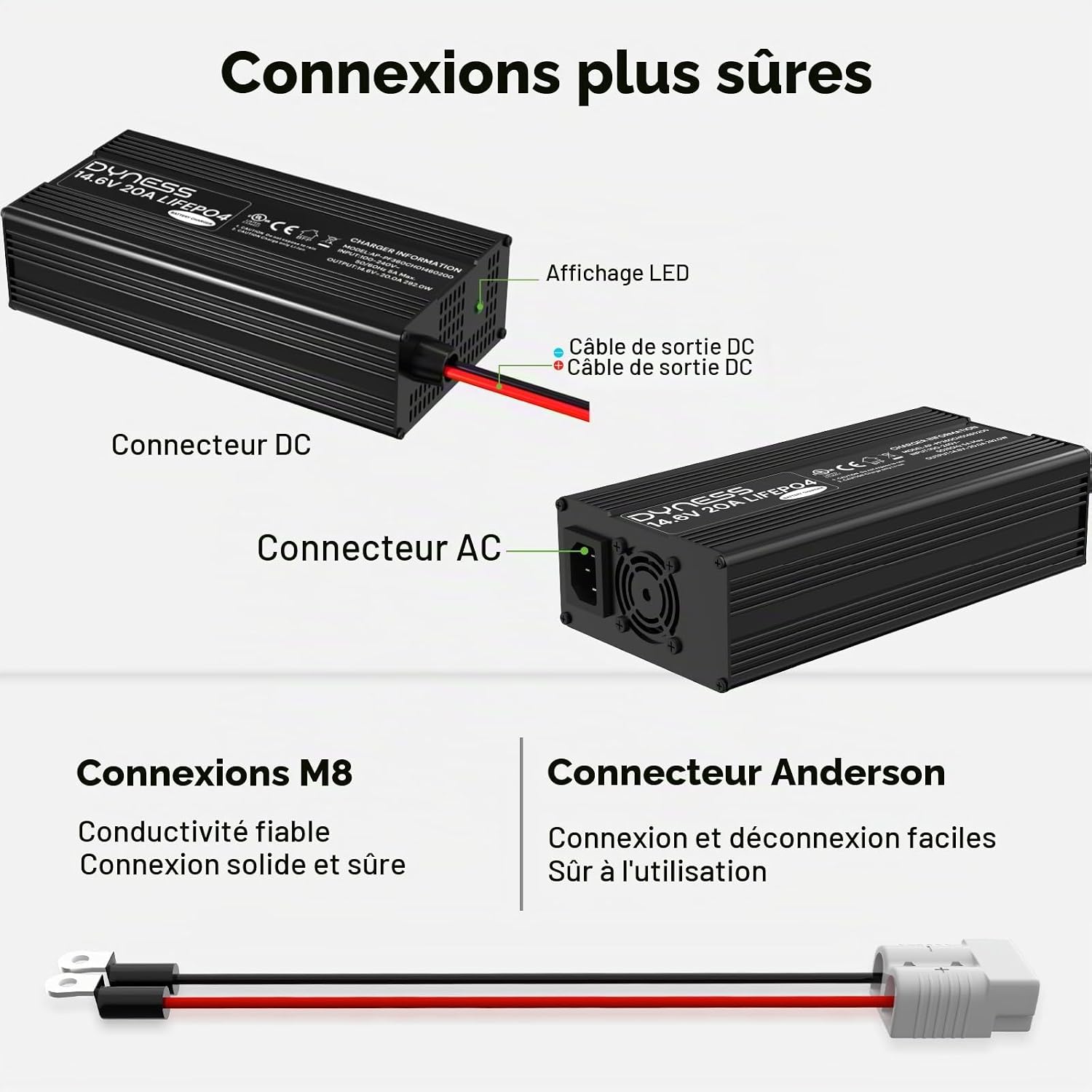
малюнок 4: закінченоview of the charger's DC output connector, AC input connector, and LED display for status indication.
5. Інструкція з експлуатації
Intelligent 3-Level Charging Mode
The Dyness LiFePO4 charger utilizes an intelligent 3-level charging algorithm to optimize battery performance and longevity:
- Pre-charge (T1): Ця початкова літера stage gently charges deeply discharged batteries, helping to restore them safely and extend their overall lifespan.
- Fast Charge (T2): Під час цього сtage, the charger delivers a constant current to rapidly charge the battery to approximately 80-90% of its capacity.
- Постtage (T3): У фінальному сtage, the charger maintains a constant voltage while gradually reducing the current until the battery is fully charged. This ensures a safe and complete charge.

малюнок 5: A graph illustrating the 3-stage charging process (Pre-charge, Fast Charge, Constant Voltage) with corresponding voltagкриві e та струму з плином часу.
Функція активації 0V
The charger features a 0V activation function, allowing it to reactivate deeply discharged LiFePO4 batteries, even if their Battery Management System (BMS) has triggered protection. This function safely brings the battery back to a normal voltage level, making it usable again.

малюнок 6: Depiction of the secure battery activation process, showing the charger's ability to reactivate LiFePO4 batteries after BMS protection has been triggered.
Оцінка часу зарядки
The charging time will vary depending on the battery capacity and its current state of charge. Approximate charging times for common LiFePO4 battery capacities are:
- 100Ah LiFePO4 battery: Approximately 5 hours
- 200Ah LiFePO4 battery: Approximately 10 hours
- 300Ah LiFePO4 battery: Approximately 15 hours
Note: These times are estimates and may vary based on battery condition, ambient temperature, and other factors.

малюнок 7: Visual guide to estimated charging times for 100Ah, 200Ah, and 300Ah 12V LiFePO4 batteries using the Dyness 20A charger.
6. Технічне обслуговування
To ensure the longevity and optimal performance of your Dyness LiFePO4 charger, follow these simple maintenance guidelines:
- Прибирання: Disconnect the charger from both AC power and the battery before cleaning. Use a soft, dry cloth to wipe the exterior. Do not use liquid cleaners or solvents.
- Зберігання: Коли зарядний пристрій не використовується, зберігайте його в прохолодному, сухому місці, подалі від прямих сонячних променів та екстремальних температур.
- Вентиляція: Regularly check that the ventilation openings are not blocked by dust or debris. The robust aluminum casing with an internal fan ensures optimal heat dissipation, but clear airflow is essential.
- Перевірка кабелю: Periodically inspect the AC and DC cables for any signs of damage, fraying, or loose connections. Replace damaged cables immediately.

малюнок 8: Крупним планом view of the charger's integrated fan, highlighting its role in efficient heat dissipation for prolonged lifespan.
7. Вирішення проблем
If you encounter issues with your Dyness LiFePO4 charger, refer to the following common problems and solutions:
| проблема | Можлива причина | Рішення |
|---|---|---|
| Зарядний пристрій не вмикається / Немає світлодіодної індикації | No AC power; Loose connections; Faulty AC cable. | Check AC power outlet; Ensure AC and DC cables are securely connected; Try a different AC cable if available. |
| Charging LED not illuminating / Charger not charging | Incorrect battery connection (reverse polarity); Battery deeply discharged (0V); Battery fault; Charger fault. | Verify correct polarity (red to +, black to -); For deeply discharged batteries, the 0V activation function should initiate automatically (see Operating Instructions); Test with another known good battery if possible; Contact support if issue persists. |
| Світлодіод помилки горить | Overheating; Short circuit; Overvoltage; Внутрішня несправність. | Disconnect charger, allow to cool down in a well-ventilated area; Check for short circuits in wiring; Ensure battery voltage is within acceptable range; If error persists, contact customer support. |
| Повільна зарядка | Battery capacity is very large; Battery is heavily discharged; Ambient temperature is low. | Charging times vary by battery capacity (refer to "Charging Time Estimates"); Ensure charger is in a suitable temperature environment. |
If the problem persists after attempting these solutions, please contact Dyness customer support for further assistance.
8. Технічні характеристики
The following table details the technical specifications for the Dyness 14.6V 20A LiFePO4 Battery Charger:
| Особливість | Значення |
|---|---|
| Бренд | Dyness |
| Модель | 14.6V 20A LiFePO4 Charger |
| Вхідний об'ємtage | 100-240 В змінного струму, 50/60 Гц |
| Вихідний випtage | 14.6 вольта постійного струму |
| Вихідний струм | 20 Amperes |
| Розміри продукту (Д x Ш x В) | 20.3 x 10 x 5.4 см (8.0 x 3.9 x 2.1 дюйма) |
| Вага товару | 1.3 кілограмів (2.87 фунта) |
| Тип роз'єму | Anderson 50A, M8 terminals |
| Робоча температура | -10°C до 40°C (14°F до 104°F) |
| Температура зберігання | Від -40°C до 70°C (від -40°F до 158°F) |
| Колір | чорний |
| Країна походження | Китай |

малюнок 9: A table summarizing the key technical specifications of the LiFePO4 charger.
9. Гарантія та підтримка
The Dyness 14.6V 20A LiFePO4 Battery Charger comes with a Гарантія якості 2 років з дати покупки. Ця гарантія поширюється на дефекти матеріалів і виготовлення за нормального використання.
For technical assistance, warranty claims, or any questions regarding your product, please contact Dyness customer support. Our professional technical support and customer service team are available to assist you within 24 hours.
Будь ласка, збережіть чек про покупку для підтвердження гарантії.