
Minuteman EN450G
Інструкція з експлуатації резервного ДБЖ Minuteman EN450G 450VA
Model: EN450G
1. Вступ
This manual provides essential instructions for the safe and efficient operation of your Minuteman EN450G 450VA Standby Uninterruptible Power Supply (UPS). The EN450G is designed to provide reliable backup power and surge protection for various electronic devices, including gaming consoles, desktop PCs, home office equipment, and network devices. Please read this manual thoroughly before installation and use, and retain it for future reference.
2. Важливі інструкції з техніки безпеки
WARNING: To reduce the risk of electric shock, fire, or injury to persons, read all instructions before using this product.
- Цей ДБЖ містить небезпечні речовиниtages. Do not attempt to disassemble the unit. Servicing should be performed by qualified service personnel only.
- Не підключайте до ДБЖ предмети, не пов’язані з комп’ютером, наприклад медичне обладнання, обладнання для життєзабезпечення, мікрохвильові печі чи пилососи.
- Не блокуйте вентиляційні отвори. Забезпечте достатню циркуляцію повітря навколо пристрою.
- Do not install the UPS in direct sunlight, near heat sources, or in areas with excessive dust, moisture, or flammable liquids.
- Connect the UPS to a properly grounded AC power outlet.
- The battery is hot-swappable. Exercise caution when replacing the battery. Refer to the Maintenance section for instructions.
- In case of emergency, press the power button to turn off the UPS and disconnect the power cord from the AC power outlet.
3. Продукт закінчивсяview
The Minuteman EN450G UPS provides comprehensive power protection. Familiarize yourself with its components:
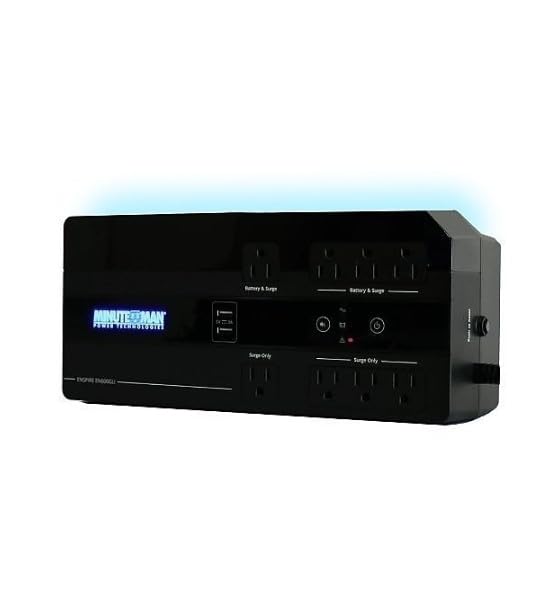
малюнок 1: Minuteman EN450G UPS Unit. This image displays the Minuteman EN450G UPS unit. The front panel features the 'Minuteman Power Technologies' logo, two USB charging ports, and control buttons. The top surface shows four 'Battery & Surge' protected outlets and four 'Surge Only' outlets, clearly labeled. The unit is black and designed for compact placement.
3.1 Функції передньої панелі
- Кнопка живлення: Вмикає або вимикає ДБЖ.
- Порти для зарядки USB: Two ports for charging mobile devices.
- Індикатори стану: LEDs indicating power status, battery status, and fault conditions.
3.2 Характеристики задньої панелі
- Battery & Surge Outlets (x4): Provide battery backup power and surge protection for critical devices.
- Surge Only Outlets (x4): Provide surge protection only for non-critical devices.
- Вхід змінного струму: Connects the UPS to the wall power outlet.
- Автоматичний вимикач: Захист від перевантаження з можливістю скидання.
4. Налаштування та встановлення
4.1 Розпакування
Обережно розпакуйте ДБЖ та перевірте його на наявність пошкоджень під час транспортування. Якщо виявлено пошкодження, не використовуйте пристрій та зверніться до дилера.
4.2 Розміщення
The EN450G is designed for versatile placement:
- Desktop: Поставте пристрій на стійку рівну поверхню.
- Поверх: Position on the floor, ensuring ventilation is not obstructed.
- Настінне кріплення: The unit can be mounted on a wall using appropriate hardware (not included). Ensure the mounting surface can support the weight of the UPS.
Ensure the installation area is clean, dry, and has adequate ventilation. Avoid placing the UPS near heat-emitting appliances or in direct sunlight.
4.3 Підключення до живлення
- Переконайтеся, що ДБЖ вимкнено.
- Plug the UPS power cord into a grounded 120V AC wall outlet.
- Allow the UPS to charge for at least 8 hours before initial use to ensure optimal battery runtime.
4.4 Підключення пристроїв
- Battery & Surge Protected Outlets: Connect critical devices such as your computer, monitor, router, or other essential electronics that require continuous power during outagес.
- Лише розетки: Connect non-critical devices like printers, scanners, or desk lamps that only require surge protection.
CAUTION: Do not connect laser printers or shredders to the battery backup outlets, as their high power draw can overload the UPS.
5. Операція
5.1 Увімкнення/вимкнення ДБЖ
- Увімкнути: Press and hold the power button for approximately 2 seconds until you hear a beep and the power indicator illuminates.
- Вимикати: Press and hold the power button for approximately 2 seconds until you hear a beep and the power indicator turns off.
5.2 Індикатори стану
The front panel LEDs provide information about the UPS status:
- Green LED (Solid): UPS is operating normally, providing AC power.
- Green LED (Flashing) & Audible Alarm: ДБЖ працює від батареї під час перебоїв у роботі.tage.
- Red LED (Solid) & Audible Alarm: Battery low or fault condition. Refer to Troubleshooting.
5.3 Час роботи від батареї
The EN450G provides approximately 3 minutes of runtime at full load (450VA/255W) and 11 minutes at half load. Actual runtime may vary based on connected equipment and battery age.
6. Технічне обслуговування
6.1 Заміна батареї
The EN450G features a hot-swappable Sealed Lead Acid (SLA) battery, allowing replacement without interrupting power to connected devices. Batteries typically last 3-5 years depending on usage and environmental conditions. A flashing red LED or continuous alarm may indicate a need for battery replacement.
- Ensure the UPS is connected to AC power and operating normally.
- Locate the battery access panel (refer to product diagram if available).
- Carefully slide out the old battery pack.
- Insert the new, fully charged replacement battery pack, ensuring correct orientation.
- Secure the battery access panel.
- Allow the new battery to charge for 8-12 hours to reach full capacity.
WARNING: Use only approved replacement batteries. Improper battery replacement can result in fire or explosion. Dispose of old batteries properly at a recycling facility.
6.2 Очищення
Periodically clean the exterior of the UPS with a soft, dry cloth. Do not use liquid or aerosol cleaners. Ensure ventilation openings remain clear of dust and debris.
7. Вирішення проблем
This section addresses common issues you may encounter with the EN450G UPS. If a problem persists after attempting the solutions below, contact technical support.
| проблема | Можлива причина | Рішення |
|---|---|---|
| ДБЖ не вмикається. | Акумулятор не підключений або розряджений. Шнур живлення не підключено. | Ensure battery is properly connected and charged. Verify power cord is securely plugged into wall outlet and UPS. |
| UPS beeps continuously or red LED is solid. | Battery low or fault condition. Overload on battery outlets. | Allow battery to charge. If problem persists, battery may need replacement. Disconnect non-essential devices from battery outlets. Check circuit breaker. |
| UPS operates on battery frequently. | Нестабільне вхідне живлення змінного струму. UPS sensitivity setting (if applicable, though not specified for this model). | Check the quality of your incoming AC power. Consider connecting to a different outlet. |
| No power from surge-only outlets. | Спрацював автоматичний вимикач. | Press the circuit breaker reset button on the rear panel. Reduce load if necessary. |
8. Технічні характеристики
| Особливість | Деталь |
|---|---|
| Модель | EN450G |
| Ємність | 450ВА / 255Вт |
| Обсяг введення/виведенняtage | 120 В змінного струму |
| Форма вихідного сигналу | Імітація синусоїди |
| Розетки | 4 x Battery & Surge Protected, 4 x Surge Only |
| Тип батареї | Sealed Lead Acid (SLA), Hot-Swappable |
| Typical Runtime (Full Load) | До 3 хвилин |
| Typical Runtime (Half Load) | До 11 хвилин |
| Розміри (Д x Ш x В) | 12.8 x 5.7 x 4.1 дюйми (32.5 x 14.5 x 10.4 см) |
| вага | 4.4 фунта (2 кг) |
| Варіанти монтажу | Desktop, Floor, Wall Mount |
9. Інформація про гарантію
Please refer to the warranty card included with your product or visit the manufacturer's webДетальні умови гарантії див. на сайті. Зберігайте чек про покупку для гарантійних випадків.
10. Технічна підтримка
If you require technical assistance or have questions regarding your Minuteman EN450G UPS, please contact your dealer or the manufacturer's customer support. Have your model number (EN450G) and serial number ready when contacting support.
For more information, you may visit the official Minuteman webсайт.
Ask a question about this manual
Ask about setup, troubleshooting, compatibility, parts, safety, or missing instructions. Manuals+ will review the question and use this page’s manual context to help answer it.