
вступ
This manual provides essential information for the safe and efficient use of your Google Pixel 9 Pro 5G smartphone. Please read these instructions carefully before operating your device.

Малюнок 1: Спереду view of the Google Pixel 9 Pro 5G.
Що в коробці
Перевірте наявність усіх елементів в упаковці:
- Смартфон Google Pixel 9 Pro
- USB-C to USB-C Cable (1m, USB 2.0)
- Інструмент для вилучення лотка SIM-картки
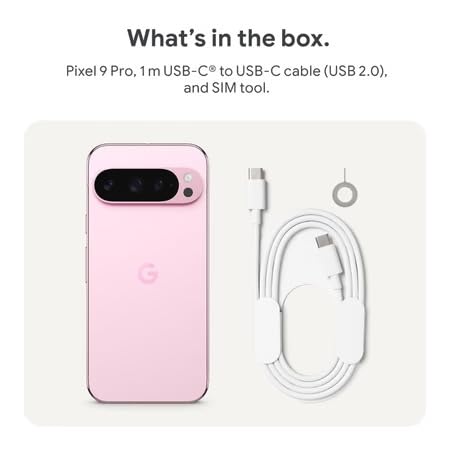
Figure 2: Included items in the Pixel 9 Pro packaging.
Налаштування
1. Встановлення SIM-картки
- Locate the SIM tray on the side of your Pixel 9 Pro.
- Insert the provided SIM ejector tool into the small hole on the SIM tray and press gently until the tray pops out.
- Вставте свою Nano-SIM-картку в лоток золотими контактами вниз. Переконайтеся, що вона правильно встановлена.
- Carefully push the SIM tray back into the device until it is flush.
2. Початкове заряджання
Перед першим використанням рекомендується повністю зарядити пристрій.
- Підключіть кабель USB-C до порту зарядки внизу телефону.
- Connect the other end of the cable to a compatible USB power adapter (sold separately) and plug it into a power outlet.
- Значок акумулятора на екрані вказуватиме стан зарядки.
3. Увімкнення/вимкнення живлення
- Щоб увімкнути: Press and hold the Power button (located on the right side) until the Google logo appears on the screen.
- Щоб вимкнути: Натисніть і утримуйте кнопку живлення, потім торкніться опції «Вимкнути живлення» на екрані.
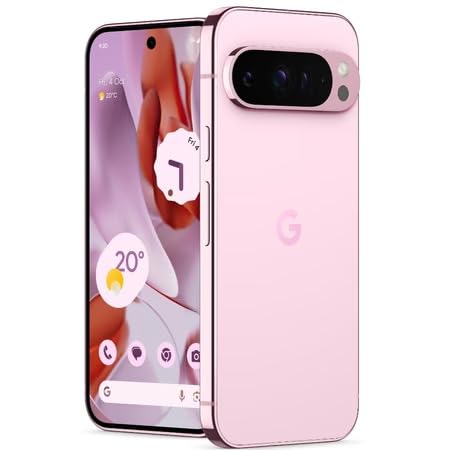
Figure 3: Power and volume buttons on the side of the device.
4. Майстер початкового налаштування
Upon powering on for the first time, follow the on-screen instructions to:
- Виберіть свою мову та регіон.
- Підключіться до мережі Wi-Fi.
- Увійдіть за допомогою свого облікового запису Google або створіть новий.
- Set up security features such as fingerprint unlock, face unlock, PIN, pattern, or password.
- Перенесення даних зі старого пристрою (необов'язково).
Інструкція з експлуатації
Основна навігація
- Жести на сенсорному екрані: Interact with the device using taps, swipes, pinches (for zoom), and long presses.
- Головний екран: Access your applications, widgets, and customize your layout.
- Сповіщення: Проведіть пальцем вниз від верхньої частини екрана до view сповіщення.
- Швидкі налаштування: Swipe down twice from the top of the screen to access quick settings toggles (Wi-Fi, Bluetooth, etc.).
Робота камери
The Pixel 9 Pro features a powerful triple rear camera system.

Figure 4: Rear camera system of the Pixel 9 Pro.
- Відкриття камери: Tap the Camera app icon on your home screen or lock screen.
- Зміна об'єктивів: Tap the icons on the viewfinder to switch between wide, ultrawide, and 5x telephoto lenses.
- Режими зйомки: Select from various modes such as Night Sight for low-light conditions, Астрофотографія for capturing stars, Макрос for close-up shots, довгі витримки for creative effects, and Портрет for depth-of-field effects.
- Зум з суперроздільною здатністю: Pinch the screen to digitally zoom up to 30x. For video, Super Res Zoom supports up to 20x.
- Професійні елементи керування: Access advanced camera settings like shutter speed and manual focus for greater creative control.
Керування батареєю
- Перевірка рівня заряду батареї: View відсоток батареїtage in the status bar or in Settings > Battery.
- Екстремальна економія заряду батареї: Enable this mode in Settings > Battery > Extreme Battery Saver to significantly extend battery life.
- Зарядка: Use the provided USB-C cable and a compatible power adapter for optimal charging speed.
Функції безпеки
Your Pixel 9 Pro incorporates multiple hardware security layers to protect your data.
- Розблокування відбитком пальця: Register your fingerprints in Settings > Security & privacy > Device unlock.
- Фейсконтроль: Налаштуйте розпізнавання обличчя для зручного розблокування.
- PIN-код/графічний ключ/пароль: Always set a strong screen lock method.
- Оновлення програмного забезпечення: Regularly install system updates to ensure your device has the latest security patches.
Датчик температури
The Pixel 9 Pro includes a thermometer for measuring temperature.
- Open the dedicated Thermometer app.
- Follow the on-screen instructions to measure body temperature or the temperature of objects.
- Temperature data can be saved and tracked within the Fitbit application.
Технічне обслуговування
Очищення пристрою
- Використовуйте м’яку тканину без ворсу для очищення екрана та корпусу телефону.
- Avoid using abrasive materials, harsh chemicals, or aerosol sprays.
- Do not submerge the device in water, despite its water-resistant rating.
Оновлення програмного забезпечення
Google regularly releases software updates to improve performance, add features, and enhance security.
- To check for updates, go to Settings > System > System update.
- Ensure your device is connected to Wi-Fi and has sufficient battery charge before installing updates.
Фізичний догляд
The Pixel 9 Pro is built with Corning Gorilla Glass Victus 2 and is water-resistant, offering durability against everyday drops and spills.
- While durable, avoid excessive impacts or drops to prevent damage.
- Consider using a screen protector and a protective case for additional safeguarding.
Усунення несправностей
Пристрій не відповідає
If your phone becomes unresponsive, perform a force restart:
- Натисніть і утримуйте кнопку живлення приблизно 10-15 секунд, доки пристрій не перезавантажиться.
Збої або зависання програм
- Закрийте проблемну програму та знову відкрийте її.
- Clear the app's cache: Go to Settings > Apps > See all apps > [App Name] > Storage & cache > Clear cache.
- Переконайтеся, що додаток оновлено до останньої версії з Google Play Store.
- Перезавантажте телефон.
Проблеми з підключенням до мережі (Wi-Fi/стільниковий зв'язок)
- Toggle Wi-Fi or cellular data off and then back on.
- Перезавантажте телефон.
- Перевірте, чи правильно вставлено вашу SIM-картку.
- Скидання налаштувань мережі: перейдіть до Налаштування > Система > Скидання параметрів > Скинути налаштування Wi-Fi, мобільних пристроїв та Bluetooth.
Батарея швидко розряджається
- Перевірте використання батареї в Налаштуваннях > Акумулятор, щоб визначити програми, які споживають багато енергії.
- Зменште яскравість екрана та час очікування екрана.
- Disable unnecessary features like GPS, Bluetooth, and Wi-Fi when not in use.
- Enable Extreme Battery Saver mode.
Скидання до заводських налаштувань (крайній засіб)
Warning: A factory reset will erase all data from your phone. Back up all important data before proceeding.
- Перейдіть до Налаштування > Система > Параметри скидання > Стерти всі дані (скидання до заводських налаштувань).
- Confirm your decision when prompted.
Технічні характеристики
| Особливість | Деталь |
|---|---|
| Бренд | |
| Модель | Pixel 9 Pro |
| Операційна система | Android 15 |
| Процесор | Google Tensor G4 (3.1 GHz) |
| ОЗУ | 16 ГБ |
| Внутрішня пам'ять | 256 ГБ |
| Дисплей | 6.3 Inches LTPO OLED (Actua), 1280 x 2856 Pixels, 120 Hz Refresh Rate |
| Задня камера | 50 MP wide + 48 MP ultrawide (Macro) + 48 MP 5x telephoto |
| Фронтальна камера | 42 Мп |
| Ємність акумулятора | 4700 міліamp Hours (up to 24 hours average life) |
| Підключення | 5G, Wi-Fi 7, Bluetooth 5.3, NFC, UWB, USB-C |
| SIM-карта | Одна Nano SIM-карта |
| Водонепроникність | Водостійкий |
| Розміри | 8 x 72 x 153 міліметри |
| вага | 198 грамів |
Гарантія та підтримка
Інформація про гарантію
Your Google Pixel 9 Pro 5G comes with a 1 роки гарантії від виробника з дати покупки. Ця гарантія поширюється на виробничі дефекти за умови нормального використання. Будь ласка, збережіть чек про покупку для пред'явлення претензій по гарантії.
Підтримка клієнтів
For technical assistance, warranty claims, or other support inquiries, please contact Google customer service:
- Виробник: Google LLC, 1600 AmpHitheatre Parkway, гора View, Каліфорнія 94043, США
- Phone Support (India): +91 7718892303
- Контактна особа імпортера (Індія): Nexora Axis Private Limited (+91 7718892303)
For the most up-to-date support information, please visit the official Google Pixel support webсайт.