
1. Продукт закінчивсяview
This Ossuret car radio features the Android 14 operating system, an 8-core 1.8GHz CPU, 4GB RAM, and 32GB internal storage. It is equipped with a 9.7-inch QLED touchscreen display (768*1024 resolution) for clear visuals and responsive interaction. Key functionalities include wireless Apple CarPlay and Android Auto, integrated GPS navigation, FM/AM radio with RDS, and a built-in DSP for enhanced audio control. The unit supports 4G LTE connectivity (SIM card slot and antenna included) and WiFi, allowing for online navigation, streaming, and app usage. Steering wheel control compatibility ensures safe and convenient operation.
Ключові характеристики:
- Операційна система: Android 14
- Процесор: 8-Core 1.8GHz CPU (2*A75 + 6*A5)
- Пам'ять і зберігання: 4 ГБ оперативної пам'яті + 32 ГБ флеш-пам'яті
- Дисплей: 9.7-inch QLED Touch Screen (768*1024)
- Підключення: Wireless Apple CarPlay, Wireless/Wired Android Auto, Bluetooth, WiFi, 4G LTE (modem not included, supports external USB Dongle)
- Навігація: Built-in GPS with offline map data, supports online navigation apps (Maps, Waze)
- Аудіо: FM/AM Radio with RDS, Built-in DSP (BU32107EFV), DAB/DAB+ (optional)
- Мультимедіа: Music, Video (up to 1280P), Photo Viewer
- Додаткові функції: Steering Wheel Control, Dual Zone, Mirror Link, APK Installer, Wallpapers, OBD2 (optional), DVR (USB Camera)
2. Сумісність
This car radio is specifically designed for the following vehicle models and years:
- Opel Zafira C: 2010, 2011, 2012, 2013, 2014, 2015, 2016
- Vauxhall Zafira C: 2010, 2011, 2012, 2013, 2014, 2015, 2016
Важлива примітка: This unit is not compatible with the original rearview camera of the vehicle. Please confirm your vehicle's center console before installation.

Image 2.1: Visual guide for compatible and incompatible vehicle console types. The image displays four different car console configurations, with checkmarks indicating compatibility for three and an 'X' for one, specifically noting incompatibility with the original rearview камера.
3. Налаштування та встановлення
3.1 Що в коробці:
- USB кабель
- Джгут проводів RCA
- GPS антена
- Антена 4G
3.2 Інструкції зі встановлення:
Professional installation is highly recommended to ensure correct wiring and functionality. Incorrect installation may damage the unit or vehicle electronics. Ensure the vehicle's power is disconnected before beginning installation.
- Carefully remove the original car radio or infotainment system.
- Підключіть головний джгут живлення до проводки автомобіля. Переконайтеся, що всі з'єднання надійно закріплені.
- Підключіть GPS-антену та розташуйте її в місці з чітким view неба для оптимального прийому сигналу.
- If using 4G, connect the 4G antenna and insert your 4G SIM card into the designated slot before powering on the device.
- Connect the RCA harness for audio/video output and input, if applicable.
- Connect any additional accessories such as USB cables, external cameras (DVR), or OBD2 devices.
- Mount the new Ossuret car radio securely into the dashboard.
- Перед повним збиранням приладової панелі знову підключіть живлення автомобіля та перевірте всі функції.
4. Інструкція з експлуатації
4.1 Інтерфейс користувача закінченоview and Key Features Demonstration:
Video 4.1: This video provides a comprehensive demonstration of the Ossuret Android 14 car radio's user interface and key functionalities. It showcases system settings, various applications including Bluetooth, Radio, Music, Navigation (Google Maps, Android Auto), DSP audio controls, CarAPP features (car info, AC settings, amplifier info), steering wheel control learning, and voice assistant interaction for music and navigation.
4.2 Apple CarPlay and Android Auto:
The unit supports both wireless Apple CarPlay and wireless/wired Android Auto. Connect your smartphone via Bluetooth or USB to access phone functions, online navigation, calls, messages, and music directly on the car radio display. This feature allows you to focus on driving while staying connected.

Image 4.2: The car radio display showing both Apple CarPlay (wireless) and Android Auto (wireless/wired) interfaces, highlighting seamless smartphone integration for navigation, communication, and entertainment.
4.3 Steering Wheel Control (SWC):
Control the car radio directly from your vehicle's steering wheel buttons. This allows for easy adjustment of music, volume, and other functions, enhancing driving safety by minimizing distractions.

Image 4.3: The car radio display illustrating the steering wheel control setup, enabling users to map vehicle steering wheel buttons to various radio functions for convenient and safe operation.
4.4 4G LTE and WiFi Connectivity:
The radio supports 4G network connectivity via a dedicated SIM card slot and antenna, as well as built-in WiFi. This enables online navigation, music streaming, video playback, and access to various internet services while on the go. Ensure the SIM card is inserted before powering on the device.
4.5 Digital Sound Processor (DSP):
Equipped with a built-in DSP (BU32107EFV), this unit allows for precise sound adjustments. You can customize the sound effect, enhance bass, and reduce car noise, providing a superior audio experience.

Image 4.4: The car radio display showing the Digital Sound Processor (DSP) interface with various sound adjustment options, including equalizer presets, surround sound, bass enhancement, and sound field settings.
4.6 Picture-in-Picture (PIP) and Split Screen:
The Picture-in-Picture (PIP) feature allows you to watch video in a small, resizable window on top of other applications. The split-screen function enables you to run two applications simultaneously, such as navigation and music, for enhanced multitasking.

Image 4.5: The car radio display demonstrating the Picture-in-Picture (PIP) feature, where a video plays in a small, adjustable window while other applications are visible.
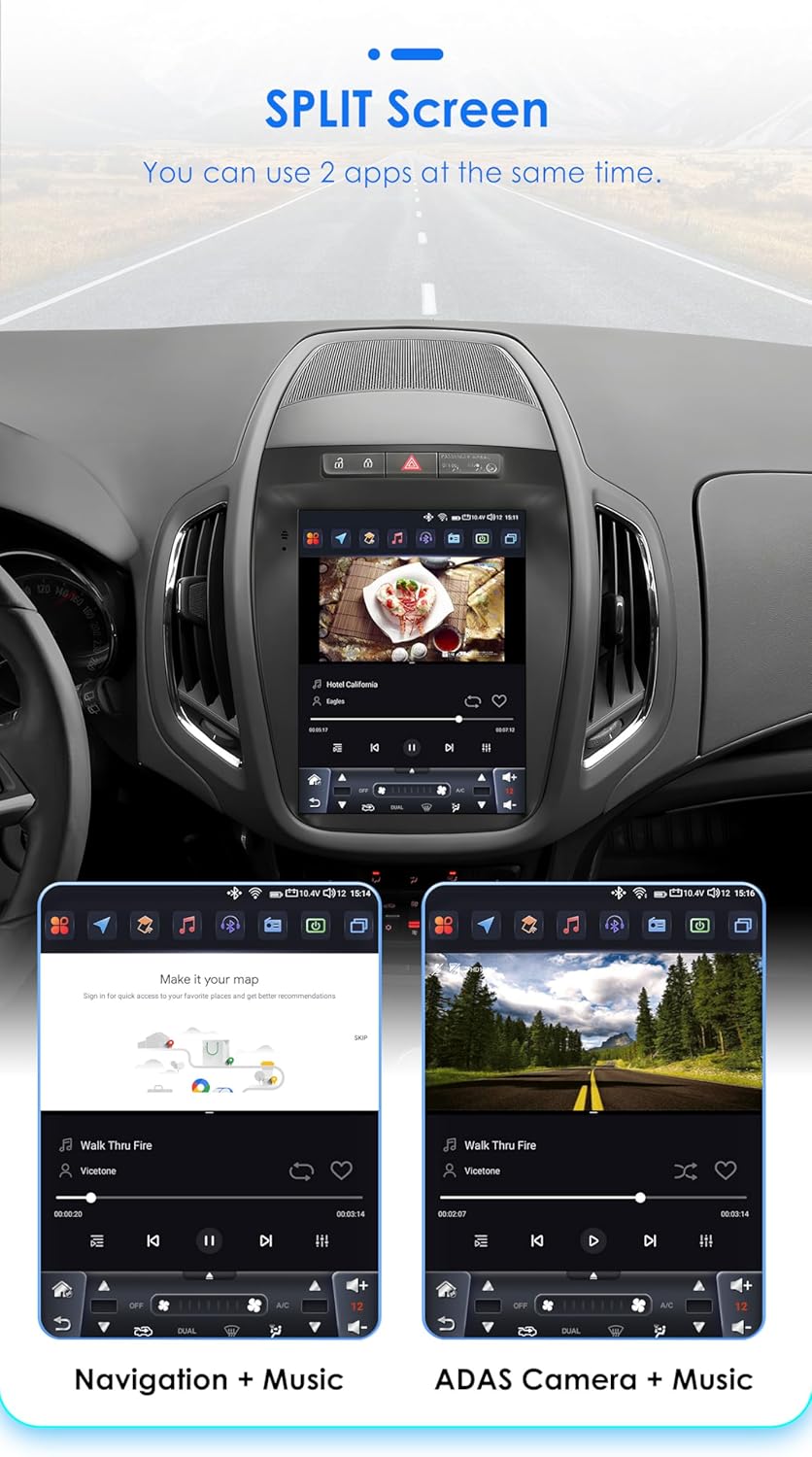
Image 4.6: The car radio display showcasing the split-screen feature, allowing two applications, such as navigation and a music player, to run side-by-side for improved user experience.
4.7 Original Car Information Display:
The unit can display original car information, integrating seamlessly with your vehicle's existing systems to provide relevant data directly on the screen.

Image 4.7: The car radio display showing the 'Original Car Information Display' interface, which provides access to various vehicle data and settings.
5. Технічне обслуговування
To ensure the longevity and optimal performance of your Ossuret car radio, follow these maintenance guidelines:
- Прибирання: Використовуйте м’яку суху тканину для очищення екрана та зовнішньої поверхні. Для видалення стійких плям злегкаampПротріть тканину водою або засобом для чищення екранів. Уникайте абразивних матеріалів або агресивних хімікатів.
- Оновлення програмного забезпечення: Періодично перевіряйте наявність та встановлюйте доступні оновлення програмного забезпечення, щоб забезпечити ефективну роботу системи та наявність найновіших функцій і патчів безпеки.
- температура: Уникайте тривалого впливу на пристрій екстремальних температур, як високих, так і низьких.
- Управління живленням: Ensure the vehicle's electrical system is in good condition to prevent power fluctuations that could affect the unit.
6. Вирішення проблем
Якщо у вас виникли проблеми з автомобільним радіо, зверніться до наступних поширених проблем та способів їх вирішення:
- Немає живлення:
- Check the power connections and fuses.
- Переконайтеся, що запалювання автомобіля увімкнено.
- Немає звуку:
- Перевірте підключення динаміків.
- Перевірте рівні гучності та налаштування вимкнення звуку.
- Переконайтеся, що вибрано правильне джерело аудіо.
- Проблеми з сигналом GPS:
- Переконайтеся, що GPS-антена правильно підключена та має чіткий сигнал view неба.
- За потреби оновіть дані карти.
- Проблеми з підключенням Bluetooth:
- Переконайтеся, що Bluetooth увімкнено як на автомобільному радіо, так і на вашому пристрої.
- Видаліть попередні сполучення та спробуйте підключитися знову.
- Перезапустіть обидва пристрої.
- Сенсорний екран не реагує:
- Перезапустіть пристрій.
- Переконайтеся, що екран чистий і не містить сміття.
Якщо проблема не зникає, зверніться до служби підтримки клієнтів для отримання додаткової допомоги.
7. Технічні характеристики
| Особливість | Специфікація |
|---|---|
| Операційна система | Android 14 |
| ЦП | 8-Core 1.8GHz (2*A75 6*A5) |
| ОЗУ | 4 ГБ |
| Флеш-пам'ять | 32 ГБ |
| Розмір екрана | 9.7 дюймів |
| Тип екрану | Сенсорний QLED-екран |
| роздільна здатність | 768*1024 |
| CarPlay | Бездротовий |
| Android Auto | Бездротовий/дротовий |
| Радіо тюнер | FM/AM, RDS (DAB/DAB+ optional) |
| DSP | Built-in BU32107EFV |
| Підключення | Bluetooth, USB, WiFi, 4G LTE (external dongle support) |
| GPS | Yes, with offline map data (Europe map type) |
| Режим аудіовиходу | Стерео |
| Сумісні пристрої | Смартфон |
| Спосіб контролю | Application, Buttons, Touchscreen |
| Розміри упаковки | 20 х 10 х 10 см |
| вага | 2 кг |
| Країна походження | Китай |
8. Гарантія та підтримка
This Ossuret car radio comes with a Гарантія 1 рік з дати покупки. Ця гарантія поширюється на виробничі дефекти та несправності за умов нормального використання.
8.1 What is Covered:
- Дефекти матеріалів і виготовлення.
- Malfunctions occurring during normal operation.
8.2 What is Not Covered:
- Пошкодження, спричинені неправильним встановленням або несанкціонованим ремонтом.
- Damage due to accidents, misuse, abuse, neglect, or external causes.
- Cosmetic damage, including scratches, dents, or broken plastic on ports.
- Damage from operating the product outside the permitted or intended uses described in this manual.
8.3 Підтримка клієнтів:
For technical assistance, warranty claims, or any questions regarding your Ossuret car radio, please contact your retailer or the manufacturer's customer service. Please have your purchase receipt and product model information ready when contacting support.