
вступ
This manual provides detailed instructions for the installation, operation, and maintenance of the ASUS B760M-AYW WiFi D4 II microATX motherboard. Please read this manual thoroughly before installing or using the product to ensure correct setup and optimal performance.
Інформація про безпеку
- Завжди від’єднуйте кабель живлення від розетки, перш ніж торкатися будь-яких внутрішніх компонентів.
- Wear an anti-static wrist strap or frequently touch a grounded object to prevent electrostatic discharge (ESD) damage to components.
- Тримайте компоненти за краї, щоб уникнути дотику до чутливих частин.
- Забезпечте належну вентиляцію всередині корпусу ПК, щоб запобігти перегріву.
Налаштування
1. Встановлення процесора
The motherboard supports Intel LGA 1700 socket processors. Carefully align the CPU with the socket, ensuring the triangular mark on the CPU matches the mark on the socket. Lower the CPU gently into the socket, then close the load plate and secure the retention lever.
Зображення: Зверху вниз view of the ASUS B760M-AYW WiFi D4 II motherboard, highlighting the LGA 1700 CPU socket.
2. Встановлення пам'яті (ОЗП)
This motherboard features two DDR4 DIMM slots. For optimal performance, install memory modules in a dual-channel configuration. Open the clips on both ends of the DIMM slot, align the memory module with the slot key, and press down firmly until the clips snap into place.
3. Встановлення накопичувачів (M.2 та SATA)
The motherboard includes two M.2 slots for NVMe SSDs and four SATA 6 Gbps ports for traditional hard drives or SSDs.
- M.2 SSD: Insert the M.2 SSD into the slot at a 30-degree angle, then push it down and secure it with the provided M.2 screw package.
- Накопичувачі SATA: Підключіть кабелі даних SATA від накопичувачів до портів SATA на материнській платі. Підключіть кабелі живлення від блока живлення до накопичувачів.

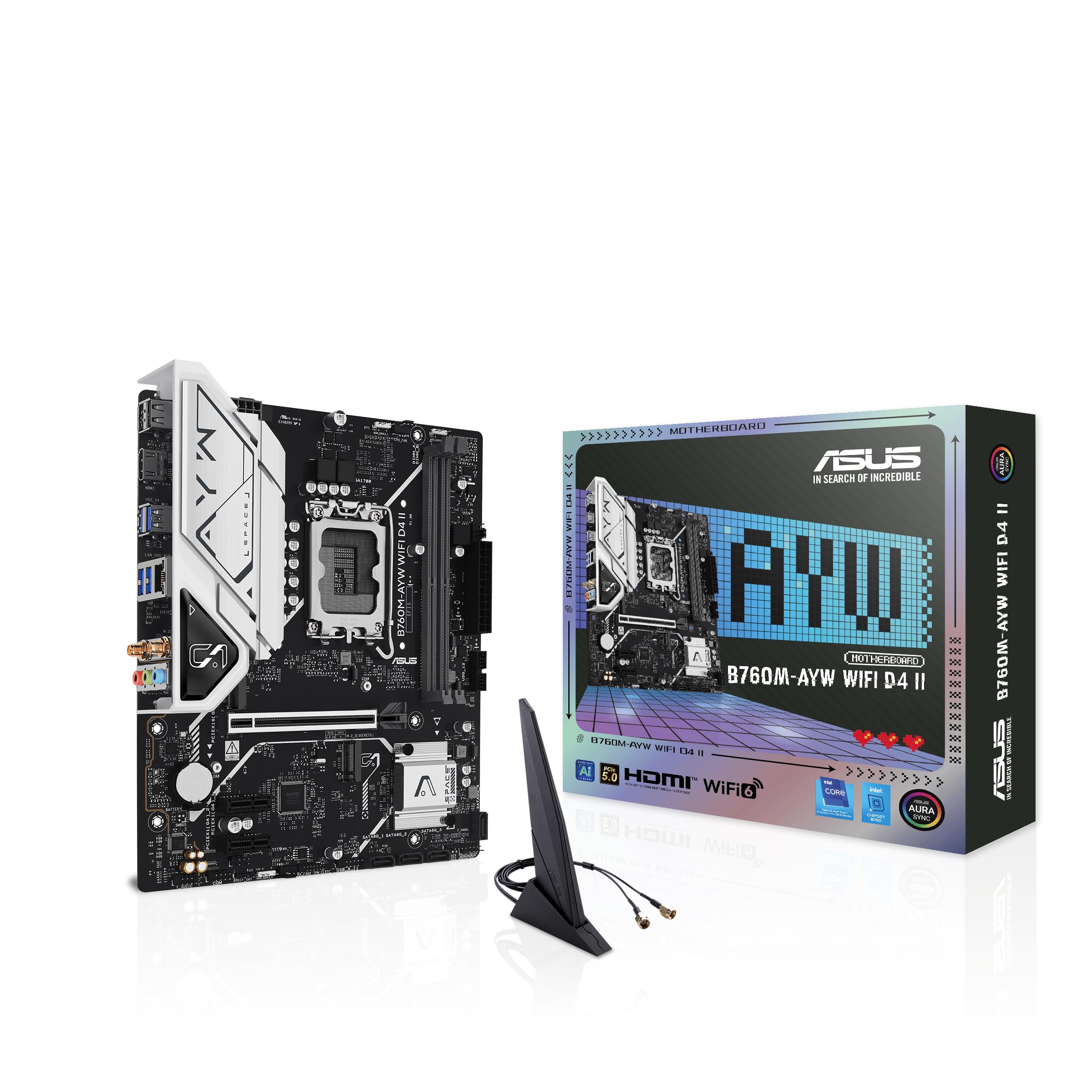
Image: The ASUS B760M-AYW WiFi D4 II motherboard shown with its retail box, Wi-Fi antenna, SATA cables, and M.2 screw packages.
4. Встановлення плати розширення (PCIe)
The motherboard features one PCIe 5.0 x16 slot for graphics cards and additional PCIe 4.0 x1 slots for other expansion cards. Insert the card firmly into the desired slot until it clicks into place and secure it with a case screw.
5. Підключення живлення
Підключіть 24-контактний роз'єм живлення ATX та 8-контактний роз'єм живлення процесора від блока живлення до відповідних портів на материнській платі.
6. Підключення передньої панелі
Connect your PC case's front panel cables (USB 5Gbps, audio, power switch, reset switch, power LED, HDD LED) to the corresponding headers on the motherboard. Refer to the motherboard layout for exact header locations.
7. Задні роз'єми вводу/виводу
Connect your peripherals to the rear I/O ports. These include HDMI, USB 5Gbps Type-A, Realtek 2.5Gb Ethernet, and audio jacks.
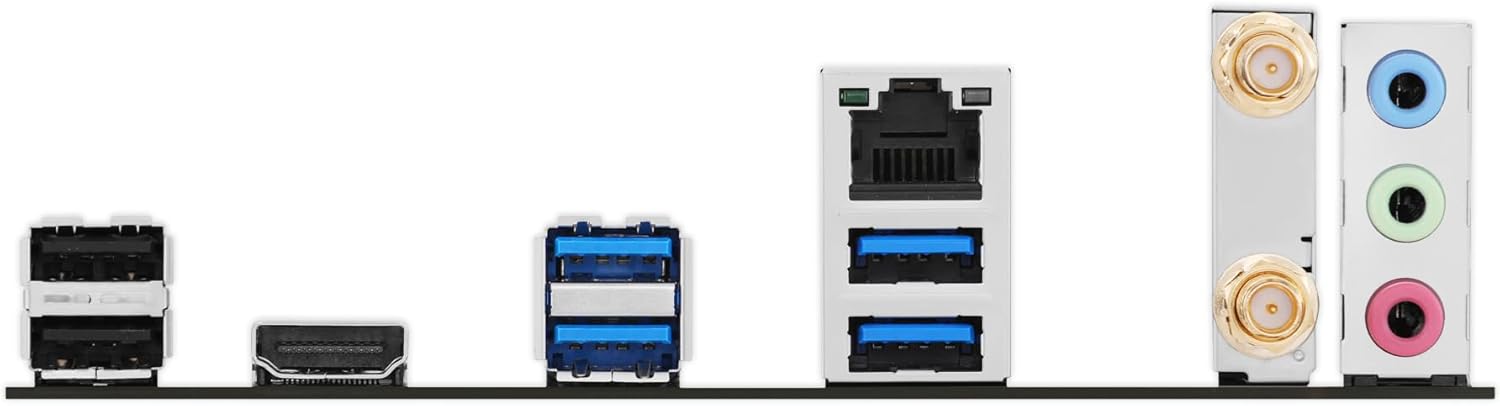
Зображення: Детальний view of the rear input/output panel of the ASUS B760M-AYW WiFi D4 II motherboard, showing USB ports, Ethernet, and audio jacks.
8. Встановлення антени Wi-Fi
Screw the included Wi-Fi antenna onto the two antenna connectors on the rear I/O panel. Position the antenna for optimal signal reception.
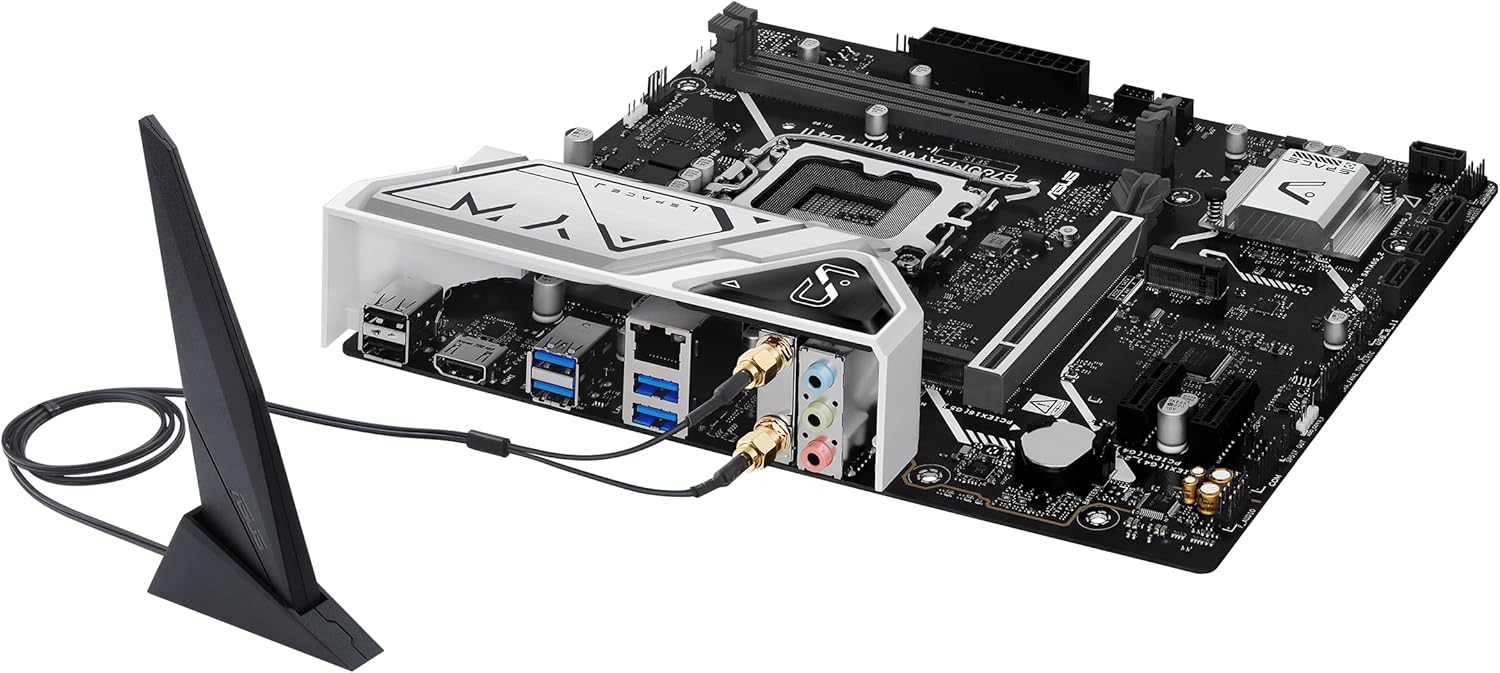
Image: The ASUS B760M-AYW WiFi D4 II motherboard with its external Wi-Fi antenna connected to the rear I/O ports.
Операційна
1. Конфігурація BIOS/UEFI
Щоб отримати доступ до утиліти налаштування BIOS/UEFI, натисніть Видалити key during the Power-On Self-Test (POST). Here you can configure boot order, enable XMP for memory, adjust fan speeds, and manage other system settings.
2. Встановлення драйвера
After installing your operating system, install the necessary drivers for the motherboard's components. These include chipset drivers, LAN drivers, Wi-Fi drivers, and audio drivers. Drivers can be found on the ASUS support webсайт для вашої конкретної моделі материнської плати.
3. Програмні утиліти
ASUS provides several utilities to enhance your system experience:
- Синхронізація аури: For controlling RGB lighting on compatible components.
- Fan Xpert 2+: Для розширеного керування вентиляторами та оптимізації охолодження системи.
- Ящик для зброї: A centralized software suite for system monitoring, driver updates, and utility management.
Технічне обслуговування
1. Оновлення BIOS
Періодично перевіряйте службу підтримки ASUS website for BIOS updates. BIOS updates can improve system stability, add support for new hardware, or fix bugs. Use the ASUS EZ Flash utility within the BIOS to perform updates, following the instructions carefully.
2. Оновлення драйверів
Keep your drivers updated to ensure optimal performance and compatibility. Regularly check the ASUS support website for the latest drivers for your motherboard.
3. прибирання
To maintain optimal performance and longevity, regularly clean dust from your PC case and motherboard components. Use compressed air to remove dust from heatsinks, fans, and slots. Ensure the system is powered off and unplugged before cleaning.
Усунення несправностей
1. Q-LED Core Indicators
The motherboard features Q-LED Core indicators that light up to indicate the status of key components during POST. These LEDs can help diagnose issues:
- Світлодіодний індикатор процесора: Indicates CPU initialization status.
- Світлодіод DRAM: Indicates memory detection status.
- Світлодіод VGA: Indicates graphics card detection status.
- СВІТЛОДІОД ЗАПУСКУ: Indicates boot device detection status.
If an LED remains lit, it suggests an issue with the corresponding component.
2. Поширені проблеми
- Немає живлення: Check all power connections (24-pin ATX, 8-pin CPU, GPU power). Ensure the power supply is switched on.
- Немає дисплея: Verify the graphics card is properly seated and connected to power. Ensure the monitor cable is connected to the graphics card, not the motherboard (unless using integrated graphics).
- Нестабільність системи: Check memory seating, run memory diagnostic tools, ensure CPU cooler is properly installed, and verify BIOS settings.
- Периферійний пристрій не виявлено: Ensure the device is properly connected and its drivers are installed. Try a different port if available.
Технічні характеристики
| Особливість | Специфікація |
|---|---|
| Бренд | ASUS |
| Назва моделі | B760M-AYW WIFI D4 II |
| Гніздо ЦП | LGA 1700 |
| Сумісні процесори | Intel Core 14th, 13th, 12th Gen, Pentium Gold, Celeron Processors |
| Тип чіпсета | Intel B760 |
| Технологія оперативної пам'яті | DDR4 |
| Доступні слоти пам'яті | 2 |
| Максимальна ємність пам'яті | 96 ГБ |
| Інтерфейс графічної карти | PCI Express 5.0 x16 |
| Total M.2 Slots | 2 |
| Total SATA Ports | 4 |
| Ethernet | Realtek 2.5 Гбіт/с Ethernet |
| Wi-Fi | Wi-Fi 6 |
| Порти HDMI | 1 |
| Фронт USB | USB 5Gbps support |
| Задній USB | USB 5 Гбіт/с типу A |
| Форм-фактор | мікроATX |
| Розміри предмета (Д x Ш x В) | 9.6 см (Д) x 8.3 см (Ш) x 1.4 см (В) |
Інформація про гарантію
The ASUS B760M-AYW WiFi D4 II motherboard comes with a 3-year limited warranty. For detailed terms and conditions, please refer to the warranty card included with your product or visit the official ASUS support webсайт.
Підтримка
Для отримання технічної підтримки, завантаження драйверів, оновлень BIOS та додаткової інформації про продукт, будь ласка, відвідайте офіційний сайт підтримки ASUS. webсайт:
You can also find FAQs and troubleshooting guides on the support portal.