
вступ
This manual provides essential information for setting up, operating, and maintaining your Element 43-inch 4K UHD HDR Frameless Xumo TV. Your new television offers stunning 4K Ultra HD resolution, enhanced color and contrast with Dolby Vision and HDR, and immersive sound with Dolby Audio. The integrated Xumo TV platform provides access to a wide range of streaming content and smart features. Please read this manual thoroughly to ensure proper use and enjoyment of your television.
Налаштування
1. Що в коробці
Before you begin, ensure all components are present. Carefully remove the TV and accessories from the packaging.

Figure 1: Box Contents and TV Dimensions. This image displays the items included in the TV box: TV, Voice Remote, TV Stands, Stand Screws, Quick Start Guide, and 2 AAA Remote Batteries. It also provides detailed dimensions for the TV with and without the stand, and the distance between the stand feet.
- TV
- Голосовий пульт
- Тумби під телевізор
- Гвинти для підставки
- Короткий посібник
- 2 дистанційні батареї типу AAA
- Кабель живлення
2. Кріплення підставок для телевізора
If you are not wall-mounting the TV, attach the included stands. Place the TV face down on a soft, clean surface to prevent screen damage. Align each stand with the corresponding screw holes on the bottom of the TV and secure them with the provided screws.
3. Підключення живлення та пристроїв
Connect the power cable to the TV and then to a power outlet. Connect any external devices (e.g., cable box, gaming console, Blu-ray player) to the appropriate HDMI ports on the back of the TV. The TV supports Bluetooth and Ethernet connectivity for network access.
4. Початкове налаштування
Upon first power-on, the TV will guide you through the initial setup process. This includes selecting your language, connecting to a Wi-Fi or Ethernet network, and setting up your Xumo TV account. Follow the on-screen instructions to complete the setup.
Інструкція з експлуатації
1. Використання голосового пульта дистанційного керування
The included voice remote allows for easy navigation and control. Insert the 2 AAA batteries into the remote. Use the directional pad to navigate menus and the voice button to issue commands. Dedicated buttons provide quick access to popular streaming services.
2. Navigating Xumo TV
Xumo TV provides a centralized platform for all your entertainment. The home screen displays recommended content, installed apps, and live TV options. Use the remote to browse categories, search for titles, and manage your profile.

Figure 2: Xumo TV Interface. This image illustrates the Xumo TV home screen, showcasing popular streaming applications like Netflix, Prime Video, Hulu, and HBO Max, along with trending content suggestions.

Figure 3: Available Streaming Apps. This image displays a wide array of streaming service logos, indicating the extensive content options available through the Xumo TV platform.
3. Налаштування зображення та звуку
Відкрийте меню налаштувань телевізора, щоб налаштувати viewing experience. Adjust brightness, contrast, color, and sharpness. Enable or disable features like Dolby Vision and HDR for optimized picture quality. Configure sound modes and volume levels for Dolby Audio.
- 4K Ultra HD: Experience crystal-clear, detailed images.
- Dolby Vision та HDR: Enhances color and contrast for a more dynamic picture, especially in dark and bright scenes.
- Dolby Audio: Delivers superior sound quality for movies and gaming.
- 120Hz Effective Refresh Rate: Provides smooth motion and sharp visuals for fast-paced content.

Figure 4: 4K UHD HDR10 Detail. This close-up image highlights the clarity and detail provided by 4K UHD and HDR10 technology, exemplified by the sharp focus on a dog's eye.
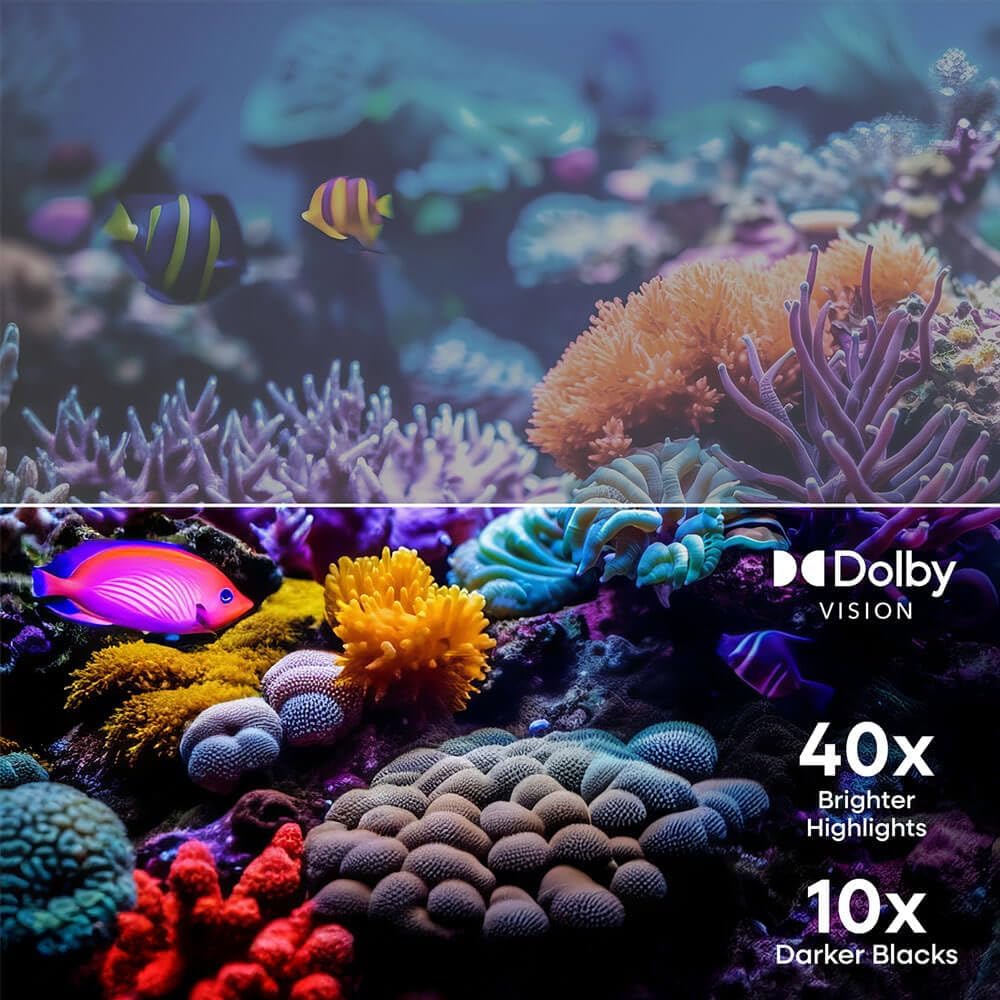
Figure 5: Dolby Vision Enhancement. This image demonstrates the visual improvement with Dolby Vision, showing a comparison between standard and Dolby Vision enhanced scenes, highlighting 40x brighter highlights and 10x darker blacks.

Figure 6: 120Hz Effective Refresh Rate. This image illustrates the smooth motion provided by the 120Hz effective refresh rate, depicted by fast-moving race cars on screen.
Технічне обслуговування
Очищення екрану
Щоб очистити екран, обережно протріть його м’якою тканиною без ворсу. Для стійких плям злегка протрітьampen the cloth with water or a screen-specific cleaning solution. Avoid using harsh chemicals or abrasive materials. Always unplug the TV before cleaning.
Загальний догляд
Keep the TV in a well-ventilated area, away from direct sunlight, heat sources, and excessive dust. Do not block ventilation openings. Avoid placing heavy objects on the TV or subjecting it to strong impacts.
Усунення несправностей
| проблема | Можлива причина | Рішення |
|---|---|---|
| Немає живлення | Кабель живлення відключено; проблема з розеткою | Переконайтеся, що кабель живлення надійно підключено. Спробуйте іншу розетку. |
| Немає зображення, але звук є | Incorrect input source; Device connection issue | Натисніть кнопку «Вхід» на пульті дистанційного керування, щоб вибрати правильне джерело. Перевірте підключення кабелю HDMI/AV. |
| Звуку немає, але зображення є | Volume muted or too low; Audio settings incorrect | Увімкніть звук телевізора або збільште гучність. Перевірте налаштування аудіовиходу в меню телевізора. |
| Неможливо підключитися до Wi-Fi | Неправильний пароль; Проблема з маршрутизатором; Телевізор занадто далеко від маршрутизатора | Verify Wi-Fi password. Restart your router. Move TV closer to router or use an Ethernet cable. |
| Пульт не працює | Розряджені батарейки; Перешкода; Пульт дистанційного керування не сполучений | Замініть батарейки. Усуньте будь-які перешкоди між пультом дистанційного керування та телевізором. За потреби повторно з’єднайте пульт дистанційного керування (див. Короткий посібник користувача). |
Технічні характеристики
- Бренд: елемент
- Номер моделі: E550AE43C
- Розмір екрана: 43 дюймів
- роздільна здатність: 4K Ultra HD (3840 x 2160)
- Технологія дисплея: LED
- Підтримка HDR: Dolby Vision, HDR10
- Частота оновлення: 120Hz Effective
- Аудіотехнології: Dolby Audio
- Платформа Smart TV: Xumo TV
- Підключення: Bluetooth, Ethernet, HDMI (multiple ports), USB
- Співвідношення сторін: 16:9
- Розміри виробу (з підставкою): 37.7"W x 22.2"H x 8.7"D (approximate, based on image)
- Розміри виробу (без підставки): 37.7"W x 22.0"H x 3.3"D (approximate, based on image)
- Вага товару: 15.9 фунта
- Тип монтажу: Настінне кріплення, кріплення на стіл
- Включені компоненти: Remote Control, Power Cable
Інформація про гарантію
Element televisions typically come with a limited manufacturer's warranty. For specific details regarding the warranty period, coverage, and terms and conditions, please refer to the warranty card included with your product or visit the official Element Electronics webсайт. Зберігайте чек про покупку для гарантійних претензій.
Підтримка
If you encounter any issues not covered in this manual or require further assistance, please contact Element Electronics customer support. You can usually find contact information (phone number, email, or support portal) on the official Element Electronics webсайті або в короткому посібнику користувача, що постачається з вашим телевізором.
Інтернет-ресурси: For the latest updates, FAQs, and additional support, visit the Element Electronics Store on Amazon або їх офіційний бренд webсайт.


